Colorpanda Monitor Light Bar Review: A Budget Screen Light That Fixes Desk Glare


Colorpanda Monitor Light Bar Review: A Budget Screen Light That Fixes Desk Glare
Colorpanda Monitor Light Bar
Buy if you work long hours at a desk and want to kill screen glare and eye strain without a bulky lamp. Skip if you need a front diffuser, fine-grained dimming, or premium studio lighting with a remote.
Buy on AmazonWhat We Liked
- Anti-Glare Asymmetric Design That Keeps Your Screen Clear
- Three Adjustable Color Temperatures for Any Time of Day
- A Counterweight Clip That Grips Curved and Flat Monitors
- Solid Aluminum Body With a Clean Matte Black Finish
- Memory Function That Remembers Your Last Brightness Setting
- Space-Saving Design at a Genuinely Budget-Friendly Price
What Could Be Better
- No Front Diffuser Can Mean Some Light Spill Onto Your Face
- Only Three Brightness Levels With No Fine Dimming Control
- Long-Term LED Reliability Is a Question Mark
- Getting the Angle Right Takes Some Trial and Error
How we test: Every product is used in real conditions and evaluated using our standardized scoring criteria. Read our full review methodology.
If you finish a long workday with tired, dry eyes, the problem is often not your screen but how your desk is lit. Overhead lighting either glares off the monitor or leaves your keyboard in shadow. A monitor light bar for screen glare is designed to fix exactly that.
The Colorpanda Monitor Light Bar is a budget computer monitor light bar and USB reading light that clips to the top of your monitor and shines an eye-care beam onto your keyboard and desk. It runs on USB-C power, uses touch controls, and packs three color temperatures into a slim aluminum body for work, study, or gaming. Think of it as part monitor lamp, part LED screen lamp that lights the desk without a bulky overhead light fixture.
I mounted this light bar on a curved monitor and ran it through full workdays to see how the lighting, glare control, and clip hold up. This review covers what the Colorpanda does well, where it falls short, and how it compares to light bars like the Quntis and BenQ ScreenBar.
The short version? For the price, it solves the glare and eye strain problem without overhauling your setup, though it is not the most refined option out there.
What I Liked
Across my testing, the Colorpanda got the fundamentals of a monitor light bar right. Here is what stood out.
Anti-Glare Asymmetric Design That Keeps Your Screen Clear
The Colorpanda uses an asymmetric optical design that throws light forward onto your keyboard and desk instead of back at the monitor. In practice, the anti-glare angle works: you get a well-lit desk without the screen washing out. There is no glare bouncing off the panel into your eyes, which is the whole point of a monitor light bar.
This matters most during late sessions. Overhead lighting tends to fight your monitor, and switching to a bar aimed at the desk noticeably cut the screen glare I was used to. If you deal with dry eyes, that change alone can relieve eye strain you did not know you had.
Three Adjustable Color Temperatures for Any Time of Day
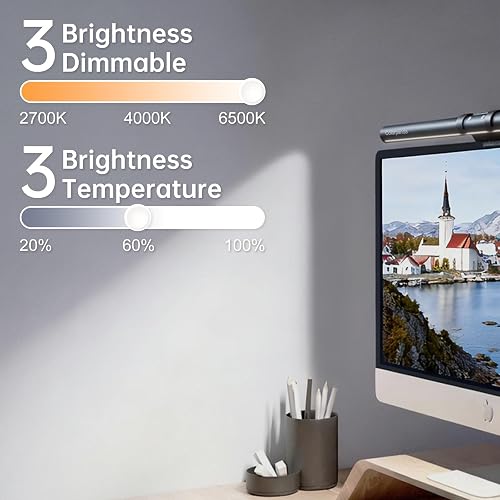
Touch controls handle brightness and color temperature separately, cycling through three color temperatures: warm at 2700K, neutral at 4000K, and cool at 6500K. Cool tones keep you alert during the day, while warm tones are easier on the eyes for late-night work. Having that range means you are not stuck in one mood the whole time.
A Counterweight Clip That Grips Curved and Flat Monitors
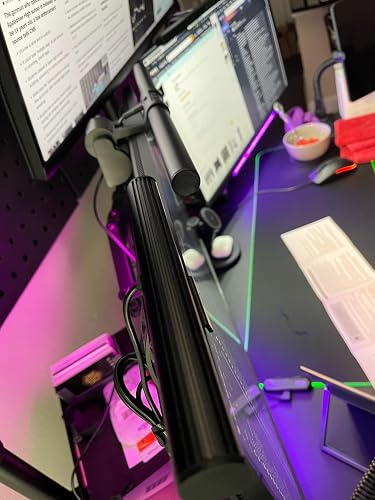
Instead of screws or tape, the bar sits in a counterweight clip that hooks over the top of your monitor. It fits screen thicknesses from about 0.12 to 2.2 inches, so it works on flat monitors, curved monitors, and even portrait setups and most laptop screens. Silicone non-stick pads keep it from sliding around or covering your webcam.
I clipped it onto a curved monitor and wobbled the desk; the monitor moved but the light bar did not. For anyone with an oddly shaped or thin-bezel monitor, that clip design for monitor mounting is the most reassuring part. That same budget mindset carries over to other desk essentials, like the HP 65W laptop charger that revives a mainstream HP laptop for around $12. And when the monitor itself wobbles too much for the clip to help, a heavy-duty mount like the HUANUO TitanLift Heavy Duty Monitor Arm holds ultrawides up to 44 lbs rock steady.
Solid Aluminum Body With a Clean Matte Black Finish
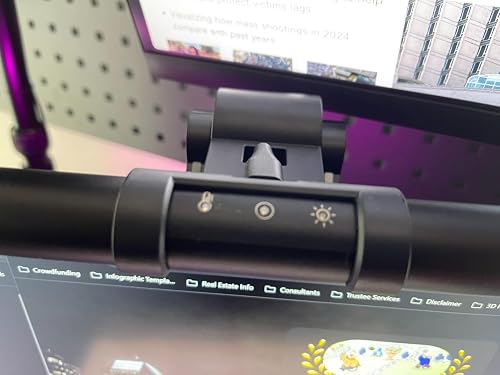
The bar is built from aluminum and does not flex at all, which is more than you expect at this price. The matte black finish is clean, logo-free, and minimal in aesthetic, so it disappears on top of the monitor. At roughly 16 inches wide and about a pound, it feels sturdy without being heavy.
Memory Function That Remembers Your Last Brightness Setting
There are three brightness levels, and a memory function saves your last brightness and color setting. Turn the bar off and back on, and it returns to exactly where you left it. It is a small touch, but it means you are not resetting the dimmer every morning.
Space-Saving Design at a Genuinely Budget-Friendly Price
Because it clips to the monitor, this desk lamp takes up zero desk space, unlike a traditional task lamp. This basic model sticks to front lighting, so there is no backlight glow behind the screen and no wireless or RGB extras to fuss with. For a clean, easy to install work light at a low price, it slots into almost any desk setup, and several Amazon buyers called it as good as light bars costing three times more.
What Needs Improvement
No product is perfect, and the Colorpanda has a few rough edges worth knowing before you buy.
No Front Diffuser Can Mean Some Light Spill Onto Your Face
There is no diffuser on the front of the bar. Depending on your monitor angle, the light can be a little bright on your face until you tilt it correctly. Most people will not notice once it is positioned right, but it is worth mentioning.
Only Three Brightness Levels With No Fine Dimming Control
You get three brightness steps and nothing in between. The jumps between levels are fairly large, so if the medium setting is not quite right, you cannot dial it in further. The bar is dimmable, but only in coarse steps rather than a smooth range.
Long-Term LED Reliability Is a Question Mark
One buyer reported that after roughly three months of nightly use, the blue light-emitting diodes (LEDs) stopped working and only the warm LEDs remained. With a one-year warranty and support that can be slow, that is a real risk on a budget bar. It is a single account rather than a pattern, but it is the kind of durability question you weigh at this price.
Getting the Angle Right Takes Some Trial and Error
Like most light bars, this one needs some fiddling to aim correctly. On thin-bezel or glossy monitors, several users across desk-setup communities report the light hitting their eyes rather than the desk. Plan to spend a minute adjusting the tilt before it looks and feels right.
How It Compares
The monitor light bar market runs from ultra-budget clips to premium screen bars, and the Colorpanda sits at the affordable end. Here is how it lines up against three popular light bars.
vs Quntis Monitor Light Bar
The Quntis is the closest match in tier and price. Quntis bars advertise a very high color-rendering index and offer a version that is essentially a monitor light bar with remote control, which the Colorpanda lacks. If a remote and slightly richer color matter to you, the Quntis is worth a look; if you just want touch controls and glare relief, the Colorpanda covers the basics for less.
vs BenQ ScreenBar Halo
The BenQ ScreenBar Halo is the premium benchmark. It pushes far more light, uses a multi-section reflector, and is one of the few bars that fully eliminates screen glare, but it costs several times more than the Colorpanda. For a home office on a budget, the Colorpanda gets you most of the eye-care benefit without the BenQ price.
vs Xiaomi Mi Computer Monitor Light Bar
Xiaomi’s bar sits in the middle, with the same 2700K to 6500K color temperature range and a desk dial controller, priced well above the Colorpanda. The dial is nicer to use than touch buttons, and the overall build is a step up. Choose the Xiaomi if you want a more polished control scheme; choose the Colorpanda if price is the priority. If a remote control matters more to you than saving money, the Quntis Computer Monitor Light Bar lands closer to the Xiaomi’s feature set without the full premium price. Shoppers rounding out the rest of the desk for those long sessions might also look at the Anker Wireless Vertical Ergonomic Mouse, which tackles wrist strain the same way this bar tackles eye strain.
For most people who just want to fix desk glare and eye strain cheaply, the Colorpanda is the practical pick. Buyers chasing maximum brightness or a remote should spend up to the Xiaomi or BenQ.
Final Verdict
The Colorpanda Monitor Light Bar does the one job you buy a monitor light bar for: it lights your desk and keyboard while keeping glare off the screen. Add three color temperatures, a memory function, and a clip that grips almost any monitor, and it is a lot of eye-care lighting for the money.
I am giving it a 4.3 out of 5.
It loses points for the missing diffuser, coarse brightness steps, and a lingering question about long-term LED life. For a budget bar aimed at glare and eye strain, though, those are fair trade-offs rather than dealbreakers.
Bottom line: if you spend serious time at your desk and want to fix glare and eye strain without breaking the bank, the Colorpanda is a solid, easy pick.
Specifications
| Finish Type | Matte |
| Base Material | Aluminum |
| Bulb Base | E27 |
| Product Dimensions | 1"D x 16"W x 1"H |
| Item Weight | 1.3 Pounds |
| Switch Type | Push Button |
| Additional Features | Dimmable |
| Light Source Type | LED |
| Power Source | Corded Electric |
| Number of Light Sources | 1 |
| Mounting Type | Monitor |
| Control Method | Touch |
| Connectivity Technology | USB |
| Color | Black |
| Shape | Rectangular Prism |
| Installation Type | Clip-on |
| Brand Name | Colorpanda |
| Room Type | Office, Home Office, Gaming Room |
| Model Number | FSKU002 |
| Manufacturer Warranty Description | 1 year |
Frequently Asked Questions
Do monitor light bars like the Colorpanda work on curved or thick monitors?
Yes. The Colorpanda Monitor Light Bar uses a counterweight clip rated for screen thicknesses from about 0.12 to 2.2 inches, so it fits flat, curved, portrait, and most laptop screens. In testing it stayed put on a curved monitor even when the desk was wobbled.
Does the Colorpanda Monitor Light Bar have a warranty?
Yes. Colorpanda lists a one-year warranty on the light bar, and the brand says its support team responds within about 12 hours. Keep in mind that one buyer found support slow when an LED issue appeared after the return window.
Can I use the Colorpanda Monitor Light Bar for reading?
It works well as a reading and work light. The asymmetric beam lights your desk and keyboard rather than the screen, and the warm 2700K setting is comfortable for reading at night. The cooler 6500K mode is better for daytime focus.
Is the Colorpanda Monitor Light Bar good for reducing eye strain and glare?
That is its main purpose. The anti-glare asymmetric design keeps light off the monitor, which reduces screen glare and can relieve eye strain during long sessions. Several buyers said it noticeably eased the dry, tired eyes they got from overhead lighting.
How is the Colorpanda Monitor Light Bar powered?
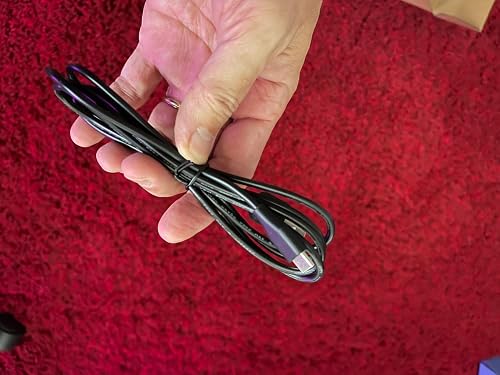
It is powered by a USB-C cable that runs through the clip, using a USB-A to USB-C cord in the box. There is no wireless or battery option, so you plug it into a monitor USB port, a hub, or a wall adapter. Touch controls on the bar handle on/off, color temperature, and brightness.
How does the Colorpanda Monitor Light Bar compare to the Quntis or BenQ ScreenBar?
The Colorpanda is the budget option. The Quntis adds a remote and higher color rendering, while the BenQ ScreenBar Halo is far brighter and better at eliminating glare, but both cost more. For basic glare and eye strain relief, the Colorpanda covers the essentials for less.
Ready to Buy?
Colorpanda Monitor Light Bar delivers on its promises. If it fits your needs, it's a solid choice you won't regret.
Check Price on Amazon Founder & Product Reviewer at TheReviewRewind
Daniel has tested 400+ products across 20+ categories through hands-on, real-world testing. Every review includes video documentation and standardized scoring criteria. His reviews appear as Amazon shoppable videos and here on TheReviewRewind.
We earn a commission if you make a purchase, at no extra cost to you. This does not influence our ratings or recommendations. Full disclosure
Looking for more options? See all our Electronics reviews.
Related Reviews