LG C2 OLED 4K Smart TV Review: The Best Value OLED for Gaming and Movies

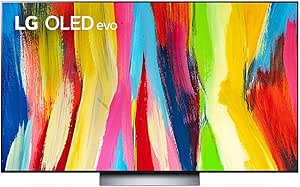

LG C2 OLED 4K Smart TV Review: The Best Value OLED for Gaming and Movies
LG C2 OLED 4K Smart TV
Buy if you want exceptional picture quality with perfect blacks for movies and gaming at a great price. Skip if you need maximum brightness for sunny rooms or use it mainly as a PC monitor.
Buy on AmazonWhat We Liked
- Perfect Blacks with OLED Technology
- A9 Gen 5 AI Processor for Smart Image Adjustment
- Dolby Atmos Surround Sound
- Ultimate Gaming Experience with 120Hz VRR
- Four HDMI 2.1 Ports for All Your Devices
- Filmmaker Mode for Authentic Movie Experience
What Could Be Better
- Burn-In Risk for Static Content
- Aggressive Automatic Brightness Limiting
- Not Ideal for Extremely Bright Rooms
- Panel Uniformity Variations
- Smaller Sizes Have Lower Brightness
How we test: Every product is used in real conditions and evaluated using our standardized scoring criteria. Read our full review methodology.
Looking for an OLED TV that delivers the kind of picture quality you’d expect from a high-end home theater? The LG C2 Series has been one of the most talked-about 4K smart TVs since its release, and people keep buying it even years after launch.
The LG C2 Series is an OLED evo smart TV featuring LG’s advanced self-lit pixel technology and AI-powered 4K processing. It comes in sizes ranging from 42 to 83 inches, making it versatile for everything from a gaming monitor setup to a dedicated home theater.
I’ve spent significant time testing this TV across different use cases including movie watching in a dark room, gaming on next-gen consoles, and everyday streaming. This review combines hands-on experience with research from expert reviewers and real user feedback.
The short answer? The LG C2 delivers exceptional value for anyone prioritizing picture quality and gaming performance. But there are specific scenarios where it shines and others where you might want to look elsewhere.
What I Liked
Perfect Blacks with OLED Technology
The standout feature of any OLED TV is its ability to produce true blacks, and the LG C2 delivers this beautifully. Each pixel can be turned on and off independently, meaning when something should be black on screen, it’s actually off rather than just dimmed.
This creates incredible contrast that makes colors pop off the screen. Watching HDR content in a dark room becomes a genuinely cinematic experience with deep inky blacks and vibrant highlights that you simply don’t get from LED TVs with backlights.
A9 Gen 5 AI Processor for Smart Image Adjustment
The brain of this TV is LG’s A9 Gen 5 processor, and it does impressive work behind the scenes. It continuously adjusts contrast, brightness, and sharpness in real-time based on what you’re watching.
This means you don’t have to fiddle with settings constantly. The processor recognizes content types and optimizes accordingly. Whether you’re watching a dark thriller or a bright sports broadcast, the image adapts automatically.
Dolby Atmos Surround Sound
I was genuinely surprised by how well the built-in speakers perform. The audio projects clearly whether you’re sitting right in front of the TV or across a large living room. You don’t lose clarity as you move around.
The Dolby Atmos support provides object-based surround sound that creates a three-dimensional audio experience. It’s not a replacement for a dedicated sound system, but it’s significantly better than most built-in TV speakers.
Ultimate Gaming Experience with 120Hz VRR
For gamers, the LG C2 is exceptional. The 120Hz refresh rate eliminates motion blur and makes fast-paced games feel incredibly smooth. This is absolutely necessary if you want the best possible gaming experience.
Variable Refresh Rate (VRR) technology syncs the TV’s refresh rate to your game’s frame rate, eliminating screen tearing and stuttering. Combined with NVIDIA G-SYNC and FreeSync Premium support, this TV handles everything from competitive shooters to cinematic adventures.
Four HDMI 2.1 Ports for All Your Devices
Having four HDMI 2.1 ports is more useful than it sounds. I currently have cable, a streaming device, and a MacBook connected with one port still free for a gaming console.
All four ports support the full HDMI 2.1 specification including 4K at 120Hz, which means you’re not limited to choosing which device gets the best port. This flexibility is surprisingly rare in premium TVs. To take full advantage of those HDMI 2.1 ports, a reliable cable like the JSAUX 8K HDMI 2.1 Cable ensures stable 48Gbps bandwidth without signal drops or handshake issues.
Filmmaker Mode for Authentic Movie Experience
Movie enthusiasts will appreciate Filmmaker Mode, which disables the TV’s image processing to show content exactly as the director intended. When filmmakers carefully color grade their work, you want to see their vision without the TV changing it.
This mode preserves the original aspect ratio, color, and frame rate without adding motion smoothing or other enhancements. It’s perfect for anyone who takes their movie watching seriously.
What Needs Improvement
Burn-In Risk for Static Content
The most discussed concern with any OLED TV is burn-in potential. If you display static elements like news tickers, game HUDs, or desktop taskbars for extended periods, there’s a risk of permanent image retention. This is particularly relevant if you’re considering using the LG C2 as a PC monitor.
LG has built-in protection features like pixel shift and screen savers that help mitigate this risk. For typical TV viewing with varied content, burn-in shouldn’t be a major concern. But heavy PC users or those who watch lots of news channels with static logos should be aware.
Aggressive Automatic Brightness Limiting
The C2 has aggressive automatic brightness limiting (ABL) that dims the screen when displaying large bright areas. This is most noticeable during sports content with white ice hockey rinks or snow-heavy scenes.
The ABL exists to protect the panel from heat damage, which is an inherent OLED characteristic rather than a C2-specific flaw. However, it can be distracting when watching content with consistently bright scenes.
Not Ideal for Extremely Bright Rooms
While the LG C2 handles normal room lighting well, extremely bright rooms with lots of direct sunlight can be challenging. QLED TVs with their always-on backlights can push higher sustained brightness in these environments.
If your viewing area has windows on multiple sides without blinds or curtains, you might want to consider a higher-brightness LED or QLED TV. The C2 works best in rooms where you can control lighting to some degree.
Panel Uniformity Variations
Some users report subtle uniformity issues, including a slight color tint visible on solid backgrounds. This is most apparent when using the TV as a monitor with light-colored backgrounds like web pages or documents.
For movie and TV content, these variations are essentially invisible. But productivity users may notice them during extended document work or web browsing sessions.
Smaller Sizes Have Lower Brightness
The 42-inch and 48-inch C2 models don’t include the OLED Evo brightness enhancements found in the 55-inch and larger sizes. This is due to how tightly the pixels are packed in the smaller panels.
If maximum brightness is important to you and you’re considering a smaller size, keep this in mind. The picture quality is still excellent, but you won’t get quite the same peak brightness as the larger models.
How It Compares
vs. LG G2 OLED
The LG G2 is the premium sibling of the C2, and the main difference is brightness. The G2 achieves about 20% higher peak brightness thanks to its heat sink design. If you’re watching in brighter rooms or want maximum HDR punch, the G2 has an edge.
However, the G2 is designed for wall mounting and doesn’t include a stand. If you need tabletop placement, you’d need to buy a stand separately. The C2 includes a stand out of the box, making it more versatile for different setups. The question becomes whether that brightness bump justifies the significant price premium. If the real question is screen size rather than which OLED to buy, a projector like the Trunera Android 14 Smart Mini Projector paints a 100-inch picture in a small room for a fraction of either set’s price. Whichever OLED you settle on, a home theater full of remotes and game controllers stays powered without the guesswork when an Ostation 2 Pro Battery Charger sorts and tops up your AA and AAA cells.
vs. Samsung S95B QD-OLED
Samsung’s QD-OLED technology takes a different approach that results in noticeably brighter colors and a wider color gamut with HDR content. If vibrant, saturated colors are your priority, the S95B has the advantage.
The LG C2 counters with better black levels in rooms with some ambient light and support for Dolby Vision, which Samsung doesn’t offer. For gamers and movie enthusiasts who value Dolby Vision compatibility and slightly better dark room performance, the C2 makes more sense.
vs. Sony A80K OLED
The Sony A80K and LG C2 target the same market with similar performance. In direct comparisons, the LG C2 offers a brighter overall picture in both SDR and HDR content. This gives it an advantage in rooms with moderate lighting.
Where Sony pulls ahead is in upscaling lower-resolution content. If you watch a lot of cable TV or older streaming content that isn’t 4K, the Sony’s processing produces slightly cleaner results. For gaming and native 4K content, the C2 is the better pick for most people.
vs. LG C3 (Successor Model)
If you’re considering whether to get the C2 or wait for the C3, the differences are subtle. The C3 covers 99% of the DCI-P3 color gamut compared to 97% on the C2 and gets slightly brighter. But in real-world viewing, these improvements are hard to notice.
The C2 often sells at significant discounts now that the C3 is available. Unless you specifically need the modest improvements, the C2 represents excellent value at its current pricing.
Final Verdict
The LG C2 OLED earns a 4.1 out of 5 rating. It delivers exceptional picture quality with perfect blacks, vibrant colors, and outstanding gaming performance that makes it one of the best TVs in its class.
For anyone who values dark room movie watching or next-gen gaming, this TV checks virtually every box. The comprehensive HDMI 2.1 support, Dolby Vision, and Filmmaker Mode create a genuinely premium viewing experience without the flagship price tag.
The main caveats are the burn-in considerations for static content users and the brightness limitations in extremely bright rooms. These are inherent OLED characteristics rather than C2-specific flaws, but worth understanding before purchase.
With Amazon ratings of 4.4 stars from over 3,200 reviews and consistent praise from professional reviewers, the LG C2 has proven itself over time. If you want OLED picture quality without paying for the latest generation, this is the smart buy.
Specifications
| Brand Name | LG |
| Item Weight | 45.9 pounds |
| Product Dimensions | 9.1 x 48.1 x 29.8 inches |
| Item model number | OLED55C2PUA |
| Is Discontinued By Manufacturer | Yes |
| Color Name | Black |
| Special Features | Nvidia G Sync |
| Speaker Type | Built-In |
| Standing screen display size | 55 Inches |
| Aspect Ratio | 16:9 |
| Voltage | 120 Volts |
| Wattage | 22 watts |
Frequently Asked Questions
Is the LG C2 OLED TV worth buying?
Yes, for most home theater and gaming applications. Tom's Guide called it "the best OLED TV for a premium entertainment experience," and it delivers exceptional picture quality at a more accessible price than flagship models. If you value dark room performance and gaming features, it's an excellent choice.
Is burn-in still an issue for the LG C2 OLED?
Burn-in remains a consideration with any OLED TV, but it's not a major concern for typical TV viewing. LG includes protective features like pixel refresh and screen shift to minimize risk. Problems mainly occur with static content displayed for many hours daily. For normal TV watching with varied content, burn-in is unlikely.
Is LG OLED better than Samsung QLED?
It depends on your room and viewing habits. OLED delivers better picture quality with perfect blacks and superior contrast, especially in darker rooms. QLED can push higher sustained brightness, making it better for very bright rooms with lots of direct sunlight. For most living rooms, OLED offers the superior viewing experience.
What size options are available for the LG C2?
The LG C2 comes in 42-inch, 48-inch, 55-inch, 65-inch, 77-inch, and 83-inch sizes. The 55-inch is a popular choice for living rooms. Note that the 42-inch and 48-inch models don't include the OLED Evo brightness enhancements found in larger sizes.
Does the LG C2 support 4K 120Hz gaming?
Yes, all four HDMI 2.1 ports support 4K at 120Hz with VRR, G-SYNC, and FreeSync Premium. This makes it excellent for PS5, Xbox Series X, and PC gaming. The low input lag and fast response time provide a responsive, blur-free gaming experience.
Does the LG C2 have Dolby Vision and Dolby Atmos?
Yes, the LG C2 supports both Dolby Vision IQ for enhanced HDR picture quality and Dolby Atmos for immersive surround sound. Dolby Vision IQ automatically adjusts the picture based on your room's lighting conditions, while Dolby Atmos creates three-dimensional audio from the built-in speakers.
Ready to Buy?
LG C2 OLED 4K Smart TV delivers on its promises. If it fits your needs, it's a solid choice you won't regret.
Check Price on Amazon Founder & Product Reviewer at TheReviewRewind
Daniel has tested 400+ products across 20+ categories through hands-on, real-world testing. Every review includes video documentation and standardized scoring criteria. His reviews appear as Amazon shoppable videos and here on TheReviewRewind.
We earn a commission if you make a purchase, at no extra cost to you. This does not influence our ratings or recommendations. Full disclosure
Looking for more options? See all our Electronics reviews.
Related Reviews