Phomemo A30 Ribbon Label Printer Review: Custom Printed Ribbon for Gifts and Labels


Phomemo A30 Ribbon Label Printer Review: Custom Printed Ribbon for Gifts and Labels
Phomemo A30 Ribbon Label Printer
Buy if you want to print custom names and messages directly onto satin ribbon for gifts, plus durable waterproof labels, all from your phone. Skip if you need photo-quality print or want to avoid pricey, proprietary ribbon refills.
Buy on AmazonWhat We Liked
- Printing Directly Onto Satin Ribbon Is the Standout
- Inkless Thermal Transfer, Nothing to Refill
- A Deep Print Master App With Real Design Tools
- Durable, Waterproof Labels Built to Survive
- Cordless, Palm-Sized and Ready to Carry Anywhere
What Could Be Better
- The Ribbon and Specialty Tapes Get Expensive
- 203 DPI Print Quality Is Basic, Not Photo-Grade
- The App Wants an Email and Keeps Upselling You
- Bluetooth Can Drop and Need an App Reconnect
How we test: Every product is used in real conditions and evaluated using our standardized scoring criteria. Read our full review methodology.
Most label makers do one thing: spit out a plain strip of tape for a jar or a cable. The Phomemo A30 ribbon label printer does that too, but its real trick is printing names, messages, and little designs directly onto satin ribbon. That one feature turns a basic gift into something that looks custom, and it is what sets this compact Bluetooth label maker apart from the pack.
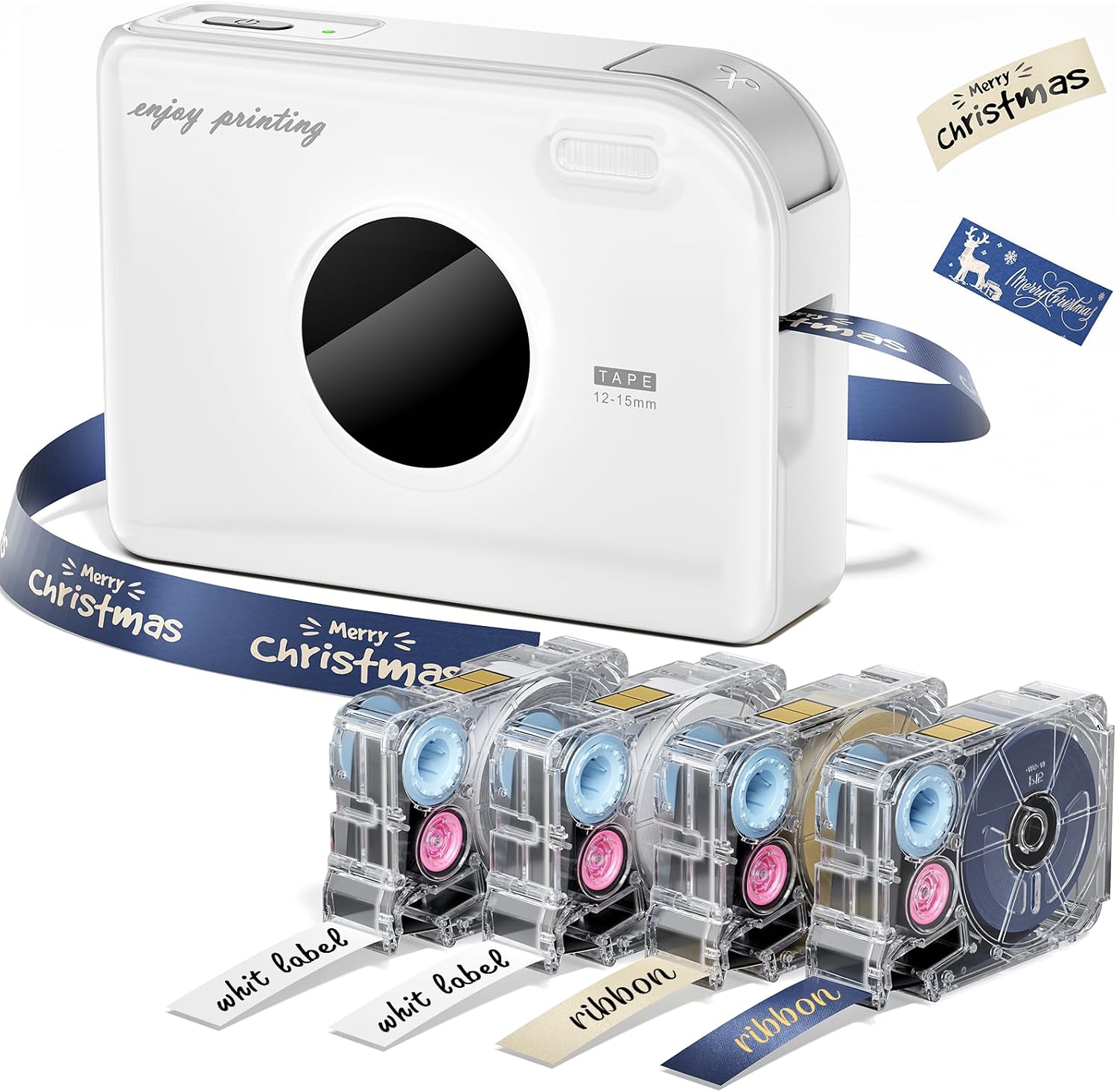
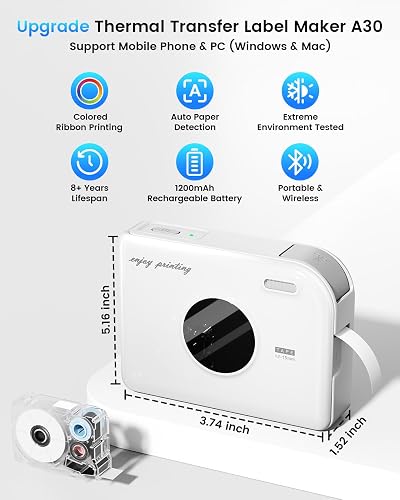
The pitch is straightforward. The A30 is a palm-sized, inkless machine that uses thermal-transfer printing, so there is no ink and no toner to run dry. You design everything from your phone over Bluetooth in the Print Master app, it works with both iOS and Android, and the gift set ships with two satin ribbons and two rolls of label tape so you can start printing out of the box. It runs around $50 to $60.
I went through this A30 the way a buyer would: printing labels and ribbon from the app, swapping cartridges, and testing how the output actually looks. The short version is that the ribbon feature is genuinely fun and useful, the labels are tough, and the machine is easy to live with, but there is one thing about the running cost you really want to know before you buy.
What I Liked
After designing and printing both labels and ribbon from the app, a handful of strengths stood out. Here is what this Phomemo label maker does well.
Printing Directly Onto Satin Ribbon Is the Standout
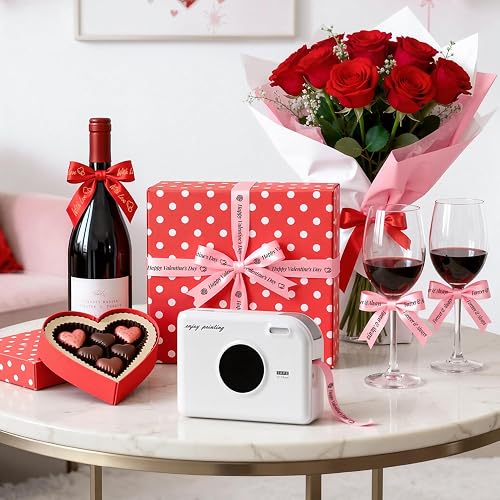
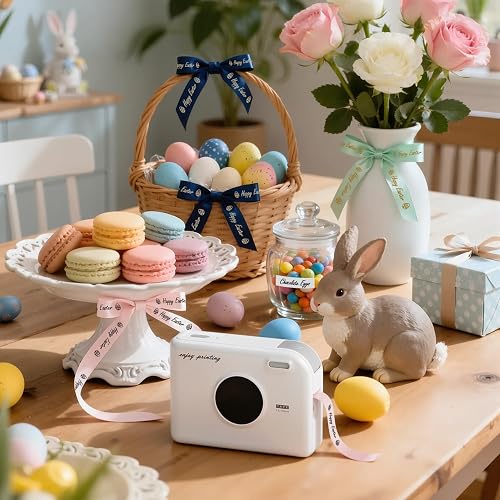
This is the feature that justifies the whole machine. Most label makers can only print adhesive tape, but the A30 prints your text straight onto satin ribbon, so you can wrap a gift and have the ribbon itself say “Happy Birthday, Mom” or carry your business name.
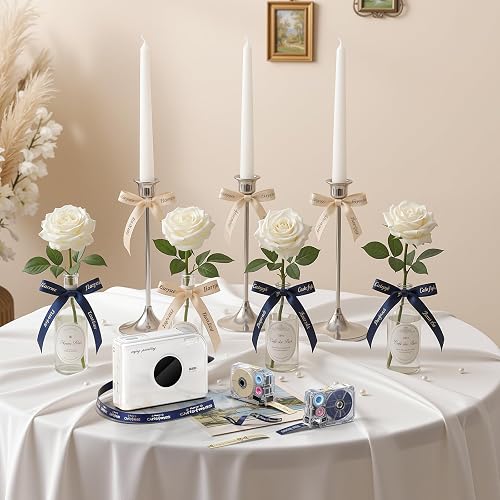
It genuinely makes gifts and small craft projects look put together rather than generic. For birthdays, holidays, wedding favors, or a small business dressing up its packaging, printed ribbon is the kind of touch that usually costs extra at a shop. Here you make it yourself in a minute, and the gold-on-navy and black-on-beige ribbons in the gift set look sharp doing it. When that small business also needs to get orders out the door, the JADENS Bluetooth Thermal Label Printer prints ink-free 4x6 shipping labels straight from your phone.
Inkless Thermal Transfer, Nothing to Refill
The A30 uses thermal-transfer printing, which means there is no ink and no toner anywhere in the system. Heat moves the color off the ribbon or tape onto your label, so there is nothing to refill and nothing to dry out between projects.
That keeps the printer low-maintenance and always ready. You are never hunting for a cartridge the night before you need to wrap a gift, and the thermal printing technology handles text, icons, QR codes, and barcodes cleanly. It is the same inkless approach that makes thermal paper label makers so convenient, applied here to both tape and ribbon.
A Deep Print Master App With Real Design Tools
The Print Master mobile app is where the work happens, and it is more capable than I expected. It carries 200 built-in fonts, 600 symbols, and more than 200 border templates, plus tools to drop in QR codes, barcodes, images, timestamps, and your own logo.
That depth is what lets a label look designed instead of plain. A small business can put a logo and an expiration date on a product, or someone organizing a whole pantry can make every label match. You can also print from a personal computer using Phomemo’s Labelife software over USB, which is handy for batch jobs. For sellers who lean on that batch printing to ship orders, the SVANTTO Y42BT Bluetooth Label Printer pairs a similar design app with fast, ink-free 4x6 shipping labels.
Durable, Waterproof Labels Built to Survive
The consumables are tougher than typical paper stickers. The labels are waterproof and oil-resistant and hold up across a wide temperature range, roughly -4 to 140 degrees Fahrenheit, so they survive the dishwasher, the freezer, and greasy hands.
That durability is what makes them practical rather than decorative. Kitchen jars, garage bins, and cosmetics stay readable instead of smearing off after a week, and the ribbon prints resist fading too. For labels that actually need to last, this holds up better than an inkjet sticker sheet. If you would rather print your own durable stickers at home, the AgoDeo Premium Printable Vinyl Sticker Paper delivers sharp matte labels that resist smudging through an inkjet or laser printer.
Cordless, Palm-Sized and Ready to Carry Anywhere
The A30 is small and light, roughly the size of your palm at about 258 grams, and it runs on a built-in 1,200 mAh rechargeable battery that charges over USB-C. That gets you around 2.5 hours of cordless printing per charge.
Because you print in quick bursts rather than for hours straight, a charge lasts a long time in practice. And since it is cordless, you can walk around the house labeling things or bring it to a craft table without being tethered to an outlet. The retro-white machine feels solid in the hand for something this compact.
What Needs Improvement
No budget label maker is flawless, and the A30 makes a few trade-offs worth knowing before you buy. This is the honest side of the machine.
The Ribbon and Specialty Tapes Get Expensive
This is the one thing to underline before you buy. The ribbon is pricey for how little you get on a roll, and a single ribbon might only cover a couple of small gifts, so the running cost adds up faster than the low sticker price suggests.
Worse, you are locked into Phomemo’s proprietary cartridges. You cannot drop a loose roll of craft ribbon from a fabric store into the A30, because its cartridges hold the ribbon and a thermal film together as one unit. Replacement ribbons and specialty tapes like glitter or luminous run around $20 each, so factor consumables into the real cost, not just the printer.
203 DPI Print Quality Is Basic, Not Photo-Grade
The A30 prints at 203 dpi, which is standard for this class of thermal printer. It is clean and readable for text, names, and simple icons, but it is not high resolution.
Zoom into a detailed graphic or a dense barcode and you can see it look a little pixelated, and tiny numbers on a small label can be hard to read. This is a machine for crisp, legible labels and decorative ribbon, not for photo-quality artwork, so set expectations accordingly.
The App Wants an Email and Keeps Upselling You
The Print Master app is required to design and print, and it asks you to register an email before you can get going. Some buyers were caught off guard that an account is needed at all, since the listing does not spell it out clearly.
On top of that, the app keeps nudging you toward a premium A+ membership. Many templates are free, but the best ones carry a little diamond icon marking them as paid, and the privacy-conscious may not love handing over an email just to make a label. The proprietary software is functional, but the constant upsell is a minor irritation.
Bluetooth Can Drop and Need an App Reconnect
Bluetooth pairing works, but it is not always instant. You pair from inside the Print Master app rather than your phone’s Bluetooth settings, and some users report the connection dropping and needing the app reopened before it will print again.
It is a minor friction rather than a dealbreaker, and once connected it holds for a session. A few buyers also noted the occasional off-center print that needed a reprint or a paper-size tweak, so expect a little fiddling now and then.
How the Phomemo A30 Compares
At around $50 to $60, the A30 sits in the budget Bluetooth label maker tier, but its ribbon printing makes the comparison less about price and more about what you actually want to make. Here is how it stacks up.
vs Phomemo D30
The D30 is Phomemo’s smaller, cheaper label maker on the same Print Master app, and it is a fine pick for quick tape labels around the house. It routinely sells for under $40 and carries thousands of positive reviews.
But the D30 prints adhesive labels only. It cannot touch ribbon, which is the entire reason to buy the A30. If you only need to label a pantry and cables, save the money and get the D30; if printed ribbon is the draw, the A30 is the one.
vs Brother P-touch CUBE Plus (PT-P710BT)
Brother’s P-touch CUBE Plus is the editorial favorite among phone-connected label makers. It prints durable laminated TZe tape up to one inch wide and has a deep, polished app, but it runs roughly $90 to $115 and does not print on ribbon out of the box.
The trade-off is durability versus versatility. Brother’s laminated labels are tougher for long-term kitchen and cable use, while the A30 costs less and does the ribbon trick Brother’s mainstream model cannot. They solve different problems.
vs Brother Craft Ribbon Printers
Brother does make dedicated ribbon printers, like the PT-H200 P-touch Craft and the TapeCreator Pro, that also print messages onto fabric ribbon for gifts and packaging. They are the closest name-brand rivals to what the A30 does.
The catch is cost. Those Brother craft units sit at a notably higher price point, so the A30 undercuts them for buyers who want ribbon printing without paying a premium. If you want a known name and genuine supplies, Brother appeals; if value is the priority, the A30 wins.
vs NIIMBOT D110
The NIIMBOT D110 is a popular budget thermal label maker, often under $30, with inexpensive label rolls that bring the cost per label way down. It is a strong value for plain organizing labels.
But like the D30, it prints adhesive labels only, with no satin ribbon and no gift-wrapping angle. If you never plan to print ribbon, NIIMBOT’s cheaper consumables are the smarter running cost; the A30 is worth the premium only if the ribbon feature matters to you.
Final Verdict
The Phomemo A30 is a fun, genuinely versatile little printer, and the ribbon feature is the thing that sets it apart from an ordinary label maker. It is cordless and inkless, the labels hold up, the Print Master app is deeper than expected, and it is backed by a one-year warranty.
I am giving it a 3.8 out of 5.
It loses ground on running cost more than anything. The ribbon and specialty tapes are expensive and locked to proprietary cartridges, the 203 dpi print is basic rather than photo-grade, and the app wants an email plus keeps pitching a premium membership. None of those are dealbreakers if you know about them going in, and the machine’s real buyers rate it around 4.0 stars.
If custom printed ribbon and pretty, durable labels are what you are after, this delivers that in a way few budget machines can. Just go in understanding the ribbon costs and the basic print quality.
Bottom line: For gift-givers, crafters, and small sellers who want printed satin ribbon without paying name-brand prices, the Phomemo A30 is an easy recommendation, as long as you budget for the proprietary consumables.
Specifications
| Brand | Phomemo |
| Model Name | A30 |
| Model Number | A30-WH-4 |
| Color | Retro White |
| Printing Technology | Heat (thermal) transfer printing |
| Connectivity | Bluetooth |
| Hardware Interface | USB |
| Compatibility | Android, iOS |
| Printer Output | Monochrome |
| Label Width | 0.47 in (12 mm) tape |
| Maximum Media Size | 0.55 in |
| Print Media | Pre-cut / continuous labels, ribbon, magnetic, iron-on, glitter, luminous |
| Item Weight | 258 g (about 0.57 lb) |
| Item Dimensions | 5.07"D x 2.83"W x 7.45"H |
| Special Features | Waterproof, oil-resistant, lightweight |
| In the Box | 1x A30 label maker, 1x Black-on-Beige satin ribbon, 1x Gold-on-Navy satin ribbon, 2x Black-on-White label tapes |
Frequently Asked Questions
Does the Phomemo A30 print on ribbon, and can I use any craft ribbon?
Yes, printing on satin ribbon is its headline feature, but you cannot use loose craft ribbon from a fabric store. The A30 only takes Phomemo's proprietary cartridges, which hold the ribbon and a thermal film together as one unit, so you buy replacement ribbon cartridges rather than any generic roll.
Does the A30 need ink or toner?
No. It uses thermal-transfer printing, so heat moves color off the ribbon or tape onto your label. There is no ink and no toner to buy or replace, and nothing dries out between projects. The only consumables are the ribbon and label cartridges themselves.
How long does the battery last?
The A30 has a built-in 1,200 mAh rechargeable battery that charges over USB-C and delivers roughly 2.5 hours of cordless printing per charge. Because most people print in short bursts rather than continuously, a single charge tends to last a long time in real use.
Do I need an app or an account to use it?
Yes. You design and print from the free Print Master app on iOS or Android, and it asks you to register an email before your first print. You can also print from a Windows or Mac computer over USB using Phomemo's Labelife software, which is useful for batch jobs.
Are the labels really waterproof and durable?
The labels are waterproof and oil-resistant and rated for a wide temperature range, roughly -4 to 140 degrees Fahrenheit. In practice that means they survive the dishwasher, the freezer, and greasy hands without smearing, which makes them far more durable than ordinary paper stickers.
What is the print resolution, and is the quality good?
The A30 prints at 203 dpi, which is standard for a thermal label printer. It is crisp and readable for text, names, icons, QR codes, and barcodes, but it is not high resolution, so detailed graphics and very small numbers can look a little pixelated.
Does the Phomemo A30 work with iPhone and Android?
Yes. It connects over Bluetooth to both iOS and Android devices through the Print Master app. You pair from inside the app rather than your phone's Bluetooth settings, and the connection can occasionally drop and need the app reopened before printing again.
Ready to Buy?
Phomemo A30 Ribbon Label Printer delivers on its promises. If it fits your needs, it's a solid choice you won't regret.
Check Price on Amazon Founder & Product Reviewer at TheReviewRewind
Daniel has tested 400+ products across 20+ categories through hands-on, real-world testing. Every review includes video documentation and standardized scoring criteria. His reviews appear as Amazon shoppable videos and here on TheReviewRewind.
We earn a commission if you make a purchase, at no extra cost to you. This does not influence our ratings or recommendations. Full disclosure
Looking for more options? See all our Office Products reviews.
Related Reviews