YOJOCK USB-C Power Meter Tester Review: A Cheap Way to Stop Guessing at Charging


YOJOCK USB-C Power Meter Tester Review: A Cheap Way to Stop Guessing at Charging
YOJOCK USB-C Power Meter Tester
Buy if you want a cheap, pocketable way to read volts, amps, and watts on your chargers, cables, and power banks. Skip if you need exact PD protocol detection or e-marker cable reading, where a Power-Z or Alientek is the better tool.
Buy on AmazonWhat We Liked
- It Reads the Full Picture of a Charging Port
- A 3.6-32V, 8-Amp Range With Real Headroom
- Eight Display Modes, Including a Readable Big-Font View
- It Catches Power Banks That Lie About Capacity
- Safety Cutoffs That Step In to Protect Your Gear
- One Tool for Every Cable, Port, and Protocol
What Could Be Better
- The Fine Print on Detailed Screens Is Small
- It Needs a Live Circuit Before It Powers On
- Two Ports Can Give Two Different Readings
- No Protocol Detection or E-Marker Reading
How we test: Every product is used in real conditions and evaluated using our standardized scoring criteria. Read our full review methodology.
You’ve got a drawer full of chargers and cables, half of them feel slow, and you have no real way to know which one is the problem — or whether your device is charging at all. The YOJOCK USB-C power meter is built to take the guessing out of it.
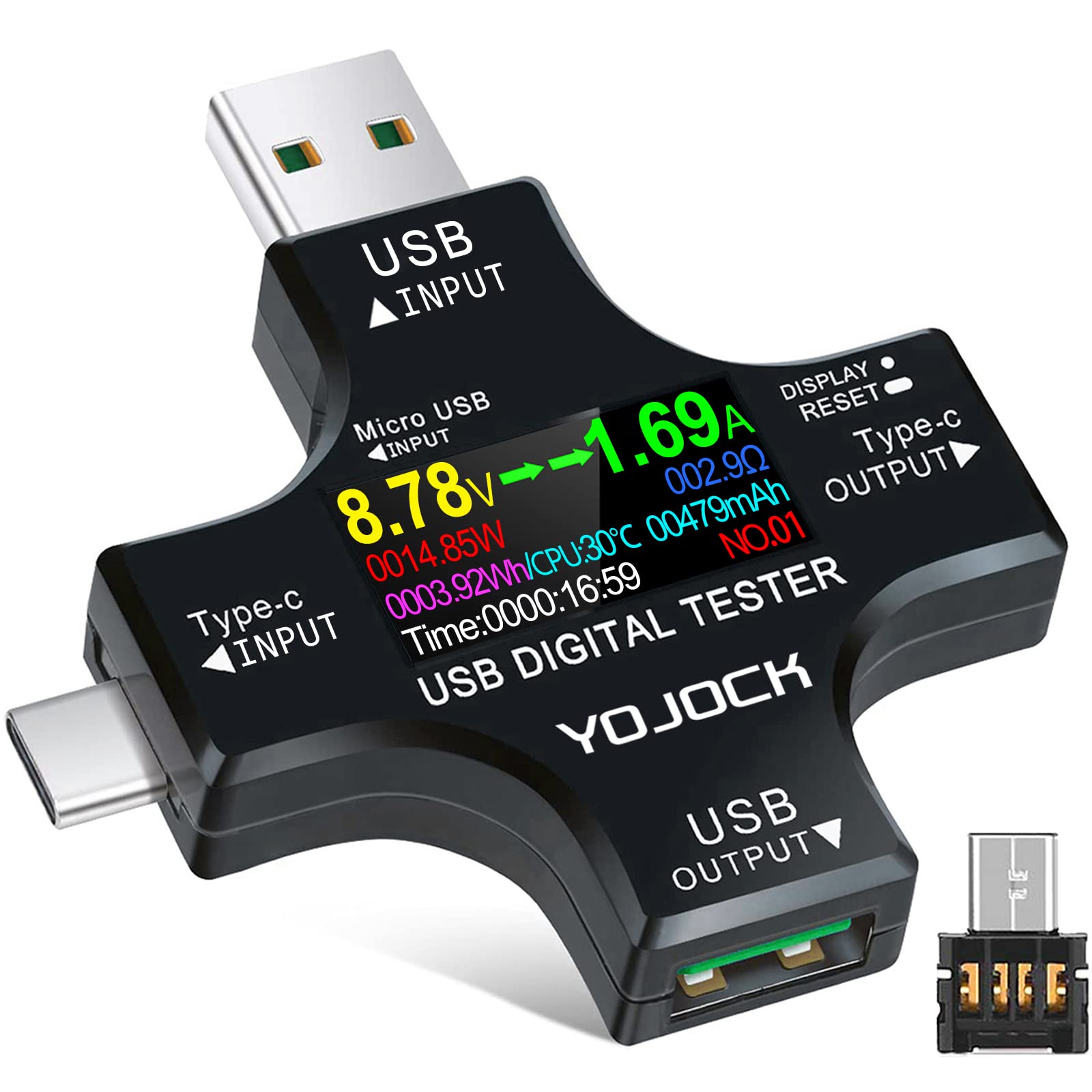
It’s a tiny inline USB tester, about 2.8 inches long and 40 grams, that sits between your power supply and your device and reads out what’s actually flowing through. It has a USB-C end, a USB-A end, and a micro-USB adapter on the side, plus a color screen with eight display modes. At around $17, it’s aimed at anyone who wants real answers without buying a lab instrument.
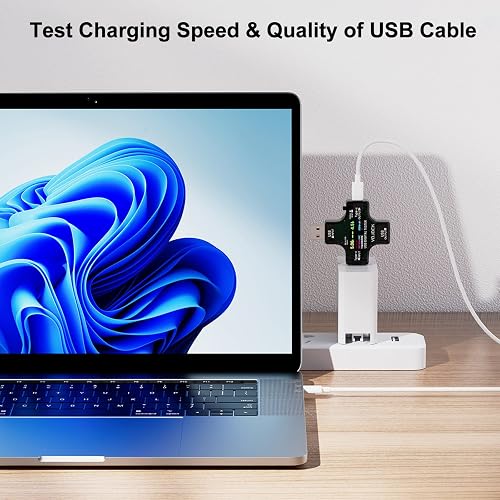
I ran this USB power meter on phone bricks, laptop chargers, cables, and power banks to see how much a cheap tester can really tell you. The short version: it turns “I think this charger is slow” into a number you can actually see — with one first-use quirk you’ll want to know about.
What I Liked
For a cheap gadget, the YOJOCK USB-C tester does more than I expected. Here’s what stood out across weeks of plugging it into chargers, cables, and power banks.
It Reads the Full Picture of a Charging Port
The YOJOCK doesn’t just show volts and amps. It works as a voltmeter, ammeter, and power meter in one, reading voltage, current, and wattage plus capacity, power, temperature, resistance, and elapsed charging time — the full picture of what’s happening on a Type-C port.
In practice that meant I could glance down and see a cable pulling, say, 9.2 volts at 2 amps instead of the wattage I expected. It even shows the direction of current with little on-screen arrows, so you always know which way the power is flowing. That same at-a-glance read is handy for checking how quickly a USB-rechargeable tool like the EASYmaxx LED Rechargeable Work Light 2-Pack tops up when you plug it in.
A 3.6-32V, 8-Amp Range With Real Headroom
This meter measures from 3.6 up to 32 volts and from 0 up to 8 amps. Most devices today top out around 20 volts and 5 amps, so you are not going to peg it out.
That ceiling is a genuine step up from a lot of cheaper testers, and it leaves headroom for higher-power USB-C gear down the road. As a multimeter-style tool for USB, the range covers basically any charging situation you’ll run into.
Eight Display Modes, Including a Readable Big-Font View
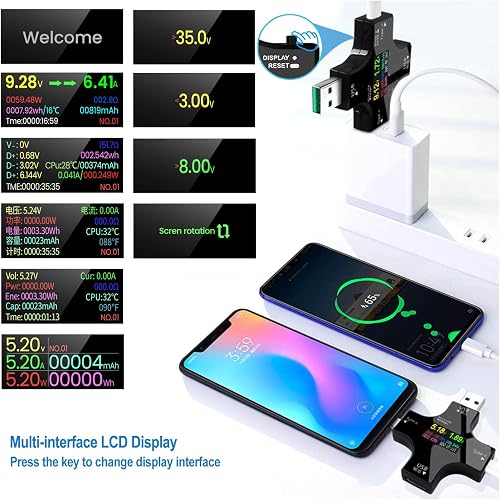
There are eight color screens and you cycle through them with the single button. My favorite is the big-font mode that shows volts, amps, and watts in large digits on the color LCD — far easier to read than the dense detailed screens.
Two of the modes plot a live graph instead of a number. If a charger is spiking or dropping out, you’ll see the line jump around; a plain number would just look steady and you’d never catch it.
It Catches Power Banks That Lie About Capacity
Plug it inline as a battery pack discharges and it measures the capacity and energy actually coming out. You can finally check whether that 10,000mAh pack delivers what it claims.
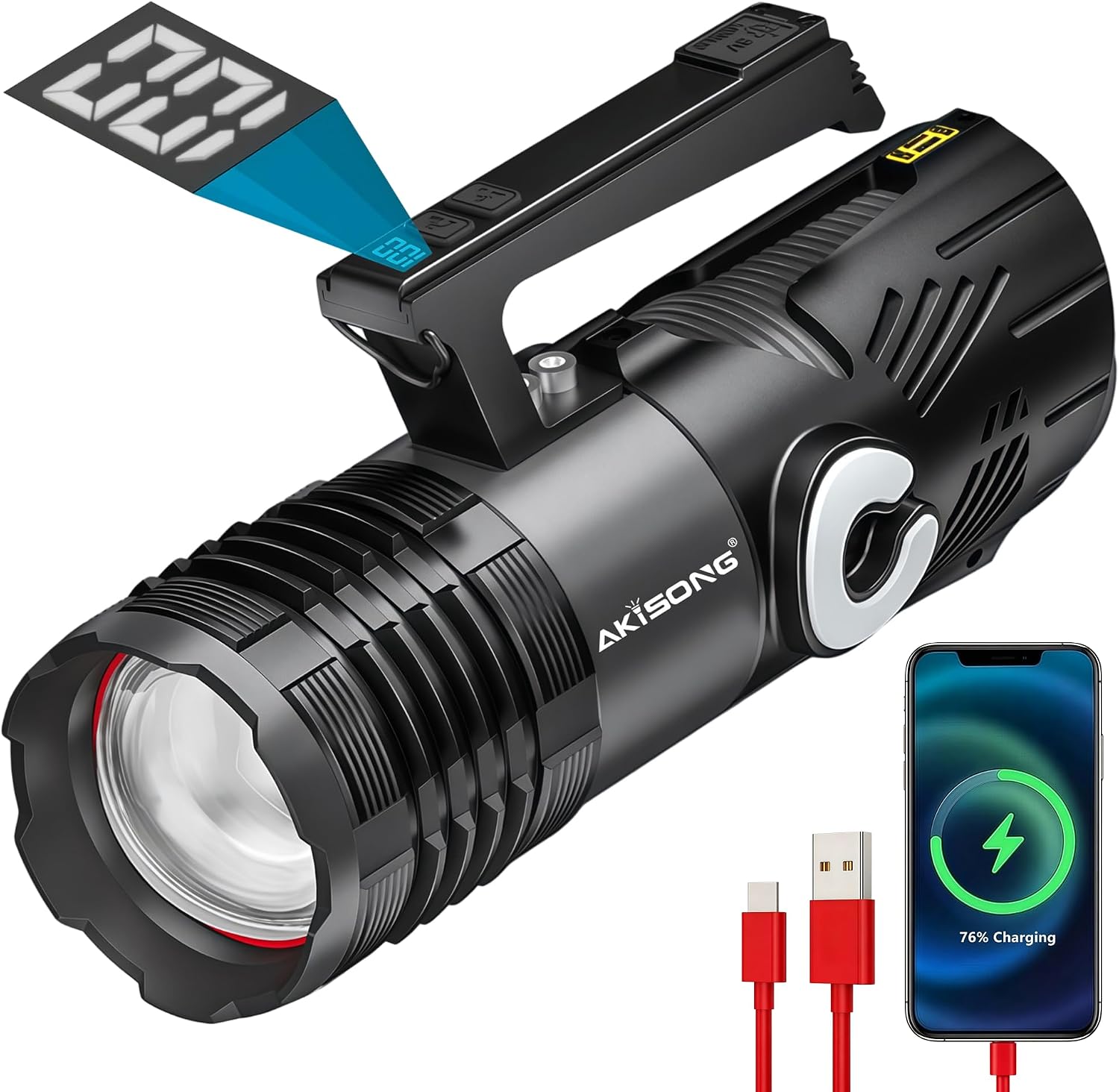
Conversion losses mean no pack ever reads a full 10,000 back out, and that’s normal. Where it earns its keep is exposing the cheap packs that rate capacity by charge-in rather than what you get back — Amazon buyers describe using it exactly this way on power banks and solar setups. It is just as useful on a flashlight that doubles as a power bank, like the AKISONG 70W Rechargeable Flashlight, whose 10,000mAh cells feed a USB output for emergency phone charging. Tinkerers who keep this tester on the bench tend to reach for a compact driver like the HOTO Electric Screwdriver Kit when a pack’s case needs opening up.
Safety Cutoffs That Step In to Protect Your Gear
It includes over-voltage, over-current, under-voltage, and low-energy protection, and it cuts the output automatically if something’s wrong. So if a charger does something it shouldn’t, the tester steps in instead of letting it reach your device.
And if the power drops out mid-test, it saves your data so you don’t lose the capacity reading you were partway through. For a tool whose whole job is protecting more expensive gear, that’s reassuring.
One Tool for Every Cable, Port, and Protocol
Between the built-in USB-C and USB-A ends and the micro-USB adapter — which doubles as an OTG adapter — it drops in line with almost anything you own. It reads the PD, Quick Charge, and BC fast-charge protocols and handles iPhone fast charging up to about 29 watts, plus laptop chargers like a MacBook or Dell.
You’re not buying a different tester for each connector. This one USB power meter covers the whole setup from a power supply to a phone, tablet, or laptop. That universal fit also lets you spot check the real output of a big battery device like the AKISONG 150W XHP360 rechargeable spotlight, whose 20,800mAh pack runs its own USB-A charging port.
What Needs Improvement
No tool at this price is perfect, and the YOJOCK has a few quirks worth knowing before you buy.
The Fine Print on Detailed Screens Is Small
The detailed display modes pack a lot of numbers onto a small color screen, and the secondary data is genuinely tight to read. The big-font mode fixes this for the main volts, amps, and watts readout, but if you lean on the detailed screens, factor in the small text. Reviewers and buyers of this class of meter say the same thing.
It Needs a Live Circuit Before It Powers On
This trips up a lot of first-time users: the screen will not light up when only the USB-C input is plugged into a PD charger. You need both an input and an output connected — a source and a device drawing current — before it reads anything.
If the screen stays blank, use the included adapter and try flipping the USB-C plug around. It also means this tester reads power through a live connection and cannot check a bare, dead cable on its own; that’s a job for a dedicated cable tester.
Two Ports Can Give Two Different Readings
One honest quirk I hit: the readings on the native Type-C port and on the USB port through the adapter can come out different. It’s not a dealbreaker, but you’ll want to work out which connector reads your cable correctly and stick with it once you’ve confirmed it stays consistent.
No Protocol Detection or E-Marker Reading
This is a measurement meter, not an enthusiast instrument. It won’t detect exact fast-charge protocols or read the e-marker chip inside a USB-C cable, and it isn’t lab-accurate — testers of this type are least precise at very low currents. If those capabilities matter to you, see the comparisons below.
How It Compares
The budget USB tester shelf is crowded with near-identical brands, so the real question is where the YOJOCK sits against the units enthusiasts actually name.
vs Power-Z KM003C
The KM003C is what most reviewers and serious users reach for. On r/UsbCHardware it’s called “the perfect choice but pricey,” and it adds full PD protocol detection, e-marker cable reading, and PC logging that the YOJOCK simply doesn’t have.
For the YOJOCK’s job — reading volts, amps, and watts around the house — you pay a fraction of the price. Buy the KM003C if you need protocol-level detail; the YOJOCK handles the everyday checks.
vs Alientek C2
The C2 is the affordable enthusiast pick, described on Reddit as “an affordable rival to the KM003C” that still reads e-markers and detects protocols. It’s the natural step up if you outgrow a basic meter and want firmware updates over the next few years.
The trade-off is price and complexity. The YOJOCK wins on simplicity and cost; the C2 wins on features and future-proofing.
vs Fnirsi FNB58
The FNB58 is a feature-loaded USB tester with PD triggering, Bluetooth and PC logging, and a larger 2-inch display, reviewed favorably by Elektor. It does far more, but it’s bigger, pricier, and — as Reddit regulars point out — Fnirsi spreads itself thin across too many tools.
If you want data-logging and triggering, the FNB58 earns its place. If you just want a pocketable meter that answers “is this charging fast?”, the YOJOCK is the leaner buy. For most people checking chargers, cables, and power banks, its price and simplicity make it the easy pick.
Final Verdict
The YOJOCK USB-C power meter does a genuinely useful job for an affordable little gadget: it turns “I think this charger is slow” into an actual number you can see on your chargers, cables, and power banks.
I’m giving it a 4.3 out of 5.
It loses points for the tiny fine print on the detailed screens, the active-circuit quirk, and the port-to-port reading differences — and it’s no lab instrument. But the wide 3.6-32V range, eight display modes, honest power-bank capacity testing, and automatic safety cutoffs more than earn their keep at around $17 on Amazon.
Bottom line: If you want to stop guessing which chargers and cables are actually fast, this USB tester is an easy recommendation for most people. Enthusiasts who need protocol detection or e-marker reading should step up to a Power-Z or Alientek instead.
Specifications
| Brand | YOJOCK |
| Power Source | Electric |
| Style | Digital |
| Color | Black |
| Item Weight | 40 g |
| Minimum Operating Voltage | 3.6 volts |
| Measurement Type | Ammeter, Multimeter, Voltmeter |
| Maximum Operating Voltage | 32 volts |
| Compatible Devices | iPhone 13 Pro, devices with USB-C port, PD3.0, PD2.0, QC3.0, QC2.0, BC1.2 |
| Item Dimensions | 2.8 x 1.26 x 0.47 inches |
| Specification Met | CE, RoHS |
| Model | FT-ut003 |
| Unit Count | 1 Count |
| Number of Items | 1 |
| Manufacturer | YOJOCK |
| Number of Packs | 1 |
| Included Components | USB Tester |
| Part Number | UT003 |
Frequently Asked Questions
What does the YOJOCK USB-C power meter measure?
It reads voltage, current, and wattage, plus capacity, power, temperature, resistance, and elapsed charging time. On-screen arrows also show the direction the current is flowing, so you can see the full picture of a charging port at a glance.
Why won't my YOJOCK USB tester turn on?
This is the most common first-use issue. The screen will not light up when only the USB-C input is connected to a charger. You need both an input and an output connected — a power source and a device drawing current. If it stays blank, use the included adapter and try flipping the USB-C plug around.
What voltage and current range does the YOJOCK power meter support?
It measures from 3.6 to 32 volts and from 0 to 8 amps. Most devices today top out near 20 volts and 5 amps, so that range leaves real headroom for higher-power USB-C charging.
Can the YOJOCK USB-C power meter test a cable by itself?
No. It reads power flowing through a live connection, so it needs a source and a device in the circuit. To check a bare, disconnected cable, you need a dedicated cable tester instead.
Is the YOJOCK USB power meter accurate enough?
For everyday checks of chargers, cables, and power banks, yes. It is not a lab instrument, and testers in this budget class are least precise at very low currents, but it reliably turns 'this feels slow' into a number you can act on.
Does the YOJOCK USB-C power meter come with a warranty?
The Amazon listing points buyers to the seller for warranty details rather than stating a fixed term, so contact YOJOCK directly through Amazon if you need coverage information before buying.
Ready to Buy?
YOJOCK USB-C Power Meter Tester delivers on its promises. If it fits your needs, it's a solid choice you won't regret.
Check Price on Amazon Founder & Product Reviewer at TheReviewRewind
Daniel has tested 400+ products across 20+ categories through hands-on, real-world testing. Every review includes video documentation and standardized scoring criteria. His reviews appear as Amazon shoppable videos and here on TheReviewRewind.
We earn a commission if you make a purchase, at no extra cost to you. This does not influence our ratings or recommendations. Full disclosure
Looking for more options? See all our Tools & Home Improvement reviews.
Related Reviews