JADENS Bluetooth Thermal Label Printer Review: Ink-Free 4x6 Shipping Labels From Your Phone


JADENS Bluetooth Thermal Label Printer Review: Ink-Free 4x6 Shipping Labels From Your Phone
JADENS Bluetooth Thermal Label Printer
Buy if you run an Etsy, eBay, or Shopify shop from home and want a compact, ink-free printer that prints 4x6 shipping labels straight from your phone. Skip if you ship in high volume or need rock-solid wired printing on a Mac all day.
Buy on AmazonWhat We Liked
- The Roll Sits Inside a Built-In Tray
- No Ink or Toner, Ever
- It Prints Straight From Your Phone
- Sharp Labels That Scan on the First Try
- From Tiny Product Tags to 4x6 Shipping Labels
- Quick Setup and a Genuinely Useful App
What Could Be Better
- Bluetooth on a Mac Can Be Finicky
- The App Sometimes Reprints the Last Label
- Wireless Reliability Can Slip Over Time
- The Built-In Tray Favors Smaller Rolls
- No Feed Guide, So Labels Can Drift
How we test: Every product is used in real conditions and evaluated using our standardized scoring criteria. Read our full review methodology.
If you run a shop out of your home, whether it is Etsy, eBay, or Shopify, the worst part of order day usually is not the packing. It is being chained to a desktop printer and a computer just to spit out a shipping label. The JADENS Bluetooth thermal label printer is built to cut that cord, and at $59.99 it aims squarely at the home seller who wants to print straight from a phone.
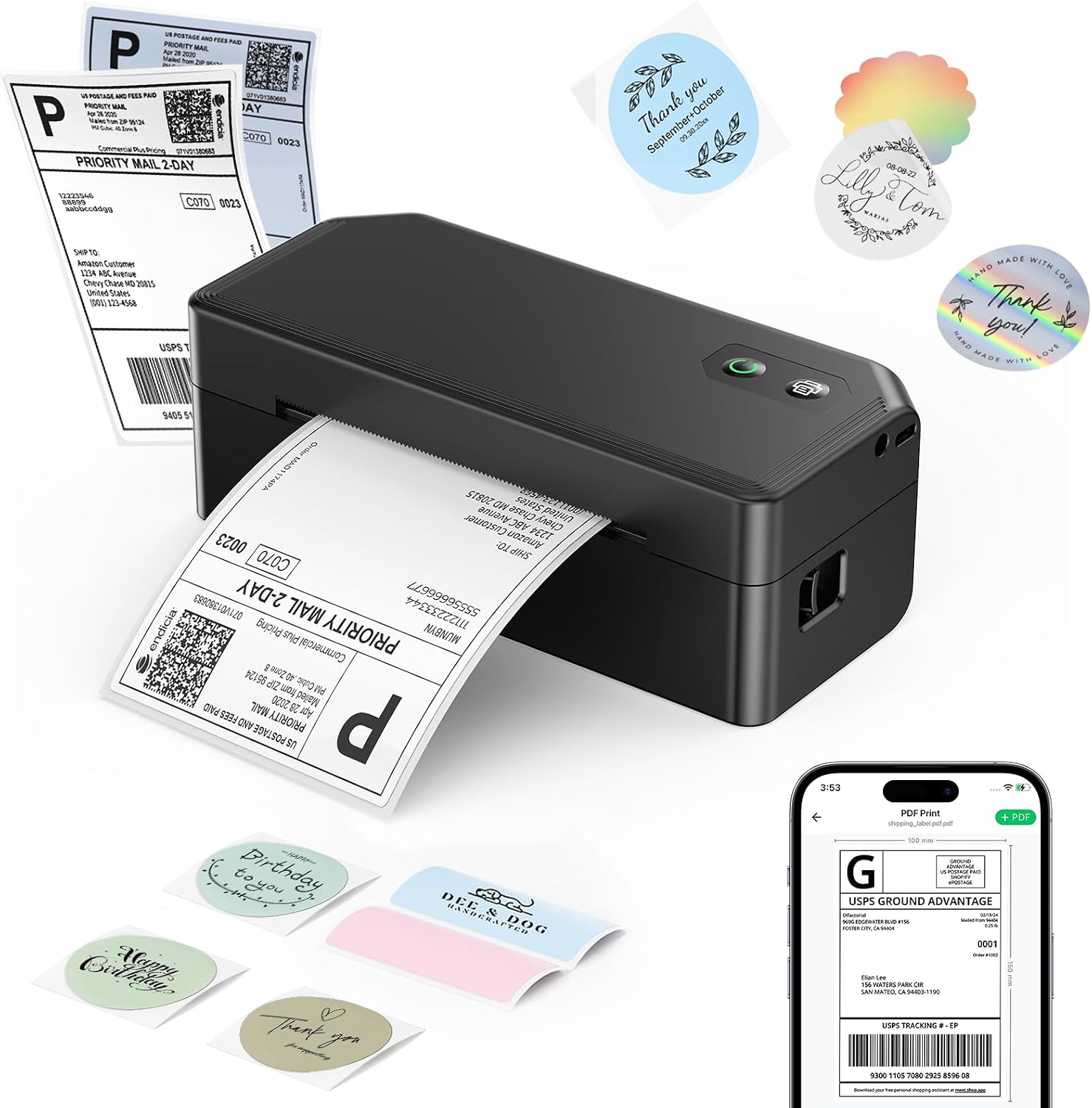
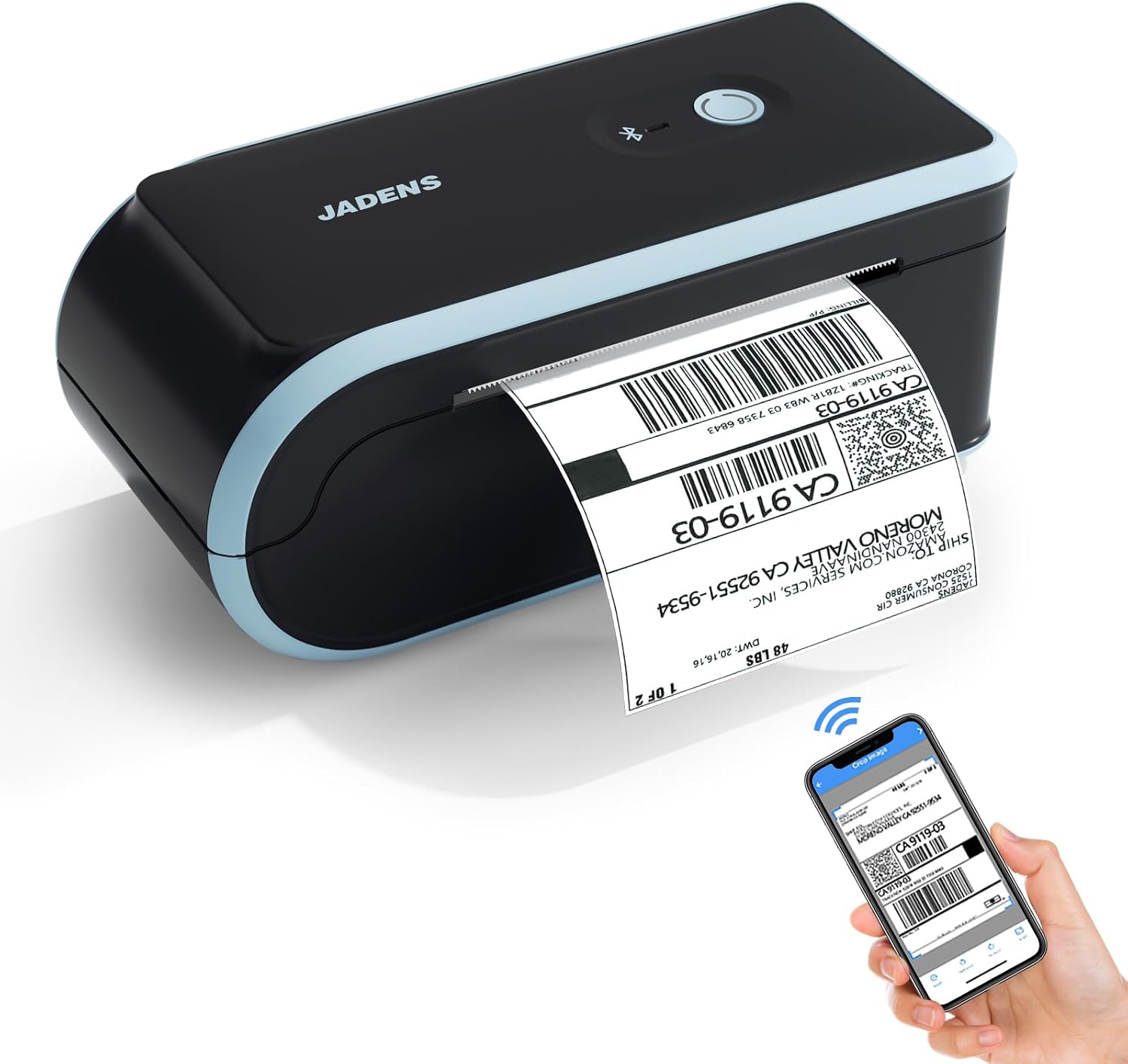
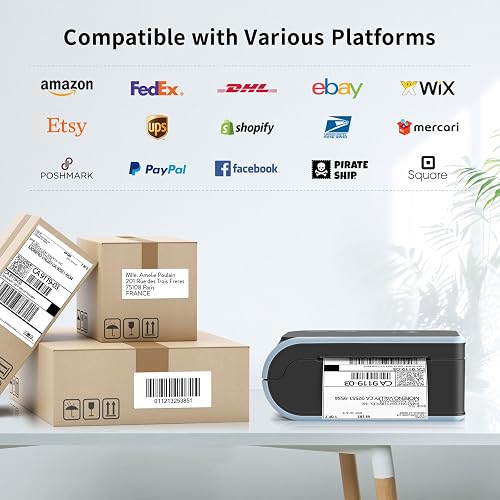
This is a direct thermal label printer, so there is no ink and no toner to buy, ever. It uses heat to darken thermal labels, which means the only thing you replace is the roll. It handles everything from small product stickers up to full 4x6 shipping labels, connects over Bluetooth to your phone through the Jadens Printer app or over USB to a computer, and drops into the platforms sellers already use, including Amazon, Etsy, UPS, and FedEx.
I ran labels through this printer straight from my phone, loaded rolls into its built-in tray, and printed both shipping labels and a photo sticker to see how far the app stretches. The short version is that this is a lot of printer for the size and the price, with a few small business caveats worth knowing before you buy.
What I Liked
After loading rolls and running shipping labels through the JADENS from my phone, a handful of things stood out. Here is what this thermal label printer does well.
The Roll Sits Inside a Built-In Tray
This is the feature I did not expect to care about, and it ended up being my favorite part. The label roll loads into a built-in tray inside the printer instead of dangling off the back on a separate stand. A lot of thermal printers use that external stand, and they often struggle to keep the roll calibrated and lined up.
Loading is simple. You flip a small tab on the side to unlock the guides, slide the roll in sticker side up, cinch the guides so the paper sits centered, and lock it back down. When you turn it on it calibrates the roll on its own. Keeping the paper enclosed makes the whole thing tidier on a packing table, and it is a real step up from the printers that leave a roll hanging in the open.
No Ink or Toner, Ever
This is the whole appeal of direct thermal for a small business. There is no ink cartridge and no toner to buy again, because the printer uses heat to darken the thermal labels. The only thing you replace is the roll of labels.
For anyone shipping regularly, that is where the savings live. You are never out of toner at the worst possible moment, and there are no surprise ink costs eating into thin margins. You just buy label rolls and keep going, which keeps the running cost about as low as a printer gets.
It Prints Straight From Your Phone
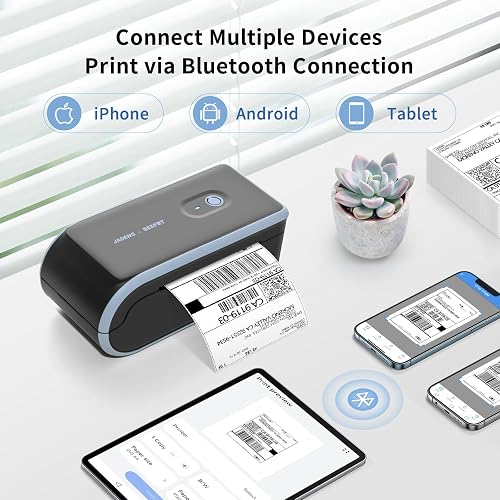
The main draw here is the dual connectivity. You can pair it over Bluetooth to your phone using the Jadens Printer mobile app on iOS or Android, or plug in over USB to a computer running Windows, Mac, Chromebook, or Linux. You are not locked to one device.
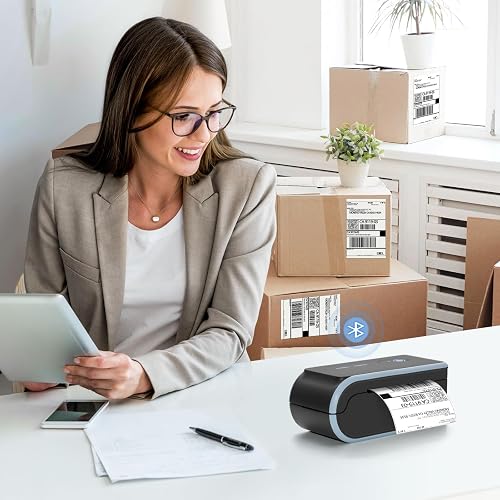
In practice that means you can design a label on a laptop or stand in your kitchen and print one straight from your phone. It also plays nicely with the platforms you already ship through, so a label from Shopify, Etsy, UPS, or FedEx drops right into a workflow you already have. If you want another ink-free 4x6 option that prints from a phone the same way, the SVANTTO Y42BT Bluetooth Label Printer takes the same phone-first approach for small business shipping.
Sharp Labels That Scan on the First Try
Print quality is genuinely sharp. Labels come out clean and dark, they do not smear when you touch them, and the 203 DPI (dots per inch) barcodes scanned reliably for me. It honestly holds its own against the bigger name brand label printers people spend a lot more on, a point Amazon buyers echo when they compare the output to a Brother or a Rollo.
You can also print more than shipping labels. Send an image to the app and it will print stickers too, though photos do not come out quite as crisp as text labels and usually want a lighter density setting. For product stickers, packaging, and little branding touches, that flexibility is a nice bonus.
From Tiny Product Tags to 4x6 Shipping Labels
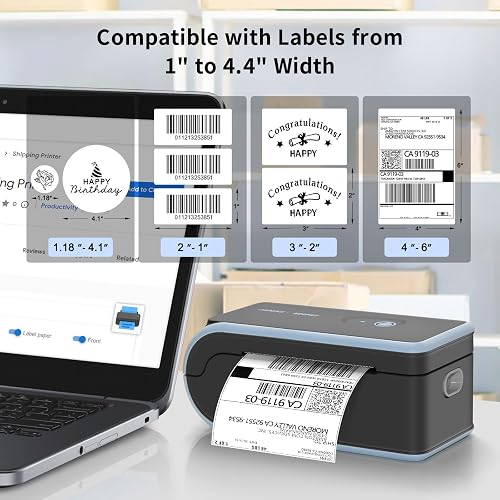
This printer handles label widths from about 1.57 inches up to 4.1 inches. On the small end you are doing barcode tags and product stickers, and on the wide end you are printing full 4x6 shipping labels. That range matters because one machine covers your whole operation instead of needing two.
The app backs that range up. Beyond quick printing, you can create labels from scratch and drop in text, barcodes, QR codes, and shapes, then adjust density, speed, copies, and offset. It turns each label into a small canvas, which is handy when you are mixing shipping labels with custom product tags. If you also need to read those barcodes back off shelves and packages, the Sumicor wireless barcode scanner handles 1D and 2D codes over Bluetooth, 2.4 GHz, or USB for inventory work.
Quick Setup and a Genuinely Useful App
Setup takes about a minute. You download the Jadens Printer app, open it, connect over Bluetooth, allow notifications, and you are printing. The box includes both a USB-A to USB-C and a USB-C to USB-C cable plus clear quick start guides, which is more thorough than most printers in this class bother to be.
JADENS also backs it with lifetime support over phone, email, remote assistance, and WhatsApp. For a first-time thermal printer buyer, having a real support path plus step-by-step guides takes a lot of the guesswork out of getting started.
What Needs Improvement
No sub-$60 label printer is flawless, and the JADENS makes a few trade-offs to hit its price. These are the limits worth knowing before you buy.
Bluetooth on a Mac Can Be Finicky
Pairing to a MacBook specifically can be a little fussy. The phone app is the smoother path, so if you have both, start there. Buyers back this up, with one Etsy seller noting they never got it working with their MacBook even though it ran fine from a phone.
The practical fix is to treat USB as the reliable route on a desktop. Over a cable it connects to Windows, Mac, Chromebook, and Linux without the wireless hassle. It is not a dealbreaker, but the Bluetooth-first, phone-first design is clearly built for the phone in your hand more than for macOS.
The App Sometimes Reprints the Last Label
The most common software complaint is that the app can hold a previous job in memory and print the old label instead of the new one you just loaded. Sellers on Reddit and Amazon both mention it, and one buyer found the app occasionally struggles to locate the printer as well.
There is a reliable workaround. Save the label to the printer first, then print, rather than hitting print straight from the file, which keeps the scaling and the queue correct. It is a learnable quirk, but it is one you will want to know on day one instead of discovering mid-shipment.
Wireless Reliability Can Slip Over Time
A minority of buyers report the wireless feature getting flaky after a few months, and a few units stopped printing over Bluetooth entirely within weeks. One long-term user said the connection dropped after three months of daily use, and another mentioned the wireless model can need an occasional restart to find the phone again.
Most sellers, including people who have printed thousands of labels over a year or two, never hit this. But it is the pattern to watch, and it is the reason the lifetime support and the USB fallback matter. If wireless is the entire reason you are buying, keep the return window in mind.
The Built-In Tray Favors Smaller Rolls
The enclosed tray that I like also has a downside. The internal space is sized for smaller-diameter rolls, so a standard large roll may not fit without unwinding part of it first. One buyer learned this the hard way after purchasing standard rolls to replace the included one.
It is worth checking roll dimensions before you stock up on labels, or buying rolls JADENS lists as compatible. Fanfold stacks and the right roll size sidestep the issue, but it is an easy mistake to make if you assume any roll will drop in.
No Feed Guide, So Labels Can Drift
There is no rail or guide on the label feed, so after several prints the labels can slide and print slightly off-center until you readjust them. One reviewer found tearing labels off in a particular direction helped keep them lined up. You will also need to recalibrate when you switch label sizes, which is a quick press-and-hold of the feed button but an extra step to remember.
None of this stops the printer from doing its job, and the first label of a batch occasionally ejects blank during calibration. These are the small daily frictions of a budget thermal printer rather than real defects.
How It Compares
At around $59.99 the JADENS sits in the budget Bluetooth tier of 4x6 thermal label printers, so it competes less with premium desktop units and more with the other affordable wireless printers e-commerce sellers cross-shop. Here is how it stacks up.
vs Rollo Wireless Label Printer
The Rollo is the premium pick sellers name most often. It is fast, reliable, and does not lock you into proprietary labels, and it earns its reputation for high-volume shipping. The catch is price, since a Rollo commonly runs $200 or more, roughly three to four times the JADENS.
That gap is the whole argument. Sellers on Reddit repeatedly frame the JADENS as the cheaper alternative that gets them most of the way there, with one calling their $59 unit “fantastic” for printing directly from the eBay and Etsy apps. If you ship dozens of packages a day, the Rollo pays for itself. If you ship a handful a day from home, the JADENS covers the same core job for a fraction of the money.
vs Brother Label Printers
Brother is the established name-brand benchmark for label and shipping printers, and its reputation for consistency is well earned. Where the JADENS closes the gap is print quality: buyers directly compare its clean 203 DPI output to a Brother, which is high praise for a printer at this price.
Brother units also tend to lean on desktop and driver-based workflows rather than a phone-first app. If you want native software and a long brand track record, Brother makes sense. If your priority is printing straight from your phone without spending name-brand money, the JADENS is the more direct fit for a home seller. If you still run an inkjet for documents alongside your label printing, cutting cartridge costs with the MYTONER 63XL Ink Cartridge Combo Pack is a cheaper way to keep that side of a home office stocked.
vs MUNBYN Bluetooth Thermal Printer
MUNBYN is the other popular budget Bluetooth 4x6 printer in this space, usually priced a bit above the JADENS. It carries a deep review history and a well-stocked label ecosystem, which is reassuring if you want the largest pool of buyer feedback behind your purchase.
On the essentials the two are very close, both handling 4x6 shipping labels over Bluetooth or USB with an app-based workflow. The JADENS undercuts it on price and adds the built-in roll tray, while MUNBYN counters with its ecosystem and volume of reviews. For a phone-first seller watching the budget, the JADENS is the easier value call.
Final Verdict
The JADENS Bluetooth thermal label printer is a do-one-thing-well machine, and for the money it does that one thing genuinely well. Ink-free direct thermal printing, sharp 203 DPI labels, dual Bluetooth and USB connectivity, a range from small product tags to 4x6 shipping labels, and that tidy built-in roll tray add up to a label printer that punches above its $59.99 price.
I am giving it a 4.2 out of 5.
It loses a little ground for the Bluetooth being finicky on a Mac, for an app that occasionally reprints the last label, and for a wireless connection that slips over time on a minority of units. The enclosed tray also favors smaller rolls, and there is no feed guide to keep labels perfectly centered. None of those are surprises on a printer this affordable, and its 4.3-star average across more than 800 Amazon ratings, plus sellers who have printed thousands of labels over years, back up the everyday experience.
For the home-based seller running an Etsy shop, listing on eBay, or shipping out of the house a few times a day, this kills the ink cost and lets you print a label from anywhere in the room. The no-ink thermal design and quick phone pairing are the real selling points, and the app is more capable than expected.
Bottom line: If you ship regularly from home and you are tired of being tethered to a desktop printer, the JADENS is an easy recommendation and a lot of printer for the size and price. Just plan on using USB if a Mac is your main machine, and keep the phone app as your smoother day-to-day path.
Specifications
| additional_printer_functions | Print Only |
| b_w_pages_per_minute | 152 |
| Brand | JADENS |
| built_in_media | thermal printer |
| Color | blue |
| color_depth | 1 bpp |
| compatible_devices | Android, iOS, Windows, Mac, Chromebook |
| control_method | App |
| controller_type | Android, iOS |
| duplex | Simplex |
| hardware_interface | Bluetooth, USB |
| ink_color | black |
| item_dimensions_d_x_w_x_h | 9"D x 4"W x 7"H |
| item_type_name | shipping label printer |
| Item Weight | 2.5 pounds |
| manufacturer | JADENS |
| maximum_copy_resolution_black_and_white | 203 dpi |
| maximum_copy_speed_black_and_white | 88.8 pages_per_minute |
| maximum_media_size | 4 x 6 inch |
| maximum_print_resolution_black_and_white | 203 DPI |
| maximum_print_resolution_color | 203 x 203 DPI |
| maximum_sheet_capacity | 100 |
| Model Name | C10 |
| model_number | D261 |
| model_series | C10 |
| number_of_drivers | 2 |
| number_of_trays | 1 |
| other_special_features_of_the_product | label printer |
| output_sheet_capacity | 50 |
| paper_size | 4"×6", 3"×2", 3"×1", 2"×1", 2-5/16" x 4" inches |
| print_media | Labels |
| printer_connectivity_type | Bluetooth |
| printer_output_type | Monochrome |
| printer_type | Thermal |
| processor_count | 1 |
| resolution | 203 x 203 DPI |
| specific_uses_for_product | Small Business, Office |
| total_usb_ports | 1 |
| unit_count | 1 Count |
| upc | 198715363104 |
| warranty_description | 1 |
| warranty_type | limited warranty |
| Connectivity Technology | Bluetooth |
| Printing Technology | Thermal |
| Special Feature | label printer |
| Printer Output | Monochrome |
| Max Printspeed Monochrome | 152 |
| Product Dimensions | 9"D x 4"W x 7"H |
Frequently Asked Questions
Does the JADENS thermal printer need ink?
No. The JADENS is a direct thermal printer, so it uses heat to darken special thermal label paper instead of ink or toner. The only consumable you ever buy is more label rolls, which is what makes it so cheap to run for regular shipping.
Does the JADENS label printer have a built-in battery?
Treat it as a Bluetooth printer rather than a battery-powered portable. It ships with a cable for power, and buyer reports conflict on whether this model runs cordless on an internal rechargeable battery, so I would not count on true battery operation. The "wireless" part refers to printing over Bluetooth from your phone, not to running without power.
Does the JADENS Bluetooth label printer work with a Mac?
Yes, but USB is the reliable route on macOS. You can connect over USB to Windows, Mac, Chromebook, and Linux, while Bluetooth pairing to a MacBook specifically can be finicky. If you have a phone, the Jadens Printer app on iOS or Android is the smoother path for wireless printing.
What label sizes and shipping platforms does the JADENS printer support?
It handles label widths from about 1.57 inches up to 4.1 inches, covering 4x6 shipping labels plus smaller barcode, product, and address labels. It works with the major platforms sellers use, including Amazon, eBay, Etsy, Shopify, USPS, UPS, and FedEx.
Are JADENS thermal printers good for a small business?
For a home-based seller it is a strong value pick. It prints sharp 203 DPI labels straight from your phone, sets up in about a minute, and removes ink costs entirely, all for around $59.99. Its main limits are the occasional app quirk and Bluetooth that prefers a phone over a Mac, so very high-volume shippers should look at a pricier printer.
Is a Bluetooth thermal label printer worth it?
If you ship regularly from home, yes. Printing a 4x6 label straight from your phone with no ink and no computer saves real time on order day, and the JADENS delivers that for well under the cost of a premium printer. Heavy-volume or color-label operations are the main cases where a different machine makes more sense.
Ready to Buy?
JADENS Bluetooth Thermal Label Printer delivers on its promises. If it fits your needs, it's a solid choice you won't regret.
Check Price on Amazon Founder & Product Reviewer at TheReviewRewind
Daniel has tested 400+ products across 20+ categories through hands-on, real-world testing. Every review includes video documentation and standardized scoring criteria. His reviews appear as Amazon shoppable videos and here on TheReviewRewind.
We earn a commission if you make a purchase, at no extra cost to you. This does not influence our ratings or recommendations. Full disclosure
Looking for more options? See all our Office Products reviews.
Related Reviews