SVANTTO Y42BT Bluetooth Label Printer Review: Ink-Free 4x6 Shipping Labels for Small Business


SVANTTO Y42BT Bluetooth Label Printer Review: Ink-Free 4x6 Shipping Labels for Small Business
SVANTTO Y42BT Bluetooth Label Printer
Buy if you run an Etsy shop, Amazon FBA, or home shipping desk and want a compact, ink-free 4x6 label printer that pairs to your phone in minutes. Skip if you need color labels or Wi-Fi printing across a network.
Buy on AmazonWhat We Liked
- No Ink, No Toner, Ever
- Genuinely Fast Print Speed
- Dual USB and Bluetooth Connectivity
- A Surprisingly Capable App
- Compact, Plug-and-Print Setup
- Wide Label and Platform Support
What Could Be Better
- No Wi-Fi, USB or Bluetooth Only
- Black and White Only
- Bluetooth Pairing Can Lag
- App Rotation and Customization Are Limited
- Windows Driver Setup Can Be Fussy
How we test: Every product is used in real conditions and evaluated using our standardized scoring criteria. Read our full review methodology.
If you sell anything online, you already know the small daily pain of shipping labels: feeding sheets of sticker paper through a regular printer, or watching an ink cartridge dry out right when a stack of orders needs to go out. The SVANTTO Y42BT Bluetooth thermal label printer is built to skip all of that. It is a compact 4x6 shipping label printer aimed at small businesses and home sellers, and at around $39.99 it undercuts most of the names people know.
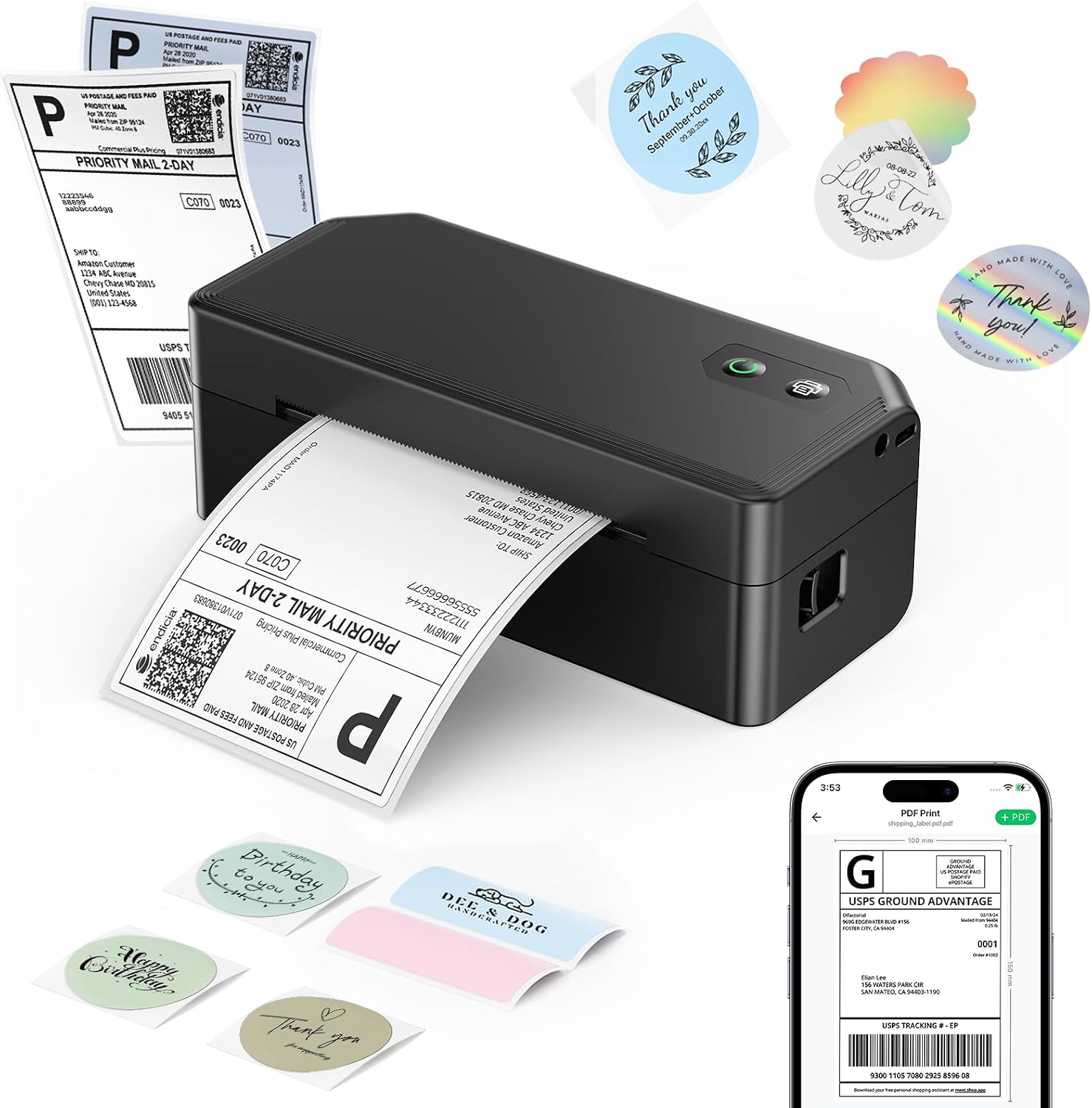
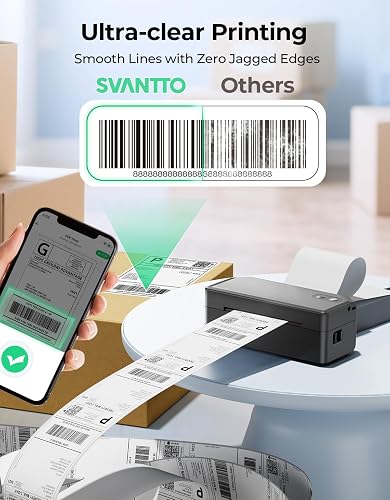
The pitch is simple. This is a direct thermal printer, so there is no ink and no toner, ever. It uses heat to darken special thermal label paper, which means the only consumable you ever buy is more labels. It prints 4x6 shipping labels and smaller at up to 180mm/s, connects over USB to Windows, Mac, and ChromeOS or over Bluetooth to iOS and Android through the FlashLabel Pro app, and works with the platforms sellers actually use: Amazon, Etsy, Shopify, USPS, UPS, and FedEx.
I tested the SVANTTO Y42BT by printing 4x6 shipping labels from both a phone and a computer, walking through the macOS driver setup, the app pairing, and even a photo label to see how far the software stretches. The short version is that this little label printer does the core job well for the money, with a couple of budget-tier caveats worth knowing before you buy.
What I Liked
After running 4x6 shipping labels through the SVANTTO Y42BT from both a phone and a laptop, a handful of strengths stood out. Here is what this Bluetooth thermal label printer does well.
No Ink, No Toner, Ever
This is the whole point of the machine, and it is the feature you feel every single day. The Y42BT is a direct thermal printer, so instead of ink or toner it uses heat to darken thermal label paper. There is nothing to run dry mid-order and nothing to replace except the labels themselves.
For anyone shipping regularly, that is where the savings live. You are never caught without a cartridge the night before a shipment goes out, and the running cost drops to the price of a roll of labels. Direct thermal technology also keeps the printer maintenance-light, since there are no print heads to clog with ink. Pair it with the right mailers and your packing station gets a lot calmer; sturdy METRONIC bubble mailers are a natural match for the 4x6 labels this printer spits out.
Genuinely Fast Print Speed
SVANTTO rates the Y42BT at up to 180mm/s, or up to 72 of the 4x6 shipping labels per minute, and in testing a single label pops out in about a second. You feed the job, it pulls the label in a little, and it comes right back out.
That speed matters most on a big order day. Rather than standing over the printer waiting on each label, you batch them and they come out one after another. For a small business processing a morning’s worth of Etsy or Amazon orders, that pace is the difference between a quick task and a chore.
Dual USB and Bluetooth Connectivity
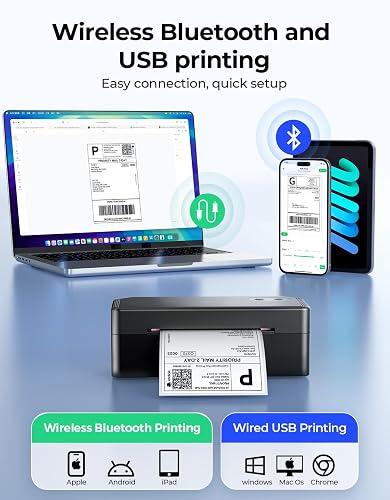
The Y42BT covers both ways people actually print. Over USB it connects to Windows, Mac, and ChromeOS, and over Bluetooth it pairs to iOS and Android through the FlashLabel Pro app. You are not locked into one setup.
In practice that flexibility is the selling point. You can plug it into a laptop to knock out a batch of orders, or pair it to your phone and print without a computer at all. Whether your workflow runs through a MacBook, a Windows PC, an iPhone, or an Android tablet, the printer keeps up. One Depop seller on Amazon bought it specifically because their old thermal printer only worked with a Chromebook that died, and the Y42BT connected straight to their iPhone instead. If you also need to scan the barcodes those labels carry, the Sumicor Wireless Barcode Scanner pairs over the same Bluetooth, 2.4 GHz, or USB options for a matching wireless workflow. For a similar ink-free 4x6 printer that leans harder on its phone app, the JADENS Bluetooth Thermal Label Printer is a close budget alternative for Etsy and eBay sellers.
A Surprisingly Capable App
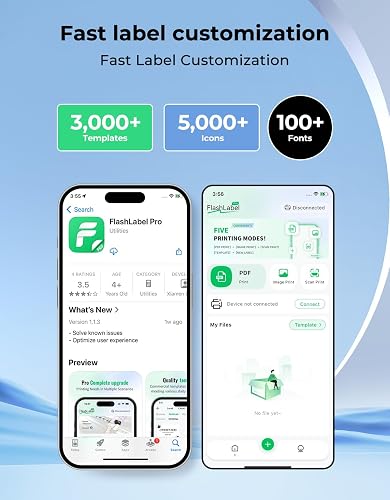
The FlashLabel Pro app is more than a print button. It ships with over 3,000 pre-made templates, 5,000-plus icons, and 100-plus fonts, so you are not designing labels from scratch. You pick a template, drop in your text or a barcode, and print.
What surprised me is how far past shipping it stretches. You can lay out text labels, barcodes, product labels, and address labels, and it will even print photo labels. In testing I sent a simple image to it and the result matched the on-screen preview cleanly. People use that flexibility for organizing and even creative projects like scrapbooking, which is a genuine bonus on a printer this cheap. If your printing runs to documents and the occasional color page rather than labels, a regular inkjet still earns its place, and the MYTONER 63XL Ink Cartridge Combo Pack keeps that HP printer stocked without paying genuine HP prices. Canon PIXMA owners can do the same with the PGI-280XXL/CLI-281XXL Ink Cartridges 15-Pack, which keeps 280/281 printers running for a fraction of genuine Canon cost.
Compact, Plug-and-Print Setup
The Y42BT is small enough to almost fit in your hand, measuring about 5.3 inches wide, and it tucks onto a desk without taking over the space. Loading labels is simple: open the two side tabs, drop the roll in, cinch the plastic guides so the paper sits centered, and close it.
Setup lives up to the “plug and print” claim, too. On macOS you add the printer through System Settings, pick the Y42BT driver, and you are printing in a couple of minutes. Several Amazon buyers echoed this, with one saying they were set up within five minutes and another calling it “basically plug and play.” The box includes the printer, a USB cable, a power adapter, test labels, and a manual, so there is nothing extra to buy on day one. That same fuss-free, plug-and-play approach shows up in other small business gear like the AGJ Restaurant Pager Wireless Calling System, which staff can set up in minutes with no app or subscription.
Wide Label and Platform Support
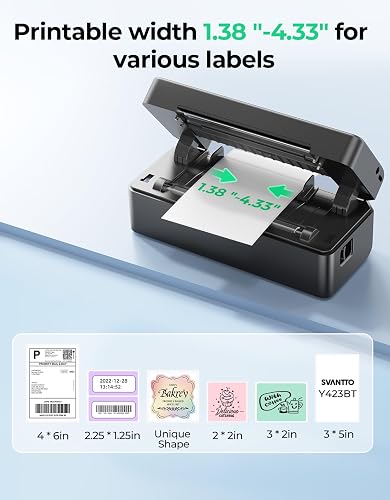
Despite the low price, the Y42BT is not a one-trick printer. It handles label sizes from 1.57 inches up to 4.3 inches wide, covering the big 4x6 shipping labels plus smaller barcode, product, and address labels, along with circle labels for product branding.
On the software side it works with the major shipping platforms sellers rely on, including Amazon, UPS, FedEx, USPS, Etsy, and Shopify. That means the same machine that prints your USPS postage can switch to Amazon FBA labels or organizing labels around the house without any fuss.
What Needs Improvement
No sub-$40 label printer is flawless, and the SVANTTO Y42BT makes a few predictable trade-offs to hit its price. These are the limits worth knowing before you buy.
No Wi-Fi, USB or Bluetooth Only
This is the one to underline. The Y42BT connects over USB or Bluetooth, and there is no Wi-Fi. If you are picturing sending print jobs to it from anywhere on your network, or sharing it between several computers across an office, that is not how this printer works.
For a single seller printing from one laptop or one phone, it is a non-issue. But if a networked, always-on shared printer is what you need, you will want to look at a Wi-Fi model instead. It is a genuine limitation rather than a bug, so go in with eyes open.
Black and White Only
Like nearly every direct thermal printer, the Y42BT prints monochrome at 203 dpi. That is exactly what you want for crisp barcodes, shipping labels, and address labels, but it means no color.
If your plan involves colorful product labels or branded stickers with color artwork, this is the wrong tool. For shipping and organizing, though, black on white is the standard and the print came out clean and sharp in testing.
Bluetooth Pairing Can Lag
The Bluetooth connection works, but it is not always instant. In the app you tap to connect, wait for the status to turn blue, and only then are you ready to print. Several Amazon buyers noted the same thing, with one writing that the print quality is clear “though it can take a moment to pair the first time,” and another saying “sometimes it takes a while for the Bluetooth to connect.”
It is a minor friction rather than a dealbreaker, and once paired it holds. But if you expect an instant handshake every time you pick up your phone, temper that expectation slightly.
App Rotation and Customization Are Limited
The FlashLabel Pro app is capable, but it has rough edges. One buyer wished for finer control over label rotation, noting the app only rotates in 90-degree steps rather than letting you nudge the angle freely. For most shipping labels that is fine, but for custom or non-standard label layouts it can be fiddly.
Another reviewer pointed out that custom label sizes are not always recognized automatically, so you may need to set a non-standard size manually the first time. It is the kind of one-time setup quirk that is easy once you know it is there.
Windows Driver Setup Can Be Fussy
Most buyers report an easy install, but not everyone. In the most detailed critical review on Amazon, one Windows user reported the printer never fully registered as a printer over USB, showing up only as a generic USB device, and could not be used as a printer over Bluetooth either. They also flagged that the driver download tried to bundle unrelated software.
That appears to be a minority experience against a generally positive 4.2-star average, and macOS setup in my testing was smooth. Still, if you are a Windows-only shop, it is worth downloading the driver from SVANTTO directly and being ready to troubleshoot the first install rather than assuming it will be instant.
How It Compares
At around $39.99 the SVANTTO Y42BT sits at the very bottom of the 4x6 thermal label printer price ladder, so it competes less with premium desktop units and more with the other budget Bluetooth printers sellers cross-shop. Here is how it stacks up.
vs Rollo Wireless Label Printer
The Rollo Wireless is the premium pick. It prints 4x6 shipping labels at around 150mm/s over AirPrint with no drivers, plays nicely with Shopify and Etsy, and does not need to sit next to your desk. Reviewers consistently rate it above the budget field for reliability and its refusal to lock you into proprietary labels.
But it costs roughly $199 to $280, five to seven times the price of the Y42BT. If you ship dozens of packages a day, that investment pays off. If you are shipping a few times a week, the SVANTTO does the same core job, over Bluetooth, for a fraction of the money. As one buyer’s guide bluntly put it, under about a dozen packages a day, a sub-$70 Bluetooth printer is genuinely enough. Once those 4x6 labels are printed, the Nicunom 1000 Pcs Packing List Envelopes give low volume sellers a waterproof peel and stick pouch to attach the packing slip on the outside of the box.
vs MUNBYN 130B Bluetooth Thermal Label Printer
The MUNBYN 130B is a popular step up, holding 4.5 stars across roughly 3,100 reviews at about $79.94. It prints at a similar speed to the SVANTTO and carries a deeper review history plus MUNBYN’s well-stocked label ecosystem.
The catch is price. You are paying roughly twice as much for a printer that, on the specs, does the same 4x6 Bluetooth job. The 130B makes sense if you already buy MUNBYN labels or want the reassurance of a larger review base. If value is the priority, the Y42BT delivers the same essentials for far less. If you like MUNBYN’s ecosystem and also need to scan and manage inventory, the MUNBYN Rugged Tablet Barcode Scanner pairs a Zebra-grade scan engine with a drop-proof Android tablet for warehouse and field work.
vs Phomemo 241BT 4x6 Bluetooth Label Printer
The Phomemo 241BT is another direct rival in the budget Bluetooth tier, sitting around $69.99 with a 4.5-star rating. It is a competent 4x6 thermal printer that, as one expert roundup summarized, “works but doesn’t excel,” occupying the same space as JADENS and MUNBYN at a similar price.
Against it, the SVANTTO’s pitch is straightforward: roughly $30 cheaper for the same monochrome 203 dpi 4x6 output and Bluetooth pairing. The Phomemo has a slightly longer track record, but the Y42BT is harder to beat on pure cost per label printer.
vs JADENS Bluetooth Thermal Label Printer 4x6
The JADENS 4x6 is the review-count champion of the sub-$80 tier, with more than 9,100 Amazon ratings at about $69.98. That volume of feedback makes it the lowest-risk budget pick, since you know exactly what you are getting.
The trade-offs are familiar, though. Expert reviews note JADENS Bluetooth pairing can be temperamental and print consistency varies between units, the same budget-tier quirks the SVANTTO shares. At a lower price with a comparable feature set, the Y42BT is the more economical choice, while JADENS wins on sheer track record. A tidy tomtoc electronic organizer pouch keeps whichever printer’s cables and spare label rolls corralled at the packing station.
Final Verdict
The SVANTTO Y42BT Bluetooth thermal label printer is a do-one-thing-well machine, and for the price it does that one thing genuinely well. Ink-free direct thermal printing, a fast 180mm/s speed, dual USB and Bluetooth connectivity, and a FlashLabel Pro app that stretches well past shipping add up to a 4x6 label printer that punches above its sub-$40 price.
I am giving it a 4.1 out of 5.
It loses ground for being USB and Bluetooth only with no Wi-Fi, for printing in black and white, and for a few budget-tier quirks like occasional slow Bluetooth pairing and a fussier-than-average Windows install for some users. None of those are surprises on a printer this cheap, and its strong 4.2-star average from real buyers backs up the everyday experience.
For the small online seller running an Etsy shop, doing Amazon FBA, or shipping out of the house a few times a week, this printer kills the ink cost and sets up in about two minutes. The no-ink thermal design and the quick phone pairing are the real selling points, and the app makes it more versatile than expected.
Bottom line: If you ship regularly and you are tired of ink and handwritten labels, and you do not specifically need Wi-Fi or color, the SVANTTO Y42BT is an easy recommendation and one of the best value 4x6 label printers you can buy right now.
Specifications
| additional_printer_functions | Print Only |
| b_w_pages_per_minute | 180 pages_per_minute |
| Brand | SVANTTO |
| built_in_media | Labels, Power adapter and plug, User manual, label printer |
| Color | Black |
| compatible_devices | Laptops, PC, Smartphones, Tablets |
| duplex | Simplex |
| global_trade_identification_number | 06976874155549 |
| hardware_interface | USB |
| ink_color | Black |
| item_dimensions_d_x_w_x_h | 2.3"D x 5.3"W x 1.85"H |
| Item Weight | 14.08 ounces |
| manufacturer | SVANTTO |
| maximum_copy_resolution_black_and_white | 203 dpi |
| maximum_copy_speed_black_and_white | 72 pages_per_minute |
| maximum_media_size | 4 x 6 inches |
| maximum_print_resolution_black_and_white | 203 dots_per_inch |
| maximum_sheet_capacity | 1 |
| Model Name | Y42BT-US |
| model_number | Y42BT-US |
| model_series | Y42BT |
| other_special_features_of_the_product | Bluetooth |
| output_sheet_capacity | 1 |
| paper_size | Circle label, 4×6, 3×3, 3×2, inches |
| print_media | Labels |
| printer_connectivity_type | Bluetooth, USB |
| printer_output_type | Monochrome |
| printer_type | Thermal |
| resolution | 203 Dpi |
| total_usb_ports | 1 |
| warranty_description | 2 Year Manufacturer |
| warranty_type | Lifetime |
| Connectivity Technology | Bluetooth, USB |
| Printing Technology | Thermal |
| Special Feature | Bluetooth |
| Printer Output | Monochrome |
| Max Printspeed Monochrome | 180 pages_per_minute |
| Product Dimensions | 2.3"D x 5.3"W x 1.85"H |
Frequently Asked Questions
Is there an app for the SVANTTO thermal printer?
Yes. The SVANTTO Y42BT uses the FlashLabel Pro app, available for iOS and Android, to print over Bluetooth. It includes more than 3,000 templates, 5,000-plus icons, and 100-plus fonts, so you can drop text or a barcode into a template and print. On Windows, Mac, and ChromeOS you print over USB using the included driver software instead of the app.
How do you install the SVANTTO Y42BT driver on macOS?
On a Mac, hold the printer's power button for about three seconds to turn it on, then open System Settings and go to Printers and Scanners. Choose Add Printer, select the Y42BT when it appears, pick the Y42BT label printer driver under the software list, and click Add. Once it shows as idle you are ready to print. In testing the whole process took only a couple of minutes.
Does the SVANTTO Y42BT need ink or toner?
No. The Y42BT is a direct thermal printer, so it uses heat to darken special thermal label paper instead of ink or toner. The only consumable you ever buy is more labels, which is what makes it so cheap to run for regular shipping.
Does the SVANTTO Y42BT support Wi-Fi?
No. The Y42BT connects over USB for Windows, Mac, and ChromeOS, or over Bluetooth for iOS and Android. There is no Wi-Fi, so you cannot send jobs to it across a network. For a single seller printing from one phone or computer this is fine, but shared-network printing is not supported.
What label sizes and shipping platforms does it work with?
The Y42BT handles label widths from 1.57 inches up to 4.3 inches, covering 4x6 shipping labels plus smaller barcode, product, address, and circle labels. It works with the major platforms sellers use, including Amazon, UPS, FedEx, USPS, Etsy, and Shopify.
Is the SVANTTO Y42BT good for a small business?
For a small online seller it is a strong value pick. It prints 4x6 shipping labels at up to 180mm/s, sets up in about two minutes, and eliminates ink costs, all for around $39.99. Its main limits are no Wi-Fi and black-and-white-only printing, so heavy-volume or color-label operations should look at a pricier printer, but for shipping a few times a week it covers the essentials well.
Ready to Buy?
SVANTTO Y42BT Bluetooth Label Printer delivers on its promises. If it fits your needs, it's a solid choice you won't regret.
Check Price on Amazon Founder & Product Reviewer at TheReviewRewind
Daniel has tested 400+ products across 20+ categories through hands-on, real-world testing. Every review includes video documentation and standardized scoring criteria. His reviews appear as Amazon shoppable videos and here on TheReviewRewind.
We earn a commission if you make a purchase, at no extra cost to you. This does not influence our ratings or recommendations. Full disclosure
Looking for more options? See all our Office Products reviews.
Related Reviews