NIIMBOT B2 Label Maker Review: Is Inkless Worth the Label Lock-In?


NIIMBOT B2 Label Maker Review: Is Inkless Worth the Label Lock-In?
NIIMBOT B2 Label Maker
The NIIMBOT B2 is a genuinely portable inkless label maker that nails everyday home and office organizing for around $34. Just go in knowing you are tied to NIIMBOT's RFID-chipped label rolls and an app that keeps pushing a paid VIP tier.
Buy on AmazonWhat We Liked
- Inkless Direct-Thermal Printing Means No Cartridges to Replace
- One-Button Offline Printing Works Without Your Phone
- Genuinely Portable at 352 Grams With USB-C Charging
- Crisp 203 DPI Text, Barcodes, and QR Codes for Organizing
- Flexible App With 60+ Fonts and 1,600+ Icons and Templates
What Could Be Better
- RFID Label Lock-In Rejects Third-Party and Compatible Rolls
- The NIIMBOT App Pushes a VIP Subscription and In-App Ads
- 203 DPI Looks Coarse for Photos and Fine Graphics
- Direct-Thermal Labels Can Fade and Max Out at 2 Inches Wide
How we test: Every product is used in real conditions and evaluated using our standardized scoring criteria. Read our full review methodology.
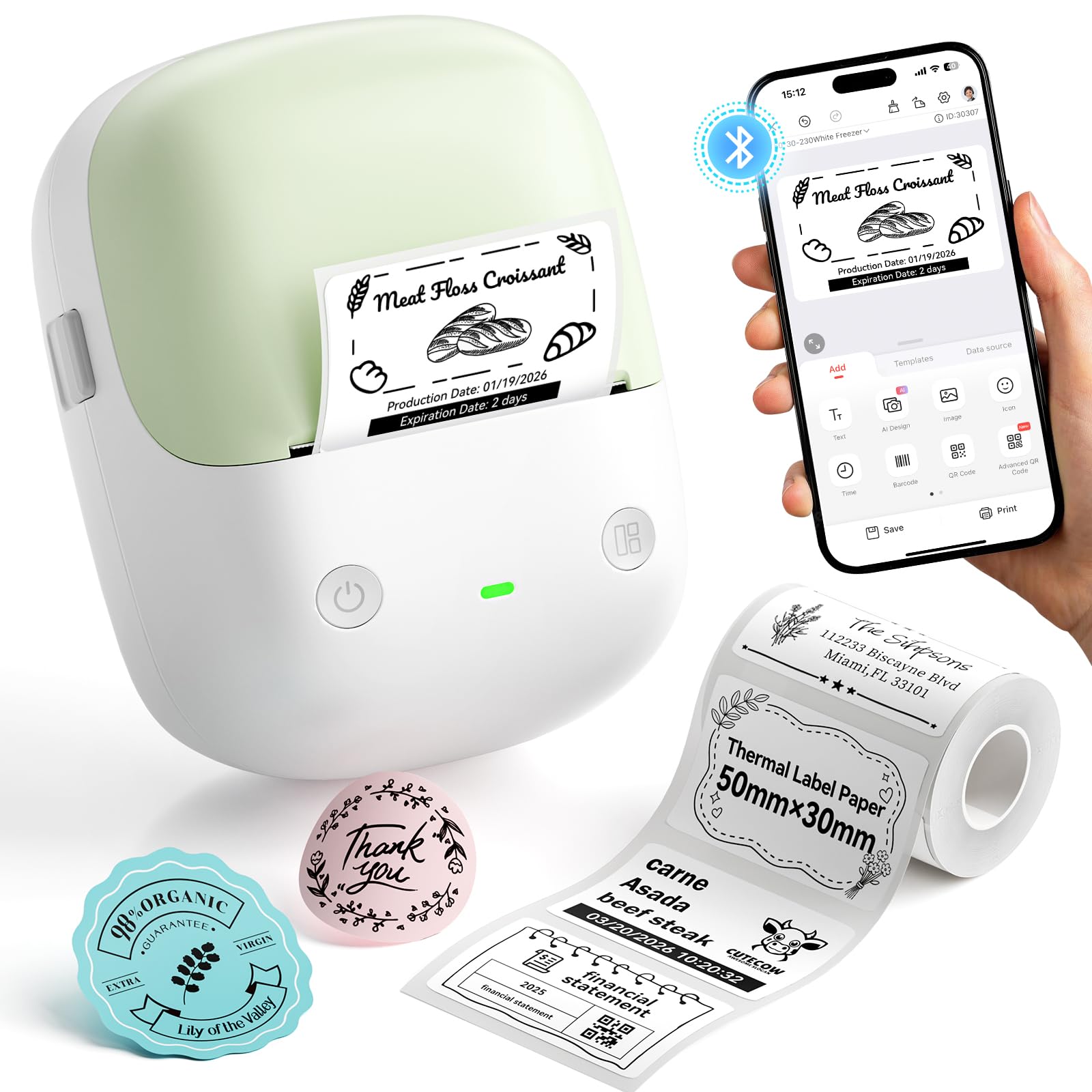
If you have ever opened a pantry full of mystery jars or slapped masking tape and a Sharpie on a storage bin, the NIIMBOT B2 Label Maker is built to end that. It is a compact, inkless Bluetooth label printer that designs labels in an app and prints them on 20-50mm rolls without a single ink cartridge.
I spent time with the B2 across kitchen jars, office shelves, and a few product-style price labels to see where it earns its keep. The short version: for around $34 it is a fast, genuinely portable labeler that most people will enjoy, as long as you understand how NIIMBOT’s label ecosystem works before you buy.
What I Liked
The NIIMBOT B2 gets the fundamentals of a portable label printer right, and a few features genuinely surprised me for the price.
Inkless Direct-Thermal Printing Means No Cartridges to Replace
The B2 uses direct thermal printing, so there is no ink, no toner, and no ribbon to buy. You load a label roll, print, and that is the entire supply chain.
For home and office organizing, that simplicity is the whole appeal. I never once thought about running out of ink, which is more than I can say for any inkjet I have owned.
One-Button Offline Printing Works Without Your Phone
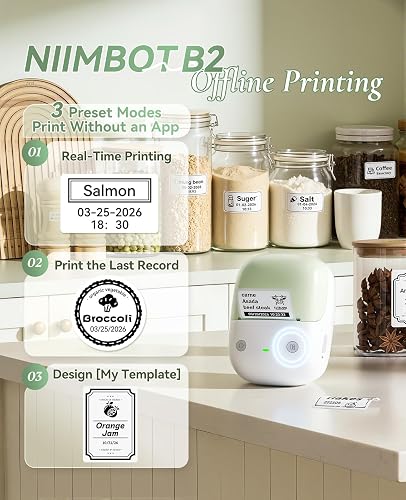
My favorite feature is the macro button on top. Press it and the B2 reprints your last label with no phone, no Bluetooth pairing, and no app open.
If you print the same date sticker or price label over and over, this is a real time saver. It turns the printer into a one-touch appliance for repeat jobs. If you like low-effort office tools that work in a single press, the Marsrock heavy duty stapler brings the same one-finger ease to binding thick stacks of paper.
Genuinely Portable at 352 Grams With USB-C Charging
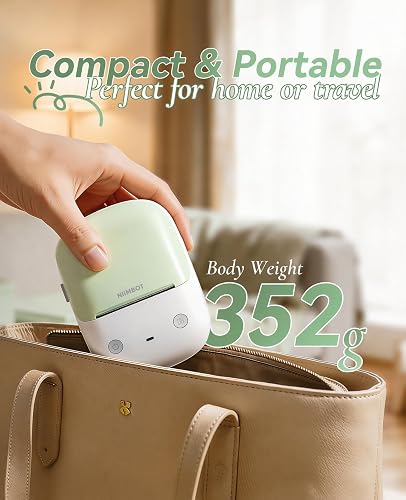
At 352 grams the B2 is light enough to toss in a bag and label things wherever you are. It charges over USB-C and runs off its internal battery, so you are not tethered to an outlet.
Crisp 203 DPI Text, Barcodes, and QR Codes for Organizing
At 203 DPI the B2 prints clean, legible text, barcodes, and QR codes on everyday labels. One owner even labeled tarantula enclosures with scannable QR codes, which tells you the resolution is fine for practical organizing.
Labels come out sharp and stick well. For jars, bins, files, and shelf tags, the print quality is exactly what you want. For printing full documents and color photos at home instead of inkless stickers, the PGI-280XXL/CLI-281XXL ink 15-pack keeps a Canon PIXMA running for a fraction of OEM cost.
Flexible App With 60+ Fonts and 1,600+ Icons and Templates
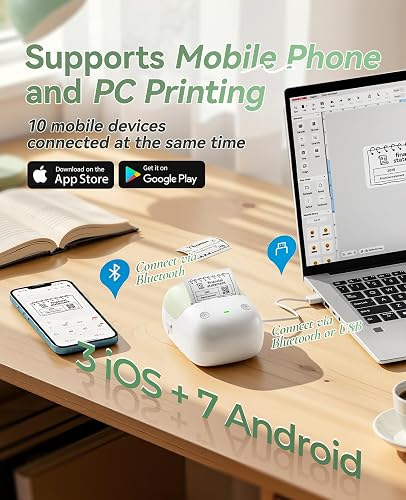
The NIIMBOT app carries 20+ languages, 60+ fonts, and more than 1,600 icons, plus borders, barcodes, and ready-made templates. It connects over Bluetooth to iOS and Android and also supports Windows PCs over USB.
The template library makes it easy to go from idea to printed sticker in under a minute. Several first-time users, including people who called themselves not tech-savvy, said it clicked after a few minutes of play. If you need labels that survive chemicals and heat rather than everyday organizing, the NIIMBOT M2 Label Maker uses the same app but prints durable 300 DPI thermal transfer labels.
What Needs Improvement
The hardware is solid, so most of my complaints are about the ecosystem NIIMBOT builds around it. These are the things I wish I had known before pressing print.
RFID Label Lock-In Rejects Third-Party and Compatible Rolls
This is the big one. NIIMBOT rolls carry an encrypted RFID chip, and the printer uses it to verify the label is genuine.
Load a third-party roll, even one cut to the exact same size, and you can hit “Reader Error” or “Paper Not Detected,” or the print comes out faint and unusable. One long-term tester found that without a chip the image was not just worse, it was strictly unusable, while an official roll printed crisp black. That means your running cost is tied to NIIMBOT’s own labels, and it is not made obvious before you buy.
The NIIMBOT App Pushes a VIP Subscription and In-App Ads
The app is capable, but it gates some fonts, templates, and features like auto-date behind a paid VIP membership that runs about $4.99 a month or $34.99 a year. It also shows ads inside the app.
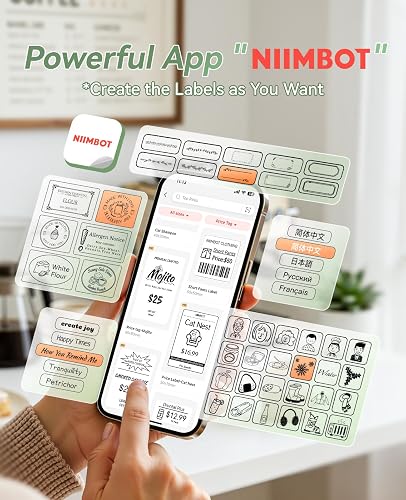
You can design ordinary labels without subscribing, so this is an annoyance rather than a dealbreaker. Still, paying for software extras after buying the printer and its labels feels ungenerous, and recent app updates have introduced Bluetooth and stability complaints that dragged the app’s store rating down.
203 DPI Looks Coarse for Photos and Fine Graphics
The 203 DPI head is great for text, barcodes, and QR codes, but it looks coarse if you try to print photos, detailed logos, or fine artwork. This is a text-and-code labeler, not a photo printer.
If sharp graphics matter to you, the 300 DPI B2 Pro is the version to look at instead.
Direct-Thermal Labels Can Fade and Max Out at 2 Inches Wide
Direct thermal labels are heat and light sensitive, so they can fade or darken over time and are not ideal for long-term archival use. Keep them off sunny windowsills and hot surfaces.
The B2 also tops out at a 2-inch (20-50mm) label width, so it cannot print standard 4x6 shipping labels. PC printing requires a driver install, and NIIMBOT does not recommend iPad use.
How It Compares
NIIMBOT’s lineup is big and the model names blur together, so here is how the B2 fits against the siblings people cross-shop.
The closest upgrade is the NIIMBOT B2 Pro. It keeps the same 20-50mm format but jumps to 300 DPI with a roughly 48mm print width and adds onboard offline template printing. If you want sharper logos and fine text, the B2 Pro is the one to size up to, though it uses the separate Pro label family.
The NIIMBOT B21 is the retro, typewriter-styled option at the same 203 DPI and 20-50mm format. Its real advantages are that it is clearly listed among NIIMBOT’s desktop-supported printers and it shares the widely stocked B21/B1/B3S 50x30mm label family, which keeps refills easy to find.
The NIIMBOT B1 is the near-identical twin: 203 DPI, 20-50mm, Bluetooth plus USB, and clearly documented desktop drivers. Choosing between the B1 and B2 mostly comes down to body style and whether you need the B2’s one-button offline printing.
If you only label small items like cable tags, spice jars, and bins, the pocket-sized NIIMBOT D11 or D110 are cheaper but limited to narrow 8-15mm media, which is too small for the 2-inch product labels the B2 is built for. And whichever NIIMBOT you choose, the RFID label system applies, so compare the roll families you can actually buy locally. Rival brands like Munbyn and Phomemo offer direct-thermal labelers too, some with more open label compatibility.
Final Verdict
The NIIMBOT B2 earns a 4.3 out of 5 from me. As a piece of hardware it is excellent value: inkless, genuinely portable, fast, and clever enough to print from a single button without your phone.
What keeps it from a higher score is the ecosystem. The RFID label lock-in means you are buying NIIMBOT’s rolls for the life of the printer, and the app leans hard on a paid VIP tier and ads. Neither is a dealbreaker for everyday organizing, but both are worth knowing before you commit.
If you want a cheap, no-fuss labeler for a kitchen, home office, or small business, the B2 is an easy recommendation at around $34. If you need sharp graphics, step up to the 300 DPI B2 Pro; if local roll availability worries you, the B21 shares the most common label family.
Specifications
| Brand | NIIMBOT |
| Model | B2 |
| Color | Green White |
| Printing Technology | Direct thermal (inkless) |
| Resolution | 203 x 203 DPI |
| Printer Output | Monochrome |
| Connectivity | Bluetooth + USB Type-C |
| Compatible Devices | iOS & Android smartphones, PC |
| Label Width | 20-50 mm (2 inch max) |
| Included Label Roll | 50 x 30 mm |
| Item Weight | 352 g |
| Product Dimensions | 4.96"D x 3.58"W x 2.64"H |
| Special Features | Offline one-button printing, automatic label rewind, rechargeable, portable |
| Warranty | 2 years |
| Best Sellers Rank | #3,844 in Office Products, #13 in Portable Thermal Printers |
Frequently Asked Questions
Does the NIIMBOT B2 need ink or toner?
No. The NIIMBOT B2 uses direct thermal printing, so there is no ink, toner, or ribbon to buy. You only ever replace the label rolls, which keeps the running cost and setup simple.
Can the NIIMBOT B2 use third-party or non-NIIMBOT labels?
Not reliably. NIIMBOT rolls carry an encrypted RFID chip, and the B2 often rejects third-party rolls with a reader or paper error, or prints them faint and unusable. In practice you are tied to NIIMBOT's own label rolls.
How do you make labels with the NIIMBOT B2?
You design labels in the free NIIMBOT app over Bluetooth on iOS or Android, or on a Windows PC over USB. Pick a template or add text, barcodes, and icons, then print. You can also press the top button to reprint your last label offline without a phone.
What is the print resolution of the NIIMBOT B2?
The B2 prints at 203 DPI, which is sharp for text, barcodes, and QR codes. It looks coarse for photos or detailed graphics, so for fine artwork the 300 DPI NIIMBOT B2 Pro is a better fit.
What is the difference between the NIIMBOT B2 and B2 Pro?
The B2 is 203 DPI and the B2 Pro steps up to 300 DPI with a roughly 48mm print width and onboard offline template printing. Both handle 20-50mm labels, but the Pro uses a separate Pro label family and prints sharper fine detail.
Can the NIIMBOT B2 print shipping labels?
No. The B2 maxes out at a 2-inch (20-50mm) label width, so it cannot print standard 4x6 shipping labels. It is built for product, price, pantry, and organization labels rather than parcels.
Ready to Buy?
NIIMBOT B2 Label Maker delivers on its promises. If it fits your needs, it's a solid choice you won't regret.
Check Price on Amazon Founder & Product Reviewer at TheReviewRewind
Daniel has tested 400+ products across 20+ categories through hands-on, real-world testing. Every review includes video documentation and standardized scoring criteria. His reviews appear as Amazon shoppable videos and here on TheReviewRewind.
We earn a commission if you make a purchase, at no extra cost to you. This does not influence our ratings or recommendations. Full disclosure
Looking for more options? See all our Office Products reviews.
Related Reviews