Pastigio 15.6 Inch Frameo Digital Picture Frame Review: A Big Screen With One Catch

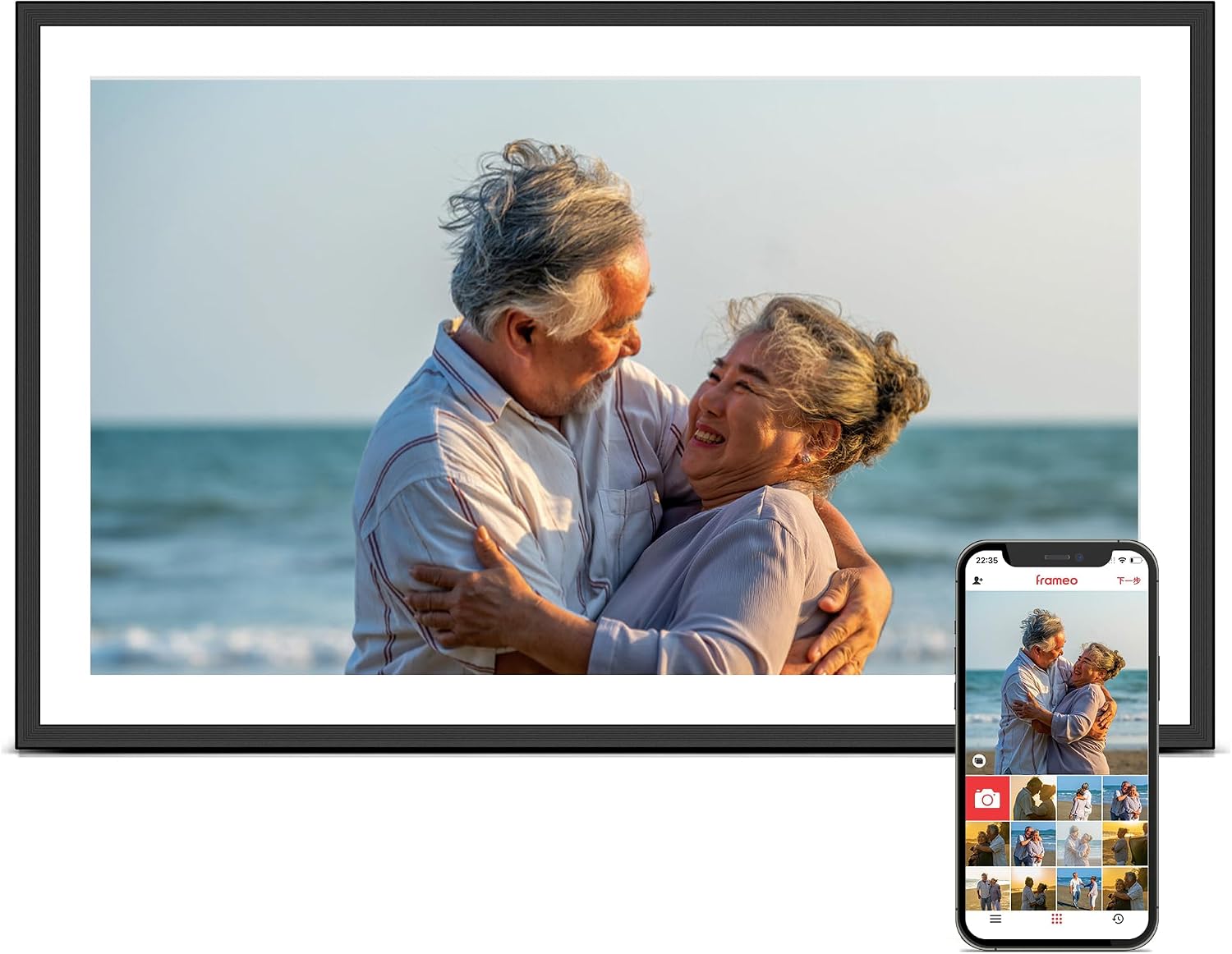

Pastigio 15.6 Inch Frameo Digital Picture Frame Review: A Big Screen With One Catch
Pastigio 15.6 Inch Frameo Digital Picture Frame
Buy if you want a big, sharp 15.6 inch Frameo frame without paying premium brand prices, with 32GB of storage and no-app SD card loading that grandparents can use. Skip if you view the screen from well off to the side or plan to send whole albums at once, since the glossy panel catches glare and the free app sends only 10 photos at a time.
Buy on AmazonWhat We Liked
- The 15.6 Inch Full HD Screen Is Genuinely Big
- Anyone You Invite Can Send Photos From Anywhere
- Generous Onboard Storage Plus A Full-Size SD Slot
- It Works With No Wi-Fi And No App Involved
- Slideshow And Display Settings You Fully Control
What Could Be Better
- The Free App Sends Only Ten Photos At A Time
- Glare And Narrow Viewing Angles Off To The Side
- The 16:9 Widescreen Crops Tall Phone Photos
- You Manage And Delete Photos At The Frame
How we test: Every product is used in real conditions and evaluated using our standardized scoring criteria. Read our full review methodology.
Most of us have thousands of photos sitting on our phones and in the cloud that nobody ever actually looks at. They live there, and the only time you see them is while scrolling past them to find something else.
The Pastigio 15.6 Inch Frameo Digital Picture Frame is built to fix exactly that. It is a 15.6 inch 1920x1080 IPS touchscreen that sits on a shelf or hangs on a wall and cycles through photos and short videos sent from anyone you invite.
This wifi digital picture frame runs the Frameo app, carries 32GB of built-in storage, and is made by Pastigio under model number M15R5. On Amazon it lists at $99.99 and holds a 4.5 star average across more than 3,500 ratings, which lands it well under the price of the premium digital photo frame brands at this size.
You do not need to care about photography for this to earn a spot on a shelf. You just need people you would rather not lose track of.
I gave my own set to my parents, connected the frame to the app, sent photos and videos to it, and worked through every settings menu. There is one thing about the screen that surprised me, and one limit in the free app that the product page never mentions.
What I Liked
I have used Frameo digital frames for years, and this Pastigio picture frame gets the fundamentals right while giving you a much bigger screen than the usual 10 inch frames for a price that stays reasonable.
The 15.6 Inch Full HD Screen Is Genuinely Big
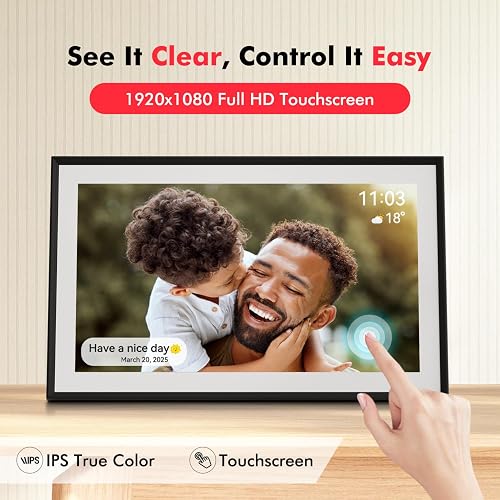
The first thing that hits you is the size. A 15.6 inch digital frame makes a real difference sitting in a living room compared to the small 10.1 inch frames, and at 1920x1080 the full HD IPS panel shows fine detail that looks soft on smaller screens.
Photos come through sharp, colors are vibrant, and old scans from the 1970s read clearly because there is simply more room to see them. The build feels solid rather than flimsy, and the black and white version looks like a picture frame instead of a tablet somebody propped up.
This is the screen you will be viewing every day, and a mediocre one is why frames end up unplugged in a drawer. This panel holds up. Buyers weighing another large option can look at the Bigasuo 15.6-Inch Digital Picture Frame, which pairs a similar panel with 64GB of storage.
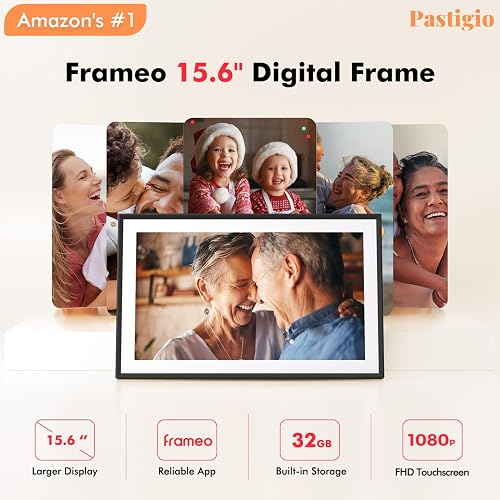
Anyone You Invite Can Send Photos From Anywhere
This is the reason to buy a wifi digital frame at all. You connect the frame to 2.4GHz Wi-Fi, scan a QR code in the Frameo app to pair your phone, and new photos land within seconds.
The Frameo app is on both the App Store and Google Play, so it does not matter what your family carries. Anyone you invite can add photos and short videos from anywhere, and the frame behaves more like a shared feed than a slideshow. You can add a caption before sending, adjust each photo to fit the frame as landscape or portrait, and react to pictures right on the screen.
It is a better way to share with a loved one than a group chat nobody scrolls back through, which is exactly why owners keep buying these as gifts for mom, grandparents, and new parents.
Generous Onboard Storage Plus A Full-Size SD Slot
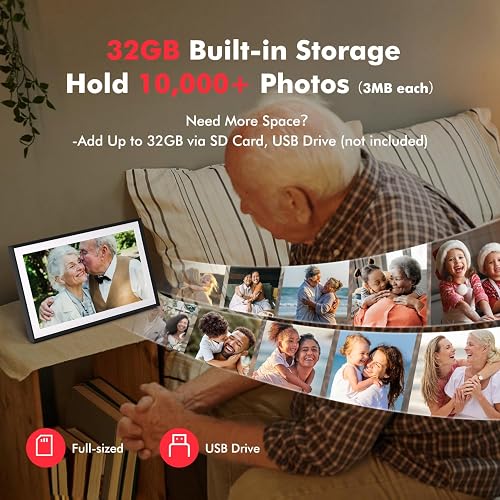
The 32GB of built-in storage holds well over ten thousand photos, and it sits on the frame rather than in somebody’s cloud. Along the edge you get a full-size SD card slot, a USB port, a headphone jack, and the power input, plus speakers on the sides for video sound.
You can also add a full-size SD card or USB drive for up to 32GB more and even play straight from external storage without copying files over. Nothing here depends on a subscription to keep working. The similarly sized FLYRUIT 15.6-inch WiFi digital picture frame offers the same Frameo sharing if you want to compare build quality at this screen size. For a smaller frame that still packs 32GB of storage on a tighter budget, the PiPivision 10.1 inch WiFi digital picture frame covers the same Frameo sharing at a lower price.
It Works With No Wi-Fi And No App Involved
Everybody assumes a wifi digital picture frame requires Wi-Fi. This one does not. You can load photos with a full-size SD card, a USB drive, or a Windows computer over a USB-C cable, and the frame pulls the files onto its own storage.
That matters if you are giving this to a parent who will not download an app or who has weak internet. You load it before you hand it over, and the frame still does its whole job. The removable kickstand sets it up vertically or horizontally, so it fits a shelf or a wall either way. If a smaller frame suits the space better, the Frameo 10.1 inch WiFi digital picture frame offers the same SD card loading with no app on a 10.1 inch screen.
Slideshow And Display Settings You Fully Control
The settings menu is deeper than I expected. Each photo timer runs anywhere from 5 seconds to 24 hours, and you can set brightness, text size, a sleep schedule so the frame turns off overnight, and whether the screen shows the time, weather, date, and captions or nothing but the photo.
Albums are the feature I would point out to a new owner. Create one for a trip or an event and show only those images for a couple of weeks, with an all-photos album always there to fall back on. There is even a clock mode and a calendar view when you want the frame doing more than a slideshow. For the same kind of hands-off control in a bedroom ambiance device, the LED Aurora Sensory Light Galaxy Projector runs its lights, sounds, and sleep timer from a remote across the room.
What Needs Improvement
Most of my reservations are about the Frameo software and the screen’s viewing angles rather than any single defect, but you are buying all of it together.
The Free App Sends Only Ten Photos At A Time
This is the limit the product page never mentions and the one thing the reviewer in me wants you to know before you buy. On the free Frameo tier you send 10 photos at a time and video clips up to 15 seconds, and that cap applies to every person sending to the frame.
Frameo+ raises it to 100 photos per send and two-minute videos for $1.99 a month or $16.99 a year, and it also unlocks remote management and cloud backup. Loading a holiday album on the free tier means repeating the same send flow over and over. The simple workaround is to use a full-size SD card or USB drive for the big initial load and save yourself the hassle.
Glare And Narrow Viewing Angles Off To The Side
Even though this is an IPS screen, the viewing angles are not as good as the premium frames, and the glossy panel catches glare. Face it out into the room where people mostly see it head on and it looks great. Place it where you will only ever see it from well off to the side and the image dims.
Independent testers noticed the same thing. Yahoo’s reviewer found photos looked sharp and bright but saw the screen dim once you moved beyond roughly 30 degrees off center. It is not unique to this frame, but it is worth planning your placement around.
The 16:9 Widescreen Crops Tall Phone Photos
The panel is a 16:9 widescreen, which suits video and landscape shots but crops the tall 4:3 photos most phones take if you let them fill the frame. You can switch a photo to fit to frame instead, but that adds borders around the image.
Business Insider, which named this the best large frame it tested, flagged the same trade-off: the big screen makes better use of Frameo’s collage view, yet the aspect ratio can cut individual photos off awkwardly.
You Manage And Delete Photos At The Frame
Photo management happens on the frame itself. To delete, hide, or reorganize anything you walk over and tap the screen, since managing a distant frame remotely is a Frameo+ feature.
A couple of smaller things are worth knowing. There is no battery, so this is meant to live plugged into an outlet around the clock, and a longer USB drive can stick out past the bottom edge. Owners of Frameo frames from various brands also report occasional Wi-Fi drops on weaker networks that need the frame moved closer to the router or the connection reset.
How It Compares
The large digital picture frame market splits into premium cloud-based frames and cheaper Frameo-powered ones. Here is where this 15.6 inch Pastigio lands against the names reviewers mention most.
vs Skylight Frame 15
Skylight is the easiest frame to hand to someone who dreads technology, since family can email photos to a dedicated address with no app at all. It is a similar 15 inch 1080p touchscreen and a well-supported platform.
The gap is price and storage. The Skylight Frame 15 runs about $299.99, roughly three times this frame, ships with only 16GB, and gates video and remote settings behind Skylight Plus at $39 a year against $16.99 for Frameo+. If offline SD loading and local storage matter, the Pastigio covers them for far less.
vs Aura Walden 15
The Aura Walden is the frame expert reviewers reach for on picture quality. Its 15 inch panel uses a 4:3 shape that fits phone photos with less cropping than this 16:9 screen, and it includes unlimited free cloud storage with no subscription.
The trade-offs are cost and control. The Walden lists around $299, uses touch bars instead of a full touchscreen, and cannot export its photo library or load from an SD card. If display quality is the priority and your Wi-Fi is reliable, pay the difference. If no-app loading matters, it does not.
vs Pexar Starlight 15.6
The Pexar Starlight is the closest hardware match, with the same 15.6 inch 1920x1080 Frameo touchscreen plus 64GB of storage, an anti-glare display, and decorative rear lighting.
It also carries a $349.99 manufacturer price and keeps the same optional Frameo paid features. The anti-glare panel answers this Pastigio’s one real screen weakness, but you are paying well over three times as much for it.
Below this price the floor is a smaller frame like the Akimart Frameo 10.1 inch at about $59.99, which runs the same app on a dimmer 1280x800 screen. The fair summary of this whole tier is that you give up app polish and a premium panel and pick up a card slot, local storage, and about $200 against the premium 15 inch frames.
Final Verdict
The Pastigio 15.6 Inch Frameo Digital Picture Frame does the job it advertises. The big full HD screen is sharp, easy setup takes a few minutes, the 32GB of storage is generous, and the fact that it works with or without Wi-Fi means you can hand it to almost anybody.
I am giving it a 4.3 out of 5.
It loses points for the Frameo free tier’s 10-photo send limit, for the glossy screen’s glare and narrow off-axis viewing, and for the 16:9 crop on tall phone photos. None of those are dealbreakers, and none stop the frame from being an easy, crowd-pleasing gift that people call you about after they set it up.
Bottom line: At $99.99 this is one of the best big digital picture frames for the money, roughly $200 less than the premium 15 inch frames. Load the first batch of photos from an SD card to dodge the app limit, place it where people see it head on, and budget $16.99 a year for Frameo+ only if you send in bulk.
Specifications
| aspect_ratio | 16:9 |
| brand | Pastigio |
| color | Black with White |
| compatible_devices | Smartphone |
| connectivity_technology | Wi-Fi |
| control_method | Touch |
| display_size | 15.6 inches |
| frame_material | Plastic |
| item_dimensions_l_x_w | 9.84"L x 15.75"W |
| item_highlight | 1920*1080 IPS FHD Touch Screen, Wall-Mountable, Electronic Photo Frame Slideshow, Share Video, Birthday Gifts for Mom, Women |
| manufacturer | Pastigio |
| memory_storage_capacity | 32 GB |
| model_number | M15R5 |
| power_source | Corded Electric |
| resolution | 1920 x 1080 |
| unit_count | 1 Count |
| warranty_description | 12 months warranty |
Frequently Asked Questions
Is the Pastigio 15.6 inch digital picture frame any good?
For the money, yes. It pairs a sharp 15.6 inch 1920x1080 IPS touchscreen with 32GB of storage and the well-established Frameo app for $99.99, which is far below the premium 15 inch frames. It averages 4.5 stars across more than 3,500 Amazon ratings, and Business Insider named it the best large frame it tested. The main caveats are glare off-axis and the free app's 10-photo send limit.
Does the Pastigio frame work without Wi-Fi?
Yes. Wi-Fi is only needed to send new photos through the Frameo app. You can load the frame entirely from a full-size SD card, a USB drive, or a Windows PC over USB-C, and it copies the files onto its own 32GB of storage. That makes it practical to fill with photos before gifting it to someone who will not set up an app.
What is the catch with the free Frameo app?
The free Frameo tier sends only 10 photos at a time and caps app videos at 15 seconds, and that limit applies to everyone sending to the frame. Frameo+ raises it to 100 photos per send and two-minute videos, plus remote management and cloud backup, for $1.99 a month or $16.99 a year. For a large initial load, an SD card or USB drive skips the limit entirely.
Which is better, Pastigio with Frameo or Skylight?
Skylight is easier for a recipient who dreads technology, because family can email photos to a dedicated address with no app. The Pastigio is better if you want many people sending from their phones for free and prefer local storage over a proprietary cloud, and it costs about a third as much. Skylight Plus also runs $39 a year against $16.99 for Frameo+.
How many photos can the 32GB frame hold?
Pastigio's own panel rates the 32GB of built-in storage at more than 10,000 photos at roughly 3MB each, and the listing cites up to 50,000 for smaller files. Either way it holds far more than most families will load. You can add a full-size SD card or USB drive for up to 32GB more, or play straight from external storage.
Can you hang the Pastigio frame on the wall?
Yes. The frame is wall-mountable and ships with a removable kickstand that props it up in portrait or landscape on a shelf. Auto-rotate adjusts the photos to match, so you can mount or stand it either way without reconfiguring anything. There is no battery, so it needs to stay plugged into an outlet.
Ready to Buy?
Pastigio 15.6 Inch Frameo Digital Picture Frame delivers on its promises. If it fits your needs, it's a solid choice you won't regret.
Check Price on Amazon Founder & Product Reviewer at TheReviewRewind
Daniel has tested 400+ products across 20+ categories through hands-on, real-world testing. Every review includes video documentation and standardized scoring criteria. His reviews appear as Amazon shoppable videos and here on TheReviewRewind.
We earn a commission if you make a purchase, at no extra cost to you. This does not influence our ratings or recommendations. Full disclosure
Looking for more options? See all our Electronics reviews.
Related Reviews