WXUNJA Android 15 Kids Tablet Review: A Sturdy Budget Pick for Kids

WXUNJA Android 15 Kids Tablet Review: A Sturdy Budget Pick for Kids
WXUNJA Android 15 Kids Tablet
Buy if you want an affordable, case-included Android tablet with real parental controls and full Google Play for kids aged 2 to 12. Skip if you need flagship speed, a sharp 1080p screen, or a two-year breakage warranty.
Buy on AmazonWhat We Liked
- Genuinely Sturdy Case That Survives Real Drops
- Snappy Octa-Core Performance That Avoids Lag
- Plenty of Storage You Can Expand Up to 1TB
- Google Kids Space With Remote Family Link Control
- Long Battery Life Built for Car Rides and Flights
What Could Be Better
- No Wall Charger Adapter Included in the Box
- The Screen Still Needs Protection From Hard Drops
- A Softer 1280x800 Screen Aimed at Younger Kids
- Wi-Fi Only and No Two-Year Breakage Warranty
How we test: Every product is used in real conditions and evaluated using our standardized scoring criteria. Read our full review methodology.
If your kids keep breaking tablets that were never built for them, the WXUNJA Android 15 Kids Tablet is worth a closer look. It promises a modern operating system, real parental controls, and a drop-ready case for the price of a couple of takeout meals.
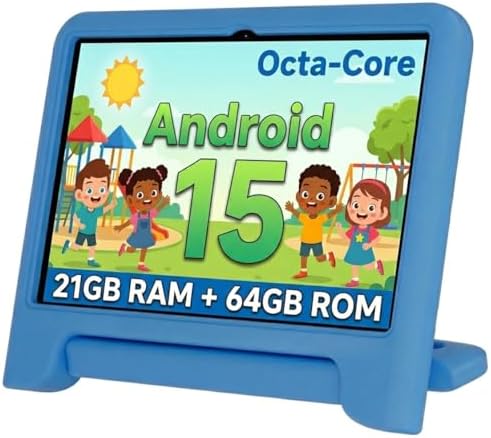
This is a 10.1-inch Android 15 tablet made for children aged 2 to 12. It ships with Google Kids Space, Family Link parental controls, and a thick silicone case already fitted, so there is nothing extra to buy before handing it to a child.
I ran through the full unboxing, walked the child-setup flow step by step, and put the interface, performance, and parental controls through normal daily use. One Kids Space feature genuinely surprised me, and the overall package punches above its budget price in a few areas that matter to parents.
Buy if you want an affordable, case-included Android tablet with real parental controls and full Google Play for kids aged 2 to 12. Skip if you need flagship speed, a sharp 1080p screen, or a two-year breakage warranty.
What I Liked About the WXUNJA Kids Tablet
After unboxing this kids tablet and living with it through setup and daily use, several things stood out as genuinely good for the price.
Genuinely Sturdy Case That Survives Real Drops
The thick silicone case wraps the whole tablet and shrugs off the everyday bumps and tumbles that come with young kids. A pre-installed screen protector slides back into place easily, and the molded back doubles as a stand with a built-in handle for small hands.
It does not feel like it will crack if a toddler drops it off the couch. For a device aimed at ages 2 to 12, that confidence matters more than almost any spec.
Snappy Octa-Core Performance That Avoids Lag
Under the hood is a 2.0 GHz octa-core processor with 3 GB of physical RAM plus virtual RAM expansion. WXUNJA markets that pairing as roughly 40 percent faster than typical budget tablet processors, and in normal use apps open quickly and switching between them stays smooth.
That is not a given at this price. Plenty of cheap tablets lag straight out of the box, so a kids tablet that stays responsive is a real win.
Plenty of Storage You Can Expand Up to 1TB
You get 64 GB of built-in storage, and a microSD slot on the side expands that all the way to 1 TB. The slot sits next to the USB-C port and tucks neatly under the case.
For a child loading up educational apps, games, and downloaded videos for offline trips, that headroom means you are not deleting things every week to make space.
Google Kids Space With Remote Family Link Control
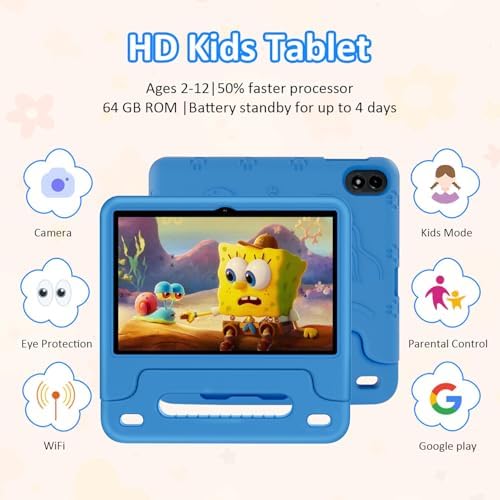
This is the part most parents care about. The tablet ships with Google Kids Space and full Family Link parental controls, so you can build a child profile, set screen-time limits, and approve apps and content.
The feature I did not expect is that you manage all of it remotely from your own phone. You never have to grab the tablet out of your kid’s hands to adjust limits or check on things.

Long Battery Life Built for Car Rides and Flights
The 6000 mAh battery delivers around 6 hours of continuous playback, which is enough to cover a long car ride or a flight without a scramble for power. When it does run down, 18-watt PD fast charging tops it back up quickly.
Dual-band Wi-Fi on both 2.4 and 5 GHz keeps streaming stable, and Bluetooth, GPS, and wireless screen mirroring round out a connectivity list that is generous for a budget kids tablet.
What Needs Improvement
No budget tablet is perfect, and the WXUNJA has a few rough edges worth knowing before you buy.
No Wall Charger Adapter Included in the Box
The box includes the tablet, the case, a screen protector, and a USB-A to USB-C cable, but no wall charger. You will need to reuse an adapter you already own or buy one separately to actually charge it.
It is a small omission, yet an annoying one when a child wants to use a new tablet straight away. Most homes have a spare USB plug, but first-time buyers should plan for it. That same bring your own adapter approach shows up on other budget desk gear too, like the Colorpanda Monitor Light Bar, which also skips a dedicated wall charger and just plugs into whatever USB port is already on the desk. When the problem is a dead laptop brick rather than a missing tablet plug, a budget replacement like the HP 65W laptop charger fills that gap for around $12.
The Screen Still Needs Protection From Hard Drops
The thick silicone case handles everyday bumps well, but it is not bulletproof. The internal screen can still be vulnerable to harder impacts, like a drop onto a tile floor at the wrong angle.
The case buys you a lot of peace of mind, just not unlimited protection. Treat it as drop-resistant rather than drop-proof.
A Softer 1280x800 Screen Aimed at Younger Kids
The 1280 by 800 IPS panel looks bright and holds up at an angle, but it is visibly softer than the 1920 by 1200 screens on pricier kids tablets like the Fire HD 10 Kids. It is fine for cartoons, games, and learning apps, less so for sharp detail.
Older kids around 11 or 12 may also find the whole experience feels a little young for them. This tablet is squarely built for the toddler-to-preschool crowd.
Wi-Fi Only and No Two-Year Breakage Warranty
There is no cellular option here, so the tablet only connects over Wi-Fi. For on-the-go data away from home, you would need a phone hotspot.
It also lacks the two-year worry-free replacement guarantee that Amazon bundles with its Fire Kids tablets. Generic brands like this typically offer only a basic warranty, which raises the real cost if a child manages to break it.
How the WXUNJA Tablet Compares
The budget kids tablet shelf is crowded, so here is how the WXUNJA stacks up against the alternatives parents most often weigh against it.
vs Amazon Fire HD 10 Kids
The Fire HD 10 Kids has a sharper 1920 by 1200 screen, a year of curated Amazon Kids+ content, and a two-year worry-free guarantee that replaces a broken tablet no questions asked. That safety net is its biggest advantage for households with toddlers.
The trade-offs are price and ecosystem. The Fire runs Amazon’s Appstore, so getting full Google Play takes sideloading, and it usually costs around 200 dollars. The WXUNJA undercuts it dramatically and gives you native Google Play and Kids Space out of the box, but you give up the premium screen and the breakage guarantee.
vs Tagital T10K Kids
The Tagital T10K is the closest like-for-like rival, with the same 10.1-inch 1280 by 800 IPS display and a similar kid-proof case. On paper the two look almost identical.
Where the WXUNJA pulls ahead is processing. It runs an octa-core chip on Android 15, while the Tagital leans on an older quad-core processor, so the WXUNJA generally feels more responsive for app switching and newer software. Against even cheaper names like Contixo and Dragon Touch, the WXUNJA’s modern Android build and full Play Store access are its main edge.
Final Verdict
The WXUNJA Android 15 Kids Tablet delivers a sturdy, case-included device with genuine parental controls and surprisingly smooth performance for an entry-level price.
I am giving it a 4.0 out of 5 based on this hands-on review. It earns strong marks for its kid-proof build, octa-core responsiveness, expandable storage, and remote Family Link management. It loses points for the missing wall charger, the softer 1280 by 800 screen, the Wi-Fi-only connectivity, and the lack of a long-term breakage warranty.
Bottom line: if you want an affordable first tablet for a toddler or preschooler that does not feel cheap, runs full Google Play, and lets you manage screen time from your phone, the WXUNJA is an easy recommendation. Just bring your own charger and treat the case as drop-resistant rather than indestructible.
Specifications
| Brand | WXUNJA |
| Model | Android 15 Kids Tablet (X-C30) |
| Operating System | Android 15 |
| Screen | 10.1" 1280x800 IPS HD |
| Processor | 2.0 GHz octa-core |
| RAM | 21 GB (3 GB physical + 18 GB virtual) |
| Storage | 64 GB, expandable to 1TB via microSD |
| Battery | 6000 mAh |
| Charging | 18W USB-C PD fast charging |
| Cameras | Front + rear, FHD 1080p |
| Wireless | Dual-band Wi-Fi (2.4/5 GHz), Bluetooth, GPS |
| Audio Formats | MP3, AAC, FLAC, OGG |
| In the Box | Tablet, silicone case, stylus |
| Age Range | 2-12 years |
Frequently Asked Questions
Is the WXUNJA Android 15 Kids Tablet any good?
For a budget kids tablet, yes. It holds a 4.2-star average across more than 600 Amazon ratings, and in hands-on use the case feels sturdy, the octa-core performance stays responsive, and the Google Kids Space parental controls work as advertised. It is not a flagship tablet, but it offers a lot for an entry-level price.
Does the WXUNJA Android 15 Kids Tablet have the Google Play Store?
Yes. The WXUNJA Android 15 Kids Tablet runs a full version of Android 15 with native Google Play Store access, so you can install mainstream apps like YouTube Kids and reading apps directly. This is a key difference from Amazon Fire Kids tablets, which use the Amazon Appstore and need sideloading for Google Play.
What age is the WXUNJA Android 15 Kids Tablet for?
It is designed for children aged 2 to 12, with Google Kids Space content geared toward younger users. In practice it suits the 3-to-5 toddler and preschool range best, while older kids around 11 or 12 may find it feels a little young for them.
How much RAM and storage does the WXUNJA Kids Tablet have?
It has 3 GB of physical RAM plus virtual RAM expansion, which WXUNJA markets as 21 GB combined. Storage is 64 GB built in, and a microSD card slot expands that up to 1 TB for apps, games, and offline videos.
Does the WXUNJA Android 15 Kids Tablet have parental controls?
Yes. It comes with Google Kids Space and Google Family Link built in, so you can create a child profile, set screen-time limits, and approve apps and content. The standout is that you can manage all of those settings remotely from your own phone.
How long does the WXUNJA Kids Tablet battery last?
The 6000 mAh battery provides about 6 hours of continuous playback, enough for a long car ride or a flight. It supports 18-watt PD fast charging to refill quickly, though you will need to supply your own wall adapter since only a USB-C cable is included.
Ready to Buy?
WXUNJA Android 15 Kids Tablet delivers on its promises. If it fits your needs, it's a solid choice you won't regret.
Check Price on Amazon Founder & Product Reviewer at TheReviewRewind
Daniel has tested 400+ products across 20+ categories through hands-on, real-world testing. Every review includes video documentation and standardized scoring criteria. His reviews appear as Amazon shoppable videos and here on TheReviewRewind.
We earn a commission if you make a purchase, at no extra cost to you. This does not influence our ratings or recommendations. Full disclosure
Looking for more options? See all our Electronics reviews.
Related Reviews