VanSmaGo Meteor Galaxy Projector Review: 13 Glass Discs Tested


VanSmaGo Meteor Galaxy Projector Review: 13 Glass Discs Tested
VanSmaGo Meteor Galaxy Projector
Buy if you want a budget galaxy projector for a kid's room or a gift, with 13 swappable glass discs, a standout moon scene, and a genuine shooting-star effect. Skip if you want hyper-sharp astronomy detail, all-night runtime, or set-and-forget focus.
Buy on AmazonWhat We Liked
- The 13 Glass Discs Give You Real Scene Variety Night After Night
- Those Glass Lenses Keep the Moon and Galaxy Scenes Genuinely Sharp
- The Built-In Meteor Shooting-Star Effect Is the Feature That Sells It
- It Runs Near-Silent With No Motor Hum to Break the Calm
- Flexible 360-Degree Tilt and Easy USB-C Setup for Any Room
What Could Be Better
- Some Discs Look Soft and Blurry Even After Careful Focusing
- The Auto Shut-Off Caps Out at Four Hours, So Not All Night
- You Have to Refocus the Knob Every Time You Swap a Disc
- No App, No Remote, and an Occasional Rotation Hitch
How we test: Every product is used in real conditions and evaluated using our standardized scoring criteria. Read our full review methodology.
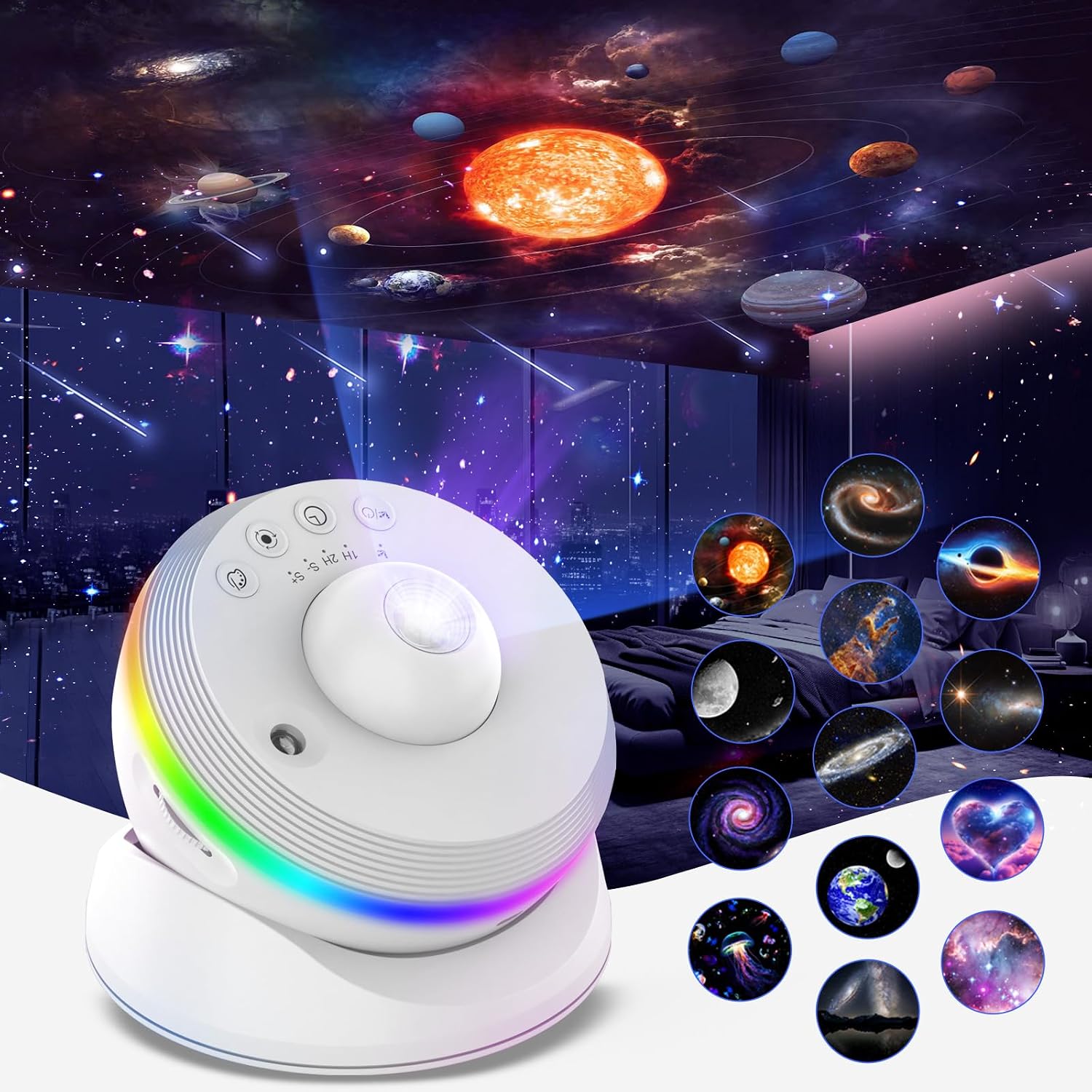
A plain bedroom ceiling turns into a moon, a swirling galaxy, and the occasional shooting star drifting overhead. That is the pitch behind the VanSmaGo Meteor Galaxy Projector, a night-light-sized star projector that swaps the usual laser dots for 13 interchangeable glass image discs.
This is a budget galaxy projector built for a bedroom, a kid’s room, or a living room on movie night. It runs off a USB-C cable, sits on a small tilting stand, and throws a space scene across your ceiling or wall from roughly 6.5 to 10 feet away. At $49.99 it sits in the crowded gap between $30 laser toys and the $100-plus planetarium units from brands like BlissLights.
I set it up the way a buyer would, cycling through all 13 discs, dialing in the focus by hand, and running the meteor effect and the color LED ring across several nights. The full hands-on test is on our YouTube channel. Here is where this planetarium projector genuinely impresses, and where it falls short.
What I Liked About the VanSmaGo Meteor Galaxy Projector
Most of what works here comes down to the glass discs and the variety they bring, not one headline spec. This is a galaxy projector you will keep switching on, and for a budget unit that counts for a lot.
The 13 Glass Discs Give You Real Scene Variety Night After Night
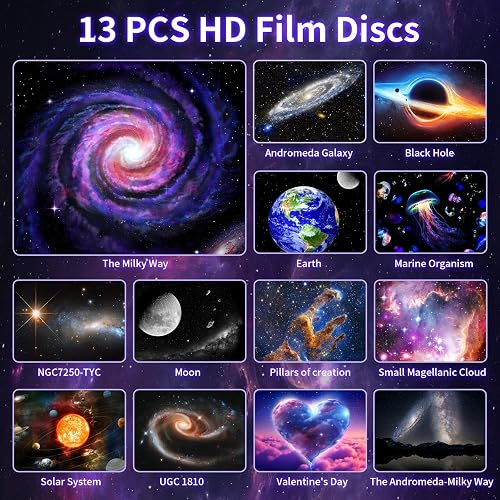
The headline is the library. You get 13 swappable discs covering the solar system, the moon, the Milky Way, Andromeda, a black hole, the Pillars of Creation, the Small Magellanic Cloud, a marine-life scene, and a Valentine’s design. Instead of staring at the same fixed starfield every night the way you do with a basic night light, you can match the scene to the mood.
That variety is a big part of why it works so well in a kid’s room, since there is something new to look up at each night. The discs snap into the front tray with a quick counterclockwise twist, and each one is labeled so you know what you are loading.
Those Glass Lenses Keep the Moon and Galaxy Scenes Genuinely Sharp
The discs are actual glass rather than the cheap plastic slides most budget projectors use, and glass focuses a noticeably cleaner image. The moon disc is the standout, with a crisp, detailed surface that looks excellent on a dark ceiling, and the solar system and the main galaxy scenes are close behind.
A focus knob on top brings the picture into a sharp projection for whatever distance you are at. In a fully dark room the better discs genuinely look like a small planetarium show overhead.
The Built-In Meteor Shooting-Star Effect Is the Feature That Sells It
The meteor in the name is the effect that stands out the most. On top of the still scene, a shooting star streaks across the ceiling every so often, and that is what takes it from a picture on the wall to something closer to watching the real night sky.
Catching one drift past is a genuinely nice touch, especially for kids at bedtime. A side dial lets you adjust how often the meteors appear.
It Runs Near-Silent With No Motor Hum to Break the Calm
With the projector running and rotating, it is effectively silent. There is no motor hum, which matters a lot when the whole point is to drift off to sleep underneath it.
That is a real edge over some pricier smart units. Space.com measured roughly 37 dB of motor noise on the Govee Star Light Projector and flagged it as too loud for a quiet sleep setup, so VanSmaGo’s fanless quiet is worth noting.
Flexible 360-Degree Tilt and Easy USB-C Setup for Any Room
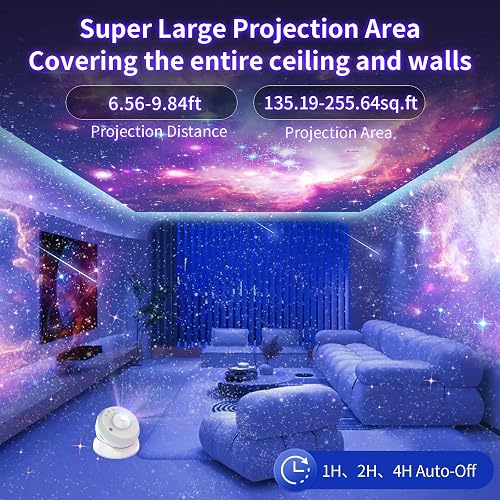
The whole head tilts a full 360 degrees on its stand, so you can aim it straight up at the ceiling, over at a wall, or anywhere between. It covers a large stretch of ceiling, with a listed projection area of about 135 to 256 square feet depending on distance.
Setup is as simple as plugging in the included USB-A to USB-C cable, and you can use any cable or wall adapter you already own. A color LED ring around the base shifts through seven preset colors for extra ambient lighting in the room, and you can switch it off if you want only the sky overhead.
What Needs Improvement
None of these are dealbreakers at the price, but they are the honest trade-offs that separate this from a serious adult planetarium projector.
Some Discs Look Soft and Blurry Even After Careful Focusing
Disc quality is uneven across the set. The moon and a few of the galaxies are genuinely sharp, but a couple of the other discs stay soft no matter how carefully you work the focus knob, and the color in some scenes can pull against the sharpness.
Buyers echo this on Amazon, where one reviewer called the moon disc the one great slide while describing several of the others as blurry. Set your expectations on the moon and the main galaxy scenes being the standouts, not every disc in the box. If you want a projector whose scenes stay consistently sharp and cycle through sixty 3D themes instead of swappable glass discs, the Rossetta Mini 3D Galaxy Projector takes that approach at a higher price.
The Auto Shut-Off Caps Out at Four Hours, So Not All Night
The timer button offers one-hour and two-hour settings, and there is a four-hour auto-off that kicks in even when no timer is set. That is a sensible safety feature, but it also means the projector will not run as a star ceiling all the way through a full night’s sleep.
If you were hoping to leave it on from bedtime until morning for a child who needs a constant night light, this is the one spec to know before you buy. More than one Amazon buyer was caught out by the four-hour cutoff.
You Have to Refocus the Knob Every Time You Swap a Disc
The focus does not hold a single setting across all 13 discs. Every time you change the scene, you need to turn the knob again to bring the new image back into sharp focus.
It takes only a few seconds once you get the feel for it, but it is a small, repeated chore rather than a set-and-forget design. Swapping discs in the dark means a little fiddling each time.
No App, No Remote, and an Occasional Rotation Hitch
Everything is controlled by touch buttons on the unit itself. There is no remote control, no app, and no Bluetooth speaker, so you cannot dim it or change scenes from across the room the way you can on some smart competitors.
The slow scene rotation can also catch or hitch now and then instead of gliding perfectly smoothly, which you notice only if you are settled and watching closely. One Amazon buyer also reported their projector lamp stopping after a few nights of use, so while most owners are happy, long-term reliability on a budget unit is worth keeping in mind. If you are shopping for a shelf gift that shows family photos rather than a star scene, the Frameo 10.1 inch WiFi digital picture frame sets up out of the box and can even be loaded without the recipient touching an app. For the same idea at a lower price, the PiPivision 10.1 inch WiFi digital picture frame shares photos from anywhere for under forty dollars.
How the VanSmaGo Galaxy Projector Compares
No major publication has tested this exact VanSmaGo model, so the useful comparisons are against projectors that reviewers have put through their paces. The split in this category comes down to disc-based scene projectors like this one versus laser-and-nebula mood lights.
Against Laser Mood Lights Like the BlissLights Sky Lite
The BlissLights Sky Lite 2.0 is the reference point for the laser-star look, projecting moving green or blue dots over a drifting RGB nebula with app control. Space.com rated it 3.5 out of 5 and liked the effect, though it noted the app once forgot the device entirely and needed a reinstall.
That is a different experience from the VanSmaGo. The Sky Lite is an ambient nebula cloud you set and leave, while the VanSmaGo gives you 13 distinct astronomical images and a meteor effect but no app, no laser field, and no smart control.
Against Disc-Based Rivals Like Pococo and Rossetta
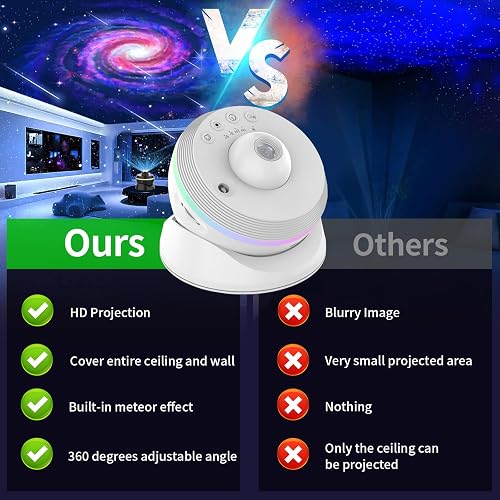
The closest comparison is the Pococo Galaxy Star Projector, another disc-based unit that Live Science rated 4 out of 5 for its sharp projections and rechargeable battery. The catch is that Pococo ships with only a disc or two in the box, so matching VanSmaGo’s 13-disc variety means buying more discs, and it costs more up front.
The Rossetta 4K Star Projector is the most direct rival, a manual-focus disc projector with a similar 12-disc set and a built-in Bluetooth speaker the VanSmaGo lacks. Budget brands such as Astrollight and Lukvuzo sell similar sub-$40 units, but they tend to use plastic slides rather than the glass discs that give VanSmaGo its sharper moon and galaxy scenes.
Where It Lands on Noise and Features
On quiet operation the VanSmaGo actually beats a smart unit like the Govee Star Light Projector, which Space.com found noticeably noisy at around 37 dB. Govee counters with app and smart-home control, a speaker, and a larger claimed coverage area, so you are trading silence and disc variety for connectivity and reach.
The honest summary is that the VanSmaGo competes on scene variety, glass-disc clarity, and near-silent running at a low price. If your priority is app control, a battery, or a Bluetooth speaker, one of the competitors above fits better.
Final Verdict
For a budget galaxy projector, the VanSmaGo Meteor Galaxy Projector does the main job well. The glass discs, the 13-scene variety, and especially the shooting-star effect make it feel genuinely special in a kid’s room or as a gift, and at $49.99 it undercuts the pricier planetarium units while sounding quieter than several of them.
Go in knowing the trade-offs. You will spend a few seconds focusing each disc, a couple of the discs look soft, the scene rotation can hitch now and then, and the four-hour auto-off means it will not stay on all night. It is also at its best in a fully dark room, which is true of every projector in this class.
Set against its 4.3-star average from more than 560 Amazon ratings, those caveats land about where I did, at a 4.2. This is an easy Christmas or birthday present that works out of the box, lands well with kids and casual adult buyers, and turns a bare ceiling into a small planetarium. If you want hyper-sharp astronomy detail or all-night runtime, step up to a more serious unit instead.
Specifications
| amperage | 2 A |
| brand_name | VanSmaGo |
| color | White |
| finish_types | Lacquered |
| included_components | User Manual |
| item_weight | 450 g |
| light_source_special_features | Color-changing, Meteor fall effect, HD Projection |
| light_source_type | LED |
| light_source_wattage | 10 watts |
| manufacturer | VanSmaGo |
| manufacturer_part_number | SKE-TKQ01 |
| material_type | Acrylonitrile Butadiene Styrene (ABS) |
| model_number | ADF-GA-53 |
| mounting_type | Table Mount |
| number_of_items | 1 |
| number_of_light_sources | 1 |
| number_of_packs | 1 |
| power_source | Corded Electric (USB-C) |
| set_name | 13 in 1 |
| shade_material | Acrylonitrile Butadiene Styrene |
| shape | Round |
| style_name | Modern |
| unit_count | 1 Count |
| wattage | 10 watts |
Frequently Asked Questions
Is the VanSmaGo Meteor Galaxy Projector worth it?
For a dark bedroom or a kid's room, yes. At $49.99 you get 13 glass image discs, a genuine meteor effect, and near-silent running, which is more than a plain laser star projector offers at this price. Judge it as budget ambiance rather than a scientific instrument and it earns its spot on the nightstand.
Is the VanSmaGo Meteor Galaxy Projector good for adults or just kids?
It is best for kids' rooms, gifts, and casual adult ambiance. If you are an adult who wants a hyper-sharp, highly detailed astronomy projection and does not want to refocus and swap discs, you will likely want a step up such as a Pococo or a higher-end planetarium unit. The moon disc will still impress most adults, but a few of the other scenes look soft.
How long does the VanSmaGo Meteor Galaxy Projector stay on?
You can set a one-hour or two-hour sleep timer, and there is a four-hour auto-off that triggers even when no timer is set. That built-in cutoff means it will not run as a star ceiling for an entire night, so it is not ideal if you need a constant all-night night light.
Does the VanSmaGo Meteor Galaxy Projector have a remote or a Bluetooth speaker?
No. Everything is controlled with touch buttons on the unit itself, and there is no remote control, no app, and no built-in Bluetooth speaker. If those features matter to you, a smart competitor like the Govee Star Light Projector or the Rossetta disc projector is a better fit.
Do you need a dark room for the VanSmaGo Meteor Galaxy Projector?
For the best image, yes. Like every projector in this class, the galaxy, nebula, and moon scenes look sharpest and most immersive with the room lights off and the blinds drawn. In a partly lit room the fainter discs wash out, though the color LED ring still adds some ambient glow.
Ready to Buy?
VanSmaGo Meteor Galaxy Projector delivers on its promises. If it fits your needs, it's a solid choice you won't regret.
Check Price on Amazon Founder & Product Reviewer at TheReviewRewind
Daniel has tested 400+ products across 20+ categories through hands-on, real-world testing. Every review includes video documentation and standardized scoring criteria. His reviews appear as Amazon shoppable videos and here on TheReviewRewind.
We earn a commission if you make a purchase, at no extra cost to you. This does not influence our ratings or recommendations. Full disclosure
Looking for more options? See all our Electronics reviews.
Related Reviews