XPPen Note Plus Digital Notebook Review: Real Paper, Real-Time Sync


XPPen Note Plus Digital Notebook Review: Real Paper, Real-Time Sync
XPPen Note Plus Digital Notebook
The XPPen Note Plus is the cheapest legitimate way to digitize handwritten notes - real paper, a battery-free EMR pen, and reliable Bluetooth 5.3 sync. The companion app and missing desktop client are rough edges, but for students and pen-loving pros it earns its $89 price.
Buy on AmazonWhat We Liked
- Real Pen On Real Paper
- Battery-Free EMR Stylus
- Reliable Real-Time Bluetooth Sync
- Any A5 Notebook Fits
- All-Day 14-Hour Battery with 1000 mAh battery delivers up to 14 hours of active writing and 50 days
- Solid Handwriting OCR
What Could Be Better
- No Desktop App for Mac or Windows
- Awkward Page Management Workflow
- Proprietary Magnetic Charger
- OCR Stumbles on Messy Handwriting with 95%
How we test: Every product is used in real conditions and evaluated using our standardized scoring criteria. Read our full review methodology.
I have tried almost every variation of digital note-taking - the iPad Pro, e-ink slates, photographing scrawled pages with my phone - and I keep crawling back to a paper notebook. The XPPen Note Plus is the first device that has actually let me keep that habit without losing the digital archive.
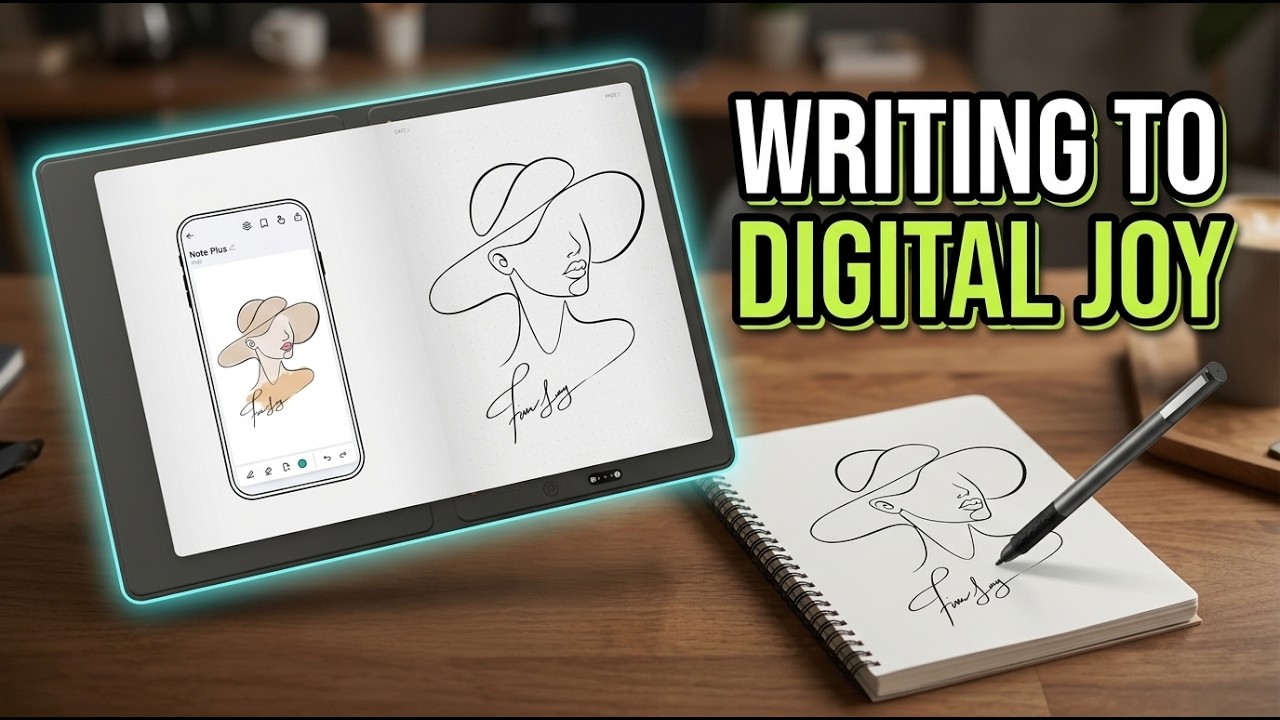
It looks like a regular A5 folio, but underneath the paper sits an EMR digitizer that captures every stroke from a battery-free stylus. Open the Note Plus X app on your phone, pair over Bluetooth 5.3, and your handwriting appears on the screen in real time at roughly 5,000 lines per inch with 8,192 pressure levels.
After a couple of weeks of meetings, lectures, and back-of-napkin sketching, I have a clear read on where this $89 smart notebook earns its keep and where it still feels like a first-generation product.
What I Liked About the XPPen Note Plus
Real Pen On Real Paper
The Note Plus is not a tablet pretending to be paper. It is paper. The folio holds a standard A5 notebook, the included PH18 pen lays down actual ink, and the digitizer captures every stroke underneath. Writing feels exactly like writing. Parkablogs called the capture “about 95% accurate,” and that tracked with my own notes - the digital copy looks like the page in front of me.
Battery-Free EMR Stylus
The PH18 stylus uses passive electromagnetic induction, so it never needs charging or pairing. There is no Bluetooth handshake, no second battery on your desk, no firmware update. Drop the pen into the strap on the side, pull it out months later, and it just works. After fighting two iPad Pencils that drained themselves overnight, this is the kind of detail I notice every day.
Reliable Real-Time Bluetooth Sync
Bluetooth 5.3 keeps the pen and the Note Plus X app glued together. As I write on paper, the strokes appear on my phone with no perceptible lag. KnowTechie noted “the digitizer panel can hold 50 pages of work” if your phone is not nearby, and that offline buffer ran without complaint through a two-hour subway commute.
Any A5 Notebook Fits
The Note Plus accepts any A5 notebook up to 8mm thick. You are not paying $25 for proprietary refills the way you would on a Moleskine Pen+ system. I swapped in a $4 dot-grid notebook from a stationery shop and the digitizer captured strokes identically.
All-Day 14-Hour Battery
The 1000 mAh battery delivers up to 14 hours of active writing and 50 days of standby. I charged it once when it arrived and hit roughly a full work week of heavy note-taking before plugging in again. Charging takes 2.5 hours through the magnetic cable.
Solid Handwriting OCR
The Note Plus X app converts handwriting to editable text in dozens of languages. Accuracy hovers around 95% for clean printing and dips a bit on rapid cursive, but I can search my entire notebook archive for “client X” or “tax” and actually find what I wrote.
Where the XPPen Note Plus Falls Short
No Desktop App for Mac or Windows
The biggest omission is the lack of a desktop client. All sync runs through the Note Plus X mobile app, so if you live in OneNote, Notion, or Obsidian on a laptop, you are exporting PDFs from your phone and importing them manually. For a device aimed at students and professionals, that is a real workflow tax.
Awkward Page Management Workflow
Advancing pages requires pressing a physical button on the folio, and the app sometimes spawns a new page when you open it instead of continuing the previous one. A professional illustrator on YouTube put it bluntly: “every single time I open up it creates a new page which I don’t want.” The app does have a manual merge feature, but you should not need it this often.
Proprietary Magnetic Charger
XPPen used a MagSafe-style proprietary cable instead of USB-C. The connection is elegant, but if you forget the charger or lose it, no spare USB-C cable in your bag will save you. Battery life is long enough that this rarely bites mid-trip - until it does.
OCR Stumbles on Messy Handwriting
The 95% OCR figure assumes neat printing. Rapid cursive, unusual letterforms, and tightly spaced shorthand can drop accuracy several points, with occasional gaps between strokes that should be continuous. For technical diagrams or math notation, expect to clean up the digital copy by hand.
How the Note Plus Compares to Other Digital Notebooks
XPPen Note Plus vs Wacom Bamboo Slate
The Bamboo Slate is the most direct competitor and the obvious comparison. Both digitize handwriting on real paper through a folio with a pen tracker. The Note Plus undercuts Wacom by roughly 35-40% (around $89 versus $140) and supports any A5 notebook rather than a Wacom-blessed paper. Wacom’s CLC software is more polished on desktop, but the Note Plus’s app handles the basics and saves you about $50 at checkout.
XPPen Note Plus vs reMarkable 2
The reMarkable 2 is a $399-$499 e-ink tablet, not a paper notebook. It offers tighter PDF annotation, a calmer no-distraction surface, and an integrated software ecosystem that the Note Plus simply does not have. But you write on glass with a plastic-tipped stylus, and the reMarkable costs roughly five times more. If you want digital pen-on-paper at the lowest possible price, the Note Plus wins on cost. If you want a self-contained reading and writing device with no second screen needed, the reMarkable still leads.
XPPen Note Plus vs Boox Note Air 4C
The Boox Note Air 4C runs full Android 13 on a color e-ink display, so it doubles as a Kindle, a notebook, and a productivity tablet. That comes at roughly $499 - more than five times the price of the Note Plus - and it requires charging the screen itself. The Note Plus deliberately does less and asks far less of your wallet and your attention.
XPPen Note Plus vs Moleskine Pen+ Smart Writing Set
The Moleskine system runs $200-$250 and demands proprietary dot-pattern notebooks at premium stationery prices. The Note Plus is roughly half the entry cost and lets you use any A5 paper. If you live in the Moleskine ecosystem already, that brand pull may be worth it. Otherwise, the math favors XPPen.
Final Verdict on the XPPen Note Plus
The XPPen Note Plus is the most honest entry into digital note-taking I have tested. It does not pretend a glass screen feels like paper - it just lets you write on actual paper and quietly ships every stroke to your phone in real time. The 8,192 pressure levels, 14-hour battery, and battery-free EMR stylus deliver the core promise without asking you to learn a new workflow.
The rough edges are real. The Note Plus X app needs better page management, the missing desktop client will frustrate anyone living in OneNote or Notion on a laptop, and OCR drops a few points on messy cursive. But at roughly $89 - less than half the price of the Wacom Bamboo Slate and a fifth the price of a reMarkable 2 - the trade-offs are easy to swallow.
If you are a student, a meeting-heavy professional, or a paper devotee who has resisted going fully digital, the Note Plus is the cheapest legitimate way to keep your handwriting habit and gain a searchable archive. Power users with a desktop-first workflow should wait for the Mac and Windows app or step up to a reMarkable.
Specifications
| Brand | XPPen |
| Pressure Levels | 8,192 |
| Connectivity | Bluetooth 5.3 |
| Battery Life | Up to 14 hours active / 50 days standby |
| Battery Capacity | 1000 mAh |
| Charge Time | 2.5 hours via magnetic cable |
| Stylus | PH18 battery-free EMR passive stylus |
| Offline Storage | Up to 50 pages |
| Paper Compatibility | Any A5 notebook up to 8mm thick |
| Dimensions | 245 x 176 x 13 mm |
| Weight | 350 g |
| OS Compatibility | Android 10+, iOS 14+ |
| Cloud Backup | Google Drive integration |
| Resolution | ~5,000 lines per inch (EMR digitizer) |
| Handwriting OCR | ~95% accuracy, multi-language |
| In Box | Folio, A5 notebook (50 pages), PH18 stylus, 6 spare nibs, magnetic charger |
Frequently Asked Questions
Does the XPPen Note Plus require a special notebook?
No. The folio fits any A5 notebook up to 8mm thick. XPPen ships a 50-page A5 pad to start, but you can swap in any A5 notebook from a regular stationery shop without losing functionality.
Does the Note Plus stylus need charging or pairing?
No. The PH18 stylus uses passive electromagnetic resonance and is battery-free. There is no Bluetooth pairing, no charging, and no firmware on the pen itself - only the folio body charges over its magnetic cable.
Can I use the XPPen Note Plus offline?
Yes. The folio stores up to 50 pages of notes locally. When you reconnect over Bluetooth 5.3, you tap the import button in the Note Plus X app and the offline pages sync to your phone.
How accurate is the handwriting recognition?
Around 95% on clean printing, based on my testing and the Parkablogs review. Accuracy drops a few points on rapid cursive, tight shorthand, or technical notation, with occasional gaps between strokes.
Is there a desktop app for Mac or Windows?
Not yet. All sync runs through the iOS or Android Note Plus X app. To get notes onto a laptop, you export PDFs or images from the mobile app and move them manually.
How does the Note Plus compare to the Wacom Bamboo Slate?
Both digitize real handwriting on paper, but the Note Plus costs roughly $89 versus $140 for the Bamboo Slate, and accepts any A5 notebook instead of Wacom-specific paper. Wacom's desktop software is more polished, but the Note Plus saves you about a third of the price.
Ready to Buy?
XPPen Note Plus Digital Notebook delivers on its promises. If it fits your needs, it's a solid choice you won't regret.
Check Price on Amazon Founder & Product Reviewer at TheReviewRewind
Daniel has tested 400+ products across 20+ categories through hands-on, real-world testing. Every review includes video documentation and standardized scoring criteria. His reviews appear as Amazon shoppable videos and here on TheReviewRewind.
We earn a commission if you make a purchase, at no extra cost to you. This does not influence our ratings or recommendations. Full disclosure
Looking for more options? See all our Electronics reviews.
Related Reviews