ERGONOV Tablet Pillow Stand Review: Hands-Free Reading on Bed, Couch, and Lap



ERGONOV Tablet Pillow Stand Review: Hands-Free Reading on Bed, Couch, and Lap
ERGONOV Tablet Pillow Stand
Buy if you want a soft lap pillow that grips a Kindle, iPad, or phone hands-free and has a built-in snack bowl. Skip if you need a stable typing surface or fight thick cases.
Buy on AmazonWhat We Liked
- 360-Degree Rotating Clip Handles Any Orientation
- Snack Bowl That Actually Earns Its Spot
- Fits Kindle, iPad, and Phone Without Swapping Mounts
- Bean-Filled Base Conforms to Your Lap
What Could Be Better
- Joints Drift With Heavier Tablets
- Thick Cases Push the Grip to Its Limit
- Built for Watching, Not for Typing
How we test: Every product is used in real conditions and evaluated using our standardized scoring criteria. Read our full review methodology.
I’ve tried propping my iPad against bed pillows, draping my Kindle over my chest, and balancing my phone on a coffee mug. None of it worked. So when the ERGONOV Tablet Pillow Stand arrived for around $8 with a 4.7-star average across 1,445 Amazon reviews, I was curious whether a bean-filled lap pillow with an articulated clip could really replace the awkward improvising I’d been doing for years.
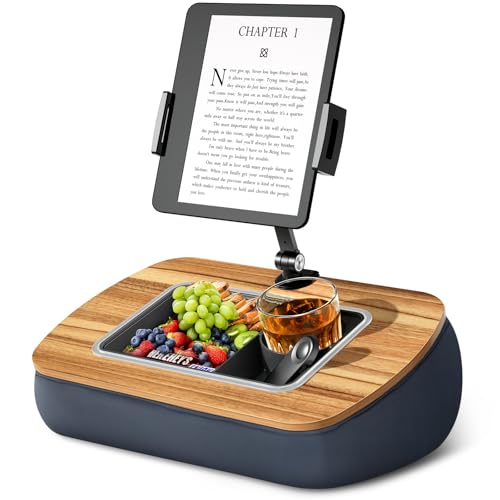
The pitch is straightforward. ERGONOV pairs a soft, bean-filled gray pillow base with a metal arm, a 360-degree rotating clip, and a removable silicone snack bowl that splits into three compartments. It’s rated for screens from 4.7 to 13 inches, so the same stand is supposed to hold a Kindle Paperwhite, an iPad Pro, and your phone without swapping mounts.
After two weeks of bed reading, couch movie sessions, and one Sunday morning where I watched an entire docuseries without lifting my arms, I have a clear picture of what this stand nails and where it falls short. The clip is more useful than I expected, the snack bowl is less gimmicky than it sounds, and the joints have a quirk you should know about before you commit.
What I Liked
360-Degree Rotating Clip Handles Any Orientation
The clip sits on a spherical joint, and you can spin a tablet from landscape to portrait in about a second without loosening anything. I use my iPad Mini in portrait for reading and landscape for video, and on most stands that means picking the device up and reseating it. With the ERGONOV I just rotated the clip while the iPad stayed mounted. The rotation has a friction stop firm enough to hold position once I let go, even when I tapped the screen to scrub through a video.
The dual 180-degree adjustable joints in the arm give you two extra pivot points. One sits where the arm meets the pillow, the other near the clip. Both have metal screws and a small wrench ships in the box. I tightened the lower joint to keep the arm from drifting down and left the upper joint slightly looser so I could nudge the screen angle without grabbing the tool.
Snack Bowl That Actually Earns Its Spot
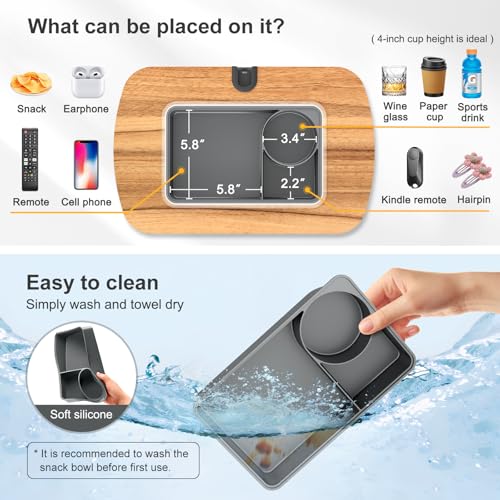
I assumed the silicone snack bowl was a marketing gimmick. It isn’t. The three compartments are sized right for a small drink, a pile of snacks, and a remote or pair of glasses. The bowl pops off the pillow with a friction fit so I can take it to the kitchen to rinse without dragging the whole stand to the sink.
What sold me was using it during a long e-reading session. My phone went in one compartment, my AirPods case in another, and a few almonds in the third. Nothing slid off onto my lap, nothing tipped over when I shifted on the couch. For a sub-$10 product, that level of utility is unusual. That same kind of bonus utility shows up in budget iPad accessories more often than you would expect, like how the MoKo case for iPad folds its front cover into a tri-fold stand for under $10 instead of charging extra for it. Sub-$10 feature density of this kind is uncommon outside the tablet accessory aisle, much like how the AJAZZ AK980 mechanical keyboard packs gasket mount, wireless, and a numpad into a board under $70.
Fits Kindle, iPad, and Phone Without Swapping Mounts
The adjustable clip grips devices from 4.7 to 13 inches. I tested it with a Kindle Paperwhite, an iPad Mini, an iPad Pro 11-inch, and an iPhone 14. All four mounted without modification. The clip jaws open wide enough for the iPad Pro and close tight enough on the Kindle that it didn’t slide when I changed angles. Phones sit slightly off-center because the clip grabs them by their long edge, but the rotating joint corrects for that visually.
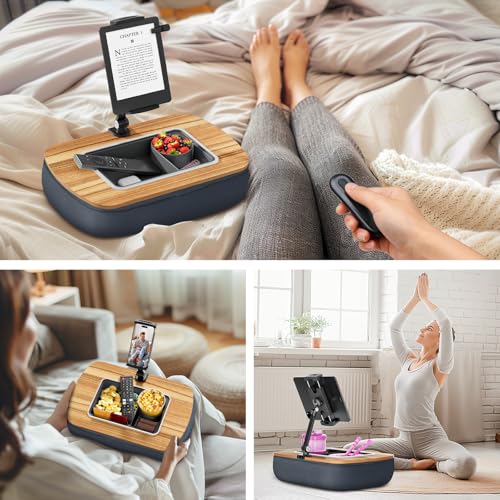
That single-mount approach matters if your household runs mixed devices. My partner reads on a Kindle while I watch video on an iPad, and we trade off without hunting for the right adapter. The bullet points on Amazon call this out as “Wide Compatibility,” and for once the marketing language matches the experience.
Bean-Filled Base Conforms to Your Lap
The pillow itself uses polystyrene bead fill inside a gray fabric cover. It molds to my legs whether I’m sitting upright on the couch or propped at a 30-degree recline in bed, and that contouring is the reason this approach beats rigid lap desks for media use. There’s no hard edge digging into my thighs after an hour, and the bottom of the pillow stayed put on a flat couch cushion without sliding around.
The weight is light enough to carry between rooms but heavy enough to anchor the arm and clip without tipping when an iPad Pro hangs off the end. ERGONOV got the fill density right. If your reading sessions tend to drift toward note-taking on real paper instead of tapping glass, the XPPen Note Plus digital notebook sits comfortably on the same lap and syncs handwritten pages to a phone over Bluetooth.
What Needs Improvement
Joints Drift With Heavier Tablets
The dual 180-degree joints hold position well with a Kindle or a phone, but a 12.9-inch iPad Pro pushed them past their comfort zone. After about 20 minutes of viewing, the lower joint crept downward roughly an inch under the tablet’s weight, dropping the screen out of my line of sight. Re-tightening with the included wrench fixed it for that session, but I had to repeat the cycle every few hours of heavy use.
This is a known trade-off across the multi-joint pillow stand category. More pivot points mean more places where weight-induced slippage can accumulate. If your daily driver is an 11-inch iPad or smaller, you’ll barely notice it. If it’s a 12.9-inch iPad Pro in a heavy case, plan on snugging the lower joint up tight from the start.
Thick Cases Push the Grip to Its Limit
ERGONOV rates the clip for devices up to 13 inches diagonally, but that spec is for the bare device. A chunky protective case adds enough thickness that the clip jaws struggle to close fully. My iPad Mini in a slim Smart Folio mounted without trouble. My iPad Pro in a rugged shock case needed a moment of wrestling, and even then the clip felt like it was at its outer limit.
If you use OtterBox-style cases or anything rugged, measure your device-plus-case thickness against the clip’s open width before you commit. The fix is usually to pop the case off for stand sessions, but that defeats the convenience for people who keep their cases on full-time.
Built for Watching, Not for Typing
This is by design, but it’s worth saying plainly. The angle that makes the ERGONOV great for reclined reading and video is the same angle that makes typing awkward. The clip holds the tablet at a tilt and the pillow puts the screen close to your chest, which works for watching and reading but leaves your wrists in a weird position for any serious keyboard work. I tried answering email on my iPad with a Bluetooth keyboard balanced on the snack bowl. It was uncomfortable in under five minutes.
If half your tablet time is typing notes or doing real work, you want a rigid stand with a separate keyboard, not this. Treat the ERGONOV as a media and reading accessory, not a workstation.
How It Compares
The UGREEN Tablet Pillow Stand sits in the same price tier and earns praise from reviewers as “the most comfortable iPad stand” they’ve tested, with a noticeably softer cushion and premium fabric. UGREEN handles a 12.9-inch iPad without flexing, but it leans on cushion quality rather than mechanical adjustability. The ERGONOV’s dual 180-degree joints and 360-degree rotating clip give it more positioning flexibility, while the UGREEN wins for sheer lap comfort during long sessions. If your priority is plush feel over angle range, the UGREEN is the better fit.
The LapGear Designer Tablet Pillow Stand is the style play in this category. Best Buy buyers describe it as “a great tablet pillow, very sturdy,” and LapGear puts the design budget into fabric prints that match home decor. It uses fixed wedge angles instead of an articulated arm, which limits adjustment but eliminates the joint-drift issue I hit with the ERGONOV. Choose LapGear if you want something that won’t look out of place on your couch and you can live with two or three preset angles.
The Lamicall Tablet Pillow Stand shows up across most top-five tablet pillow lists. Lamicall supports 4.7 to 12.8-inch devices through a multi-angle wedge cushion with no articulated arm. That makes it more stable under heavier tablets, since there’s no joint to drift, but you lose the 360-degree rotation that lets the ERGONOV switch between portrait and landscape in a second. Lamicall is the safer pick for iPad Pro owners. The ERGONOV is the better pick if you swap between a Kindle and a tablet, or between video and reading, multiple times a session.
At $8, the ERGONOV undercuts most of these competitors substantially. UGREEN, LapGear, and Lamicall all sit in the $25 to $40 range. You’re not getting premium cushion materials at this price, but the mechanical feature set holds up.
Final Verdict
The ERGONOV Tablet Pillow Stand earns a 4.4 out of 5. For around $8, you get a bean-filled lap pillow that grips a Kindle, iPad, or phone hands-free, swivels through any orientation, and bundles a snack bowl that’s more useful than it looks. The joints drift under a heavy iPad Pro and thick cases push the clip to its limit, but neither issue is a dealbreaker for the readers, video watchers, and bed loungers this product is built for.
Bottom line: If you’ve been improvising with bed pillows and stacked books, the ERGONOV solves that problem for the price of a sandwich, and the trade-offs are clear enough that you’ll know within an hour whether you’ll love it.
Specifications
| Brand | ERGONOV |
| Compatibility | 4.7-13 inch Kindle, iPad, Tablet, Phone |
| Color | Gray |
| Rotation | 360-degree clip with dual 180-degree adjustable joints |
| Snack Bowl | Removable silicone, three compartments |
Frequently Asked Questions
Does the ERGONOV Tablet Pillow Stand fit a 12.9-inch iPad Pro?
Yes, the clip is rated for screens from 4.7 to 13 inches, so a bare 12.9-inch iPad Pro mounts without trouble. The catch is weight, not size. After roughly 20 minutes of viewing with a 12.9-inch iPad Pro, the lower joint in the arm crept downward about an inch under the tablet's mass and I had to re-tighten it with the included wrench. If your daily driver is an 11-inch iPad or a Kindle, you'll never see this. If it's a 12.9-inch iPad Pro in a heavy case, tighten the lower joint hard from the start and expect occasional readjustment during long sessions.
Can the ERGONOV Tablet Pillow Stand hold a Kindle for reading in bed?
Yes, and reading in bed is where this stand shines. The 360-degree rotating clip flips the Kindle between portrait and landscape instantly, the bean-filled pillow molds to your lap or chest, and the dual 180-degree adjustable joints get the screen to a height where you don't strain your neck. A Paperwhite or basic Kindle fits the clip with room to spare. If you read for hours each night, this is the use case ERGONOV built the stand for.
Does the snack bowl come off the ERGONOV Tablet Pillow Stand?
Yes, the silicone snack bowl is fully removable. It sits in a friction-fit recess on the pillow and pops off with a light pull, so you can take it to the kitchen to wash without dragging the stand to the sink. The bowl has three compartments sized for a small drink, a pile of snacks, and accessories like a remote or glasses case. The bowl is dishwasher-safe based on standard food-grade silicone, but I hand-wash mine to be safe.
How does the ERGONOV Tablet Pillow Stand compare to the LapGear Designer Tablet Pillow?
They serve different priorities. The ERGONOV uses an articulated arm with a rotating clip, so you can land virtually any angle and orientation. The LapGear uses fixed wedge angles instead, which limits adjustment but eliminates joint drift. LapGear also puts the design budget into fabric prints that look good in a living room, while the ERGONOV prioritizes function. Pick the LapGear for style and stability with heavier tablets. Pick the ERGONOV for orientation flexibility, the snack bowl, and a lower price point.
Can the ERGONOV Tablet Pillow Stand hold a phone or only tablets?
It holds phones too. The adjustable clip is rated for screens from 4.7 inches up, which covers every modern phone from an iPhone SE to the largest Android flagships. A phone sits slightly off-center because the clip grabs it by its long edge, but the 360-degree rotating joint corrects for that visually so the screen looks centered to your eyes. If you read articles or watch shorts on your phone in bed, the ERGONOV works for that, though most buyers use it primarily for tablets and e-readers.
Is the ERGONOV Tablet Pillow Stand worth it for the price?
Yes, if your use case matches the design. At around $8, the ERGONOV gives you a bean-filled lap pillow, a rotating clip, an articulated arm, and a removable snack bowl. Competing pillow stands from UGREEN, Lamicall, and LapGear sit in the $25 to $40 range with arguably nicer cushion materials but fewer mechanical features. You're trading premium fabric for orientation flexibility and a lower price. For bed and couch readers, that trade is easy. For users who need rigid stability under heavy tablets, the budget shows in the joint drift.
Ready to Buy?
ERGONOV Tablet Pillow Stand delivers on its promises. If it fits your needs, it's a solid choice you won't regret.
Check Price on Amazon Founder & Product Reviewer at TheReviewRewind
Daniel has tested 400+ products across 20+ categories through hands-on, real-world testing. Every review includes video documentation and standardized scoring criteria. His reviews appear as Amazon shoppable videos and here on TheReviewRewind.
We earn a commission if you make a purchase, at no extra cost to you. This does not influence our ratings or recommendations. Full disclosure
Looking for more options? See all our Electronics reviews.
Related Reviews