WAVLINK Docking Station Review (2026)


WAVLINK Docking Station Review (2026)
WAVLINK Docking Station Review (2026)
Buy if you need triple 4K monitor support and versatile ports at under $100. Skip if you need native macOS multi-display without driver installation.
Buy on AmazonWhat We Liked
- Triple 4K Display Support From One Cable
- Solid Build With Upright Design
- 11-in-1 Port Selection
- 125W USB-C Power Delivery
- Wide Laptop and OS Compatibility
What Could Be Better
- macOS Display Limitations
- Gets Warm Under Heavy Load
- GPU-Dependent Monitor Count on Windows
How we test: Every product is used in real conditions and evaluated using our standardized scoring criteria. Read our full review methodology.
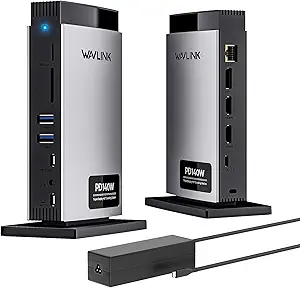
Need a docking station that turns your laptop into a full workstation? Most promise triple-monitor support and a wall of ports, then fall flat on delivery. The WAVLINK Laptop Docking Station takes a different approach with an upright design, 11 ports, and triple 4K display output from a single USB-C cable.
I tested this dock with multiple laptops, three 4K monitors, and every peripheral I could connect. The 125W USB-C power delivery kept my laptop charged throughout, and the vertical stand stayed planted even with a tangle of cables hanging off it.
Here is what worked, what fell short, and whether this dock earns a spot on your desk.
What I Liked
Triple 4K Display Support From One Cable
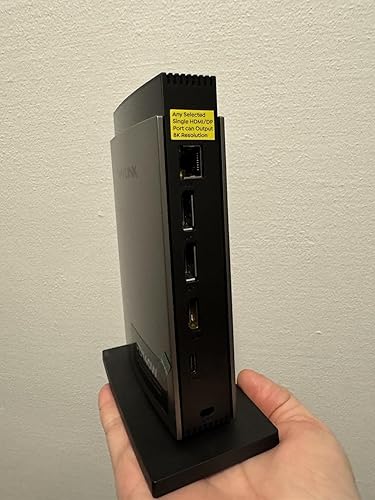
The WAVLINK docking station drives three separate monitors at 4K@60Hz through two HDMI ports and one DisplayPort. Under DP1.4 with DSC, a single display can hit 8K@30Hz or 4K@144Hz on Windows. I connected three 4K panels and had smooth, flicker-free output across all of them.
This kind of triple-monitor support from one USB-C connection is uncommon at this price point. For anyone building a multi-display home office or editing setup, it delivers without needing multiple adapters. We tested a similar setup with the WAVLINK WL-UMD26 triple monitor dock, which adds a Kensington lock slot and earned the same 4.2 rating across Mac and Windows testing. Windows users who want a fourth display can step up to the WAVLINK Quad Monitor Docking Station, which uses native DP Alt Mode to drive four monitors plus VGA for under $50.
Solid Build With Upright Design
Most docking stations lay flat and take up a wide stretch of desk space. This one stands upright on a weighted base, which keeps the footprint small. The stand is heavy enough that even with six cables plugged in, the dock stayed planted with zero wobble.
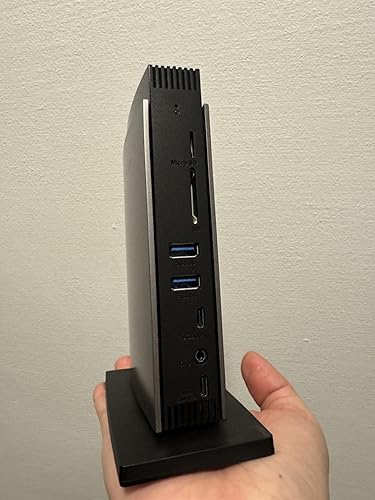
The build has a clean, professional look. It fits neatly beside a monitor without clashing with a workspace aesthetic. That same tidy-desk mindset extends to upkeep, where a JUFINX X117 compressed air duster clears the dust that settles around a dock and its cable connections.
11-in-1 Port Selection
The port count covers almost every connection you might need. On the front, there are two USB-A ports, two USB-C ports, SD and microSD card readers, and a 3.5mm audio jack for headphones or a microphone. The back houses two HDMI outputs, one DisplayPort, Gigabit Ethernet, and the USB-C host connection.
The 10Gbps USB-C 3.2 port handles fast file transfers from external drives. Having SD and microSD readers built in eliminates one more adapter from the desk. If you need quad 4K display output with even more ports, the WAVLINK Pro DL7400 steps up to 15 ports with four HDMI connections and DisplayLink technology.
125W USB-C Power Delivery
The dock includes a 140W PD3.1 power adapter and passes up to 125W through to your laptop. That is enough to charge even larger 15-inch and 16-inch laptops at full speed while running all connected peripherals. You plug one USB-C cable into your laptop and get charging, video, data, and Ethernet through that single connection.
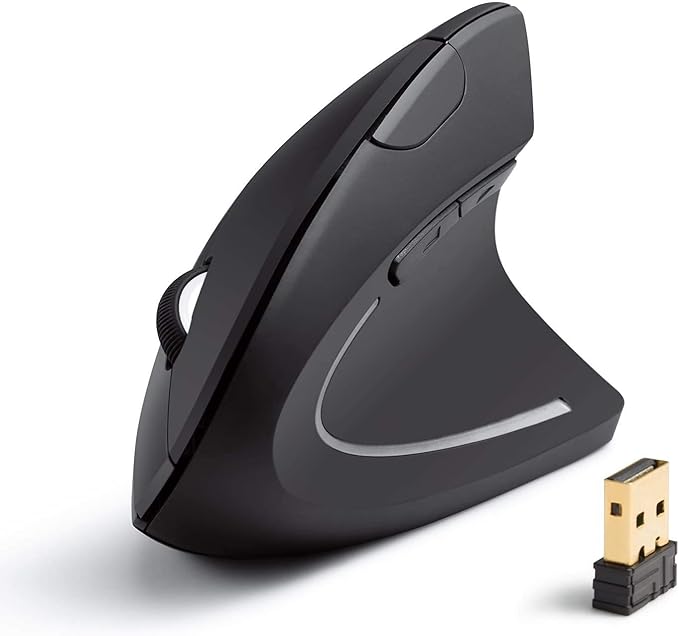
This eliminates the need for a separate laptop charger at your desk. The included power adapter is on the heavier side, but that is expected given the wattage it needs to push. Pairing this dock with a wireless peripheral like the Anker Wireless Vertical Ergonomic Mouse keeps your desk clear of extra cables since the mouse runs on AAA batteries rather than another USB connection.
Wide Laptop and OS Compatibility
The dock works with MacBook models from M1 through M4, plus Thunderbolt 3 and 4 Windows laptops from Dell, HP, Lenovo, and others. It supports Windows, macOS, Chrome OS, and Linux. No driver is required on Windows for basic functionality, making the setup plug-and-play for most users.
Cross-platform compatibility means one dock can serve a household or office with mixed devices. Switching between a MacBook Pro and a Dell XPS takes seconds.
What Needs Improvement
macOS Display Limitations
macOS does not support MST (Multi-Stream Transport), which limits MacBook users to one external display through the dock without additional software. To drive two or three monitors on a Mac, you need to install a DisplayLink driver. The driver works, but it adds a step that Windows users can skip entirely.
This is an Apple platform restriction, not a WAVLINK flaw. Still, Mac buyers should factor in that extra setup before purchasing.
Gets Warm Under Heavy Load
With three monitors, an external drive, and a phone charging through the front USB-C port, the dock gets noticeably warm. It never reached uncomfortable temperatures in my testing, but the warmth is consistent under sustained multi-device use.
Good airflow around the dock helps. Tucking it into a tight shelf without ventilation would not be ideal.
GPU-Dependent Monitor Count on Windows
Some Windows laptops can only drive three monitors total, including the laptop screen, because of GPU limitations. The dock supports triple external displays, but the host laptop’s graphics card has to keep up. Before buying, check whether your specific laptop supports three external outputs over USB-C.
This is a common limitation across all docking stations, not unique to WAVLINK. The product listing notes it clearly, which is appreciated.
How It Compares
| Feature | WAVLINK | Plugable TBT4-UDZ | CalDigit TS4 | Anker 675 |
|---|---|---|---|---|
| Price | Under $100 | ~$250-300 | ~$350-400 | ~$250 |
| Total Ports | 11 | 16 | 18 | 12 |
| Connection | USB-C | Thunderbolt 4 | Thunderbolt 4 | USB-C |
| Power Delivery | 125W | 96W | 98W | 100W |
| Max Display Output | Triple 4K | Triple 4K | Dual 6K or Triple 4K | Dual display |
| Ethernet | Gigabit | 2.5G | 2.5G | Gigabit |
| Design | Upright | Horizontal | Horizontal | Monitor stand |
| Best For | Budget multi-monitor | Premium Thunderbolt | Mac power users | Space-saving |
The WAVLINK docking station sits in the sub-$100 tier, which puts it against a different crowd than the Thunderbolt 4 and 5 docks from Plugable or CalDigit.
The Plugable TBT4-UDZ offers top-tier performance with native Thunderbolt 4 support and consistently earns top marks in reviews. It costs roughly three times the WAVLINK’s price. For users who need guaranteed triple-display support without driver workarounds, the Plugable justifies the premium.
The CalDigit TS4 packs 18 ports and native Thunderbolt 4, making it a favorite among Mac power users. It is one of the more expensive options on the market. If budget is not a concern and you want maximum port density with Apple Silicon optimization, the CalDigit is hard to beat.
The Anker 675 USB-C Docking Station integrates a monitor stand into the dock itself, saving desk space in compact setups. It supports fewer simultaneous displays than the WAVLINK and has a lower power delivery ceiling. For users who value form factor over raw connectivity, the Anker offers a creative alternative.
Where the WAVLINK stands out is value. Triple 4K output, 125W charging, and 11 ports for under $100 is a combination that few competitors match at this price.
Final Verdict
The WAVLINK Laptop Docking Station delivers triple 4K monitor support, 125W power delivery, and 11 versatile ports at a price that undercuts most competitors. The upright design saves desk space, the build feels solid, and the broad OS compatibility makes it practical for mixed-device households or offices.
The macOS display limitation and warmth under heavy load are worth noting but not deal-breaking. For the price, this dock punches well above its weight.
Rating: 4.2 out of 5
I recommend the WAVLINK docking station for anyone who wants a capable multi-monitor USB-C dock without spending $200 or more. It handles the fundamentals well and does not cut corners where it matters.
Specifications
| Brand | WAVLINK |
| Hardware Interface | Ethernet, HDMI, MicroSD, Thunderbolt, USB 2.0, USB 3.0, USB Type C |
| Compatible Devices | Apple M4/M3/M2/M1(compatible with MacBook 2018 or later) and Intel Macs (with macOS 11 or later) /Dell XPS 13 7390 2-in-1 (Ice Lake), XPS 12 9250, XPS 13 9350, XPS 13 9360, XPS 13 9370, XPS 13 9380,XPS 15 9550 (Intel + Nvidia GPU), XPS 15 9550 (Intel GPU), XPS 15 9560 (Intel + Nvidia GPU), XPS 15 9570, XPS 17 9700,XPS 12 XPS9250,Dell LATITUDE 7480, Alienware 13 R3, Alienware 15 R3, Alienware 17 R4, Dell Precision 15 M7510, Dell Precision 17 M7710, Dell XPS 13 9365, Dell Precision 15 5000 Series (5510), Dell Precision 15 3000 Series (3510), Dell Latitude 7370 (3C7XP), Dell Latitude 12 7275, Alienware 17 R3, Dell Precision M5510 15.6" /HP EliteBook Folio G1 (Model V1C43EA), Spectre x360 Convertible 13-w000 (SKU W9A95AV), Spectre x360 - 13-ac003la, Spectre x360 - 15-ch000, Elite X2 1012 G1, HP Spectre x360 - 13-ae011dx (Late 2017),Elite x2 1012 G2,HP Spectre x360 (2017),HP EliteBook Folio G1 12.5", HP ZBook 15 G3, HP Zbook 17 G3 Workstation, HP ZBook Studio Series, HP Elite X2 1012 G1, HP Spectre x360 2-in-1 13-W023DX 13.3 /Intel NUC8i7HVK (Hades Canyon), NUC8i7HNK (Hades Canyon), NUC9VXQNX (Ghost Canyon), Intel NUC9V7QNX (Ghost Canyon), Intel NUC9i9QNX (Ghost Canyon), Intel NUC9i7QNX (Ghost Canyon), Intel NUC9i5QNX (Ghost Canyon) /Thinkpad P50, Thinkpad P51, Thinkpad P70, Yoga C930, X1 Carbon 7th Gen, ThinkPad P70 Series Mobile Workstation, Legion Y720, ThinkPad T570, Miix 720, ThinkPad X1 Carbon (5th Gen 2017), ThinkPad X1 Yoga (2nd Gen 2017), ThinkPad P50 /MSI VR Ready GS43VR Phantom Pro-006; ASUS ZenBook Pro UX501VW and more |
| Total USB Ports | 5 |
| Number of Ports | 11 |
| Item Weight | 1.43 Kilograms |
| Total HDMI Ports | 2 |
| Wattage | 140 |
| Manufacturer | WAVLINK |
Frequently Asked Questions
Is the WAVLINK docking station actually worth the price?
At under $100, the WAVLINK docking station delivers triple 4K monitor support, 125W power delivery, and 11 ports. Comparable docks from Plugable and CalDigit cost two to three times more. For users who need multi-monitor connectivity without the Thunderbolt 4 premium, it offers strong value.
Does the WAVLINK docking station work with MacBook M1 through M4?
Yes, the dock is compatible with MacBook models from M1 through M4, as well as Intel Macs from 2018 and later. macOS does not support MST natively, so Mac users are limited to one external display without installing the DisplayLink driver.
How many monitors can the WAVLINK docking station support?
The dock supports up to three external monitors at 4K@60Hz through two HDMI ports and one DisplayPort. On Windows, some laptops may be limited to three total displays including the laptop screen, depending on GPU capabilities. A single display can reach 8K@30Hz or 4K@144Hz.
Does the WAVLINK docking station require driver installation?
On Windows, the dock works plug-and-play with no driver needed for most features. Mac users who want to connect more than one external display need to install the DisplayLink driver, which is a free download from the WAVLINK website.
What is the power delivery on the WAVLINK docking station?
The dock includes a 140W PD3.1 power adapter and delivers up to 125W of pass-through charging to your laptop. That is enough to charge most 15-inch and 16-inch laptops at full speed while running all connected peripherals through a single USB-C cable.
Ready to Buy?
WAVLINK Docking Station Review (2026) delivers on its promises. If it fits your needs, it's a solid choice you won't regret.
Check Price on Amazon Founder & Product Reviewer at TheReviewRewind
Daniel has tested 400+ products across 20+ categories through hands-on, real-world testing. Every review includes video documentation and standardized scoring criteria. His reviews appear as Amazon shoppable videos and here on TheReviewRewind.
We earn a commission if you make a purchase, at no extra cost to you. This does not influence our ratings or recommendations. Full disclosure
Looking for more options? See all our Electronics reviews.
Related Reviews