Acer USB-C Docking Station Review: Dual 4K That Leans on Your Laptop


Acer USB-C Docking Station Review: Dual 4K That Leans on Your Laptop
Acer USB-C Docking Station
A compact, well-built 9-in-1 dock that hits dual 4K@60Hz and 100W passthrough charging when your laptop supports DisplayPort 1.4 Alt Mode. Macs only mirror the two HDMI outputs, the built-in cable is short, and it runs warm, but it is a lot of desk for a small dongle.
Buy on AmazonWhat We Liked
- Dual 4K@60Hz HDMI output that matches the spec on the right laptop
- A genuinely compact, travel-friendly aluminum build
- One-cable convenience with 100W passthrough charging
- Nine ports covering monitors, storage, and peripherals
- Fast 5Gbps data and 104 MB/s card reads for photo work
- A hardware lock button most budget docks skip
What Could Be Better
- Dual 4K@60Hz needs a DisplayPort 1.4 host to deliver
- macOS mirrors the two HDMI outputs instead of extending
- The built-in cable is only 0.65 ft, limiting placement
- It runs warm, and charging can throttle under load
- No Ethernet port and no power adapter in the box
How we test: Every product is used in real conditions and evaluated using our standardized scoring criteria. Read our full review methodology.
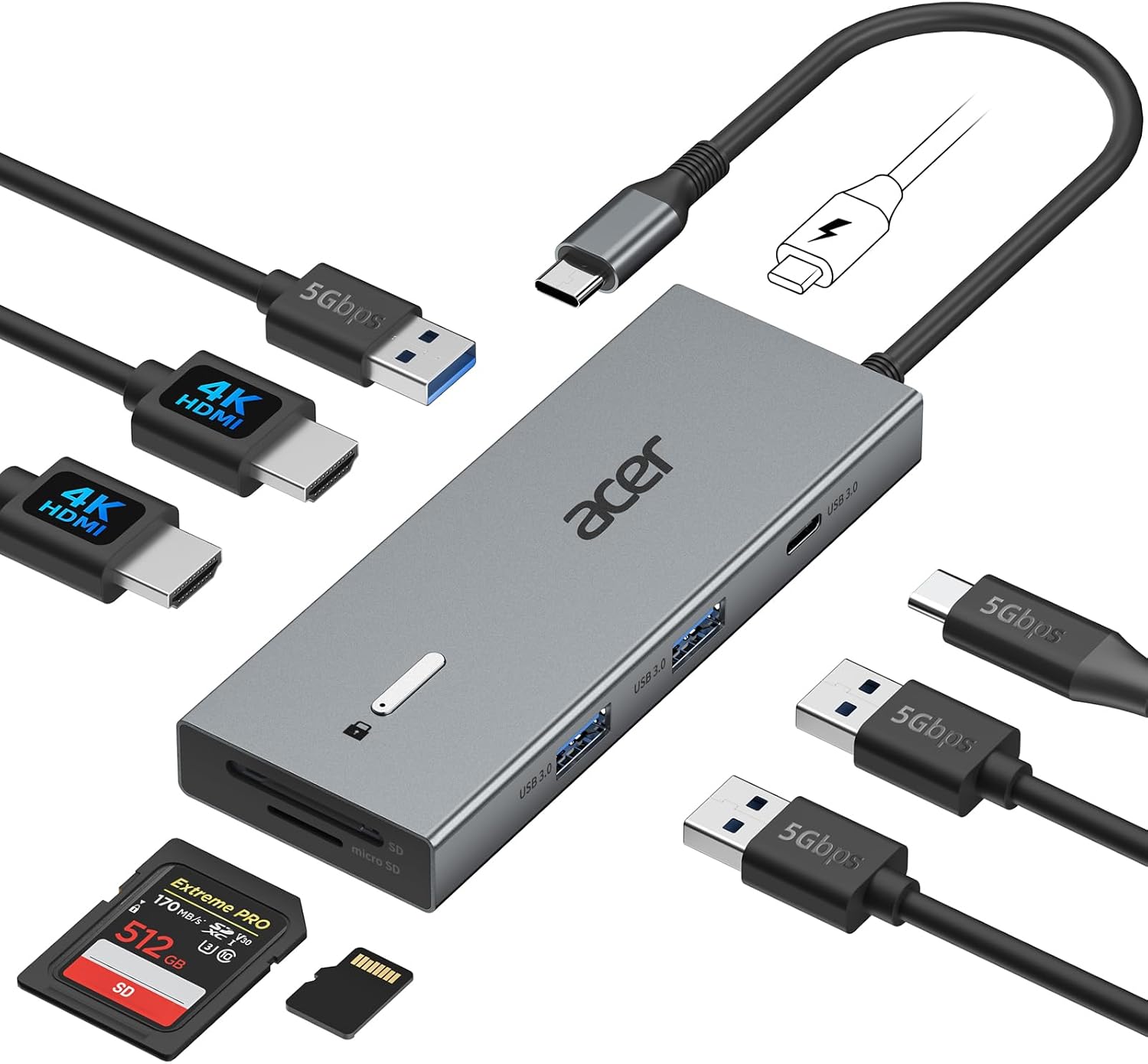
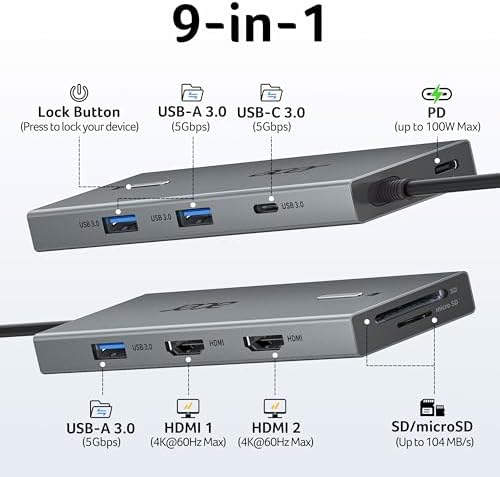
The Acer USB-C Docking Station Dual Monitor is a 9-in-1 laptop dock that promises a tidy desk from a single cable: two 4K HDMI outputs, three USB-A ports, a USB-C data port, SD and microSD slots, and 100W passthrough charging. At around $35, it undercuts most name-brand docks by a wide margin. The catch is that “dual 4K@60Hz” is a conditional promise, not a guarantee.
Whether this Acer dock delivers its headline resolution depends almost entirely on the laptop you plug it into. On the right USB-C port it turns a thin notebook into a two-monitor workstation; on the wrong one, the monitors may never wake up at all. I dug into the spec panels, the owner reviews, and the compatibility fine print to work out exactly where the line sits.
Acer USB-C Docking Station: The Quick Take
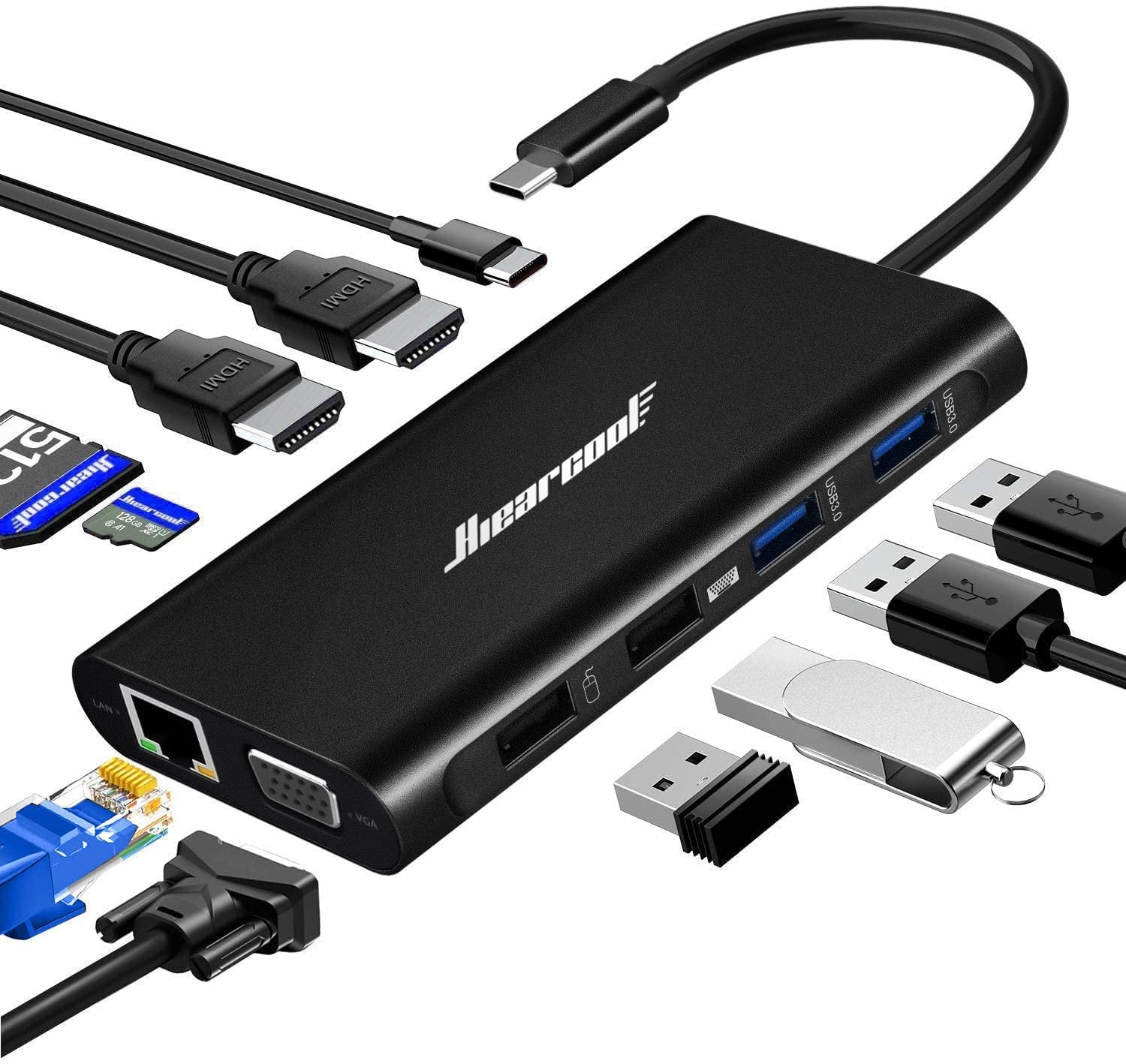
This Acer USB-C hub is a compact USB C docking station built around display output. The aluminum body is smaller than a phone, the nine ports cover the everyday peripherals most desks need, and a hardware lock button adds a security touch that budget docks usually skip. Data transfer runs at 5Gbps on both the USB 3.0 Type-A and USB-C ports, fast enough for drives, a game controller, or a card reader rated up to 104 MB/s.
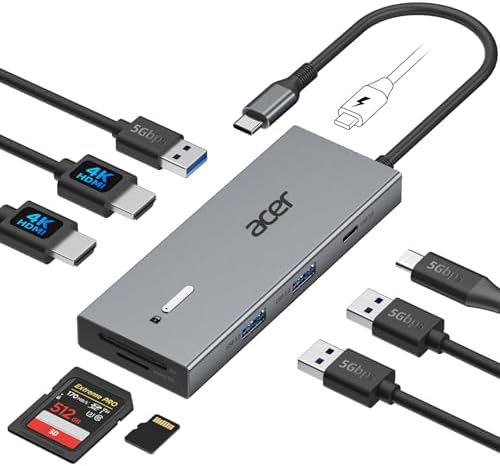
The dock works with Windows and Mac laptops, plus USB-C tablets and handhelds like an iPad Pro or a Steam Deck, as long as the port supports DisplayPort Alternate Mode. That single requirement shapes everything else in this review, so it is worth confirming before you buy.
What I Liked
For a dock that costs a fraction of an Anker or CalDigit unit, the Acer gets the fundamentals right. The owners who matched it to a capable laptop are consistent about what works, and the spec panels back them up.
Dual 4K@60Hz HDMI output that matches the spec on the right laptop
Both HDMI ports can drive a 4K monitor at 60Hz at the same time, and that is the feature people buy this for. One owner who had run it for the better part of a year noted that an older ProArt computer monitor finally reached full 4K resolution at 60Hz here, where their previous Anker dongles capped the same screen at 4K30. On a DisplayPort 1.4 host, the dual 4K claim holds up.
A genuinely compact, travel-friendly aluminum build
Reviewers repeatedly call out how small this dock is in person. It weighs 4.6 ounces, the metal shell helps shed heat, and several owners drop it in a bag for work trips. For a nine-port USB hub, it takes up very little desk space.
One-cable convenience with 100W passthrough charging
The dock accepts up to 100W of power delivery and passes up to 90W to the laptop, so one USB-C cable can charge the machine while the monitors, keyboard, and mouse stay connected. Owners running two monitors plus peripherals plus a charger describe exactly the single-cable routine the dock is designed for.
Nine ports covering monitors, storage, and peripherals
Three USB-A ports, a USB-C data port, and dual card slots handle a camera, a couple of drives, and a wireless receiver without an extra adapter. It is a practical port mix for a working desk rather than a spec-sheet stunt.
Fast 5Gbps data and 104 MB/s card reads for photo work
A photographer reported stable transfers moving large files, measuring up to roughly 6Gbps with a Thunderbolt SSD attached. For offloading SD cards between shoots, the 104 MB/s reader keeps pace with everyday UHS-I media.
A hardware lock button most budget docks skip
A single click locks Windows and a three-second hold locks a Mac, and the housing includes a security slot. In a shared office or coworking space, that is a small but welcome extra.
What Needs Improvement
Most of the complaints about this Acer dock are not defects so much as limits of what a single USB-C cable can carry. Knowing them ahead of time is the difference between a happy desk and a return.
Dual 4K@60Hz needs a DisplayPort 1.4 host to deliver
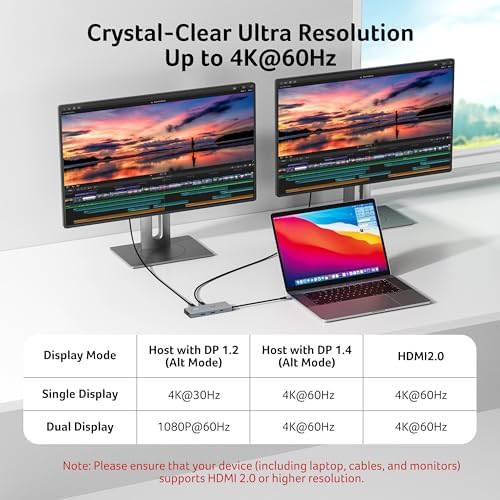
The resolution panel spells out the trade-off. A laptop with only DisplayPort 1.2 Alt Mode drops to 1080p@60Hz on dual monitors and 4K@30Hz on a single screen. You reach full dual 4K@60Hz only with a DisplayPort 1.4 host or an HDMI 2.0 signal chain end to end.
macOS mirrors the two HDMI outputs instead of extending
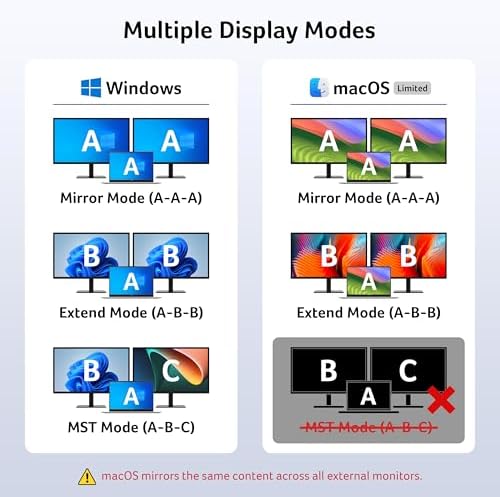
This is the big one for MacBook owners. Because the dock uses a single USB-C stream rather than DisplayPort MST, macOS shows the same image on both HDMI outputs instead of two independent desktops. Microsoft Windows can run two separate screens; a Mac effectively gets one extended display duplicated across the ports.
The built-in cable is only 0.65 ft, limiting placement
The attached USB-C cable measures just 0.65 feet. That is fine when the laptop sits right beside the dock, but awkward if the dock lives behind a monitor arm or across the desk. It is the most common practical gripe in the reviews.
It runs warm, and charging can throttle under load
Several owners describe the dock getting hot during long sessions, and one noted that charging slowed when the USB-C port was also powering the laptop. A few report edge-case instability, including a Dell laptop that looped on restart after sitting idle, and a 2.4GHz wireless mouse receiver that stuttered until moved to another port.
No Ethernet port and no power adapter in the box
Unlike larger docks, there is no Ethernet jack, so a wired network means a separate USB adapter. The power brick is also not included; passthrough charging needs your own 65W-or-higher, ideally 100W, USB-C charger.
How It Compares
Against pricier USB-C docking stations, the Acer competes on value and resolution rather than features. The gaps are predictable once you know what a single-cable dock can and cannot do.
Compared with an Anker 555 8-in-1 hub, the Acer’s advantage is dual 4K at 60Hz; one owner moved over specifically because the Anker 555, 565, and 575 capped their monitor at 4K30. Against UGREEN docks in the same price band, reviewers found the Acer ran warmer under sustained load, though its aluminum shell helps. The UGREEN units sometimes add Ethernet, which the Acer lacks.
Step up to a Thunderbolt dock from CalDigit or Plugable and the math changes. Those drive two independent displays on a Mac and add Gigabit Ethernet, but they cost three to five times as much. If you run a Dell, Lenovo, or Windows ultrabook with DisplayPort 1.4, the Acer gets you most of the way there for far less money.
The honest comparison is this: as a USB-C hub with 4K HDMI for a Windows desk, the Acer is a strong budget pick. As a true multi-monitor solution for a MacBook, a DisplayLink or Thunderbolt dock is the better tool.
Final Verdict
The Acer USB-C Docking Station Dual Monitor earns a 4.0 because it does the hard part well and is upfront about its limits in the fine print. On a DisplayPort 1.4 Windows laptop, you get dual 4K@60Hz, 100W passthrough charging, and nine ports in a dock smaller than your phone, for roughly the price of a nice cable. That is a lot of capability for the money.
The caveats are real but knowable. Confirm your laptop’s USB-C port supports DisplayPort Alt Mode, expect mirrored rather than independent screens on a Mac, plan for the short 0.65-foot cable, and bring your own charger. Skip it if you need Ethernet, two separate MacBook desktops, or a dock that sits far from the laptop.
For a home or office desk that needs a clean two-monitor setup on one USB-C cable, this Acer dock is an easy recommendation with eyes open. Match it to the right laptop and it quietly disappears into your routine, which is exactly what a good dock should do.
Specifications
| Brand | acer |
| Manufacturer | acer |
| Color | Grey |
| Item model number | ODK4K0 |
| UPC | 195133286442 |
| Hardware Interface | HDMI, MicroSD, USB 3.0 |
| Number of Ports | 9 |
| Total USB Ports | 3 |
| Total HDMI Ports | 2 |
| Wattage | 100 watts |
| Maximum Supported Resolution | 4K (2160p) @ 60Hz |
| Maximum Number of Displays Supported | 2 |
| Package Dimensions | 6.65 x 5.51 x 0.87 inches |
| Item Weight | 4.6 ounces |
| Date First Available | March 17, 2025 |
Frequently Asked Questions
Does the Acer USB-C Docking Station really support dual 4K at 60Hz?
Yes, but only when your laptop's USB-C port supports DisplayPort 1.4 Alt Mode or the HDMI chain is HDMI 2.0 end to end. On a DisplayPort 1.2 host, dual monitors drop to 1080p at 60Hz and a single monitor runs 4K at 30Hz.
Does the Acer USB-C Docking Station work with a MacBook?
It works, but macOS mirrors the same image across both HDMI ports instead of running two independent extended desktops. MacBook owners get one extended display duplicated on both monitors, so it suits mirroring more than a true dual-screen Mac setup.
Do I need a power adapter for the Acer USB-C Docking Station?
Yes, if you want passthrough charging. The dock does not include a power brick, so you supply your own 65W-or-higher USB-C charger, with 100W recommended to pass the full 90W to your laptop.
Why won't my monitors turn on with the Acer USB-C Docking Station?
The most common cause is a laptop USB-C port that is data-only and does not support DisplayPort Alternate Mode. Without DP Alt Mode, the dock cannot output video at all. Check your laptop's port specification before assuming the dock is faulty.
Does the Acer USB-C Docking Station have an Ethernet port?
No. This 9-in-1 dock covers HDMI, USB-A, USB-C, and SD/microSD, but it has no Ethernet jack. If you need a wired network connection, you will need a separate USB-to-Ethernet adapter.
Is the Acer USB-C Docking Station worth it?
For a Windows laptop with DisplayPort 1.4, it is strong value, delivering dual 4K at 60Hz and 100W charging for around $35. It is less compelling if you need Ethernet, independent dual displays on a Mac, or a longer connecting cable.
Ready to Buy?
Acer USB-C Docking Station delivers on its promises. If it fits your needs, it's a solid choice you won't regret.
Check Price on Amazon Founder & Product Reviewer at TheReviewRewind
Daniel has tested 400+ products across 20+ categories through hands-on, real-world testing. Every review includes video documentation and standardized scoring criteria. His reviews appear as Amazon shoppable videos and here on TheReviewRewind.
We earn a commission if you make a purchase, at no extra cost to you. This does not influence our ratings or recommendations. Full disclosure
Looking for more options? See all our Computers reviews.
Related Reviews