Lamicall Adjustable Laptop Stand Review: A Foldable Aluminum Riser That Won't Wobble


Lamicall Adjustable Laptop Stand Review: A Foldable Aluminum Riser That Won't Wobble
Lamicall Adjustable Laptop Stand
Buy if you want a sturdy, adjustable laptop riser that stays rock-solid while you type and folds flat for travel. Skip if you need one-handed height adjustment or an ultra-compact travel stand.
Buy on AmazonWhat We Liked
- Rock-Solid Stability for Typing
- Premium Aluminum Build Quality
- Adjustable Height to Eye Level
- Foldable and Portable Design
- Effective Heat Dissipation
What Could Be Better
- Stiff Adjustment Mechanism
- Larger Folded Footprint
- Minor Wobble at Maximum Height
How we test: Every product is used in real conditions and evaluated using our standardized scoring criteria. Read our full review methodology.
Looking for an adjustable laptop stand that actually stays put while you type? I tested the Lamicall Adjustable Laptop Stand, a foldable aluminum riser that promises ergonomic relief without the desktop clutter.
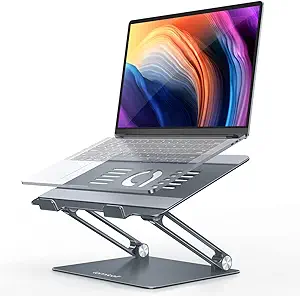
Lamicall designed this portable laptop riser with a reinforced aluminum alloy base that supports laptops from 10 to 17.3 inches. At $37.99 on Amazon, it targets remote workers and anyone tired of hunching over a flat desk. TechRadar named it the best laptop stand overall, and it holds a 4.7-star rating across nearly 10,000 Amazon reviews.
I put it through daily use at my desk to see if the stability claims hold up. The short answer: this stand delivers where many competitors fall short, though the stiff adjustment mechanism is something you should know about before buying.
What I Liked About the Lamicall Laptop Stand
This ergonomic laptop riser gets a lot right for the price. Here are the standout features that earned it a spot on my desk.
Rock-Solid Stability for Typing
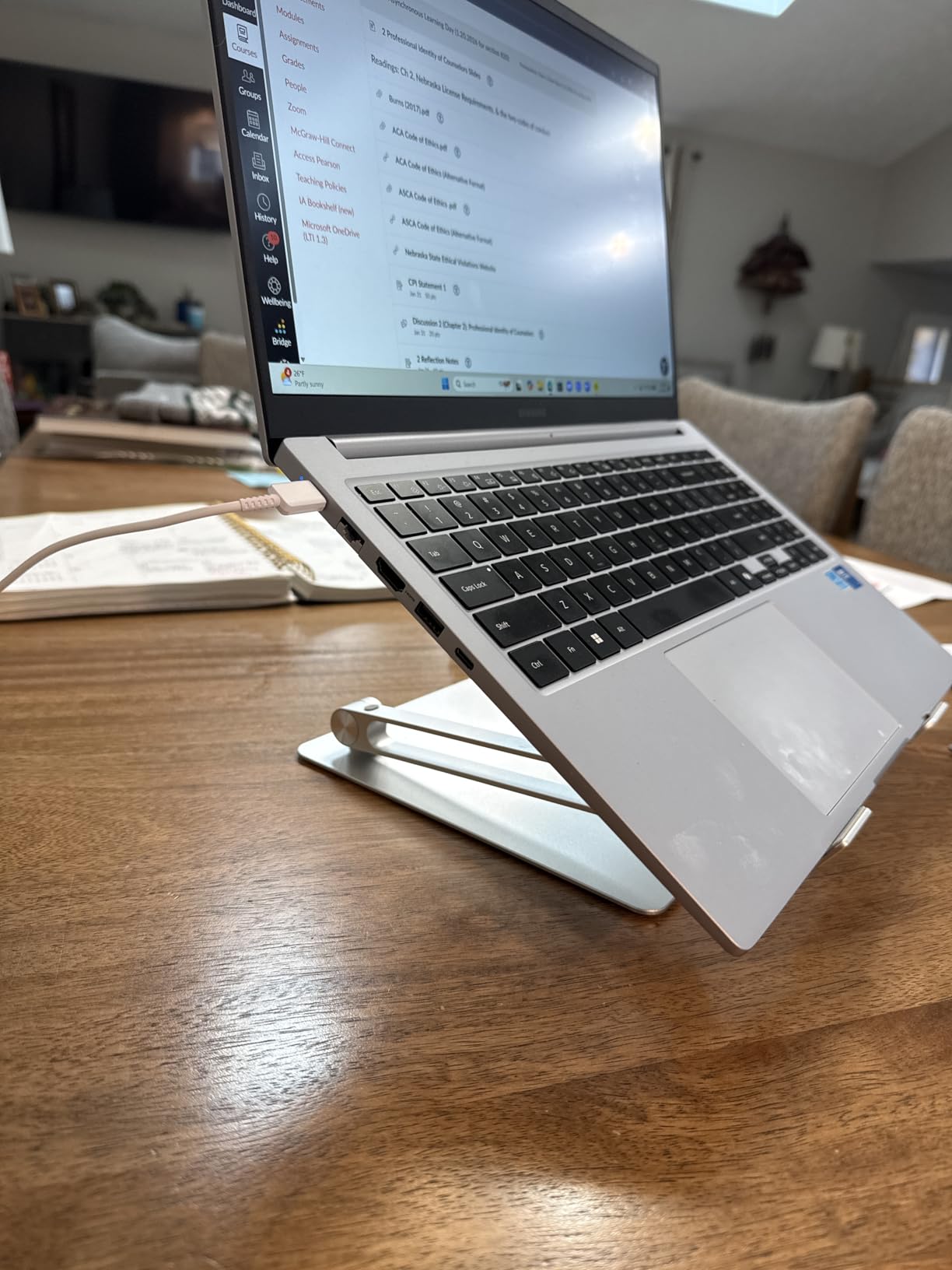
The first thing I noticed is zero shaking or rattling when typing. Many laptop stands wobble the moment your fingers hit the keys, but the Lamicall stays planted. The upgraded large base with its heavier aluminum alloy construction prevents the stand from sliding or tipping, even during aggressive typing sessions.
Across nearly 9,000 verified Amazon reviews, stability is the most praised feature. Users consistently describe the stand as “very sturdy” and note they “don’t need to worry about it falling down once placed.” That tracks with my experience.
Premium Aluminum Build Quality
The entire stand is constructed from aluminum alloy, giving it a weight of about 2.29 pounds. That heft is a feature, not a bug. The metal construction feels substantial, and the anti-skid silicone pads on the surface and base protect your laptop from scratches while preventing any sliding.
The build quality puts many plastic competitors to shame. Every joint and hinge feels deliberate, and the reinforced arms maintain their position without loosening over time.
Adjustable Height to Eye Level
This laptop stand elevates your screen to eye level, which makes a real difference for posture during long work sessions. You can adjust both the height and the angle of the top plate independently, giving you a full range of ergonomic positions.
The stand offers roughly 90 degrees of adjustability. Whether you want a slight tilt for typing or a steep angle for reading, the Lamicall accommodates. Paired with a standing desk, it brings the screen to the perfect height so you are not bending down to look at the display. Adding a HUANUO Single Monitor Arm next to this stand creates a dual screen workstation where both displays sit at proper ergonomic height.
Foldable and Portable Design
Despite its sturdy aluminum construction, this riser folds flat into a space-saving shape. You can store it in a laptop bag or toss it in a backpack for travel. At 2.29 pounds, it adds minimal weight to your carry.
The folding mechanism is straightforward: push down on the top plate, and it collapses against the base. Unfolding requires placing your hand on the bottom plate and lifting upward. The portability makes it practical for hybrid workers who move between home and office.
Effective Heat Dissipation
Multiple ventilation holes across the top plate promote airflow beneath your laptop. This open design helps cool your laptop and prevents the thermal throttling that can happen during resource-heavy tasks. The elevated position itself improves airflow compared to sitting flat on a desk.
The rubber pads are positioned to avoid blocking the ventilation cutouts, so air circulates freely around the laptop base.
What Needs Improvement
No product is perfect, and the Lamicall laptop stand has a few trade-offs worth knowing about.
Stiff Adjustment Mechanism
Adjusting the height requires two hands and real effort. You need to hold the bottom plate with one hand while pushing or pulling the top section with the other. It takes a bit of muscle to move the arms into position.
This stiffness is an intentional design choice. The resistance is what keeps the stand from wobbling or shifting during use. If you set it once and leave it, this is a non-issue. But if you frequently switch between sitting and standing heights, the constant readjusting can get tedious. If you alternate between sitting and standing often enough that a stiff riser wears on you, the Nulaxy Telescopic 360 Rotating Laptop Stand reaches full standing height on a locking telescoping arm instead.
Larger Folded Footprint
When collapsed, this stand takes up more space than ultra-slim portable alternatives. The heavier aluminum base and Z-shaped frame create a thicker profile compared to lighter, simpler designs. If you carry a compact laptop bag, it may not slide in as easily as you would like.
For dedicated desk use or a roomy backpack, this is not a concern. But digital nomads with tight packing constraints should measure their bag space first.
Minor Wobble at Maximum Height
At the very highest elevation settings, a few users have reported slight wobbling during typing. At standard working heights, the stand is rock-solid. The wobble only appears when you extend both the height and angle to their extremes simultaneously.
For most ergonomic setups, you will not push the stand to its absolute limits, so this is a marginal concern for the average user.
How the Lamicall Compares to Other Laptop Stands
The laptop stand market is crowded. Here is how the Lamicall stacks up against two popular alternatives.
Lamicall vs. Rain Design iLevel2
The Rain Design iLevel2 is the premium pick in this category. It features a spring-loaded mechanism that lets you adjust the height with one hand, a significant ergonomic advantage over the Lamicall’s two-handed adjustment. The anodized aluminum finish matches Apple notebooks well.
The trade-off is portability and price. The Rain Design does not fold for travel, making it a desk-only solution. It also costs considerably more than the Lamicall’s $37.99 price point. If you want a permanent desk setup and prefer easy adjustment, the Rain Design is worth considering. If you need something portable, the Lamicall wins.
Lamicall vs. BESIGN LS03
The BESIGN LS03 targets budget-conscious buyers with a fixed six-inch elevation and U-shaped aluminum design. It offers excellent airflow and assembles without tools, making it a simple out-of-the-box solution.
The limitation is flexibility. The BESIGN cannot adjust its height, so it works best for users who sit at a consistent desk height. The Lamicall’s full range of height and angle adjustments gives it a clear advantage for anyone who needs to fine-tune their ergonomic position or switch between sitting and standing setups.
Final Verdict
The Lamicall Adjustable Laptop Stand is one of the best ergonomic laptop risers you can get for under $40. Its aluminum alloy construction delivers the stability that most competitors lack, and the foldable design adds genuine portability.
I give it a 4.5 out of 5. The stiff adjustment mechanism and slightly larger folded profile are minor trade-offs for a stand that stays rock-solid during daily use. If you want a reliable, adjustable laptop stand that works at your desk and travels with you, this is the one to get.
Specifications
| Brand | Lamicall |
| Item Weight | 2.29 pounds |
| Product Dimensions | 12 x 10 x 2 inches |
| Item Dimensions LxWxH | 12 x 10 x 2 inches |
| Color | 3-Gray |
| Manufacturer | Lamicall |
| ASIN | B08NSQNH4R |
| Date First Available | November 30, 2020 |
Frequently Asked Questions
Can I use the Lamicall stand with a 17 inch gaming laptop?
Yes. The Lamicall Adjustable Laptop Stand supports laptops from 10 to 17.3 inches, so a 17-inch gaming laptop fits within its compatibility range. The reinforced aluminum base and anti-skid rubber pads hold heavier laptops securely. Product dimensions are 12 x 10 x 2 inches, providing enough surface area for larger machines.
How do you adjust the Lamicall laptop stand?
Place one hand on the bottom plate and use the other to lift or push the upper arm into position. You can adjust both the height and the angle of the top plate independently. The mechanism is stiff by design, which prevents the stand from shifting during use. It requires a bit of force, but it keeps the stand stable once set.
Can I type comfortably on my laptop keyboard while using the stand?
Yes. The Lamicall stand is specifically designed to remain stable during typing. The stiff joints and heavy base eliminate the shaking and rattling common with other laptop stands. At standard heights, you can type without any noticeable movement or bounce.
Does the Lamicall stand work with MacBook Air M1 and M2 models?
Yes. The stand is compatible with all MacBook Air models, including M1 and M2 versions. It also works with MacBook Pro 13-inch, 14-inch, and 16-inch models, as well as Dell XPS, HP, Acer, ASUS, and Lenovo laptops within the 10 to 17.3-inch range.
Are foldable laptop stands like the Lamicall a good option?
Foldable laptop stands offer the best balance of portability and ergonomic benefit. The Lamicall folds flat for storage or travel, fitting into a laptop bag or backpack. TechRadar rates it the best laptop stand overall, noting its space-saving footprint and stable build quality. The trade-off is a slightly larger folded size compared to ultra-slim fixed-height alternatives.
Does the Lamicall laptop stand help with laptop cooling?
The stand improves airflow around your laptop through multiple ventilation holes in the top plate and the elevated position itself. This helps cool your laptop during resource-intensive tasks by allowing air to circulate beneath the device, reducing the risk of thermal throttling.
What is the weight capacity of the Lamicall laptop stand?
The Lamicall stand comfortably supports laptops up to 17.3 inches, including 17-inch gaming laptops which typically weigh 5-7 pounds. The aluminum alloy frame, reinforced arms, and anti-skid silicone pads on both the top plate and base keep heavier machines stable during typing. We did not observe any sag or lean under a 6.4-pound gaming laptop across multi-hour sessions.
How much can you adjust the angle and height on the Lamicall laptop stand?
You can adjust the top plate angle and the overall height independently. The stand raises the screen to roughly eye level for most users (adding about 6-8 inches of elevation) and tilts the keyboard surface to a comfortable typing angle. The adjustment mechanism is intentionally stiff so the stand holds position once set, which means changes take two hands and a bit of force.
Ready to Buy?
Lamicall Adjustable Laptop Stand delivers on its promises. If it fits your needs, it's a solid choice you won't regret.
Check Price on Amazon Founder & Product Reviewer at TheReviewRewind
Daniel has tested 400+ products across 20+ categories through hands-on, real-world testing. Every review includes video documentation and standardized scoring criteria. His reviews appear as Amazon shoppable videos and here on TheReviewRewind.
We earn a commission if you make a purchase, at no extra cost to you. This does not influence our ratings or recommendations. Full disclosure
Looking for more options? See all our Computers reviews.
Related Reviews