ProtoArc XK04 Foldable Keyboard Review: Pocket-Sized Typing That Actually Works


ProtoArc XK04 Foldable Keyboard Review: Pocket-Sized Typing That Actually Works
ProtoArc XK04 Foldable Keyboard
Buy if you type in short bursts away from a desk and want a keyboard that folds to pocket size and pairs with three devices. Skip if you are a fast touch typist writing all day, or you need a built-in stand and backlighting.
Buy on AmazonWhat We Liked
- A Hinge That Stays Rock Solid
- Three Bluetooth Devices, One Keyboard
- Keys Big Enough That It's Not Annoying
- A Battery You Stop Thinking About
- Pocket-Sized, With a PU Leather Cover
- Quiet Enough for a Cafe Table
What Could Be Better
- The Stand Is Flimsy, With Nowhere to Store It
- The Compact Layout Costs You Some Accuracy
- No Backlighting at All
- A Plasticky Echo Under Hard Typing
How we test: Every product is used in real conditions and evaluated using our standardized scoring criteria. Read our full review methodology.
If you have ever tried to answer a long email on your phone, you know how fast the onscreen keyboard becomes the thing standing in your way. Carrying a laptop just for that feels like overkill.
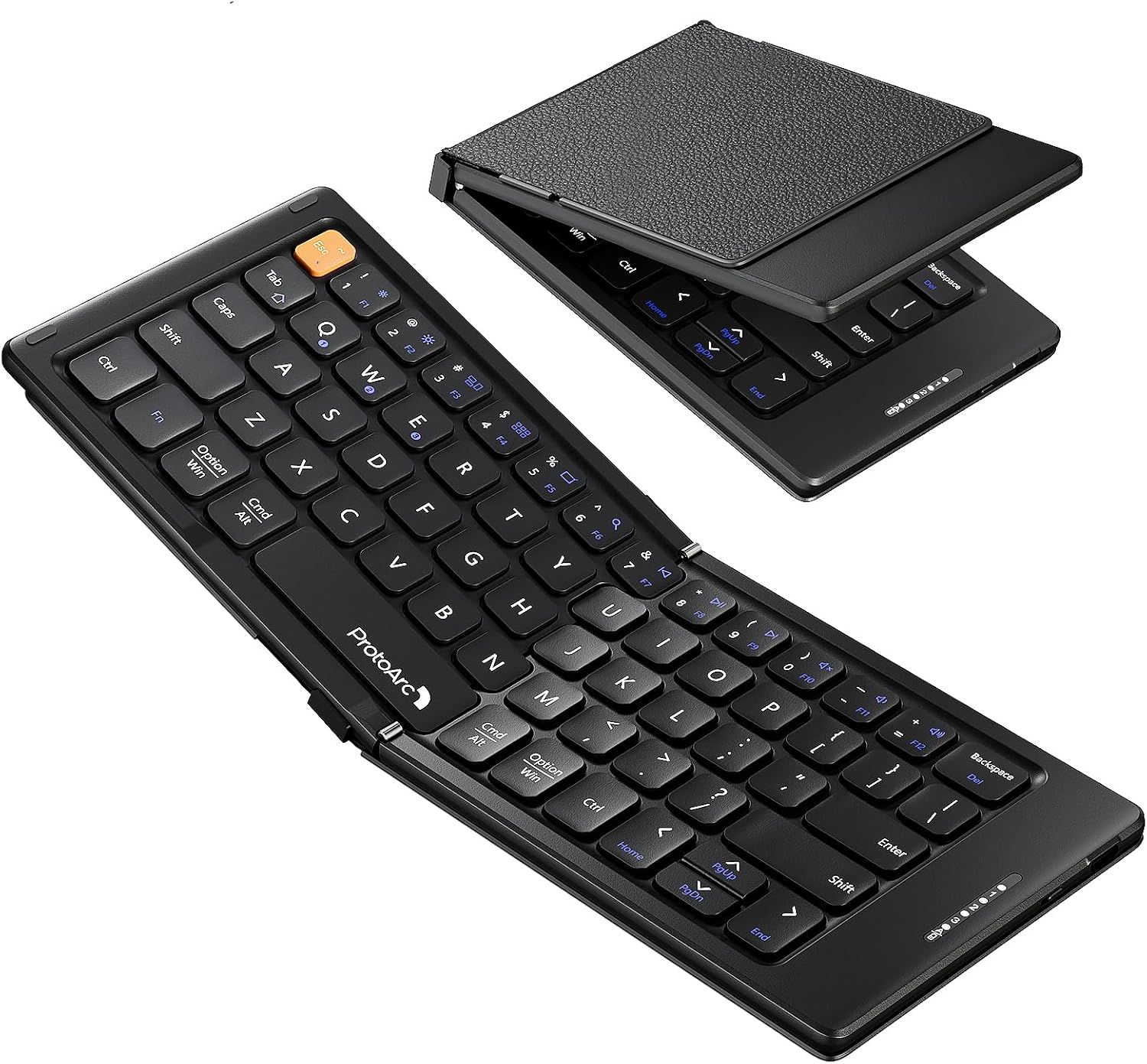
The ProtoArc XK04 foldable Bluetooth keyboard is built for phones and tablets. It is a compact keyboard that folds in half to roughly pocket size inside a PU leather cover, connects to iOS, Android, Windows, and Mac, and charges over USB-C. In the box you also get a fold-out stand, a braided USB-A to USB-C cable, a user manual with warranty details, and a quick start guide.
I have been using this folding keyboard as my travel typing setup for this ProtoArc XK04 review: cafe tables, airplane trays, and the couch. At $27.98, it sits at the budget end of the portable keyboard market, so the question is whether the small size costs you anything that matters.
The short answer is that the XK04 compact layout works better than its price suggests, though there is one part of the package I would change.
What I Liked
For a keyboard this small, the ProtoArc XK04 gets the fundamentals right. Here is what stood out across weeks of use.
A Hinge That Stays Rock Solid
The hinge is the first thing you notice when you open it. It unfolds cleanly, and once it is flat on a table there is no wobble and no flex under your hands.
Stability is the whole game for a folding keyboard, and this is where cheap ones fall apart. A Reddit reviewer in r/SamsungDex put it the same way: “When laid out flat, the center hinge is remarkably stable/stiff.”
Three Bluetooth Devices, One Keyboard
This bluetooth keyboard runs on Bluetooth 5.1 and holds three devices at once, with a rated range of 33 feet. You switch between them by holding Fn and tapping 1, 2, or 3, which sit on the Q, W, and E keys.
That means no re-pairing and no digging through Bluetooth menus when your day moves from a phone in the morning to a tablet in the afternoon. Pairing is quick, and the connection has stayed stable across sessions rather than dropping between uses.
Keys Big Enough That It’s Not Annoying
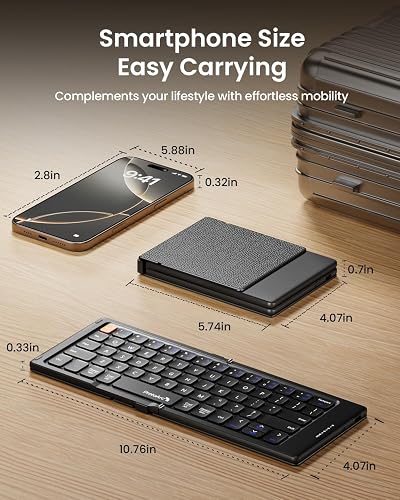
Unfolded, you get a 10.76 inch typing surface across 65 keys. It is smaller than a full-size board, but there is real space between the keycaps, so you are not mashing two letters at once.
Writing for Android Police, Andy Boxall found the same thing: “The 65-key keyboard isn’t quite full-size, but within a few minutes, I was typing with the same speed and accuracy as on my Apple iPad’s Magic Keyboard.” For something this thin, the keys also have more travel and a snappier feel than you would expect.
A Battery You Stop Thinking About
The XK04 is USB-C rechargeable, and a full charge takes about two hours. ProtoArc rates standby at up to 150 days, helped by an auto sleep mode that kicks in when you set the keyboard down.
Standby is not the same as active use, so treat that number as a ceiling. The practical result is that this is a device you top up every few weeks and otherwise stop thinking about charging. Desk keyboards can pull off the same trick, and the RK Royal Kludge M100 stretches its 8000mAh battery to a rated 400 hours with the backlight off.
Pocket-Sized, With a PU Leather Cover
Folded, it is about the size of a hard drive and sits comfortably in one palm, at 5.74 inches across and 7.8 oz. It has enough weight to feel solid rather than hollow, but it disappears in a bag.
The PU leather cover is not decoration. It protects the keys in transit, and a magnetic closure keeps the whole thing from springing open in your bag. That is the difference between this and the bare plastic folding keyboard designs you usually see at this price.
Quiet Enough for a Cafe Table
The keys are quiet in use, with no loud clatter when you get up to speed. In a shared office or a cafe, that matters more than it does at your own desk.
It is not a mechanical board and it is not trying to be one. For a keyboard that folds into a pocket, the typing sound stays out of your way.
What Needs Improvement
No keyboard at this size is without trade-offs, and a few here are worth knowing before you buy.
The Stand Is Flimsy, With Nowhere to Store It
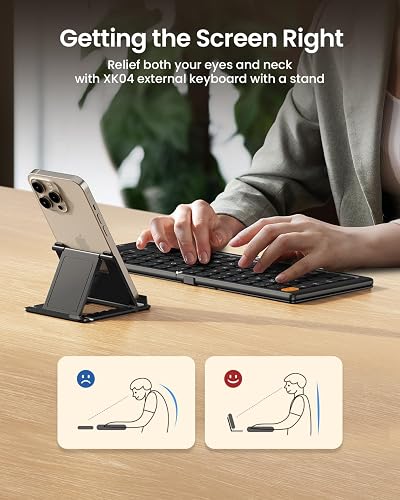
There is no built-in way to prop up a screen. You get a small fold-out stand in the box, and it does hold a phone or a tablet at a few angles, but it is a separate piece of plastic with no slot on the keyboard to store it.
Android Police landed on this as the one real compromise, calling the stand “really flimsy” with “nowhere to store it with the keyboard.” Lose the stand and half the setup goes with it.
The Compact Layout Costs You Some Accuracy
The keycaps are 0.55 inches wide, which is workable but not full-size. If you are a fast touch typist or you write long pieces all day, the layout will eventually frustrate you, and some users report going back to delete duplicated letters.
This is a purpose-built travel keyboard, not a replacement for your desk board. If you have large hands, try it before you commit.
No Backlighting at All
The keys are not backlit. On a dim flight or a late train, you are typing by feel or by whatever light the screen throws.
A Plasticky Echo Under Hard Typing
Because the shell is thin and light, there is a slightly hollow, plasticky echo when you hit the keys hard. It is a consequence of the weight savings rather than a defect, and it is not a dealbreaker at this size.
One more thing worth knowing: an owner on r/ProtoArcHub reported that “after about 3-4 months of regular use, my A through F keys have stopped working properly.” That is a single isolated report against a 4.4-star average from 1,112 Amazon ratings, and ProtoArc covers the keyboard with a two-year warranty if you land on a bad unit.
How It Compares
Foldable keyboards are a small category, and the XK04 is at the compact end of it. Here is how it sits against the alternatives people actually cross-shop.
vs ProtoArc XK01
Across the ProtoArc foldable keyboard lineup, the XK01 is the tri-fold model, and the main difference is the touchpad. As RIDEPLAY tv noted in its XK04 write-up, “the only con is there no touch pad on this model so you will need a mouse or upgrade to the XK01 version.”
The trade is size. The XK04 folds in two and lands closer to phone dimensions, while the tri-fold gives you a larger deck and pointer control. If you drive a tablet or a Samsung DeX session and want to leave the mouse at home, the XK01 is the better fit. When pointer control matters more than typing comfort, the Burhoo K808 Mini Wireless Keyboard with Touchpad puts a touchpad and real mouse buttons under your thumb in a one-handed body built for TV and presentation control.
vs Microsoft Universal Foldable Keyboard
The Microsoft foldable is the long-standing reference point in this category, and it is the bigger board of the two. A r/SamsungDex owner who has used both wrote that the ProtoArc is “SMALLER than all other keyboards, BUT great for travel because of the normal keyboard layout … so easy to type on.”
That is the trade-off in one line. Pick the Microsoft if deck size matters most; pick the XK04 if what you want is the smallest thing that still types like a keyboard.
vs Apple Magic Keyboard for iPad
The Magic Keyboard is the better typing experience and the better-integrated one, and nothing here changes that. What the XK04 offers is the gap in portability and price.
Andy Boxall’s Android Police testing found the XK04 matched his Magic Keyboard for speed and accuracy within a few minutes, in a bag that “barely accepts the iPad wrapped in the Magic Keyboard.” If the iPad lives on your desk, keep the Magic Keyboard. If you want one keyboard for your phone, tablet, and laptop under $30, the XK04 is the practical pick. If the desk board is what you would rather upgrade instead, the YUNZII B87 Wireless Mechanical Keyboard covers the same phone, tablet, and laptop switching with full mechanical typing under $80.
Final Verdict
The ProtoArc XK04 is a practical little keyboard that does the one thing it sets out to do: it makes real typing possible when all you have on you is a phone or a tablet. The convenience and freedom of carrying a keyboard this small is a productivity win at $27.98.
I am giving it a 4.3 out of 5, in line with the 4.4-star average across 1,112 Amazon ratings.
The stable hinge, three-device Bluetooth support, quiet keys, and battery you can ignore for weeks are what earn the score. It loses ground for the flimsy detachable stand, the absence of backlighting, and a compact layout that will slow down fast typists.
Bottom line: If you want a foldable keyboard that fits in a pocket and types better than it has any right to at this price, the XK04 is an easy recommendation. Just plan on finding a sturdier way to prop up your screen.
Specifications
| additional_features | Foldable, Lightweight, Portable, Rechargeable, Silent |
| antenna_location | Business Travel, Mobile Typing, Phone Messaging, Tablet Note-Taking |
| Brand | ProtoArc |
| built_in_media | Foldable Wireless Keyboard, Phone Stand, USB Cable, User Manual |
| Color | Black |
| compatible_amazon_tablet_models | Amazon Fire HD 10 13th Generation, Amazon Fire HD 8 12th Generation, Amazon Fire HD 8 Kids Pro 12th Generation |
| Compatible Devices | Laptop, Smartphone, Tablet |
| compatible_operating_system_family | Android, Windows |
| Connectivity Technology | Bluetooth |
| enclosure_material | Acrylonitrile Butadiene Styrene, PU Leather |
| hand_orientation | Ambidextrous |
| Product Dimensions | 10.76"L x 10.76"W x 0.55"H |
| item_weight | 7.8 oz |
| Keyboard Description | Flexible |
| keyboard_layout | QWERTY |
| manufacturer | ProtoArc |
| mechanical_keyboard_switch_model | Clicky |
| mfr_part_number | XK04 |
| model_name | XK04 |
| model_number | XK04 |
| number_of_items | 1 |
| number_of_keys | 65 |
| number_of_packs | 1 |
| number_of_sections | 1 |
| Style | Contemporary |
| switch_type | Clicky |
| unit_count | 1 Count |
| warranty_description | 2 Years |
| Recommended Uses For Product | Business Travel, Mobile Typing, Phone Messaging, Tablet Note-Taking |
| Special Feature | Foldable, Lightweight, Portable, Rechargeable, Silent |
| Material | Acrylonitrile Butadiene Styrene, PU Leather |
Frequently Asked Questions
Is the ProtoArc XK04 foldable keyboard good?
For its purpose, yes. It holds a 4.4-star average across 1,112 Amazon ratings, the hinge stays stiff with no wobble, and the 65-key layout is close enough to full size that you are not fighting it. The compromises are the flimsy stand and no backlighting.
How do I pair the ProtoArc XK04 with my device?
Turn on the power switch on the side first, then open Bluetooth settings on your device and select it. It holds three devices at once, and you switch between them with Fn plus 1, 2, or 3, which sit on the Q, W, and E keys.
What devices does the ProtoArc XK04 work with?
It connects over Bluetooth 5.1 to iOS, Android, Windows, and Mac at a rated 33-foot range, covering iPhones, iPads, Android phones and tablets, Fire tablets, laptops, and foldables like the Galaxy Z Fold.
How big is the ProtoArc XK04 when folded, and how much does it weigh?
Folded it measures about 5.74 by 4.07 inches and 0.7 inches thick, roughly the size of a portable hard drive. Unfolded, the typing surface is 10.76 inches wide. It weighs 7.8 oz.
How long does the ProtoArc XK04 battery last?
A full USB-C charge takes about two hours, and ProtoArc rates standby at up to 150 days thanks to an auto sleep mode. Standby is not active use, but in practice you charge it every few weeks, not every few days.
My ProtoArc keyboard isn't working. What can I do to fix it?
Check the power switch first, since the keyboard must be on before it appears for pairing. If it is on but unresponsive, charge it over USB-C, then remove it from your Bluetooth list and pair again. ProtoArc includes a two-year warranty if that fails.
Does the ProtoArc XK04 have a touchpad?
No. The XK04 is keys only, so you will want a mouse for pointer control, or ProtoArc's tri-fold XK01, which builds a touchpad into a larger deck.
Ready to Buy?
ProtoArc XK04 Foldable Keyboard delivers on its promises. If it fits your needs, it's a solid choice you won't regret.
Check Price on Amazon Founder & Product Reviewer at TheReviewRewind
Daniel has tested 400+ products across 20+ categories through hands-on, real-world testing. Every review includes video documentation and standardized scoring criteria. His reviews appear as Amazon shoppable videos and here on TheReviewRewind.
We earn a commission if you make a purchase, at no extra cost to you. This does not influence our ratings or recommendations. Full disclosure
Looking for more options? See all our Computers reviews.
Related Reviews