SHARECLOUD Android 15 Tablet Review: A Budget Pick for Everyday Basics


SHARECLOUD Android 15 Tablet Review: A Budget Pick for Everyday Basics
SHARECLOUD Android 15 Tablet
Buy if you need an affordable tablet for browsing, streaming, and light productivity with WiFi 6 and expandable storage. Skip if you need strong multitasking performance, a high-resolution display, or plan to game.
Buy on AmazonWhat We Liked
- WiFi 6 Keeps Streaming Smooth
- The Included Case Is a Thoughtful Addition
- Battery Life That Handles a Full Session
- Stock Android 15 With Easy Parental Controls
- Expandable Storage Up to 1TB with 64GB
- Bluetooth 5.4 Pairs Reliably
- Low Blue Light Display
What Could Be Better
- Physical RAM Limits Multitasking with 24GB
- The 1280x800 Resolution Shows Its Age
- The Processor Has Clear Boundaries
- Speaker Volume Falls Short
How we test: Every product is used in real conditions and evaluated using our standardized scoring criteria. Read our full review methodology.
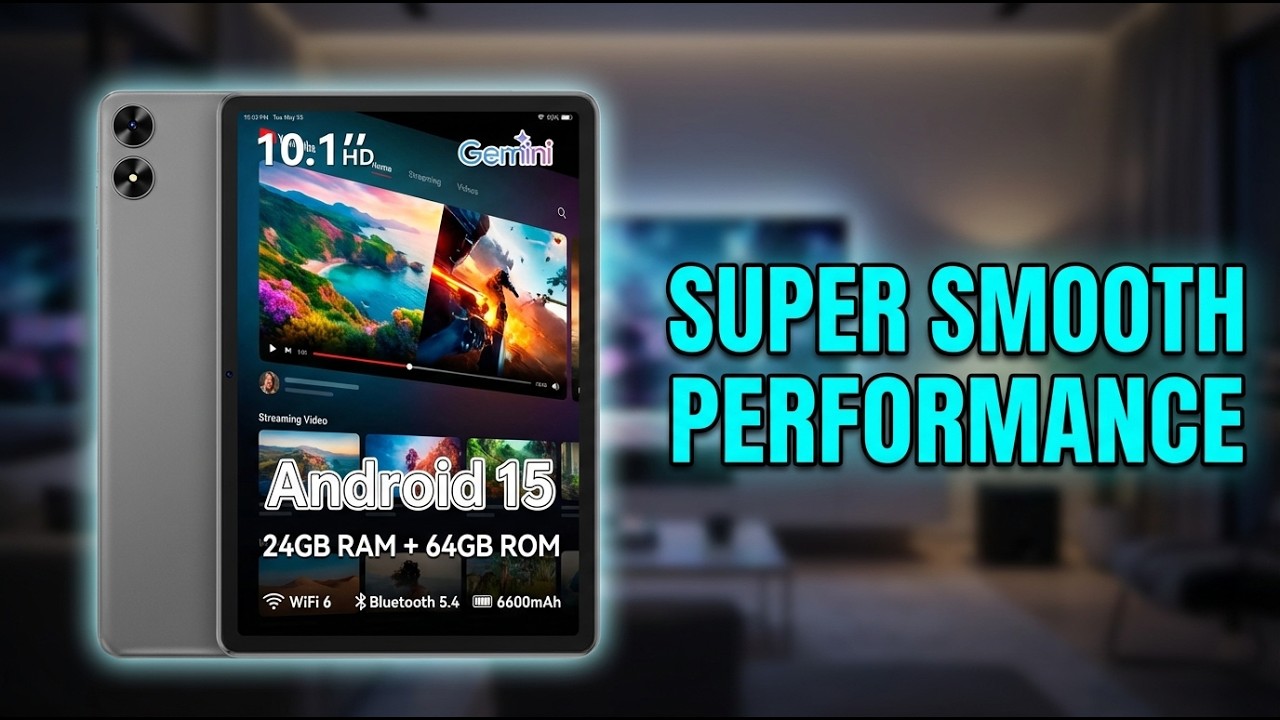
If you need a tablet for browsing, streaming, or reading but you’re working with a tight budget, the SHARECLOUD Android 15 Tablet deserves a look. This 10.1 inch tablet runs Android 15, includes Wi-Fi 6 and Bluetooth 5.4, and comes with a protective case — all at a price that undercuts most of the competition.
I spent five days testing this tablet at home and on campus WiFi. Chrome, Gmail, YouTube, and Google Docs all ran reliably with smooth app switching for everyday tasks.
The SHARECLOUD tablet delivers where it counts for casual use. The 6,600 mAh battery kept me going through hours of content, and the expandable storage up to 1TB means you won’t run out of room for apps and media files. But there are some clear trade-offs with the 4 GB physical RAM and the 1280x800 HD resolution — trade-offs you should know about before buying.
What I Liked About This Android Tablet
WiFi 6 Keeps Streaming Smooth
The Wi-Fi 6 connectivity on this SHARECLOUD Android 15 tablet with case is the standout feature at this price. I streamed YouTube and Netflix for hours without a single buffer, even on congested campus WiFi where my older tablet would choke. The 802.11ax standard also means faster downloads when you’re grabbing apps or files from the Google Play Store.
The Included Case Is a Thoughtful Addition
Most budget tablets in this price range ship bare and expect you to buy protection separately. The SHARECLOUD tablet includes a protective case with a built-in stand — no extra purchase needed. The case handles everyday drops and bumps, and the stand angle works well for hands-free streaming or video calls.
Battery Life That Handles a Full Session
The 6,600 mAh battery consistently got me through extended browsing and streaming sessions. I averaged around six to seven hours of mixed use before needing to charge, which is solid for a 10.1 inch tablet at this price point. For lighter tasks like reading or checking email, it stretches even further.
Stock Android 15 With Easy Parental Controls
There’s no bloatware here — just a clean, stock Android 15 experience. The Google Play Store gives you access to every app you’d need, and setting up parental controls is straightforward if you’re buying this for a kid. Screen time limits, content filters, and app restrictions are all built into the operating system.
Expandable Storage Up to 1TB
The 64GB of built-in ROM pairs with a microSD card slot that supports up to 1TB of expandable storage. For students loading up on textbooks and PDFs, or anyone with a large media library, the extra room makes a real difference. The combination of 24GB RAM (4 GB physical plus 20 GB virtual) and flexible storage means you’re not constantly managing space.
Bluetooth 5.4 Pairs Reliably
Connecting wireless earbuds, a keyboard, or a computer mouse via Bluetooth 5.4 worked without fuss. The pairing was quick, and the connection stayed stable across the room. For anyone using this tablet with external peripherals, the Bluetooth performance is a genuine plus.
Low Blue Light Display
The IPS touchscreen includes a low blue light mode that reduces eye strain during longer screen time sessions. If you’re reading before bed or handing this to a child for a movie, the display is noticeably easier on the eyes compared to tablets without this feature.
What Needs Improvement
Physical RAM Limits Multitasking
The 24GB RAM spec needs context: only 4 GB is physical memory, with the remaining 20 GB handled through virtual expansion. For basic tasks like browsing and streaming, this works fine. But when I tried running multiple apps simultaneously — a video, a browser, and a document — the tablet noticeably slowed down and occasionally force-closed background apps.
The 1280x800 Resolution Shows Its Age
The 10.1 inch IPS display runs at 1280x800 HD resolution, which falls short of the FHD standard you’ll find on competing 10 inch tablets. Text isn’t as sharp as I’d like for extended reading, and video content that looks crisp on a 1080p screen loses some detail here. If you’ve used a higher-resolution tablet or a modern smartphone, the difference is noticeable.
The Processor Has Clear Boundaries
The Allwinner A333 penta-core processor at 1.8GHz handles everyday tasks — email, browsing, light document work — without complaint. But graphically intensive games stutter, video editing is off the table, and even scrolling through image-heavy pages occasionally lags. This is a tablet built for basics, and the processor is the main reason why.
Speaker Volume Falls Short
The built-in speakers get the job done for casual listening, but they’re quieter than I expected. For streaming video or listening to music, I found myself reaching for Bluetooth headphones or an external speaker more often than not. In a noisy room, the speakers struggle to keep up.
How It Compares
The SHARECLOUD Android 15 Tablet review wouldn’t be complete without looking at what else is available. At this price point, there are several alternatives worth considering on Amazon and elsewhere.
Samsung Galaxy Tab A9+
The Galaxy Tab A9+ runs around twice the price but gives you an 11-inch display at 1340x800 resolution, 8 GB of physical RAM (no virtual padding), and a MediaTek Helio G88 processor. If multitasking performance matters to you, the Samsung handles app switching and split-screen use without the lag I experienced on the SHARECLOUD. The trade-off is the higher price tag.
Lenovo Tab M11
The Lenovo Tab M11 offers a 1920x1200 FHD display with a 90Hz refresh rate, 8 GB of physical RAM, and a MediaTek Helio G99 processor. The display difference alone is significant — text is sharper, video content looks noticeably better, and the 90Hz refresh rate makes scrolling feel smoother. If screen quality is your priority, the Lenovo is the stronger pick among these inch tablets.
onn 10.1” Tablet
At the other end of the budget spectrum, the onn 10.1” tablet from Walmart costs less but ships with 32 GB of storage and older WiFi standards. If you’re looking for the absolute minimum spend, the onn gets the job done for basic browsing. But the SHARECLOUD’s WiFi 6, Bluetooth 5.4, and double the storage make it the better value if you can stretch the budget slightly.
Final Verdict
The SHARECLOUD Android 15 Tablet earns a 3.7 out of 5. It does what it promises — delivers a functional Android 15 tablet experience for browsing, streaming, and light productivity at a price that’s hard to argue with.
The WiFi 6 connectivity, Bluetooth 5.4, included protective case, and expandable storage up to 1TB are genuine value adds at this price point. Customer reviews on Amazon reflect a similar sentiment, with buyers praising the tablet for everyday basics.
Where it falls short is performance under pressure. The 4 GB physical RAM and entry-level processor mean this isn’t the tablet for heavy multitasking, gaming, or creative work. The HD resolution also trails the competition.
If your needs are straightforward and your budget is firm, this tablet delivers solid value. If you need more power or a sharper screen, consider stepping up to the Samsung Galaxy Tab A9+ or Lenovo Tab M11.
Specifications
| Brand | SHARECLOUD |
| Model Name | P10C |
| Screen Size | 10.1 Inches |
| Display Resolution | 1280 x 800 Pixels |
| Operating System | Android 15 |
| RAM | 4 GB (24 GB with virtual expansion) |
| Storage | 64 GB |
| Processor | Allwinner A333 Penta-Core 1.8GHz |
| Battery | 6600 mAh |
| Wireless | WiFi 6 (802.11ax), Bluetooth 5.4 |
| Display Type | IPS |
| Expandable Storage | Up to 1 TB (microSD) |
| Color | Gray |
| Connectivity | WiFi, Bluetooth |
Frequently Asked Questions
Is the SHARECLOUD Android 15 Tablet good for kids?
Yes. The SHARECLOUD tablet comes with a protective case that handles drops and bumps, and Android 15 includes straightforward parental controls for managing screen time, content filters, and app restrictions. The low blue light display also helps protect young eyes during extended use.
How long does the battery last on the SHARECLOUD Android 15 Tablet?
The 6,600 mAh battery provides around six to eight hours of mixed use including browsing the web, streaming video, and checking email. For continuous video playback, expect closer to six hours. Battery life varies depending on screen brightness and WiFi 6 usage.
Can you expand the storage on this tablet?
Yes. The SHARECLOUD Android 15 tablet ships with 64GB of built-in ROM and supports microSD cards up to 1TB. This gives you plenty of room for apps, media files, textbooks, and documents without running out of space.
Does the SHARECLOUD tablet support Netflix and YouTube streaming?
Yes. Netflix and YouTube both run smoothly over WiFi 6 without buffering on this tablet. The 10.1 inch HD IPS screen handles video content well for casual viewing, though it may not support Widevine L1 for the highest quality HD streams on all platforms.
What is the most reliable Android tablet in this price range?
At this price point, the SHARECLOUD Android 15 tablet competes with the onn 10.1 inch tablet and similar budget options. For reliability, the Samsung Galaxy Tab A9+ and Lenovo Tab M11 have stronger track records but cost more. The SHARECLOUD offers solid value if your needs center on basic browsing, streaming, and productivity.
Ready to Buy?
SHARECLOUD Android 15 Tablet delivers on its promises. If it fits your needs, it's a solid choice you won't regret.
Check Price on Amazon Founder & Product Reviewer at TheReviewRewind
Daniel has tested 400+ products across 20+ categories through hands-on, real-world testing. Every review includes video documentation and standardized scoring criteria. His reviews appear as Amazon shoppable videos and here on TheReviewRewind.
We earn a commission if you make a purchase, at no extra cost to you. This does not influence our ratings or recommendations. Full disclosure
Looking for more options? See all our Computers reviews.
Related Reviews