WAVLINK Thunderbolt 5 Dock Review: 13-in-1 With NVMe M.2 Storage


WAVLINK Thunderbolt 5 Dock Review: 13-in-1 With NVMe M.2 Storage
WAVLINK Thunderbolt 5 Dock
Buy if you want flagship Thunderbolt 5 speed plus a built-in NVMe M.2 slot in one unit. Skip if you need native HDMI or DisplayPort, or only use a few basic ports.
Buy on AmazonWhat We Liked
- Genuine Thunderbolt 5 Speed Up To 120Gbps
- Built-In NVMe M.2 Slot Replaces An Enclosure
- Three Downstream Thunderbolt 5 Ports At 80Gbps
- 140W Power Delivery Over A Single Host Cable
- Solid Metal Chassis With Silent Passive Cooling
- Fast 2.5G Ethernet And SD 4.0 Card Reader
What Could Be Better
- No Native HDMI Or DisplayPort Video Output
- macOS Is Limited To Two External Displays
- Occasional SSD Dropouts On Mac Under Load
- Large External Brick And No Included Adapters
How we test: Every product is used in real conditions and evaluated using our standardized scoring criteria. Read our full review methodology.
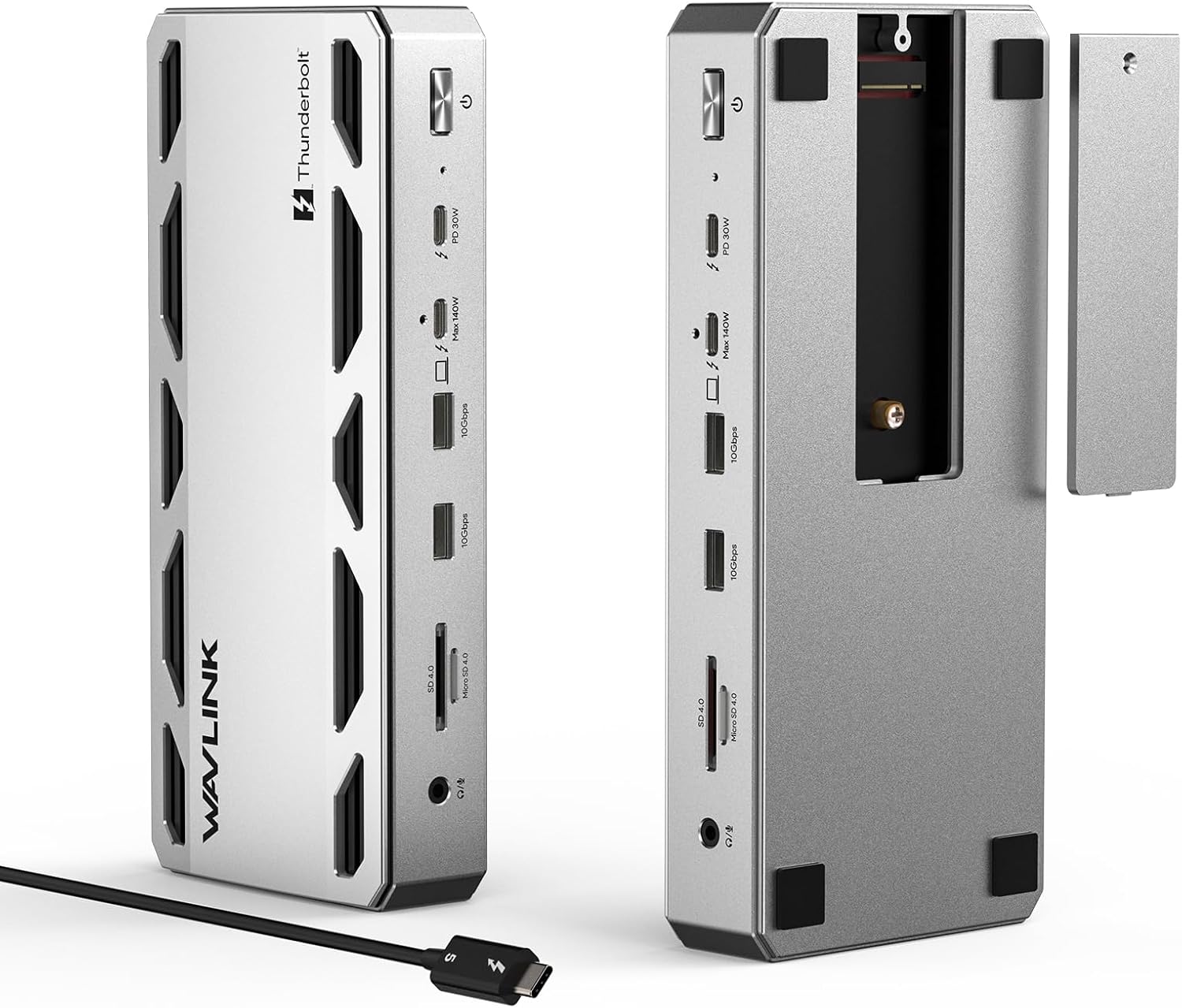
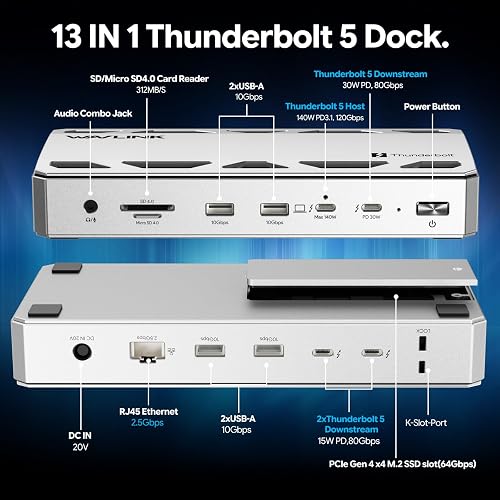
Can a single Thunderbolt 5 dock finally replace both your docking station and a separate SSD enclosure? That is the question I set out to answer with the WAVLINK Thunderbolt 5 Dock (model WL-UTD58-M), a 13-in-1 Thunderbolt 5 docking station that pairs 120Gbps host bandwidth with a built-in PCI Express (PCIe) Gen 4 x4 M.2 slot.
I ran it as my daily desk hub with a MacBook Pro, loading it up with two external computer monitors, an internal NVMe drive, three external SSDs, an SD card, and Ethernet all at once. I measured real transfer speeds from the M.2 slot, the SD 4.0 reader, and the 2.5G Ethernet port, and I checked how it behaves on both Thunderbolt 5 and Thunderbolt 4 hosts.
At $349.99, this dock sits at the flagship upper tier of the market alongside options from CalDigit, OWC, and Anker. Here is what stood out after extended testing, where it falls short, and who should actually buy it.
What I Liked
Genuine Thunderbolt 5 Speed Up To 120Gbps
The host connection runs up to 120Gbps under a supported configuration, which is the headline reason to choose Thunderbolt 5 over Thunderbolt 4. In practice that bandwidth matters when you are moving large media files, driving high-resolution displays, and running fast storage at the same time. With everything connected at once, the dock never became the bottleneck during my testing.
Built-In NVMe M.2 Slot Replaces An Enclosure
The feature that makes this dock stand apart is the PCIe Gen 4 x4 M.2 slot, which accepts a 2280 NVMe solid-state drive up to 8TB and advertises up to 64Gbps. In my testing I saw around 3,700 MB/s read and 3,150 MB/s write, which is fast enough for high-bitrate RAW footage, large photo libraries, and video timelines. Keeping that scratch storage inside the dock meant one less enclosure and cable on my desk.
Three Downstream Thunderbolt 5 Ports At 80Gbps
Beyond the upstream Thunderbolt 5 port that connects to your laptop, you get three downstream Thunderbolt 5 ports rated at 80Gbps, which is more than most docks offer. Those Thunderbolt ports give you high-bandwidth connections for displays, external SSDs, and other peripherals without constantly swapping cables. Four USB-A 3.2 Gen 2 ports at 10Gbps, an SD 4.0 card reader, and a 3.5mm audio and microphone jack round out the selection.
140W Power Delivery Over A Single Host Cable
The dock pushes up to 140W of charging back to a supported laptop through the same Thunderbolt 5 cable that carries data and video. That means a power-hungry MacBook Pro or Windows workstation stays charged without its own separate brick plugged in. The included locking clip keeps the host cable firmly seated, a small touch that stops it working loose over time.
Solid Metal Chassis With Silent Passive Cooling
At roughly 1 pound 13 ounces, the all-metal chassis feels substantial and stays planted when heavier cables are attached. The internal metal fins act as passive heatsinks, so the dock cools without a fan and runs completely silent. In my sessions it ran warm but never hot, even with the ports loaded up.
Fast 2.5G Ethernet And SD 4.0 Card Reader
Wired networking came in at around 2.35Gbps over the 2.5G Ethernet port, which is about what you expect from a 2.5G link once normal overhead is included. The SD 4.0 reader moved footage at roughly 230 to 247 MB/s with a fast card, so offloading a shoot straight to the internal SSD is quick. For photographers and video creators, that card-to-drive workflow lives in one place.
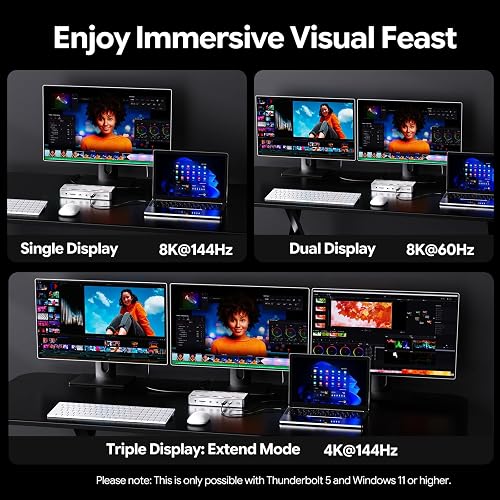
On a Windows 11 PC with Thunderbolt 5, the dock drives a single 8K display at 144Hz, dual 8K displays at 60Hz, or triple 4K displays at 144Hz. That high refresh rate keeps timeline scrubbing and window motion feeling smooth across a multi-monitor workstation. WAVLINK offers that same triple 4K output lower in its lineup, and the WAVLINK Laptop Docking Station 3 Monitors gives Windows users three independent displays from a single cable. Mac users who need more than the two displays this dock allows can look at the WAVLINK Pro Docking Station Quad 4K Displays, which drives three or four external monitors from one USB-C connection.
What Needs Improvement
No Native HDMI Or DisplayPort Video Output
The most common complaint about this dock, and the one I agree with most, is the lack of any built-in HDMI or DisplayPort. Every monitor has to connect over Thunderbolt or USB-C, so standard displays need a USB-C to HDMI or USB-C to DisplayPort cable or adapter. Those adapters are not included, which is an added cost and an easy thing to overlook before you buy.
macOS Is Limited To Two External Displays
The triple 4K at 144Hz configuration only works on a Windows 11 or later PC with a Thunderbolt 5 port. On macOS, this dock supports a maximum of two external displays, a limitation that comes from Apple’s hardware rather than WAVLINK. If you are a Mac user hoping to run three external monitors, check the compatibility list before ordering.
Occasional SSD Dropouts On Mac Under Load
Running a hot, high-capacity NVMe drive in the slot on a Mac, I saw occasional disconnects during demanding sessions, and at least one Amazon buyer reported the same. The chassis acts as the heatsink and there is no dedicated drive fan, so a drive that runs hot can struggle. It is worth knowing if you plan to hammer the internal SSD with sustained video workflows.
Large External Brick And No Included Adapters
This is a stationary desktop unit, not a travel hub. The 180W power adapter is sizable, the dock itself is heavy, and once every port is filled, cable management becomes its own small project. You also need a Thunderbolt 4 or 5 host to benefit; a Thunderbolt 4 laptop works but caps bandwidth well below Thunderbolt 5 speeds.
How It Compares
The WAVLINK WL-UTD58-M competes with the best Thunderbolt 5 docks and laptop docking station options on the market, and its built-in M.2 slot is the feature that keeps it in the conversation. Tom’s Hardware put it directly against Razer, CalDigit, Hyper, and Ivanky docks and gave it the top spot, writing that “with an integrated M.2 slot and a well-balanced assortment of ports, it’s hard to ignore its value proposition.” Macworld reached a similar conclusion, calling it “great value for money for 80Gbps speed and power.”
WAVLINK WL-UTD58-M vs CalDigit TS5 Plus
The CalDigit TS5 Plus is the premium benchmark in this category, with around 20 ports including native DisplayPort 2.1 and 10 Gigabit Ethernet. It has the connectivity and native video output the WAVLINK lacks, but it costs more and has no internal SSD slot. If you need native DisplayPort and 10GbE, the CalDigit wins; if you want built-in NVMe storage and faster-than-gigabit networking at a lower price, the WAVLINK is the smarter buy.
WAVLINK WL-UTD58-M vs OWC Thunderbolt 5 Dock
The OWC Thunderbolt 5 Dock matches the three downstream Thunderbolt 5 ports, 140W charging, and 2.5G Ethernet, and adds a fully fanless design with OWC’s Dock Ejector software. What it does not have is an internal M.2 bay. For anyone who wants local scratch storage inside the dock, that single difference is what tips the decision toward the WAVLINK.
WAVLINK WL-UTD58-M vs Sonnet Echo 13 TB5 SSD Dock
The Sonnet Echo 13 is the closest storage-equipped rival, offering add-your-own or preinstalled M.2 options alongside three downstream TB5 ports, 140W, and 2.5GbE. Sonnet adds an SSD heatsink and a quiet active fan, which directly addresses the drive-cooling concern I ran into on the WAVLINK. It is a strong alternative if you plan to run a hot, high-capacity drive continuously, though the WAVLINK undercuts it on price.
Final Verdict
The WAVLINK Thunderbolt 5 docking station is one of the most capable desktop expansion units I have tested, and the built-in NVMe M.2 slot is what justifies its place at the flagship tier. It combines genuine 120Gbps Thunderbolt 5 bandwidth, 140W charging, three downstream Thunderbolt 5 ports, fast 2.5G networking, and internal storage in a single silent, solidly built chassis. When the M.2 slot lets it replace both a high-speed dock and a separate SSD enclosure, the $349.99 price starts to look reasonable rather than steep.
The caveats are real but mostly predictable. The absence of native HDMI or DisplayPort means budgeting for adapters, macOS tops out at two external displays, and a hot internal drive can drop out on a Mac under heavy load. None of these are dealbreakers for the audience this dock is built for, but they are worth knowing before you commit.
I am rating it 4.4 out of 5. If you edit high-bitrate footage, shoot photos or video and want card-to-drive imports in one place, or build a multi-monitor workstation around a single host cable, this is a TB5 dock worth buying, provided your laptop and monitors can actually use what it offers. If you only need a few USB ports and one basic display, this is more dock than you need.
Specifications
| Brand | WAVLINK |
| Model Number | WL-UTD58-M |
| Color | Silver |
| Number of Ports | 13 |
| Total USB Ports | 4 |
| Compatible Devices | Thunderbolt 5/4 Laptops |
| Hardware Interface | Ethernet, MicroSD |
| Highlights | 120Gbps Transfer, 64Gbps M.2 SSD Transfer, 140W PD IN, 2.5G Ethernet, 4x 10Gbps USB-A, SD 4.0, Compatible with TB5/4 Laptops |
| Input Voltage | 20V DC |
| Wattage | 180 watts |
| Minimum Operating System | Windows 11 |
| Warranty | 1 Year Manufacturer |
Frequently Asked Questions
Does the WAVLINK Thunderbolt 5 Dock work with a MacBook Pro?
Yes. It works with any laptop that has a Thunderbolt 4 or Thunderbolt 5 USB-C port, including Thunderbolt-equipped MacBook Pro and Mac Studio models. On macOS the dock supports up to two external displays; the triple 4K at 144Hz mode requires a Windows 11 PC with a Thunderbolt 5 port.
Does this dock have HDMI or DisplayPort?
No. There are no native HDMI or DisplayPort outputs. All video runs over the Thunderbolt and USB-C ports, so a standard monitor needs a USB-C to HDMI or USB-C to DisplayPort cable or adapter, which is not included in the box.
Is an SSD included, and what kind does the M.2 slot take?
No SSD is included. The slot is a PCIe Gen 4 x4 M.2 slot that accepts an NVMe 2280 M-key drive up to 8TB. SATA M.2 drives are not supported, and because the chassis cover acts as the heatsink, a drive with its own large heatsink will not fit.
How fast is the internal M.2 SSD slot?
WAVLINK advertises up to 64Gbps. In my testing with an NVMe drive installed, I measured around 3,700 MB/s read and 3,150 MB/s write, which is fast enough for high-bitrate RAW footage and large file transfers.
Will it work with a Thunderbolt 4 laptop?
Yes, but with limits. A Thunderbolt 4 host works and charges, yet it caps bandwidth well below Thunderbolt 5 speeds, and the triple-display mode is unavailable. To get the full 120Gbps and triple 4K at 144Hz, you need a Thunderbolt 5 system.
How much power does it deliver to a laptop?
The host Thunderbolt 5 port provides up to 140W of power delivery over the same cable that carries data and video, so a supported laptop charges without a separate adapter. Actual wattage depends on what your laptop negotiates.
Ready to Buy?
WAVLINK Thunderbolt 5 Dock delivers on its promises. If it fits your needs, it's a solid choice you won't regret.
Check Price on Amazon Founder & Product Reviewer at TheReviewRewind
Daniel has tested 400+ products across 20+ categories through hands-on, real-world testing. Every review includes video documentation and standardized scoring criteria. His reviews appear as Amazon shoppable videos and here on TheReviewRewind.
We earn a commission if you make a purchase, at no extra cost to you. This does not influence our ratings or recommendations. Full disclosure
Looking for more options? See all our Computers reviews.
Related Reviews