Transformers Vertical Ergonomic Mouse Review: Wrist Relief With Smart Features


Transformers Vertical Ergonomic Mouse Review: Wrist Relief With Smart Features
Transformers Vertical Ergonomic Mouse
Buy if you work long hours and need wrist relief with productivity shortcuts like the control knob and copy-paste buttons. Skip if you need a gaming mouse, are left-handed, or want premium build materials.
Buy on AmazonWhat We Liked
- 57-Degree Ergonomic Design
- Versatile Knob Control
- Three-Device Connectivity
- Built-In LED Screen
- Side Copy-Paste Buttons
- Silent Clicks and Rechargeable Battery
What Could Be Better
- Mac Button Compatibility Is Limited
- Side Buttons Have a Learning Curve
- Build Quality Feels Plasticky
- Right-Hand Only Design
How we test: Every product is used in real conditions and evaluated using our standardized scoring criteria. Read our full review methodology.
Dealing with wrist pain after long hours at your desk? The Transformers Vertical Ergonomic Mouse takes a different approach to solving that problem — and adds a few surprises along the way.
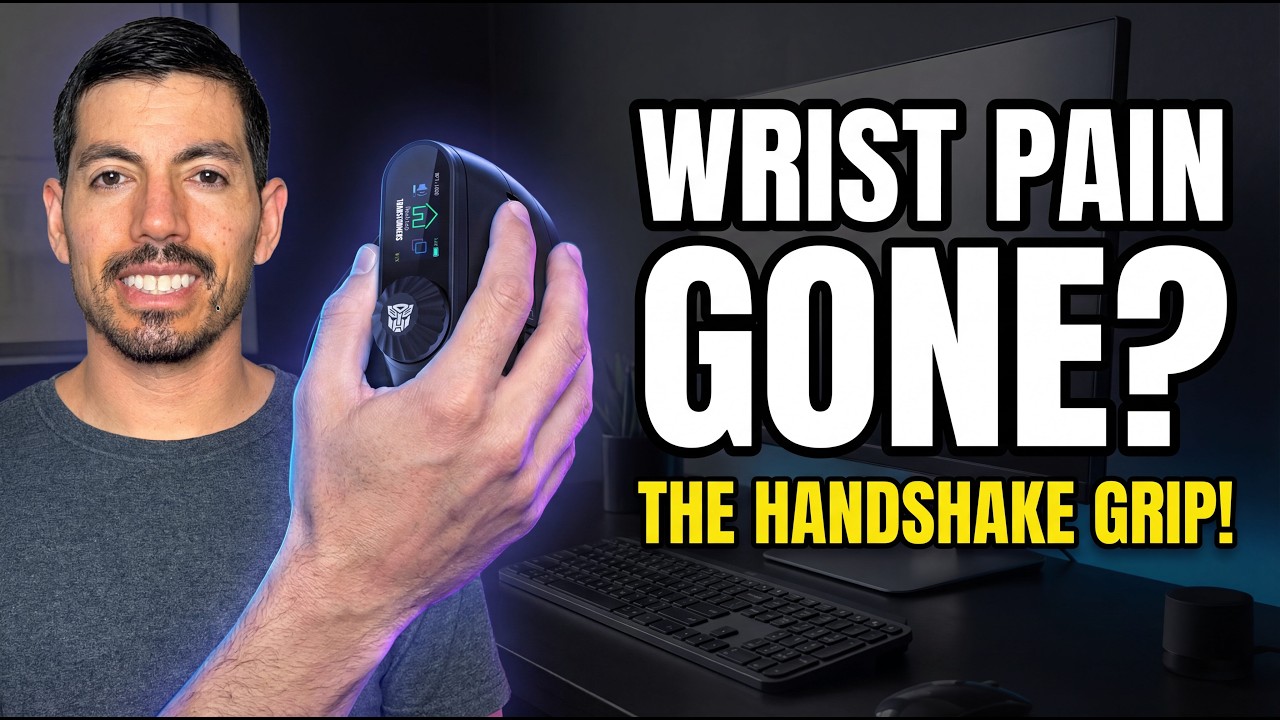
The Transformers Vertical Ergonomic Mouse is a wireless vertical mouse with a 57-degree tilt angle, a built-in LED screen, and a multi-function control knob. It connects to up to three devices via 2.4GHz wireless and dual Bluetooth 5.0, all powered by a rechargeable 500mAh battery.
I tested this mouse for two weeks across a Windows laptop and a Mac desktop, using it for spreadsheets, light design work, and general office tasks. The goal was to see if it could reduce wrist strain while keeping my workflow efficient.
The short answer? It delivers on ergonomic comfort and packs more features than I expected at this price. But there are a few trade-offs worth knowing about before you buy.
What I Liked
The Transformers Vertical Ergonomic Mouse impressed me in several areas during testing. Here are the standout features.
57-Degree Ergonomic Design
The 57-degree tilt angle places your hand in a natural handshake position, and the difference is noticeable within the first hour. I felt less forearm tension compared to my standard flat mouse, especially during afternoon work sessions.
This vertical ergonomic mouse design helps reduce the wrist pronation that contributes to carpal tunnel syndrome over time. The angle strikes a good balance — steep enough to relieve strain but not so extreme that clicking feels awkward. If you want that same handshake relief on a tighter budget, the Uineer Vertical Ergonomic Mouse delivers a comparable natural grip for around $20. A newer option from the same budget tier, the Uineer A06 Vertical Ergonomic Mouse, steepens the handshake angle to 59 degrees while keeping silent clicks and tri-mode wireless.
Versatile Knob Control
The control knob on top is the feature that surprised me most. With a click and twist, I could zoom in Photoshop, horizontal-scroll through spreadsheets, adjust volume, switch desktops, and even Alt+Tab between windows — all without extra software on Windows.
In spreadsheets and design work, this knob shaved noticeable time off my workflow. It replaces keyboard shortcuts I would otherwise fumble through, and the tactile feedback makes it satisfying to use.
Three-Device Connectivity
This mouse with LED screen connects to three devices simultaneously through 2.4GHz wireless and dual Bluetooth 5.0. I paired it with my Windows laptop, Mac desktop, and phone, and switching between them took seconds with zero lag in testing.
For anyone juggling multiple machines, this eliminates the need for separate mice or constant dongle swapping. The connection remained stable throughout my two-week testing period. Pairing this mouse with a keyboard that switches between devices just as easily, like the Keychron K10 Full Size Mechanical Keyboard, creates a seamless workflow across all three connected machines. Users on a budget who juggle multiple devices might also pair it with the YUNZII B87 Wireless Mechanical Keyboard, which offers similar wireless connectivity in a compact layout with swappable switches.
Built-In LED Screen
The tiny LCD screen displays the current DPI level, battery status, and which connection mode is active — all at a glance. It sounds like a gimmick, but it removed the guessing game I had with previous mice about what DPI setting I was on.
The screen is bright enough to read in a well-lit office without being distracting in darker setups.
Side Copy-Paste Buttons
Dedicated copy and paste buttons on the side are a thoughtful addition for daily productivity. They save the constant Ctrl+C, Ctrl+V keyboard reaches that add up throughout the day.
For anyone spending hours in documents or spreadsheets, these buttons speed up repetitive tasks noticeably.
Silent Clicks and Rechargeable Battery
The silent switches keep noise to a minimum, which matters in shared workspaces or late-night sessions. I could barely hear the clicks compared to my previous mouse.
The 500mAh rechargeable battery lasted about three weeks of daily use before needing a charge. USB-C charging means you can use any modern cable, and the mouse works while charging — no downtime required. Auto-sleep mode kicks in when idle to conserve power.
What Needs Improvement
No product is without trade-offs, and the Transformers Vertical Ergonomic Mouse has a few areas worth noting.
Mac Button Compatibility Is Limited
The forward and back buttons do not work natively on macOS. You need a third-party app to remap them, and the knob functions are more restricted on Mac compared to Windows. If you work primarily on a Mac, factor in the extra setup step.
Side Buttons Have a Learning Curve
With copy, paste, and other buttons along the thumb area, accidental presses happen frequently during the first week or two. Your grip needs to adjust to avoid triggering shortcuts unintentionally. Larger hands may find this more challenging.
Build Quality Feels Plasticky
The mouse is light and functional, but the materials do not match the feel of a Logitech MX Vertical or Lift. If you are coming from a higher-end mouse, the difference in construction is noticeable. At the $39 price point, this is an expected compromise.
Right-Hand Only Design
There is no left-handed version of this mouse. Left-handed users will need to look elsewhere, such as the Logitech Lift which offers a dedicated left-hand model.
How It Compares
The vertical ergonomic mouse market has several established players. Here is how the Transformers Vertical Ergonomic Mouse stacks up against the competition.
vs Logitech MX Vertical
The Logitech MX Vertical is the most recognized vertical mouse at $99.99. It shares the same 57-degree angle and offers Logi Options+ software for deep button customization. Build quality is noticeably better with its rubberized grip and heavier construction.
The Transformers mouse costs less than half the price and adds features the MX Vertical lacks — the LED screen, control knob, and copy-paste buttons. If you prioritize software customization and premium materials, the MX Vertical is worth the extra cost. If you want more features per dollar, the Transformers mouse delivers.
vs Logitech Lift
The Logitech Lift sits at $75 and targets smaller hands with a more compact design. It has silent clicks, Logi Options+ support, and excellent battery life from a single AA cell lasting up to 24 months.
The Transformers mouse is half the price with a rechargeable battery, LED screen, and control knob — features the Lift does not offer. The Lift wins on software integration and left-hand availability. For users who want the extra productivity features and do not mind a less polished build, the Transformers mouse is the better value.
vs SANWA Vertical Mouse
The SANWA Ergonomic Vertical Mouse offers a similar feature set with an LED screen and knob control. It adds wired USB-C as a fourth connectivity option but caps DPI at 2400 compared to the Transformers mouse’s 4000.
If you need higher DPI for precise design work or prefer the Transformers branding, the Transformers mouse is the better pick. The SANWA is worth considering if you want a wired backup option.
At $39, the Transformers Vertical Ergonomic Mouse undercuts its closest competitors significantly while offering a feature set that none of them fully match.
Final Verdict
The Transformers Vertical Ergonomic Mouse delivers on its core promise: it reduces wrist strain, and the control knob is a genuinely useful productivity tool. The tri-mode connectivity works flawlessly, and the LED screen adds practical value rather than just flash.
I am giving it a 4.0 out of 5.
It loses points for the plastic build quality, limited Mac button compatibility, and the learning curve with side buttons. These are fair trade-offs given the $39 price point, but they keep it from reaching the polish of Logitech’s offerings.
Bottom line: If you spend long hours at a desk and wrist comfort is a priority, this vertical ergonomic mouse with LED screen and control knob offers a feature set that more expensive competitors cannot match. It is a strong value pick for productivity-focused users.
Specifications
| Brand | Transformers |
| Model | TF-VM01 |
| Color | Black |
| Connectivity Technology | Bluetooth 5.0, 2.4GHz Wireless |
| Special Feature | Ergonomic, Rechargeable, LED Screen, Knob Control |
| Number of Buttons | 6+ |
| Movement Detection Technology | Optical |
| Battery | 500mAh Lithium-Ion (Rechargeable) |
| Charging | USB-C |
| Tilt Angle | 57 degrees |
| DPI Range | 800-4000 (6 levels) |
| Compatible Devices | PC, Mac, Laptop, Tablet, Phone |
| Hand Orientation | Right |
| Item Weight | Light |
Frequently Asked Questions
Are vertical ergonomic mice good?
Yes. Vertical mice place your hand in a natural handshake position that reduces the forearm twisting caused by flat mice. This can help prevent repetitive strain injuries and carpal tunnel syndrome over time. The adjustment period is typically one to two weeks.
Does the Transformers Vertical Mouse prevent carpal tunnel?
The 57-degree tilt reduces wrist pronation, which is a contributing factor to carpal tunnel syndrome. While no mouse can guarantee prevention, the ergonomic design significantly lowers strain during extended use compared to traditional flat mice.
Is the Transformers Vertical Mouse better than the Logitech MX Vertical?
It depends on your priorities. The Transformers mouse costs $39 compared to the MX Vertical at $99.99. It adds an LED screen, control knob, and copy-paste buttons that the MX Vertical lacks. The Logitech wins on build quality and software customization through Logi Options+. For feature-per-dollar value, the Transformers mouse leads.
What DPI settings does the Transformers Vertical Mouse support?
The mouse offers six DPI levels: 800, 1600, 2400, 2800, 3200, and 4000. You can switch between them using the top button, and the LED screen displays the active DPI setting in real time.
Does the Transformers Vertical Mouse work with Mac?
Yes, the mouse connects to Mac via Bluetooth or 2.4GHz wireless and tracks without issues. The main limitation is that the forward and back side buttons require a third-party app like BetterTouchTool to remap on macOS. The control knob functions are also more limited on Mac compared to Windows.
Ready to Buy?
Transformers Vertical Ergonomic Mouse delivers on its promises. If it fits your needs, it's a solid choice you won't regret.
Check Price on Amazon Founder & Product Reviewer at TheReviewRewind
Daniel has tested 400+ products across 20+ categories through hands-on, real-world testing. Every review includes video documentation and standardized scoring criteria. His reviews appear as Amazon shoppable videos and here on TheReviewRewind.
We earn a commission if you make a purchase, at no extra cost to you. This does not influence our ratings or recommendations. Full disclosure
Looking for more options? See all our Computers reviews.
Related Reviews