WALI Ultrawide Monitor Arm Review: Heavy-Duty Support Without the Premium Price

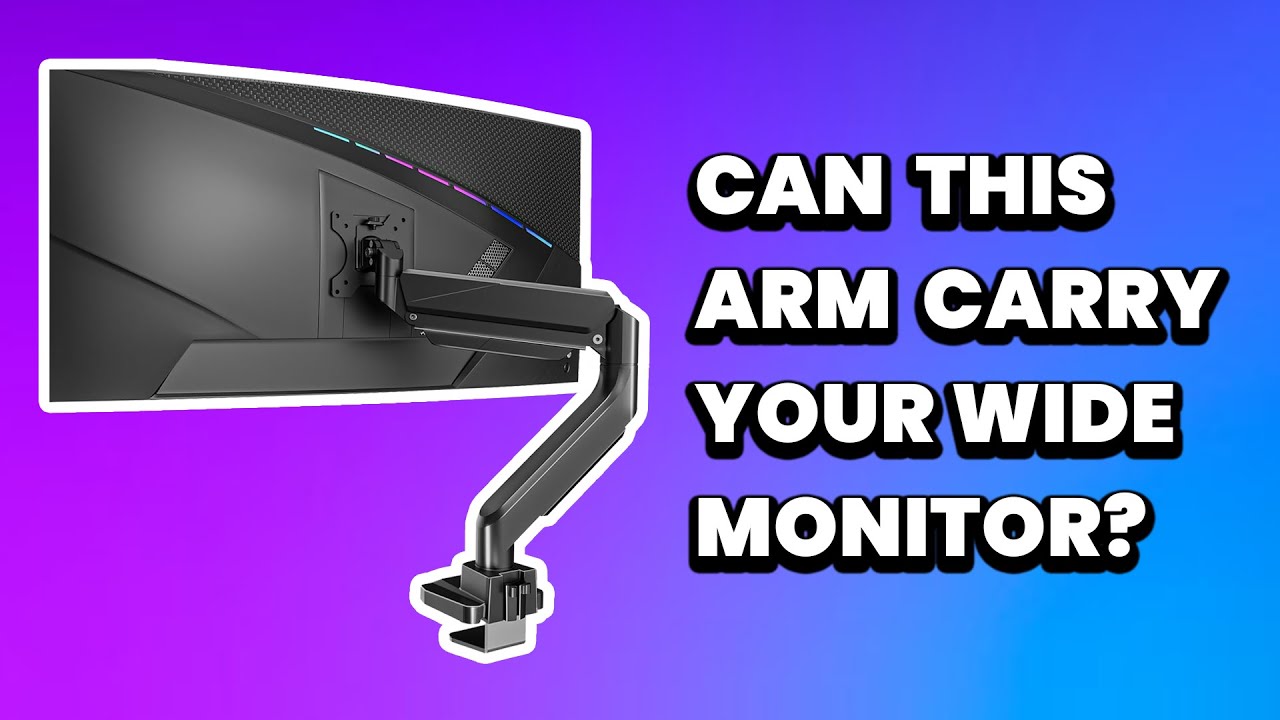

WALI Ultrawide Monitor Arm Review: Heavy-Duty Support Without the Premium Price
WALI Ultrawide Monitor Arm
Buy if you need a sturdy, affordable monitor arm for ultrawide or heavy monitors up to 33 lbs. Skip if you need frequent repositioning or premium aesthetics.
Buy on AmazonWhat We Liked
- Build Quality
- Adjustability
- Cable Management
- Value for Money
What Could Be Better
- Assembly and Installation
- Tension Calibration for Heavy Monitors
- Aesthetics
- Minor Play in VESA Connection
How we test: Every product is used in real conditions and evaluated using our standardized scoring criteria. Read our full review methodology.
Looking for a monitor arm that can handle your massive ultrawide without breaking the bank? The WALI Ultrawide Monitor Arm might be exactly what your desk setup needs.
The WALI GSM001XL is a heavy-duty gas spring desk mount designed for ultrawide monitors up to 35 inches and 33 lbs. It features VESA compatibility (75x75mm and 100x100mm), built-in cable management, and offers both C-clamp and grommet base mounting options.
I’ve been using this monitor arm for three years with a 42-inch ultrawide display. It handles my daily workflow without any issues, proving its durability through extended use.
The short answer? This arm delivers impressive value for the price. But there are some installation quirks and aesthetic trade-offs worth knowing about before you buy.
What I Liked
Build Quality
The WALI monitor arm exceeded my expectations for build quality at this price point. The arm uses high-grade steel and aluminum alloy construction that feels substantial and durable. After three years of daily use, it shows no signs of wear or degradation.
Independent testing confirms this impression. BTOD’s review noted the arm is “well-built and heavy, with wire management for both the post and the extension arms.” The clamp mount construction is notably superior to many competitors in the budget category. For standard single monitors up to 26 lbs, the HUANUO Single Monitor Arm offers a similar gas spring design with a built-in USB port at a comparable price.
Adjustability
The gas spring mechanism makes height adjustment smooth and effortless. You can move the monitor up and down just by pushing it, and it stays exactly where you leave it once properly calibrated. The arm offers +45°/-45° tilt, +90°/-90° swivel, and full 180° rotation for switching between landscape and portrait modes.
This level of adjustability rivals monitor arms costing significantly more. The ability to position your display at the perfect ergonomic height helps reduce neck and eye strain during long work sessions. If eye strain is the bigger worry during those long days, a display like the Lenovo ThinkVision P34WD-40 tackles it at the panel with flicker-free backlighting, low blue light, and an auto-brightness sensor.
Cable Management
Built-in cable routing keeps your workspace tidy. There’s a plastic flap at the rear where you can hide your power and video cables. Unlike some competitors that require tools or screw removal to access cable channels, the WALI’s cable management is intuitive and easy to use.
Value for Money
At around $45-80 depending on the specific model, the WALI delivers features you’d expect from much pricier options. The Ergotron LX, a standard bearer for premium monitor arms, costs $247-$289, roughly five to six times more than the WALI. While the Ergotron offers superior engineering and a 10-year warranty, the WALI handles everyday use just as well for most users.
After years of ownership, I can confidently say this monitor arm is worth checking out if you need ultrawide support on a budget. If you are building out a full desk setup, the Sceptre 27” Curved Monitor pairs well with this arm and keeps costs low for a multi-monitor configuration. For a portable companion to your mounted display, the SHARECLOUD Android 15 Tablet offers a budget option for reference browsing while you work on your main screen.
What Needs Improvement
Assembly and Installation
The WALI requires assembly out of the box. While the instructions are clear, you’ll spend some time putting it together before mounting your monitor. For ultrawide displays, you’ll likely need a second person to help attach the monitor to the VESA plate—it’s manageable solo, but challenging with a large, heavy screen.
Tension Calibration for Heavy Monitors
If you’re pushing close to the 33 lb weight limit, expect to spend time dialing in the gas spring tension. Reddit users report that with heavier monitors, the sagging can be significant until you find the right adjustment. One user noted they “had to tighten the joint almost breaking the L wrench” to prevent drooping.
The key is to support your monitor while adjusting tension, then slowly remove the support to test if it holds level. Getting this right on the first try is unlikely.
Aesthetics
Let’s be direct: this isn’t the prettiest monitor arm you can buy. Independent reviews have called it “probably the ugliest of the group” compared to sleeker alternatives. The plastic housing on the upper arm and the industrial clamp design prioritize function over form.
If your workspace aesthetic matters to you, the WALI might clash with a minimalist setup. But if you care more about performance than looks, this is a minor trade-off.
Minor Play in VESA Connection
Some users report a slight wobble in the bracket where the VESA plate connects to the arm. During normal use, this isn’t noticeable. However, when making fine adjustments to position your monitor perfectly level, you may need to compensate for this play.
How It Compares
Ergotron LX ($247-$289)
The Ergotron LX is the gold standard for monitor arms, but it costs five to six times more than the WALI. You get superior engineering, Constant Force technology for smoother movement, and a 10-year warranty. If you have the budget and want the absolute best, the Ergotron is hard to beat.
However, for most users who don’t need to reposition their monitor frequently, the WALI performs the same fundamental task at a fraction of the cost.
North Bayou F80 ($36)
The North Bayou F80 undercuts the WALI on price but lacks spring-assisted height adjustment. You get manual adjustment only, with more limited tilt and swivel capabilities. It has better aesthetics than the WALI, but the functional limitations make the WALI a better value overall.
HUANUO Monitor Arm ($40)
At a similar price point, the HUANUO incorporates spring-assisted height adjustment like the WALI. However, testers note it “looks and feels a bit cheaper” with more plastic in obvious areas. The WALI’s superior cable management and build quality give it the edge in this comparison.
VIVO Heavy Duty ($119)
The VIVO Heavy Duty offers similar ultrawide support and spring-assisted adjustment but costs nearly three times more than the WALI. While the VIVO’s build quality matches or slightly exceeds the WALI, the price jump is hard to justify unless you specifically need features the WALI lacks.
For budget-conscious users who need heavy-duty ultrawide support, the WALI offers the best balance of performance and price.
Final Verdict
The WALI Ultrawide Monitor Arm proves that you don’t need to spend premium prices for reliable heavy-duty monitor support. After three years of daily use, I have no reservations recommending this arm to anyone on a budget.
The build quality is solid, the adjustability is excellent for the price, and it handles ultrawide monitors with ease once properly calibrated. Yes, it requires some assembly and tension adjustment, and it won’t win any beauty contests. But these are minor trade-offs for a monitor arm that costs a fraction of premium alternatives.
I’ve had this arm for years and plan to keep using it for years to come. If you need a sturdy, affordable solution for your ultrawide display, the WALI GSM001XL deserves serious consideration.
Specifications
| Brand | WALI |
| Model | GSM001XL |
| Screen Size | Up to 35 inches (49 inches for ultrawide) |
| Weight Capacity | 33 lbs |
| VESA Compatibility | 75x75mm, 100x100mm |
| Tilt Range | +45° to -45° |
| Swivel Range | +90° to -90° |
| Rotation | 180° (landscape to portrait) |
| Max Height | 21.7 inches |
| Max Extension | 20.2 inches |
| Desk Thickness | 0.39" to 1.77" (10mm to 45mm) |
| Material | High-grade steel and aluminum alloy |
| Color | Black |
| Item Weight | 5 lbs |
| Mounting Type | C-Clamp and Grommet Base |
Frequently Asked Questions
Can the WALI monitor arm hold a 49-inch ultrawide?
Yes, the WALI GSM001XL supports ultrawide monitors up to 49 inches. However, verify your monitor weighs under 33 lbs without the stand, and be prepared to spend extra time calibrating the gas spring tension for optimal positioning.
What VESA patterns does the WALI arm support?
The WALI supports both 75x75mm and 100x100mm VESA mounting patterns, covering the vast majority of monitors on the market.
How thick can my desk be for the C-clamp?
The C-clamp works with desks from 0.39 to 1.77 inches thick (10mm to 45mm). A grommet base option is also included if you prefer drilling through your desk surface.
Does the WALI monitor arm wobble?
Some users report minor wobble or bounce during aggressive typing, especially at full extension. Positioning the monitor closer to the base minimizes this. The arm itself is stable for normal use.
How does the WALI compare to Ergotron?
The Ergotron LX offers superior engineering, smoother adjustment, and a 10-year warranty but costs five to six times more. The WALI delivers solid performance for budget-conscious users who don't need frequent repositioning.
Is assembly difficult?
Assembly is straightforward with included instructions, taking about 20-30 minutes. For ultrawide monitors, having a second person to help attach the display makes the process much easier.
Ready to Buy?
WALI Ultrawide Monitor Arm delivers on its promises. If it fits your needs, it's a solid choice you won't regret.
Check Price on Amazon Founder & Product Reviewer at TheReviewRewind
Daniel has tested 400+ products across 20+ categories through hands-on, real-world testing. Every review includes video documentation and standardized scoring criteria. His reviews appear as Amazon shoppable videos and here on TheReviewRewind.
We earn a commission if you make a purchase, at no extra cost to you. This does not influence our ratings or recommendations. Full disclosure
Looking for more options? See all our Computers reviews.
Related Reviews