wegear 140W GaN Charger Review: Four Ports, One Honest Catch


wegear 140W GaN Charger Review: Four Ports, One Honest Catch
wegear 140W GaN Charger
Buy if you want a UL-listed four-port GaN brick with a wattage display that charges a MacBook Pro fast and folds flat for travel, all for around $60. Skip if you need a genuine, sustained 140W across several devices at once, or the long support record of Anker or UGREEN.
Buy on AmazonWhat We Liked
- Genuine 140W PD 3.1 From a Single Port
- Four Ports That Actually Run Four Devices
- A Smart Display You Will Actually Read
- UL-Listed Safety on a Budget Charger
- Foldable, Travel-Ready, and Cable Included
What Could Be Better
- 140W Is a Peak, Not a Promise
- You Need the Right Cable for Full Speed
- A Dense, Heavy Brick
- The Display Sleeps After a Minute
How we test: Every product is used in real conditions and evaluated using our standardized scoring criteria. Read our full review methodology.
Traveling with a laptop, a phone, and a tablet usually means stuffing a bag with three separate wall bricks and praying one of them survives the trip. The wegear 140W GaN Charger tries to collapse that pile into a single foldable block that still charges a MacBook Pro at full speed.
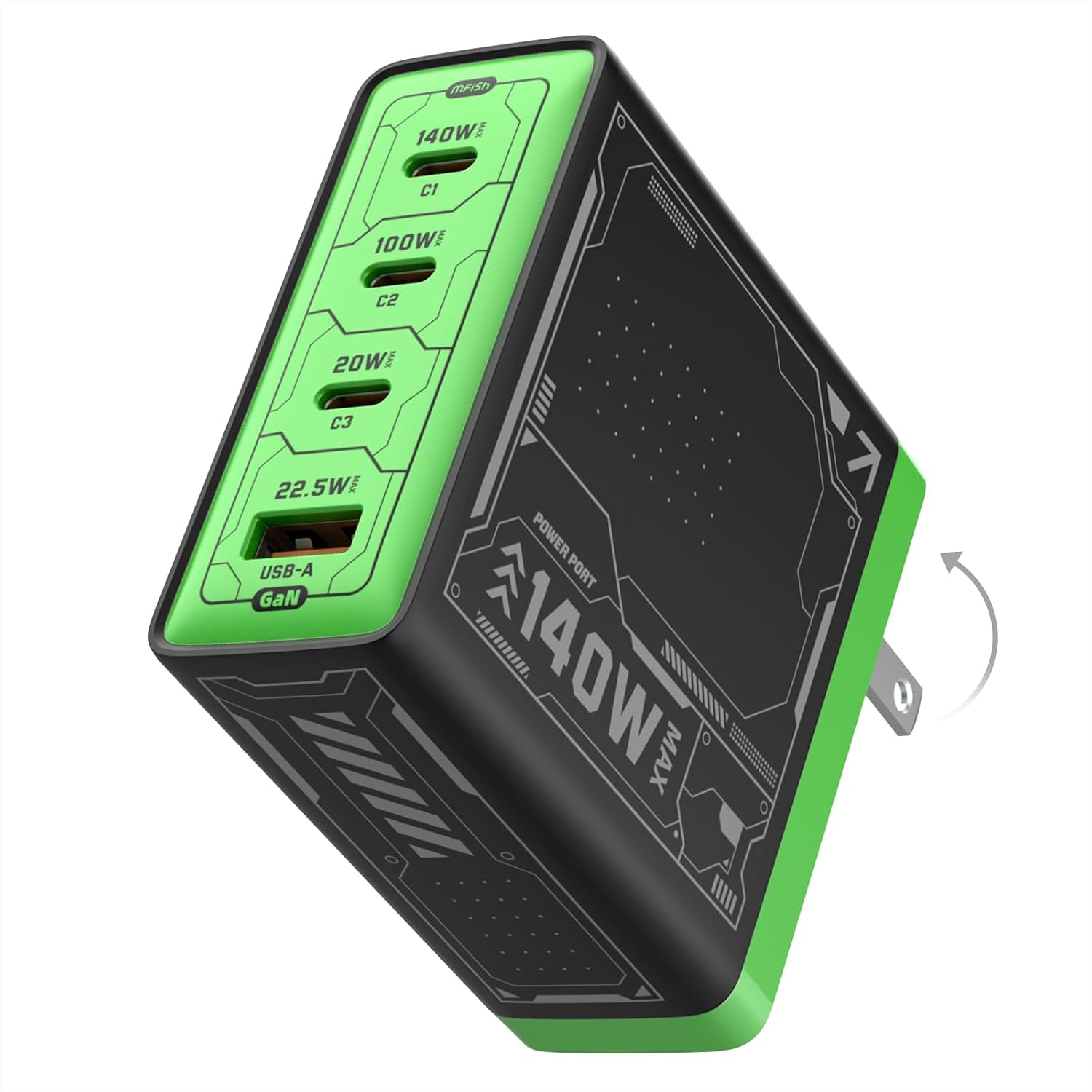
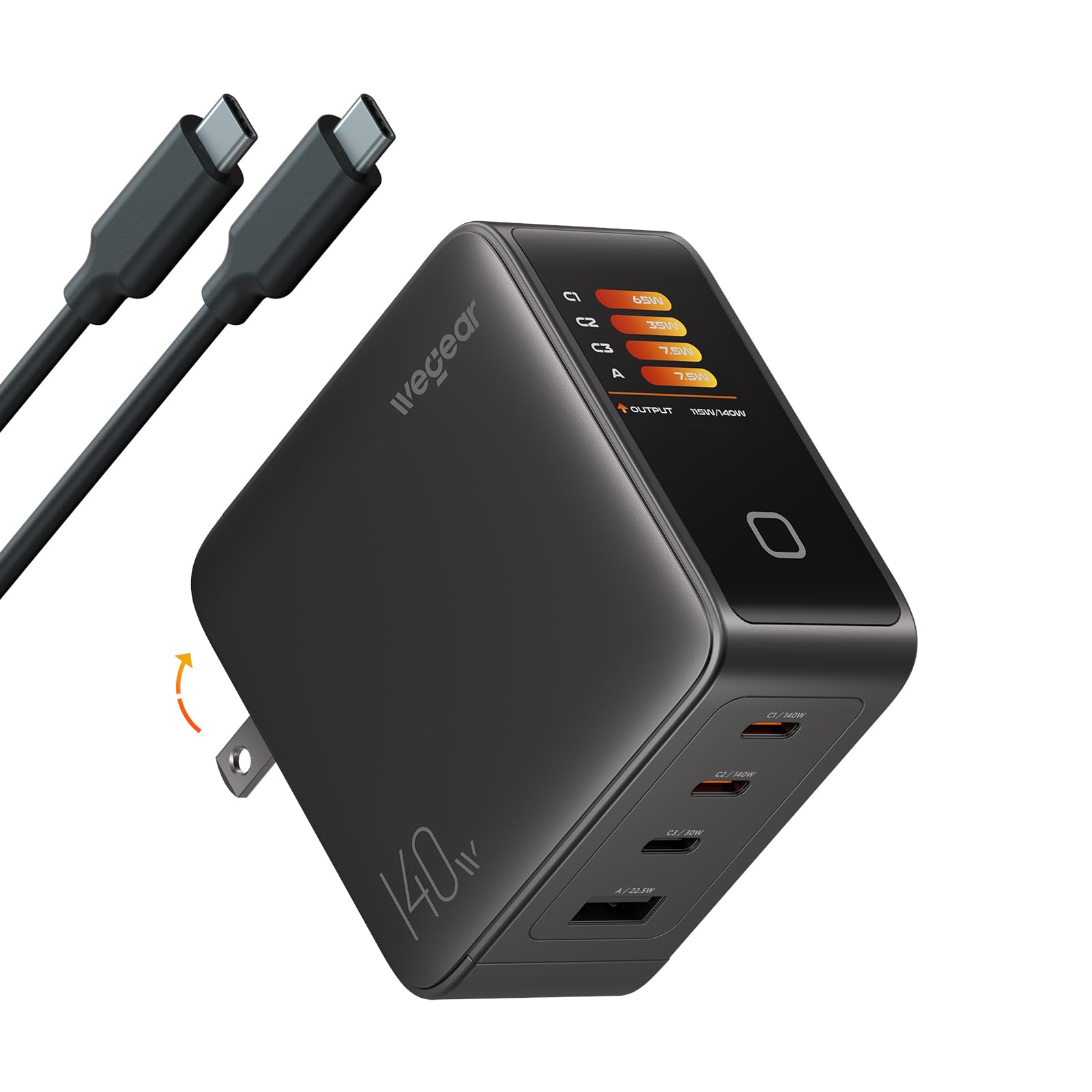
This 4-port charger pairs three USB-C ports with one USB-A port and leans on PD 3.1 to push up to 140W from a single port. A color touchscreen reads out live wattage and temperature, the prongs fold flat, and a 5-foot 240W cable comes in the box, all for a list price of $59.99.
On Amazon the charger holds a 4.5-star average across 76 ratings, solid for a brand most people have never heard of. I dug into how much power it really delivers, where it cuts corners, and how it stacks up against proven bricks from Anker, UGREEN, and Baseus.
What I Liked
The wegear gets the fundamentals right, and a few details stand out once you start charging real devices instead of reading the box.
Genuine 140W PD 3.1 From a Single Port
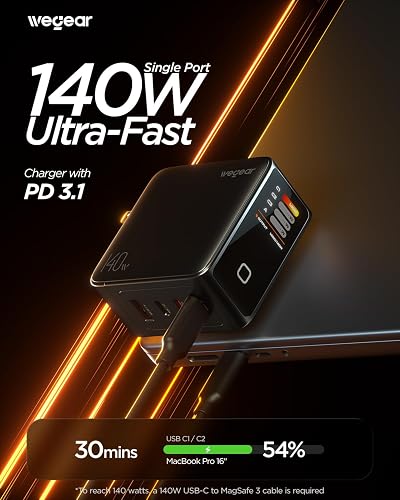
The top USB-C ports (C1 and C2) negotiate the full 140W PD 3.1 profile, enough to fast-charge a 16-inch MacBook Pro rather than trickle it. That is the number that matters for anyone replacing a laptop charger, and wegear backs it with its own 240W-rated cable in the box.
wegear’s charts put a MacBook Pro 16-inch at 54 percent after 30 minutes on a single port, and a creator who tested it saw a phone jump from 24 to 43 percent in about ten minutes. Both line up with how PD 3.1 fast charging should behave when the cable can carry the load. The same quick charging focus runs through wegear’s wider lineup, including the wegear HS1 ANC Headphones that turn a ten-minute charge into roughly five hours of playtime.
Four Ports That Actually Run Four Devices
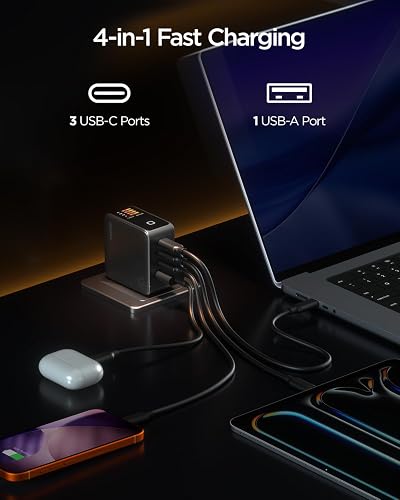
With three USB-C ports and one USB-A port, the wegear can keep up to four devices topped up from one outlet through automatic power distribution. In practice that means a laptop, a phone, and a tablet charging together instead of hunting for a second adapter.
It also supports two laptops at once, splitting to 70W plus 70W across the C1 and C2 ports. The USB-A port is a welcome holdout for older cables and accessories that never moved to USB-C. If you only charge a phone and a tablet, wegear’s smaller 67W USB-C charger covers that for less money and even less bulk. For another four-port 140W brick at a similar price, the Mfish E-Rhino 140W USB-C Charger runs the same laptop-and-phone setup, though it leaves the 240W cable out of the box.
A Smart Display You Will Actually Read
The color touchscreen is more than a gimmick. Tap the button and it cycles through per-port wattage, a temperature-monitoring screen, and a sleep indicator, so you can see at a glance whether a device is pulling its expected power.
Amazon buyers single this out, with one calling the wattage readout “really convenient” and another enjoying watching the draw drop from 45W to 11W as a phone finishes charging. It turns a dumb wall brick into something you can actually troubleshoot.
UL-Listed Safety on a Budget Charger
Unlike several cheap 140W bricks that ship with no credible safety mark, the wegear is UL listed. That certification is the single most important thing to look for in a high-wattage charger, and reviewers who test this category treat its absence as an automatic disqualifier.
A buyer who stress-tested two laptops on it specifically noted it as a “decent UL listed charger,” which is reassuring for a device that sits in your wall pushing serious current. Safety certification is not a flashy feature, but it is the one I would not skip.
Foldable, Travel-Ready, and Cable Included
The prongs fold flat so nothing snags inside a bag, and the GaN III internals keep the body compact despite the 140W ceiling. Every creator who tested it called out how easy it is to pack and go.
Crucially, wegear includes the 5-foot 240W USB-C cable you need to actually hit full speed, which many rivals leave out. That makes it a more honest value than a cheaper brick that forces a separate cable purchase, in the same way a good all-in-one travel adapter like the Epicka universal travel adapter saves you from packing extras.
What Needs Improvement
No 140W charger is flawless, and the wegear carries a few caveats that matter more because the brand has almost no independent track record.
140W Is a Peak, Not a Promise
The 140W figure applies to one port at a time, not the total shared across everything you plug in. wegear’s own notes confirm only the C1 or C2 port hits 140W, that dual output tops out at 70W plus 70W, and that the numbers come from internal testing.
A buyer who stress-tested the charger backs this up, measuring about 110W steady across two laptops with only a brief 137W transient, “not 140w.” This is not a wegear defect so much as physics: Tom’s Hardware found every 140W brick it tested throttled under sustained load, with even the premium Anker Prime settling to 118W after 30 minutes.
You Need the Right Cable for Full Speed
Reaching the full 140W requires a 240W-rated, e-marked cable, and for a MacBook at the absolute maximum, a USB-C to MagSafe 3 cable. The included 5-foot cable covers the USB-C case, but the moment you reach for a random cable from a drawer, your top speed quietly drops.
This requirement applies to every PD 3.1 charger, not just wegear. Still, it is worth knowing that “140W” and “any cable you own” are not the same sentence.
A Dense, Heavy Brick
At 10.72 ounces, the wegear has real heft for its size, and more than one Amazon reviewer was surprised by how substantial it feels in hand. On a loose or well-used outlet, that weight can make the charger sag or pull free.
The density is the price of packing 140W into a compact GaN shell, so it is a trade-off rather than a flaw. It is still noticeable in a bag or hanging from a wall socket next to lighter adapters.
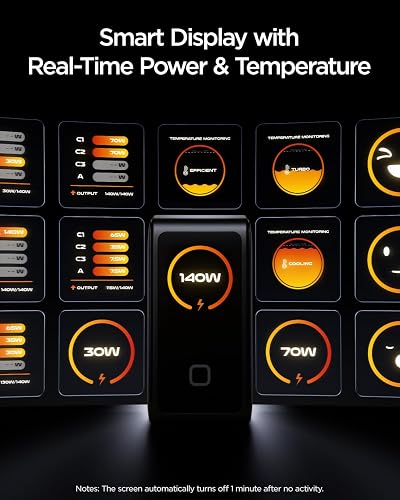
The Display Sleeps After a Minute
The color screen dims about a minute after charging activity stops, so it is not an always-on dashboard you can glance at from across the room. You have to tap the button or have a device actively drawing power to wake it.
That is sensible for heat and longevity, but buyers expecting a permanent wattage monitor should adjust their expectations. It is a convenience feature, not a lab instrument.
How It Compares
The 140W multiport space is crowded with better-known brands. Here is how the wegear stacks up against the adapters most buyers cross-shop.
vs Anker Prime 140W
The Anker Prime is the benchmark, delivering a measured 139.2W on a controlled load test and holding it for the full 30 minutes, with app-based per-port monitoring over Bluetooth. It also costs around $110, roughly double the wegear.
If you want the most proven sustained performance and a long support record, Anker is the safer pick. If you mostly want four ports, a display, and true single-port 140W for the lowest price, the wegear undercuts it hard.
vs UGREEN Nexode 140W
UGREEN’s Nexode line brings a similar smart display and well-documented power tables, and its chargers show up in independent testing rather than only in-house charts. Its headline 140W is also single-port only, dropping to about 65W per port when every port is loaded, so it shares the wegear’s core caveat.
UGREEN wins on brand pedigree and resale of trust, usually at $90 to $120. The wegear matches the everyday experience of charging a laptop and a phone together for less.
vs Baseus PD3.1 140W
The Baseus is the closest value rival, with the same 3 USB-C plus 1 USB-A layout, a bundled 240W cable, a 2-year warranty, and CE, FCC, and TUV certifications. Testers measured it holding 135W for 30 minutes before thermal throttling, slightly ahead of what you would expect from the wegear.
Baseus arguably offers more documented certification and a longer warranty. The wegear counters with its UL listing and a color display that some buyers prefer. Shoppers who only need portable power rather than a wall brick should look at a dedicated portable charger instead.
Final Verdict
The wegear 140W GaN Charger delivers what it advertises where it counts: true single-port 140W PD 3.1, four ports, a genuinely useful wattage display, and a UL listing that many budget rivals skip. At $59.99 with a 240W cable in the box, it undercuts Anker and UGREEN while matching their day-to-day charging experience.
The reservations are about expectations rather than failure. The 140W ceiling is per-port, not a shared total, so charging several power-hungry devices at once splits the budget, and the brand’s thin independent track record means you are trusting Amazon reviews more than a lab.
I rate it 4.3 out of 5. Buy the wegear from a seller with easy returns, test it hard inside the return window with the included cable, and you get a lot of modern charging technology for around sixty dollars. If a protected, sustained 140W across multiple devices or a decade of brand support matters more than price, spend up for Anker or UGREEN instead.
Specifications
| Model Number | PA2776 |
| Brand | wegear |
| Max Output | 140 watts (PD3.1) |
| Total USB Ports | 4 (3 USB-C + 1 USB-A) |
| Connector Type | USB Type-C, USB Type-A |
| Output Current | 5 A |
| Output Voltage | 28 volts (max, PD3.1) |
| Input Voltage | 100-240V AC |
| Charging Technology | GaN III |
| Special Feature | Fast charging, foldable/retractable prongs, smart color display |
| Color | Black |
| Item Weight | 10.72 ounces |
| Included Components | 140W charger, 5 ft 240W USB-C to USB-C cable, user manual |
| Compatible Devices | Laptops, phones, tablets, smartwatches |
| Warranty | 1 Year Manufacturer |
| Best Sellers Rank | #468 Computers & Accessories; #148 Laptop Chargers & Adapters |
Frequently Asked Questions
Does the wegear 140W charger really deliver a full 140W?
Yes, but only from a single USB-C port (C1 or C2) with a 240W-rated cable. The 140W is not a shared total across all four ports, so when you load several devices the power is split. One buyer who stress-tested two laptops measured about 110W steady with only a brief 137W transient, and independent testing by Tom's Hardware shows even premium 140W bricks throttle under sustained load, so this behavior is normal for the category.
Do I need a special cable for 140W charging?
Yes. PD 3.1 140W charging requires a 240W-rated, e-marked 5A cable, and for a MacBook at maximum speed a USB-C to MagSafe 3 cable. The good news is wegear includes a 5-foot 240W USB-C to USB-C cable in the box, so you can hit full speed out of the gate. A standard 60W or 100W cable will cap your charging speed.
Can the wegear charge two laptops at the same time?
Yes. With three USB-C ports and smart power distribution, it splits to 70W plus 70W across the C1 and C2 ports for two USB-C laptops, and you can add a phone or tablet on the remaining ports. Remember that total output is shared, so each device receives less than its individual maximum when several are connected.
Is the wegear 140W charger safe and certified?
It is UL listed, which is the key safety certification to look for in a high-wattage charger. That puts it ahead of several budget 140W bricks that ship with no credible electrical safety mark. As with any charger, buying from a seller with easy returns and testing it early is the smart move.
Are GaN chargers better than regular chargers?
For high-wattage charging, generally yes. Gallium nitride lets a 140W charger stay far smaller and run more efficiently than an old silicon brick of the same power, which is why the wegear can fold flat and still fast-charge a laptop. The trade-off is that cramming 140W into a pocket-sized shell makes heat management harder, so these chargers get warm under heavy load.
Is the wegear 140W charger good for travel?
It is well suited to travel. The foldable prongs protect the pins in a bag, the GaN design keeps it compact, and it ships with the cable you need so you are not packing extras. The one downside is weight, since the 10.72-ounce brick is denser than a typical wall charger.
Ready to Buy?
wegear 140W GaN Charger delivers on its promises. If it fits your needs, it's a solid choice you won't regret.
Check Price on Amazon Founder & Product Reviewer at TheReviewRewind
Daniel has tested 400+ products across 20+ categories through hands-on, real-world testing. Every review includes video documentation and standardized scoring criteria. His reviews appear as Amazon shoppable videos and here on TheReviewRewind.
We earn a commission if you make a purchase, at no extra cost to you. This does not influence our ratings or recommendations. Full disclosure
Looking for more options? See all our Computers reviews.
Related Reviews