OTVOC Laptop 15.6 Inch Review: A Budget Windows 11 Laptop With Room to Grow


OTVOC Laptop 15.6 Inch Review: A Budget Windows 11 Laptop With Room to Grow
OTVOC Laptop 15.6 Inch
Buy if you want a full-size 15.6 inch Windows 11 laptop for browsing, documents, and streaming, and you are willing to drop in a second RAM stick. Skip if you game, edit video, or need all-day battery and mainstream brand support.
Buy on AmazonWhat We Liked
- The 15.6 inch FHD IPS display is bright and easy to read
- Windows 11 stays responsive on the Core m3-8100Y processor
- An empty SO-DIMM slot lets you take this OTVOC laptop to 16GB RAM
- The 128GB M.2 SATA SSD swaps out for up to 2TB of storage
- HDMI, USB-C, and a microSD slot cover the everyday connections
- A physical privacy shutter sits over the 2MP webcam
What Could Be Better
- 4GB of RAM is the compromise you feel the most
- 128GB of storage disappears faster than the number suggests
- Battery life is a keep-the-charger-nearby proposition
- The underside runs warm enough to need desk clearance
- Build quality and brand support are where the price shows
How we test: Every product is used in real conditions and evaluated using our standardized scoring criteria. Read our full review methodology.
If your day is browsing, email, school work, and a bit of streaming, you should not have to spend a fortune to get a machine that keeps up. That is the entire pitch behind the OTVOC Laptop 15.6 inch, and it is a pitch worth testing.
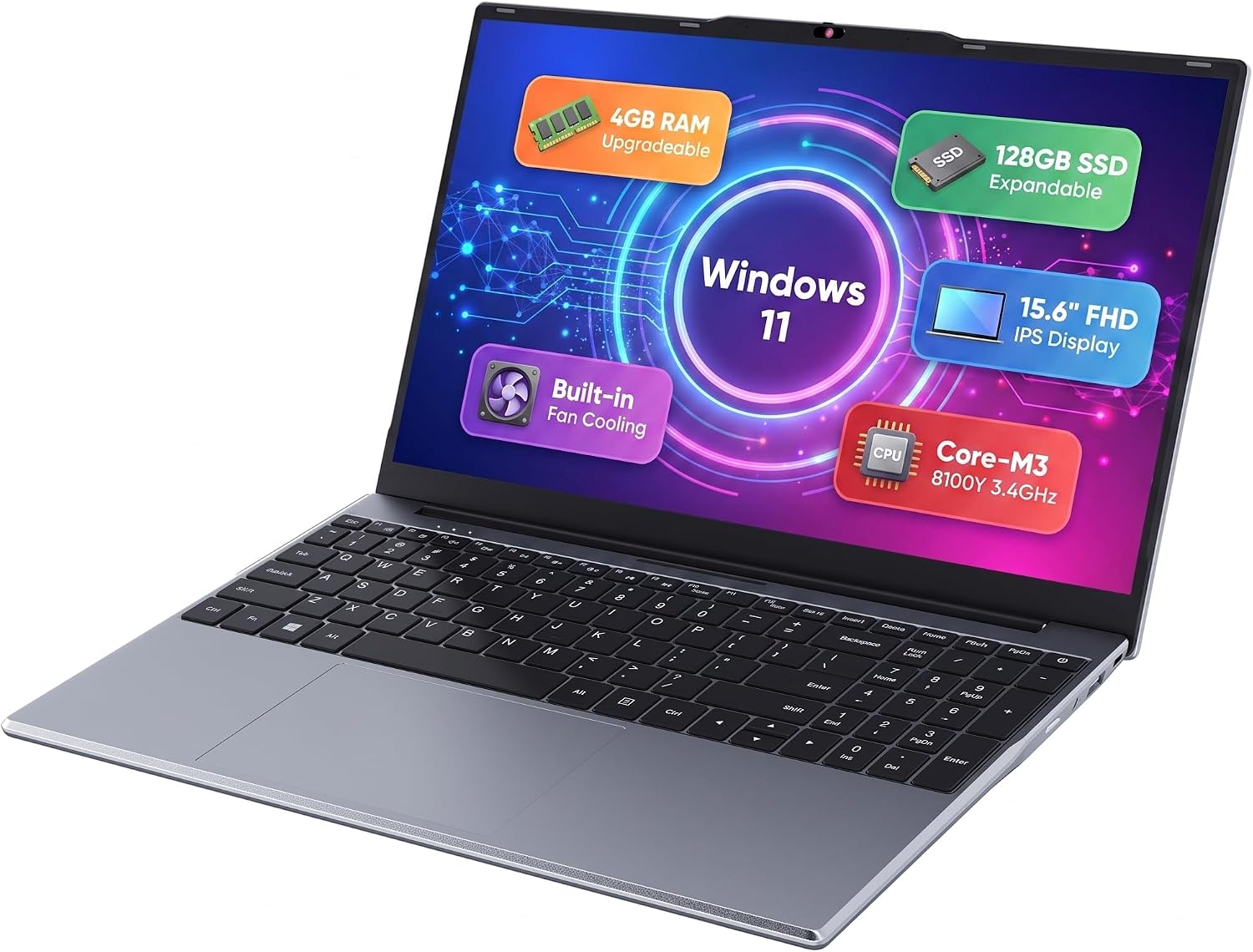
This is a full-size 15.6 inch Windows 11 laptop built around an Intel Core m3-8100Y processor, 4GB of RAM, a 128GB SSD, and a 15.6 inch FHD IPS display. OTVOC is a budget laptop brand that sits at the affordable, get-the-basics-done end of the market, and this model carries the DGBook A2 name on the box.
I spent time with it doing the things people buy a machine like this for: tab-heavy browsing, documents, and video. The part that surprised me was the speed. At this price you expect a laptop to feel sluggish, and for everyday use it simply does not.
It is not a perfect laptop, and one spec on the sheet holds it back more than any other. Here is what works, what does not, and who should skip it.
What the OTVOC Laptop 15.6 Inch Gets Right
The 15.6 inch FHD IPS display is bright and easy to read
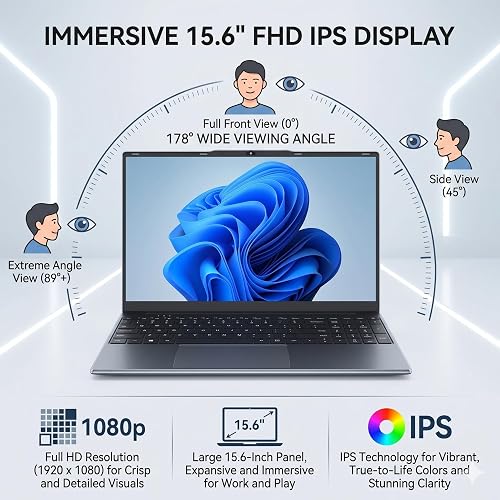
The panel is a 1920 x 1080 Full HD IPS screen rated at 300 nits with an anti-glare finish. Turned all the way up, small text stays legible and colors hold together well enough for streaming.
OTVOC rates the panel for 178 degree viewing angles, which matches what I saw leaning off to the side. For browsing, documents, and video, a full-size 1080p screen on a 15.6-inch laptop at this price is the right call. If you settle in at a desk with a screen this size, a full-size Acer Wireless Mouse beats the touchpad for long browsing and document sessions.
Windows 11 stays responsive on the Core m3-8100Y processor
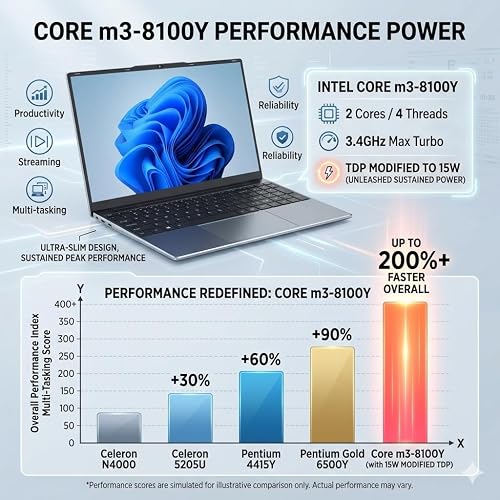
The Intel Core m3-8100Y is a dual-core, four-thread Core CPU that clocks up to 3.4 GHz and carries a dual-channel memory controller. OTVOC pairs it with an active cooling fan and lifts the sustained power limit to 15W, well above the 5W this chip normally runs at.
That matters more than the model number suggests. I had YouTube, Google News, and a weather forecast open across browser tabs, and the Windows 11 interface stayed snappy through all of it. Light multitasking is where this machine earns its keep.
An empty SO-DIMM slot lets you take this OTVOC laptop to 16GB RAM
Pop the panel on the underside and you get a genuine upgrade path. There is a pre-installed 4GB DDR3 stick plus a second, empty SO-DIMM slot that accepts a 4GB, 8GB, or 16GB module, with 16GB as the total system limit.
This is the single best thing about the machine. Almost every rival at this price solders its RAM to the board, so the memory you buy is the memory you keep.
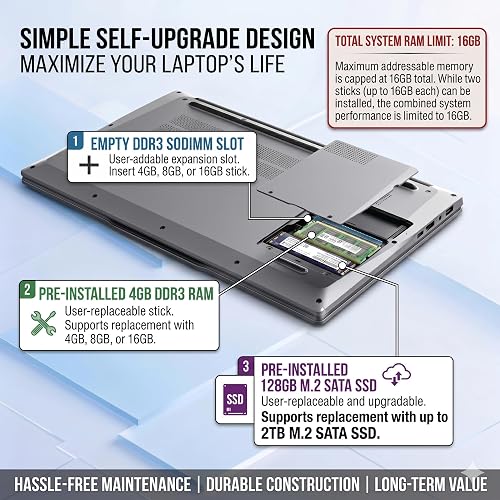
The 128GB M.2 SATA SSD swaps out for up to 2TB of storage
The drive is a user-replaceable M.2 SATA SSD rather than soldered eMMC flash, and OTVOC supports capacities up to 2TB. Boot times and file access feel quick because of it.
Storage is the other place a cheap laptop usually locks you in for good. Here you can pull the drive and move on.
HDMI, USB-C, and a microSD slot cover the everyday connections
You get two USB-A ports at USB 3.0 speeds, a USB-C port, HDMI, a 3.5mm headphone jack, a microSD card slot, and a barrel plug for the 65W adapter. HDMI drives a second monitor and the Type-C port handles accessories.
Wireless is Wi-Fi 5 (802.11ac) and Bluetooth 4.2. Neither is modern, but both connected without fuss.
A physical privacy shutter sits over the 2MP webcam
The 2.0MP front camera has an easy-glide slider that physically covers the lens. Slide it across and the camera is blocked, no software toggle required.
It is a small detail that costs OTVOC almost nothing and that plenty of pricier laptops skip. The full-size chiclet keyboard with its numeric keypad and the large, sensitive touchpad round out a layout that feels like a normal laptop rather than a compromise.
Where This Budget Windows 11 Laptop Falls Short
4GB of RAM is the compromise you feel the most
Windows 11 typically occupies 2GB to 3GB on its own once it finishes booting. On a 4GB machine that leaves very little headroom, and a heavy tab count pushes the system into swapping data out to the SSD.
The laptop handled my everyday browsing without choking, but 4GB is thin for 2026. My advice matches what the community consensus says about cheap laptops with a free slot: add a stick before you add a workload.
128GB of storage disappears faster than the number suggests
After Windows and its recovery partition claimed their share, the About screen on my unit showed roughly 19GB free. That is normal for a 128GB drive, but it catches people out.
Plan on cloud storage, a microSD card, or a larger M.2 SATA SSD from the start. Feature updates for Windows can need several gigabytes of free space on their own.
Battery life is a keep-the-charger-nearby proposition
The 38Wh three-cell battery is small, and in mixed use you are looking at a few hours before it wants a top-up rather than a full working day. OTVOC quotes about four hours, and one Amazon owner reported roughly three hours of continuous use.
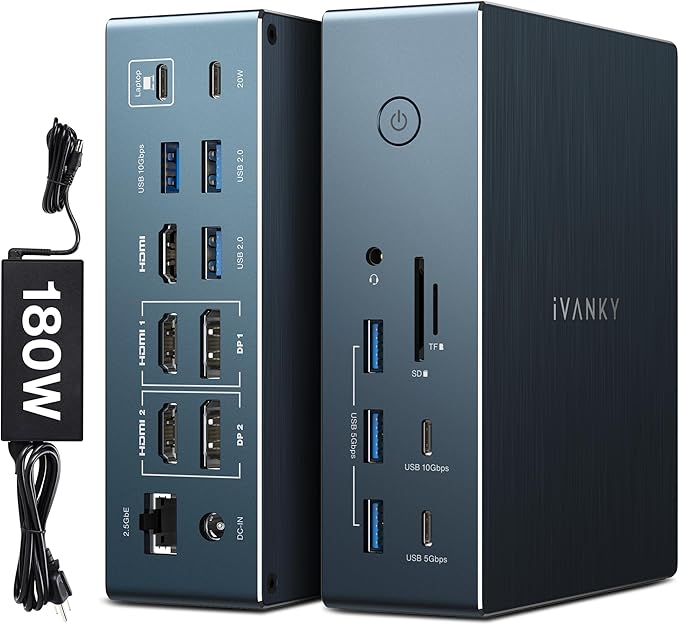
The laptop is light enough that carrying the 65W adapter along with it is not a burden. If you need to work unplugged all day, this is not the machine. Something like the SHARECLOUD Android 15 Tablet stretches six to eight hours of browsing and streaming on a charge if untethered time matters more to you than running Windows. When the laptop stays parked at a desk instead, a WAVLINK laptop docking station adds monitors, Ethernet, and card readers through a single USB-C connection.
The underside runs warm enough to need desk clearance
Like most budget laptops, the bottom panel heats up under sustained load. Give it clearance on a desk rather than burying it in a blanket or a pillow.
One Amazon reviewer made the same observation and asked for longer feet. A cheap cooling pad solves it if you work with the laptop on your lap.
Build quality and brand support are where the price shows
The chassis does not feel flimsy, but it does not feel like a MacBook Pro either, and you should not expect it to. The touchpad was serviceable for me, though two of the eight Amazon reviews I read mention switching to an external mouse.
The more serious flag is longevity. One owner reported the built-in keyboard failing after eight months, and buyers on hardware forums consistently warn that small Amazon-native laptop brands offer thinner after-sales support than mainstream manufacturers. OTVOC covers this model with a one-year manufacturer warranty.
How It Compares to Other Budget 15.6 Inch Laptops
The sub-$400 shelf is crowded, and the OTVOC laptop wins or loses on one axis: what you are allowed to change after you buy it.
The Acer Aspire Go 15 is the usual recommendation at roughly $280 to $300, and its Intel Core i3-N305 is a stronger chip than the m3-8100Y on paper. The catch is that its 8GB of LPDDR5 is soldered to the board and its 128GB of storage is UFS flash, which is phone-grade memory rather than a true SSD. It has an empty M.2 slot, so you can add a drive, but the RAM is fixed for life.
The Lenovo IdeaPad 1 earns its reputation on the best keyboard in this class and eight to nine hours of battery, both of which beat the OTVOC outright. Its RAM is also soldered. If you buy 8GB, you own 8GB in 2029.
At the bottom of the market the HP Stream 14 runs about $250 to $289 with an Intel Celeron CPU and 64GB of eMMC storage. It gets close to eight hours of browsing, but reviewers who tested it ran out of comfortable storage headroom in about ten days. The Celeron is also a genuine bottleneck once you do anything beyond basic browsing.
That is where the OTVOC lands. NotebookCheck notes that Y-series chips like the m3-8100Y live or die on the cooling solution and the sustained TDP the manufacturer allows, and PassMark rates this one at a 2,754 CPU Mark with a 1,602 single-thread score. Paired with a fan and a 15W ceiling, it out-runs the Celeron machines it shares a price bracket with, and unlike almost all of them, both the RAM and the SSD come out with a screwdriver.
Worth noting: OTVOC also sells the VocBook line. The OTVOC VocBook 15.6 inch models and the 16 inch version pair a Celeron or N95 processor with 16GB dual channel RAM and a 512GB PCIe NVMe SSD, so a second OTVOC laptop in the same catalogue solves this OTVOC laptop’s two biggest weaknesses out of the box. If you want the memory and a 512GB PCIe SSD up front rather than as an upgrade, that is the 15.6 inch laptop to look at instead of this one.
Final Verdict on the OTVOC Laptop 15.6 Inch
The OTVOC Laptop 15.6 inch earns a 3.9 out of 5 from me, and the number is conditional on purpose. What you get is a bright full-size 1080p screen, faster everyday performance than the price suggests, and a machine that can grow instead of being replaced.
What holds it back is real too. 4GB of RAM is thin for Windows 11, the battery wants a charger after a few hours, and a small brand means thinner support than a Lenovo or an Acer if something fails.
My recommendation is simple: if you buy this laptop, buy a RAM stick with it. Filling that second SO-DIMM slot turns a machine that is adequate at everyday computing into one that stays comfortable for years, and it costs a fraction of what a better-specified laptop would. Set your expectations for browsing, documents, and streaming, do the upgrade, and this is a laptop worth checking out.
Specifications
| antenna_location | Education, Home Office, Light Productivity, Personal Use, Video Streaming, Web Browsing, Word Processing |
| audio_features | Built-in Microphone, Hd Audio, Stereo Speakers |
| audio_output_type | 3.5mm Headphone Jack, Built-in Speakers |
| automatic_backup_software_included | Windows 11 Home |
| available_m2_slot_count | 1 |
| battery_average_life_standby | 6 hours |
| battery_cell_type | Lithium Ion |
| battery_life | 4 hours |
| bluetooth_version | 4.2 |
| Brand | OTVOC |
| built_in_media | Laptop |
| cache_memory_installed_size | 4 GB |
| camera_description | 2MP HD Webcam, Front |
| cellular_technology | Not Supported |
| charging_time | 3 hours |
| chipset_type | Intel Soc |
| Color | Silver |
| color_gamut | 45 |
| compatible_devices | Laptop, Notebook Computer, Personal Computer |
| compatible_flash_memory_type | microSD, microSDHC, microSDXC |
| connectivity_technology | Bluetooth, HDMI, USB, Wi-Fi |
| control_method | Touch |
| cpu_l1_cache | 128 KB |
| cpu_l2_cache | 512 KB |
| cpu_l3_cache | 4 MB |
| cpu_model_generation | 8th Generation |
| cpu_model_number | Core M3-8100Y |
| cpu_model_speed_maximum | 3.4 GHz |
| display_maximum_resolution | 1920 X 1080 |
| display_refresh_rate_in_hertz | 60 |
| display_resolution_maximum | 1920x1080 |
| display_technology | Ips, Led Backlit |
| display_type | LCD |
| eu_spare_part_availability_duration | 2 years |
| form_factor | Laptop |
| graphics_card_ram | 0.5 |
| graphics_coprocessor | Intel UHD Graphics 615 |
| graphics_description | Integrated |
| graphics_ram_type | DDR3 SDRAM |
| hard_disk_description | SSD |
| hard_disk_interface | Solid State |
| hard_drive_size | 128 |
| hardware_interface | USB 3.0 |
| human_interface_input | Touch Pad |
| item_dimensions_l_x_w_x_thickness | 14.08"L x 9.03"W x 0.76"Th |
| item_highlight | Upgradeable RAM+SSD, 15.6" FHD IPS Display, 2MP Webcam, Cooling Fan, Type-C&HDMI, For Study, Daily Office Work |
| item_weight | 4 pounds |
| keyboard_description | Full-size Chiclet Keyboard With Numeric Keypad |
| keyboard_layout | QWERTY |
| lithium_battery_energy_content | 38 watt-hours |
| manufacturer | OTVOC |
| maximum_display_brightness | 300 nit |
| memory_clock_speed | 2133 |
| memory_speed | 1333 MHz |
| memory_storage_capacity | 128 GB |
| mfr_part_number | DGBook_A2_HNL_US |
| microphone_form_factor | Built-in |
| Model Name | DGBook A2 |
| model_number | DGBook A2 |
| model_series | Otvoc Laptop Series |
| model_year | 2025 |
| native_resolution | 1920 x 1080 pixels |
| notebook_pointing_device_description | Built-in Touchpad With Multi-touch Gesture Support |
| number_of_cells | 3 |
| number_of_items | 1 |
| number_of_packs | 1 |
| number_of_ports | 5 |
| Operating System | Windows 11 Home |
| operating_system_family | Windows |
| optical_storage_device | No |
| other_special_features_of_the_product | Built-In Webcam, Built-in Microphone, Lightweight, Thin Design, Wi-fi |
| power_device | 65w Ac Adapter, Built-in Lithium-ion Battery |
| processor_brand | Intel |
| processor_count | 2 |
| processor_series | Core m3-8100Y |
| processor_speed | 1.1 GHz |
| ram_memory_installed | 4 GB |
| ram_memory_maximum_size | 16 GB |
| ram_memory_slot_total_count | 2 |
| ram_memory_technology | DDR3 |
| ram_size | 4 |
| ram_type | SODIMM |
| resolution | 1080p |
| screen_bezel_thickness | 0.5 Inches |
| screen_finish | Anti-glare |
| Screen Size | 15.6 inches |
| series_number | 8000 |
| speaker_description | Built-in Stereo Speakers |
| specific_uses_for_product | Business |
| supported_monitor_maximum_quantity | 2 |
| total_number_of_hdmi_ports | 1 |
| total_usb_ports | 3 |
| touch_screen_type | Non-touch Screen |
| touchpad_feature | Gesture Support, Multi-touch, Scroll |
| unit_count | 1 Count |
| video_output | Hdmi |
| video_processor | Intel |
| warranty_description | 1 year warranty |
| warranty_type | 1 Year Manufacturer Warranty |
| wi_fi_generation | Wi-fi 5 (802.11ac) |
| wireless_compability | 802.11a/b/g/n |
| wireless_technology | Bluetooth, Wi-Fi |
| Hard Disk Size | 128 |
| CPU Model | Core m3-8100Y |
| Ram Memory Installed Size | 4 GB |
| Special Feature | Built-In Webcam, Built-in Microphone, Lightweight, Thin Design, Wi-fi |
| Graphics Card Description | Integrated |
Frequently Asked Questions
Can you upgrade the RAM and storage on this OTVOC laptop?
Yes, and this is the main reason to pick it. A panel on the underside exposes a pre-installed 4GB DDR3 SO-DIMM stick alongside a second, empty SO-DIMM slot that accepts a 4GB, 8GB, or 16GB module, with 16GB as the total system limit. The 128GB M.2 SATA SSD is also user-replaceable with a drive of up to 2TB. There is no separate HDD bay, so the M.2 slot is your only storage path.
Is 15.6 inches a good screen size for a laptop?
For a desk or a dorm room, yes. A 15.6 inch panel gives you room to work with two documents side by side and makes streaming comfortable, and it is what allows this OTVOC laptop to fit a full-size keyboard with a numeric keypad. The trade-off is portability: at 4 pounds and 14.08 x 9.03 x 0.76 inches, it is a laptop you carry between rooms rather than one you forget is in your bag.
Is 4GB of RAM enough for Windows 11?
It clears Microsoft's official minimum, but it does not leave much room. Windows 11 typically uses 2GB to 3GB after boot, so a handful of browser tabs plus a video call will push the system into swapping to disk. For browsing, documents, and streaming it holds up; for anything heavier, add a second stick.
Can the OTVOC Laptop 15.6 inch handle gaming or video editing?
No, and OTVOC does not claim otherwise. The Intel UHD Graphics 615 built into the Core m3-8100Y will run light, older titles at low settings, but serious gaming, video editing, and music production need more CPU power, more RAM, and a dedicated GPU.
How long does the battery last?
Expect a few hours rather than a full day. The 38Wh three-cell battery is rated at about four hours, and in mixed real-world use you will want the 65W adapter nearby. The laptop is light enough that carrying the charger with it is not much of an inconvenience.
What ports does it have?
Two USB-A ports, one USB-C port, HDMI, a 3.5mm headphone jack, a microSD card slot, and a barrel connector for the power adapter. HDMI lets you drive a second monitor, and wireless is handled by Wi-Fi 5 (802.11ac) and Bluetooth 4.2.
How does the OTVOC laptop compare to the OTVOC VocBook?
They are different machines for different buyers. This model is a Core m3-8100Y with 4GB of RAM and a 128GB M.2 SATA SSD that you upgrade yourself, while the OTVOC VocBook 15 and VocBook 16 ship with a Celeron or N95 processor, 16GB of RAM, and a 512GB NVMe SSD out of the box. Pick this one if you want the stronger single-core chip and plan to upgrade; pick a VocBook if you want the memory and storage on day one.
Ready to Buy?
OTVOC Laptop 15.6 Inch delivers on its promises. If it fits your needs, it's a solid choice you won't regret.
Check Price on Amazon Founder & Product Reviewer at TheReviewRewind
Daniel has tested 400+ products across 20+ categories through hands-on, real-world testing. Every review includes video documentation and standardized scoring criteria. His reviews appear as Amazon shoppable videos and here on TheReviewRewind.
We earn a commission if you make a purchase, at no extra cost to you. This does not influence our ratings or recommendations. Full disclosure
Looking for more options? See all our Computers reviews.
Related Reviews