Acer Wireless Mouse Review: A Full-Size Budget Mouse for Laptop Work


Acer Wireless Mouse Review: A Full-Size Budget Mouse for Laptop Work
Acer Wireless Mouse
Buy if you want a comfortable, full-size wireless mouse for laptop and office work that just plugs in and goes. Skip if you need Bluetooth, a rechargeable battery, or low-latency gaming performance.
Buy on AmazonWhat We Liked
- The Button Clicks Feel Better Than the Price Suggests
- Adjustable DPI That Works Without Installing Any Software
- A Full-Size Shape That Suits Medium to Large Hands
- Plug-and-Play Setup, Even on a Locked-Down Work Laptop
- Side Buttons and a Clickable Scroll Wheel Add Real Navigation
What Could Be Better
- Standby Mode Kicks In Faster Than You Expect
- No Bluetooth At All, So the Dongle Is Your Only Option
- Acer Doesn't Include the AA Battery You Need
- The Printed Instructions Are Tiny and Multi-Language
How we test: Every product is used in real conditions and evaluated using our standardized scoring criteria. Read our full review methodology.
Most budget wireless mice give themselves away the moment you pick one up. The plastic flexes, the clicks feel hollow, and the whole thing feels cheap in your hand.
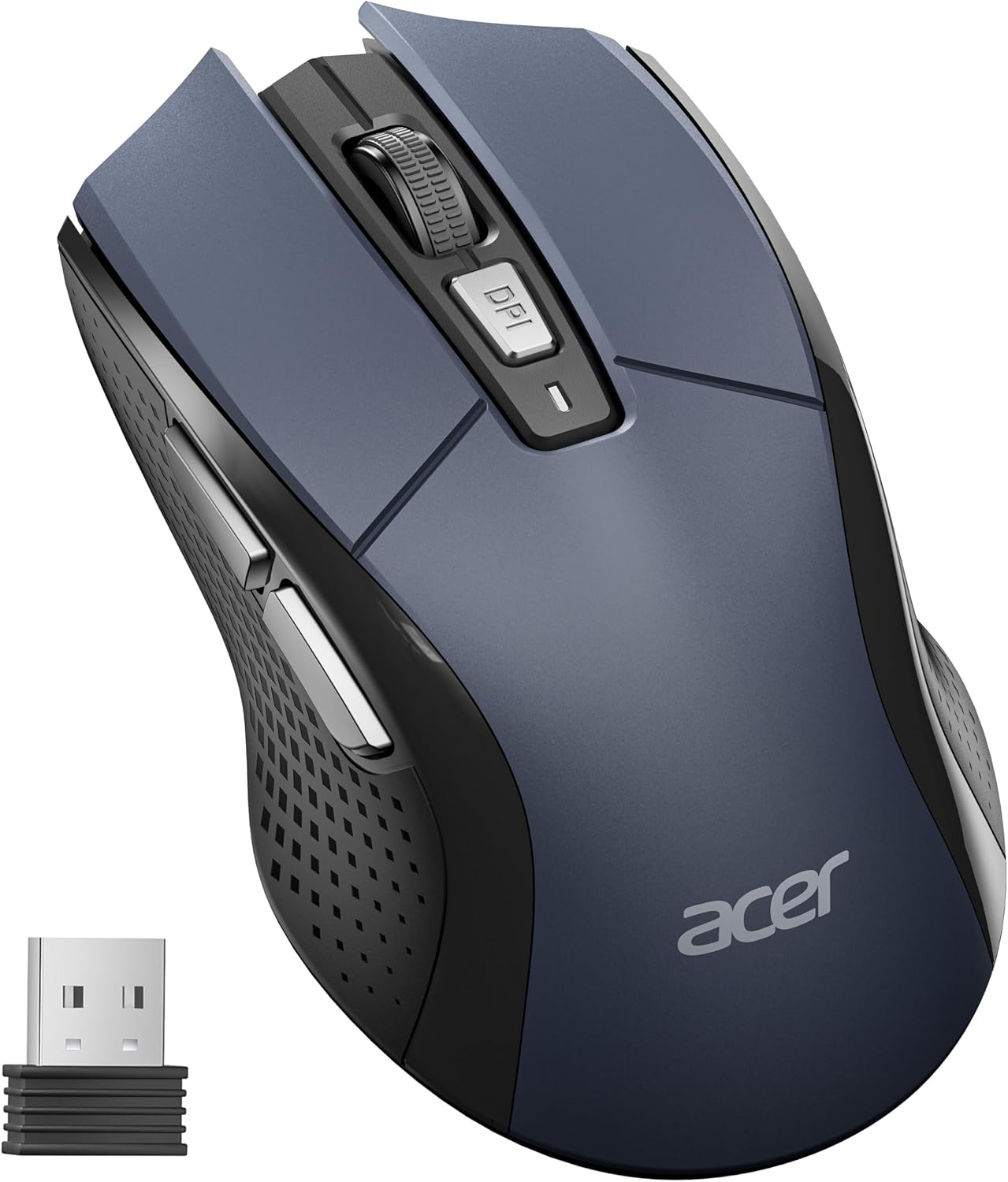
The Acer Wireless Mouse is a full-size 2.4GHz computer mouse built for exactly that complaint. It runs on a single AA battery, connects through a USB-A receiver, and gives you six buttons instead of the usual three. Acer shaped it for medium to large hands, so it sits closer to a desktop mouse than to one of those flat travel mice.
I ran it as a daily wireless mouse for laptop work — office tasks, browsing, and general computer use — and then set it beside a Logitech Lift to see how wide the gap is.
The short version: this is a better budget mouse than most of what sits at this price, with two limitations you should know about before you buy.
What I Liked
The Button Clicks Feel Better Than the Price Suggests
This is not going to be mistaken for an expensive mouse, and it does not try to be. What surprised me is the left and right click — both feel smooth and defined rather than mushy, which is where cheap mice usually fall apart. Acer rates the switches for up to 10 million clicks, and one owner reports dropping theirs with no loss of function.
Adjustable DPI That Works Without Installing Any Software
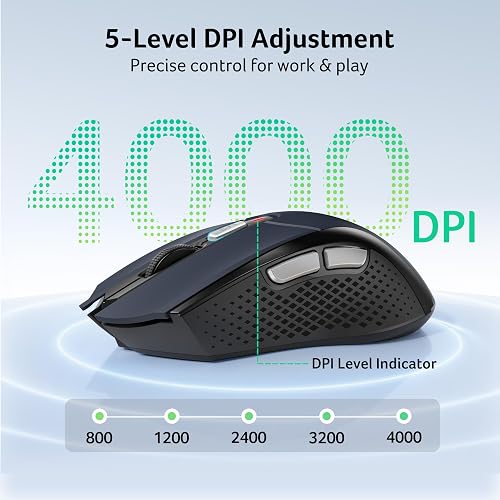
A button behind the scroll wheel cycles the optical sensor through five sensitivity levels: 800, 1200, 2400, 3200, and 4000 DPI. Drop it low for precision work like photo editing, or push it to the top to move the cursor across two monitors in one sweep. An indicator light flashes to confirm which level you landed on — once for 800 DPI, five times for 4000.
The part I appreciate most is what is missing. There is no software to install, no firmware to download, and no account to make; you click the button until the speed feels right and get on with your work. Acer applies that same no fuss thinking to its other desk gear, and the Acer 7-in-1 Wireless Charging Station clears a nightstand of cables for anyone juggling a phone, watch, and earbuds. That driver free approach pays off most on a budget machine like the OTVOC Laptop 15.6 Inch, where 4GB of RAM leaves no headroom for background utilities.
A Full-Size Shape That Suits Medium to Large Hands
At 4.9 inches long and 2.7 inches wide, this is a full-size computer mouse rather than a compact travel one. It weighs 85 g, and the natural curve along the back fills the palm instead of leaving your hand flat against plastic. That curve is doing real ergonomic work — it kept pressure off my wrist during long clicking sessions.
My own hands sit slightly under medium, and it still fit comfortably. If your fingers hang over the front edge of smaller mice, this shape solves that.
Plug-and-Play Setup, Even on a Locked-Down Work Laptop
The USB-A receiver pairs the moment you plug it in — no setup screen, no driver prompt. It is plug and play with nothing to configure: I had it running on a locked-down work laptop on Windows 11 with zero configuration, and an owner buying for a work machine reported the same thing.
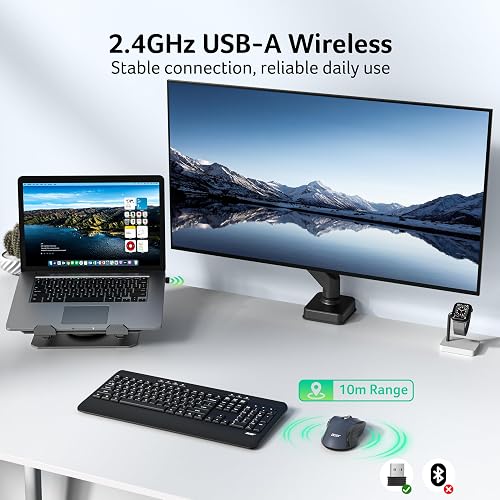
The listing rates the 2.4GHz connection at about 33 feet, and the receiver stores inside the battery compartment when you travel. That last detail matters more than it sounds: a loose dongle is a lost dongle. Acer builds the Acer 1080p USB Webcam around the same idea, so work from home professionals with a desktop tower and no built in camera can clip it on and start a call immediately. The Acer Kids Wired Headphones follow the same logic for family machines, running off a plain 3.5mm jack so a school Chromebook never needs a pairing step.
Side Buttons and a Clickable Scroll Wheel Add Real Navigation
Beyond left click, right click, and scrolling, you get two thumb buttons and a scroll wheel that clicks. The thumb buttons handle forward and back, which means moving through browser tabs and file windows without reaching for the keyboard. At this price, three-button mice are still the norm, so getting six is a genuine gain.
What Needs Improvement
Standby Mode Kicks In Faster Than You Expect
Acer lists standby as arriving after 10 minutes of inactivity, waking on two or three clicks. In practice the sensor drops off sooner than that, and one owner clocked it cutting out within roughly 30 seconds of non-use.
The wake-up click is the real irritation. Because that first click both wakes the mouse and registers with the computer, it lands on whatever the cursor happened to be sitting over — and another owner described having to learn the habit. It saves battery, but it is the one thing that reminds you what you paid.
No Bluetooth At All, So the Dongle Is Your Only Option
This is 2.4GHz over a USB-A receiver and nothing else. The listing spells out “Not Bluetooth,” and one owner admitted to buying without noticing.
If your laptop is USB-C only, you need an adapter — there is no wireless fallback to switch to. Mac users should also know the thumb buttons do not perform forward and back the way they do on a PC.

Acer Doesn’t Include the AA Battery You Need
The box ships without the AA battery the mouse runs on, which the listing flags in its pre-use notice. It is a minor cost, but it means the mouse does not work the minute you open it unless you keep spares. Rechargeable AAs solve this permanently.
The Printed Instructions Are Tiny and Multi-Language
The included manual covers a long list of languages, and the English section is set in small print. One owner got the DPI adjustment working only after some effort — a shame, since the feature itself needs no software.
How It Compares
I put the Acer next to a Logitech Lift, which is a vertical handshake-style mouse in a different price bracket. The Lift is heavier, has a textured grip along the back, and feels more refined in the hand. The Acer has no grip material at all, though I saw no sliding on a cloth mousepad during testing.
That gap is real, and so is the price gap. Set against what the Lift costs, the Acer gives up polish rather than function — I did not feel like I was missing capability, just finish. If you want the best possible feel in the hand, spend the difference.
Against the obvious budget alternatives, the picture is more mixed. Logitech’s M185 and M330 Silent both sit above the Acer on price while sticking to a standard mouse layout with fewer buttons, and the M330’s draw is quiet clicks rather than extra controls. What none of the cheap Logitech options match here is six buttons and on-the-fly DPI switching at this price.
The Acer’s clearest weakness shows against RTINGS’ budget pick, the Logitech M720 Triathlon. That mouse connects over its USB receiver or Bluetooth and pairs with up to three devices at once, so it can move between a desktop and a MacBook with a button press. The Acer cannot do any of that.
For gaming, the standard recommendation stays the Logitech G305, which also runs on AA power and posts far better sensor latency. Owners note the G305 can develop a double-click fault after a few years, but for competitive play, dedicated gaming mice remain the safer pick over any office mouse, this one included.
Final Verdict
I am giving the Acer Wireless Mouse a 4.3 out of 5. It clears the bar that most cheap wireless mice fall at: the clicks feel solid, the shape supports your palm through a full working day, and six buttons with on-the-fly DPI switching is more control than this price usually buys. Amazon owners have it at 4.5 stars across 383 ratings, which tracks with my experience.
The two things holding it back are the aggressive standby and the total absence of Bluetooth. Neither is a dealbreaker for a desk-bound laptop user, but both are worth knowing before you commit.
At $12.99 as of August 2026, this is a straightforward recommendation for a no-fuss everyday wireless mouse — provided you have a USB-A port to spare.
Specifications
| additional_features | Requires 1x AA battery (Not Included), Not Bluetooth, Not Rechargeable, Medium to Large Sized Hands |
| antenna_location | Office |
| brand | Acer |
| button_quantity | 6 |
| compatible_devices | Desktop, Laptop, Personal Computer |
| connectivity_technology | USB A |
| enclosure_material | Plastic |
| hand_orientation | Right |
| item_dimensions_l_x_w | 4.9"L x 2.7"W |
| item_weight | 85 g |
| manufacturer | acer |
| mfr_part_number | OMR339 |
| model_number | OMR339 |
| mouse_maximum_sensitivity | 4000 dots_per_inch |
| movement_detection | Optical |
| number_of_batteries | 1 AA batteries required. |
| power_source | Battery Powered |
| range | 32 feet |
| unit_count | 1 Count |
| upc | 195133360104 |
| warranty_description | 1 Year Manufacturer |
Frequently Asked Questions
Does the Acer Wireless Mouse have Bluetooth?
No. It connects over 2.4GHz through the bundled USB-A receiver only, and the listing states plainly that it is not a Bluetooth mouse. If your laptop has just USB-C ports, you will need an adapter, because there is no wireless fallback to pair with instead.
Does the Acer Wireless Mouse come with a battery?
No. It runs on a single AA battery that you supply yourself, and the listing flags this in its pre-use notice. Rechargeable AA cells work fine and remove the running cost.
How do I connect the Acer Wireless Mouse?
Pull the USB-A receiver out of the compartment under the mouse, plug it into your computer, and slide the power switch to ON. Check that the AA battery is seated the right way round and peel the film off the bottom of the mouse before first use. There is no software or firmware to install.
How do I change the DPI on the Acer Wireless Mouse?
Press the button behind the scroll wheel to cycle through 800, 1200, 2400, 3200, and 4000 DPI. The indicator light flashes to confirm the level you selected, once for 800 DPI up to five times for 4000 DPI.
Why does my Acer Wireless Mouse stop responding?
It is most likely standby rather than a fault. The mouse drops into a power-saving mode when idle and wakes on two or three clicks, so the cursor can seem frozen until you click. Be aware that the wake-up click also registers with your computer, so it can land on whatever sits under the cursor.
Is the Acer Wireless Mouse good for gaming?
Not for competitive play. It is built for office work and general use, and budget 2.4GHz office mice carry more click and sensor latency than gaming models. For casual games it is fine, but a dedicated gaming mouse like the Logitech G305 is the better pick if response time matters.
Are Acer mice any good?
This one holds up well for its price. The clicks feel smooth, the switches are rated for up to 10 million presses, and you get six buttons and adjustable DPI where most mice at this price give you three buttons and a fixed sensor. It has earned 4.5 stars across 383 Amazon ratings as of August 2026.
Ready to Buy?
Acer Wireless Mouse delivers on its promises. If it fits your needs, it's a solid choice you won't regret.
Check Price on Amazon Founder & Product Reviewer at TheReviewRewind
Daniel has tested 400+ products across 20+ categories through hands-on, real-world testing. Every review includes video documentation and standardized scoring criteria. His reviews appear as Amazon shoppable videos and here on TheReviewRewind.
We earn a commission if you make a purchase, at no extra cost to you. This does not influence our ratings or recommendations. Full disclosure
Looking for more options? See all our Computers reviews.
Related Reviews