ACASIS 16-Port USB 3.2 Hub Review: 16 Ports of Powered Connectivity


ACASIS 16-Port USB 3.2 Hub Review: 16 Ports of Powered Connectivity
ACASIS 16-Port USB 3.2 Hub
Buy if you need maximum USB coverage with per-port power switches for managing multiple drives and peripherals. Skip if you only need a few extra ports or require display output from your hub.
Buy on AmazonWhat We Liked
- 16 Ports With Full USB-A and USB-C Coverage
- High-Speed 10Gbps Transfers with 900 MB
- Reliable 96W Powered Hub
- Individual On/Off Switches Per Port
- Premium Aluminum Build
What Could Be Better
- Premium Price Point
- Shared Bandwidth Across All Ports
- Large Footprint for a Hub
- No Display Output
How we test: Every product is used in real conditions and evaluated using our standardized scoring criteria. Read our full review methodology.
Running out of USB ports is one of those problems that keeps getting worse as your desk fills up with drives, microphones, cameras, and controllers. The ACASIS 16-Port USB 3.2 Hub promises to solve that by giving you 16 high-speed ports in a single powered hub.
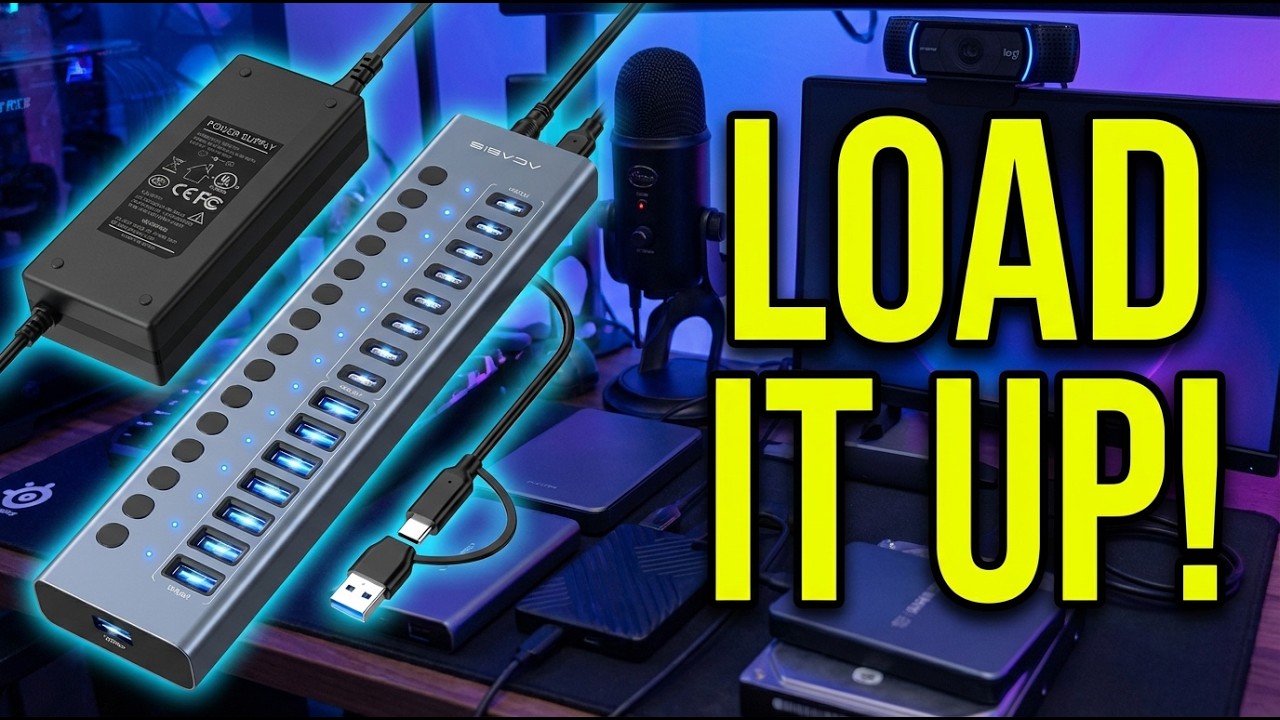
This USB-C hub splitter features eight USB-A and eight USB-C ports, each rated for 10Gbps data transfer. It ships with a 96W power adapter to keep everything running without brownouts or disconnects.
I loaded this hub with seven devices at once, including three SSDs, one HDD, a webcam, a Blue Yeti microphone, and a Stream Deck. That stress test told me everything I needed to know about whether this multi USB hub can handle a real workstation setup.
The short version? It handled the load without a single hiccup, but there are a few things worth knowing before you commit.
What I Liked
The ACASIS 16-port USB hub impressed me across several areas during testing. Here are the standout features.
16 Ports With Full USB-A and USB-C Coverage
The eight USB-A 3.2 ports plus eight USB-C 3.2 ports give you full desk coverage for both legacy and modern devices. I plugged in older USB 2.0 peripherals alongside USB-C SSDs without reaching for a single adapter.
This port mix matters because many competing hubs force you to choose between USB-A and USB-C. Having both in equal numbers means you can connect keyboards, mice, and flash drives on the USB-A side while running fast storage and newer accessories on the USB-C side.
High-Speed 10Gbps Transfers
With a single SSD connected, I measured transfer speeds of about 900 MB/s. That is close to the theoretical maximum for USB 3.2 Gen 2 and fast enough to move a 50GB project folder in under a minute.
The speed holds up well for everyday file management across multiple devices. When running lower-bandwidth peripherals like webcams and audio gear alongside a single active drive, the speed drop was negligible.
Reliable 96W Powered Hub
The included 96W power adapter (12V/8A) provides enough juice to keep all 16 ports active without any device struggling for power. During my seven-device stress test, every peripheral stayed connected and responsive with no dropouts.
Built-in surge protection and overcurrent protection add a safety layer for expensive drives and equipment. That kind of protection matters when you have thousands of dollars of gear hanging off one hub.
Individual On/Off Switches Per Port
Each port gets its own power switch with an LED indicator, letting you manage connected devices one at a time. I could flip a switch to safely disconnect an SSD without fumbling through software eject menus.
This is a genuine quality-of-life feature for anyone managing multiple external drives. The LED indicators make it easy to see which ports are active at a glance, and the switches feel solid with a satisfying click. That same at-a-glance LED approach shows up in smaller networking gear, where the LIEZHUA Gigabit Ethernet Splitter 1 to 2 uses per-port lights to flag a bad Ethernet cable in seconds.
Premium Aluminum Build
The aluminum alloy chassis does double duty as a heatsink. Even under full load with seven devices running simultaneously, the hub stayed cool to the touch.
The construction feels sturdy and weighty enough to stay put on a desk without sliding around. ACASIS designed the chassis to accelerate heat extraction, and the results show in stable performance during extended sessions.
What Needs Improvement
No product covers every base, and the ACASIS 16-port hub has a few areas worth considering.
Premium Price Point
At $69.90, this hub costs more than many USB hub alternatives in the 7-to-10-port range. You are paying for the 16-port count, 10Gbps speed, and the 96W power supply. If you only need a handful of extra ports, a smaller hub at half the price would serve you better.
Shared Bandwidth Across All Ports
All 16 ports share the same 10 gigabit connection to your computer. If you are transferring files on multiple drives simultaneously, the speed gets divided among them. For peripherals like keyboards, mice, and webcams this is a non-issue, but heavy multi-drive workflows will see reduced throughput per device.
Large Footprint for a Hub
At 9.65 x 4.92 x 2.56 inches, this hub takes up more desk space than a typical compact hub. Add the power brick and it needs a dedicated spot on your workstation. Portability is not its strength.
No Display Output
This is a data and power hub only. There are no HDMI or DisplayPort connections, so it cannot replace a docking station for video output. If you need monitor connectivity alongside port expansion, you will need a separate dock or adapter.
How It Compares
The 16-port USB hub market is a niche space, but there are a few notable alternatives worth comparing.
vs Sabrent HB-PU16
The Sabrent HB-PU16 is the most direct competitor with 16 USB-A ports and a 90W power adapter. It uses a four-controller architecture that some users find more stable for multi-drive setups. However, it lacks USB-C ports entirely, which limits its usefulness with newer devices.
The ACASIS hub wins on port versatility with its 8+8 USB-A and USB-C split, plus slightly higher power output at 96W. Choose the Sabrent if you only use USB-A devices and want proven stability. Choose the ACASIS if you need USB-C compatibility. If your workstation also needs multiple monitor outputs, the WAVLINK Pro Docking Station DL7400 adds quad 4K HDMI alongside its port expansion for Mac setups. For Windows users who prioritize triple 4K displays and 125W laptop charging over raw port count, the WAVLINK Laptop Docking Station 3 Monitors handles both from a single cable.
vs Anker 555 USB-C Hub
Anker’s 555 is a Wirecutter-recommended hub with strong brand recognition. It delivers solid build quality in a compact 8-in-1 configuration. The trade-off is far fewer ports.
If you only need a few extra connections for a laptop, the Anker 555 is more portable and widely trusted. If you need the full 16-port count for a desktop workstation, the ACASIS is the clear pick.
vs ORICO 16-Port USB Hub
ORICO offers comparable multi-port hubs with high-quality electronics and similar pricing. Both brands target the same power-user market with aluminum builds and individual switches.
The ACASIS differentiates with its 10Gbps USB 3.2 Gen 2 speed versus ORICO models that often max out at 5Gbps USB 3.0. For raw data transfer performance, the ACASIS has the edge. For laptop users who need fewer ports but want integrated SSD storage, the Minthouz USB C Docking Station combines a compact hub with an M.2 enclosure in a single portable package.
Final Verdict
The ACASIS 16-Port USB Hub delivers on its core promise: giving power users a reliable, high-speed hub with enough ports to handle a full workstation. The mix of USB-A and USB-C ports, combined with per-port switches and a solid 96W power supply, creates a hub that does more than just add connectivity.
I am giving it a 4.1 out of 5.
The shared bandwidth and lack of display output hold it back from a higher score. The price is also a consideration compared to smaller hubs. But for anyone who genuinely needs 16 ports with fast data transfer, these are acceptable trade-offs.
Bottom line: If your desk is covered in peripherals and you are tired of swapping cables, the ACASIS 16-port hub is a practical solution that handles the workload.
Specifications
| Brand | ACASIS |
| Model | HS-716MG-10GB |
| Number of Ports | 16 |
| Port Types | 8x USB-A 3.2, 8x USB-C 3.2 |
| Data Transfer Speed | 10 Gbps (USB 3.2 Gen 2) |
| Power Adapter | 96W (12V/8A) UL Certified |
| Material | Aluminum Alloy |
| Dimensions | 9.65 x 4.92 x 2.56 inches |
| Weight | 800g (1.76 lbs) |
| Color | Blue |
| Compatibility | Windows, macOS, Linux |
| USB Standard | USB 3.2 Gen 2 (backward compatible to USB 1.1) |
| Individual Switches | Yes, with LED indicators |
| Charging | Up to 2.1A per port |
| Protection | Surge protection, overcurrent protection, hot swap support |
| Installation | Plug and Play, no drivers required |
| ASIN | B0G13RQ2SZ |
Frequently Asked Questions
Is there a downside to using the ACASIS 16-Port USB Hub?
The main downside is shared bandwidth. All 16 ports share a single 10Gbps connection, so transferring large files on multiple drives at once will divide the available speed. For most peripherals like keyboards, mice, and webcams, this is not an issue. Heavy simultaneous drive transfers are where you will notice the limitation.
What should you not plug into the ACASIS USB hub?
Avoid plugging in devices that require dedicated bandwidth or display output. This hub does not support HDMI or DisplayPort monitors. High-power charging devices that exceed the per-port power output should also be avoided. Stick to peripherals, storage drives, and low-power accessories for the best experience.
What are common problems with USB-C hubs like the ACASIS?
Common issues include intermittent disconnects when too many high-bandwidth devices are active, compatibility quirks with certain USB-C cables, and heat buildup during heavy use. The ACASIS hub addresses heat with its aluminum chassis and includes surge protection, but using a quality USB-C cable for the host connection is important for stable performance.
What is the best USB hub brand?
Several brands compete in the powered USB hub space. Anker and Sabrent are well-known for reliability, while ACASIS and ORICO offer competitive multi-port options with individual switches. The best brand depends on your port count needs, budget, and whether you prioritize USB-C compatibility or proven brand recognition.
Does the ACASIS 16-Port USB Hub work with Mac, Windows, and Linux?
Yes. The hub is compatible with Windows, macOS, and Linux through plug-and-play support. No drivers are required. It also works with USB 3.2, 3.0, 2.0, and 1.1 devices for full backward compatibility across all your peripherals.
How much power does each port on the ACASIS hub provide?
The 96W power adapter distributes power across all 16 ports, with each port capable of delivering up to 2.1A for charging and powering devices. This is enough to run external SSDs, HDDs, webcams, microphones, and similar USB peripherals without power issues.
Ready to Buy?
ACASIS 16-Port USB 3.2 Hub delivers on its promises. If it fits your needs, it's a solid choice you won't regret.
Check Price on Amazon Founder & Product Reviewer at TheReviewRewind
Daniel has tested 400+ products across 20+ categories through hands-on, real-world testing. Every review includes video documentation and standardized scoring criteria. His reviews appear as Amazon shoppable videos and here on TheReviewRewind.
We earn a commission if you make a purchase, at no extra cost to you. This does not influence our ratings or recommendations. Full disclosure
Looking for more options? See all our Computers reviews.
Related Reviews