LIEZHUA Gigabit Ethernet Splitter 1 to 2 Review: A Powered Splitter That Actually Works


LIEZHUA Gigabit Ethernet Splitter 1 to 2 Review: A Powered Splitter That Actually Works
LIEZHUA Gigabit Ethernet Splitter 1 to 2
Buy if you need one more wired port for two devices and don't want to run another cable through the wall. Skip if you need three or more wired devices, or you have no USB power source where it would sit.
Buy on AmazonWhat We Liked
- Both Output Ports Stay Live at Once
- No Gigabit Speed Penalty, Even on Long Runs
- Six LED Indicators Make Troubleshooting Easy
- Solid Aluminum Build With Gold-Plated Pins
- Driver-Free and Works With Almost Anything
- Cheaper Than Running a New Cable
What Could Be Better
- It Has to Be Powered to Work
- No Reliable Hot-Swapping
- Speeds Can Drop After a Connected PC Restarts
- Only Two Devices, With No Room to Grow
How we test: Every product is used in real conditions and evaluated using our standardized scoring criteria. Read our full review methodology.
You’ve got one Ethernet port left on your router and two devices that both need to be wired. Usually one of them ends up on Wi-Fi, buffering and lagging, and you just learn to live with it.
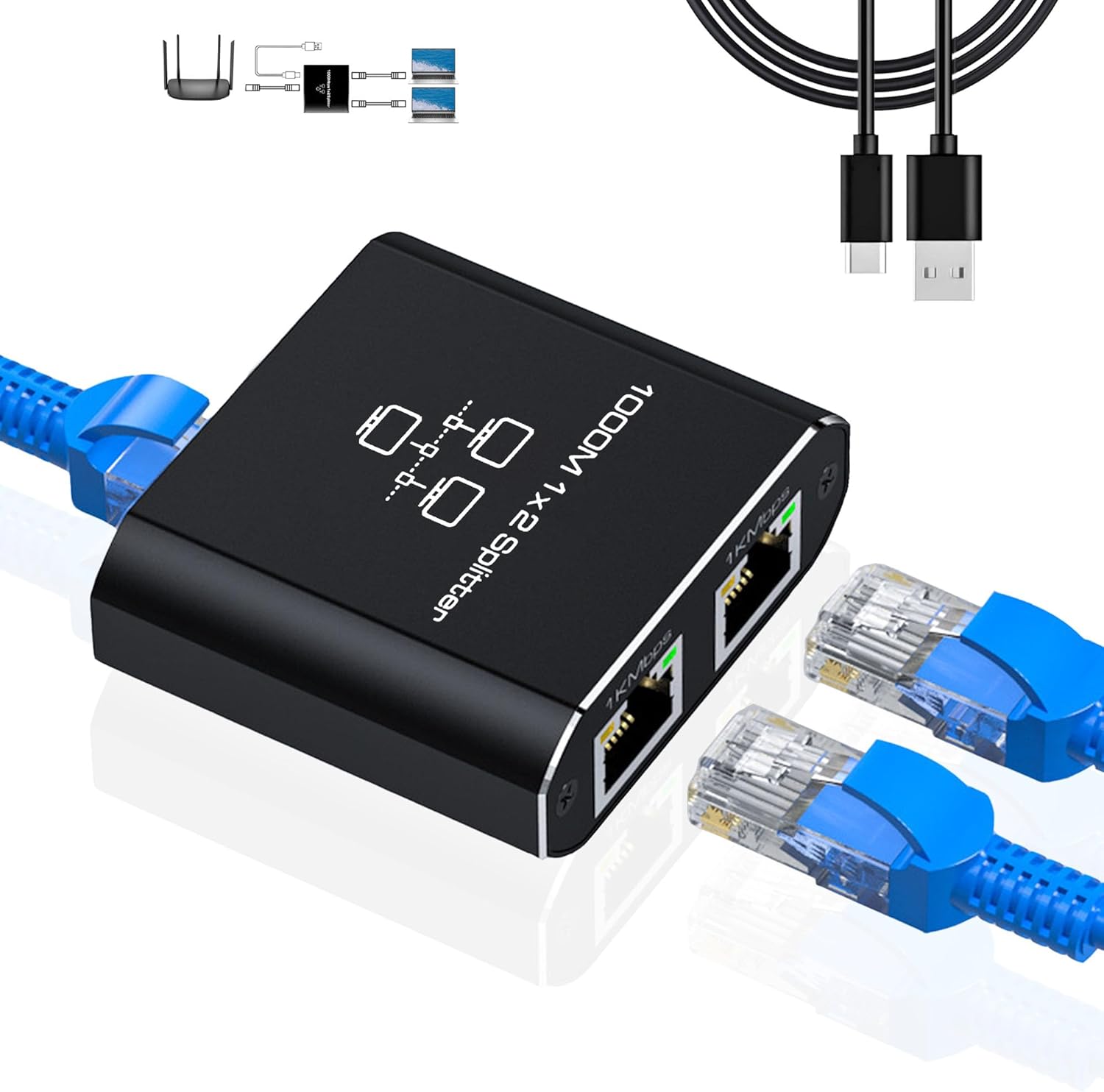
The LIEZHUA Gigabit Ethernet Splitter 1 to 2 is built to solve exactly that. It’s a small, powered RJ45 network splitter that turns a single wall drop into two live connections, and it ships with a USB power cable, six LED indicators, and support for Cat 5, 5e, 6, 7, and 8 cable. At around $16.89, it’s pitched as a cheap alternative to pulling another cable through your walls.
I ran it inline on a real home network to find out whether both ports actually stay live at gigabit speeds, or whether it behaves like the passive splitters that gave this category its bad name. I also put it on a long 50-foot cable run to check for any speed penalty.
The short version? This one is genuinely different from the cheap splitters people warn about, though there is one power-related caveat you’ll want to know before you buy.
What I Liked
The LIEZHUA Ethernet Splitter 1 to 2 earned its keep in several areas during testing. Here’s what stood out.
Both Output Ports Stay Live at Once
This is the feature that catches people off guard, and it’s the whole reason to buy this one. A lot of cheap RJ45 splitters are passive, which means they don’t really split anything. You have to buy them in pairs, one at each end of the run, and only one device gets a connection at a time.
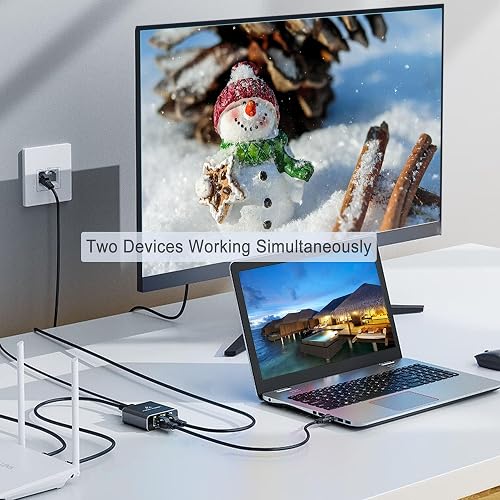
This one isn’t that. Both output ports are live simultaneously, so a PC and a game console can pull off a single wall drop at the same time, and neither one waits on the other. That is exactly the point, and it’s what most routers from the cable company can’t give you when they hand you a single usable Ethernet port.
No Gigabit Speed Penalty, Even on Long Runs
The splitter is rated at 1,000 Mbps, and in practice you’re not paying a speed penalty for splitting. Running it inline versus plugging straight into the wall, the numbers came back comparable.
On one long 50-foot cable, speeds actually climbed from around 500 Mbps up closer to 700 Mbps. Because the device is powered, it redrives the signal instead of just passing it through, so gaming, streaming, and big uploads all feel like a proper wired connection on both devices.
Six LED Indicators Make Troubleshooting Easy
There are six LED indicators, two for each port. One tells you power is coming in, and the rest show activity on each port. That sounds like decoration, but it’s the most useful troubleshooting tool on here.
If a device isn’t getting internet and its port light isn’t coming on, the problem is almost certainly the Ethernet cable, not the splitter, the router, or the device. That’s the kind of thing people spend an hour chasing, and this just tells you at a glance.
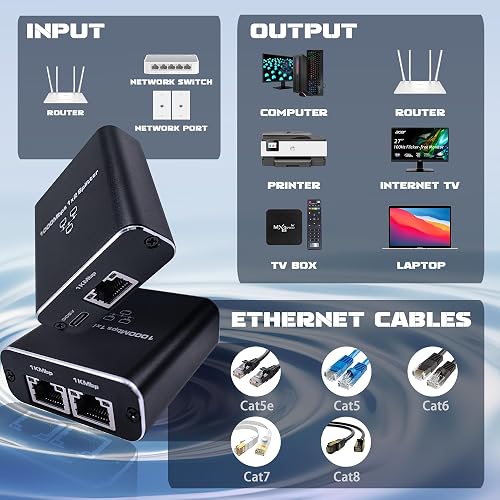
Solid Aluminum Build With Gold-Plated Pins
The build quality is better than the price suggests. The housing is aluminum alloy rather than plastic, the RJ45 jacks use gold-plated pins, and at roughly 50 grams it has enough weight that it won’t slide around behind your desk every time you bump a cable.
Driver-Free and Works With Almost Anything
Compatibility is wide open because there’s no driver and no software to install. It’s just passing Ethernet, so it works with routers, switches, desktops, laptops, smart TVs, set-top boxes, streaming sticks, game consoles, printers, and security cameras. If a device takes an Ethernet cable, it works, and it handles Cat 5, 5e, 6, 7, and 8 cable without fuss.
Cheaper Than Running a New Cable
At around $16.89, this rj45 internet adapter is a lot less hassle than fishing a second cable through your walls. Amazon buyers back that up with a 4.4-star average across more than 1,600 ratings, with several noting it worked as a simple plug-and-play way to add one more wired port.
What Needs Improvement
No product is perfect, and this splitter has a few limitations worth knowing before you buy.
It Has to Be Powered to Work
This is more caveat than flaw, but it matters. The splitter runs on 5 volts through the included USB cable, and LIEZHUA recommends a 1 or 2 amp USB charging head, so basically any phone charger will do. If that USB cable isn’t plugged in, the splitter does nothing at all. Wherever it goes, you need a spare outlet or USB port nearby, which limits where you can tuck it away.
No Reliable Hot-Swapping
The device does not handle hot-swapping well. Several buyers, and my own testing, found that swapping the Ethernet cable while the unit is powered on can throttle throughput down to single digits until you power-cycle both the computer and the splitter. It’s a quick fix once you know the trick, but you shouldn’t have to unplug and restart hardware just to change a cable.
Speeds Can Drop After a Connected PC Restarts
On a related note, a connected PC restarting can knock speeds down to around 96 Mbps until the splitter is cycled again. One reviewer on a 500 Mbps plan saw it repeatedly drop from roughly 300 Mbps to 96 Mbps whenever their machine rebooted. For a set-and-forget device this inconsistency is the biggest knock against it.
Only Two Devices, With No Room to Grow
This is a one-in, two-out device and that’s it. If you already know you need three or more wired devices, a small unmanaged switch is the better call. The splitter is smaller and simpler, but there’s no expanding past two ports later.
How It Compares
Before you buy any splitter, it’s worth seeing where this one lands against the two obvious alternatives.
vs a Cheap Unmanaged Network Switch
An unmanaged gigabit switch is the more capable option. It gives you a full 1,000 Mbps per port, needs only a single uplink cable, and scales to four, five, or eight devices instead of two. As Monoprice puts it, a switch is the better choice when speed and expansion matter.
The trade-off is size and simplicity. The LIEZHUA splitter is one-in, two-out with nothing to configure, no extra box on the desk, and usually a lower price. If two wired devices is genuinely all you need, the splitter is smaller and easier to live with. If you might need three or more, buy the switch. If your real goal is consolidating two computers onto one desk rather than just adding a wired port, a monitor with a built-in KVM like the Lenovo ThinkVision P34WD-40 lets both machines share one keyboard and mouse. And if the ports you keep running short on are USB rather than Ethernet, a powered option like the ACASIS 16-Port USB 3.2 Hub attacks the same desk clutter from the other direction.
vs Passive RJ45 Splitters
This is where the LIEZHUA pulls ahead of the products that give the category a bad reputation. Passive RJ45 splitters share the eight wires as two four-wire pairs, which caps each link at 100 Mbps and requires a matching splitter at both ends of the run. As one r/ethernet thread bluntly notes, “each device will only negotiate at 100mbps.”
Because the LIEZHUA is powered and actively redrives the signal, both ports stay live at gigabit speeds from a single unit. You’re paying a few extra dollars over a passive splitter, but you avoid the 100 Mbps ceiling and the need to buy two of them.
Final Verdict
The LIEZHUA Gigabit Ethernet Splitter 1 to 2 does the one thing most people actually want from a splitter: it keeps both output ports live at gigabit speeds from a single wall drop, without the 100 Mbps ceiling that plagues passive units.
I’m giving it a 4.0 out of 5.
It loses points for needing external power, for not hot-swapping cleanly, and for the occasional speed drop that a power-cycle fixes. But the powered signal redrive, honest gigabit throughput, solid aluminum build, and genuinely helpful LED indicators make it a strong value at around $16.89.
Bottom line: If you need one more wired port for two devices and don’t want to run another cable through the wall, this splitter is well worth checking out.
Specifications
| Brand | LIEZHUA |
| built_in_media | Ethernet Splitter 1 to 2 |
| Color | Black |
| Compatible Devices | Desktop, Laptop, Printer |
| Data Link Protocol | Gigabit Ethernet Splitter 1 to 2 |
| Data Transfer Rate | 1000 megabytes_per_second |
| Hardware Interface | Ethernet, USB Type C |
| Product Dimensions | 4.5"L x 0.93"W x 0.27"H |
| item_type_name | Gigabit Ethernet Splitter 1 to 2 |
| Item Weight | 50 g |
| manufacturer | LIEZHUA |
| mfr_part_number | 02N-HNetwork Adapters |
| model_number | 02N-HNetwork Adapters |
| number_of_items | 1 |
| Number of Packs | 1 |
| Unit Count | 1 Count |
| warranty_description | Ethernet Splitter 1 to 2 |
Frequently Asked Questions
Do Ethernet splitters like the LIEZHUA actually work?
Yes, this one does, because it's a powered splitter rather than a passive one. Both output ports stay live at the same time and negotiate gigabit speeds from a single wall drop. The cheap passive splitters people warn about are different: they only pass one connection at a time and must be bought in pairs.
How much speed do you lose with the LIEZHUA Ethernet Splitter?
In testing there was no meaningful speed penalty. Running it inline measured comparable to plugging straight into the wall, and on a 50-foot cable run speeds actually rose from around 500 Mbps to closer to 700 Mbps because the powered device redrives the signal.
Why does the LIEZHUA Ethernet Splitter need power?
The USB power lets it actively redrive the Ethernet signal so both ports can run at gigabit speeds simultaneously, which a passive splitter can't do. It uses 5 volts from any 1 or 2 amp USB charger, and without that power connected the splitter won't work at all.
Is the LIEZHUA Gigabit Ethernet Splitter compatible with my devices?
Almost certainly. There's no driver or software, so it works with routers, switches, desktops, laptops, smart TVs, set-top boxes, game consoles, printers, and security cameras. It supports Cat 5, 5e, 6, 7, and 8 cable, so any standard Ethernet cable will fit.
Should I buy an Ethernet splitter or a network switch?
If you only need two wired devices, the splitter is smaller, simpler, and usually cheaper. If you need three or more devices, or want a full gigabit port for each without any power quirks, a small unmanaged network switch is the better choice.
Why do the LIEZHUA splitter's speeds sometimes drop?
Speeds can fall to around 96 Mbps after a connected PC restarts or if you swap the cable while it's powered on. The fix is to power-cycle the splitter, which restores full gigabit throughput. It's a known quirk rather than a permanent defect.
Ready to Buy?
LIEZHUA Gigabit Ethernet Splitter 1 to 2 delivers on its promises. If it fits your needs, it's a solid choice you won't regret.
Check Price on Amazon Founder & Product Reviewer at TheReviewRewind
Daniel has tested 400+ products across 20+ categories through hands-on, real-world testing. Every review includes video documentation and standardized scoring criteria. His reviews appear as Amazon shoppable videos and here on TheReviewRewind.
We earn a commission if you make a purchase, at no extra cost to you. This does not influence our ratings or recommendations. Full disclosure
Looking for more options? See all our Computers reviews.
Related Reviews