BOYA BY-GM18CU Gooseneck Microphone Review: Clear Calls Without the Studio Price


BOYA BY-GM18CU Gooseneck Microphone Review: Clear Calls Without the Studio Price
BOYA BY-GM18CU Gooseneck Microphone
Buy if you want a clear, plug-and-play desktop mic for calls, lectures, and voice dictation. Skip if you need a studio or music-recording microphone, or demand flawless out-of-box quality control.
Buy on AmazonWhat We Liked
- Clear, Speech-Focused Cardioid Sound
- An 18-Inch Bi-Fold Gooseneck That Reaches You
- True Plug-and-Play USB-C Setup
- One-Touch Mute With a Visible LED Status
- Real-Time Headphone Monitoring
What Could Be Better
- Inconsistent Unit-to-Unit Quality Control
- Poppy Mute Button and Phantom-Power Noise
- A Foam Windscreen That Pops Off Easily
- Weak Manufacturer Support and Documentation
How we test: Every product is used in real conditions and evaluated using our standardized scoring criteria. Read our full review methodology.
If people on your video calls keep telling you that you sound far away, muffled, or stuck in a tunnel, the problem usually is not your laptop. It is that you are leaning on a built-in mic sitting a couple of feet from your mouth. The BOYA BY-GM18CU gooseneck microphone is built to fix exactly that.
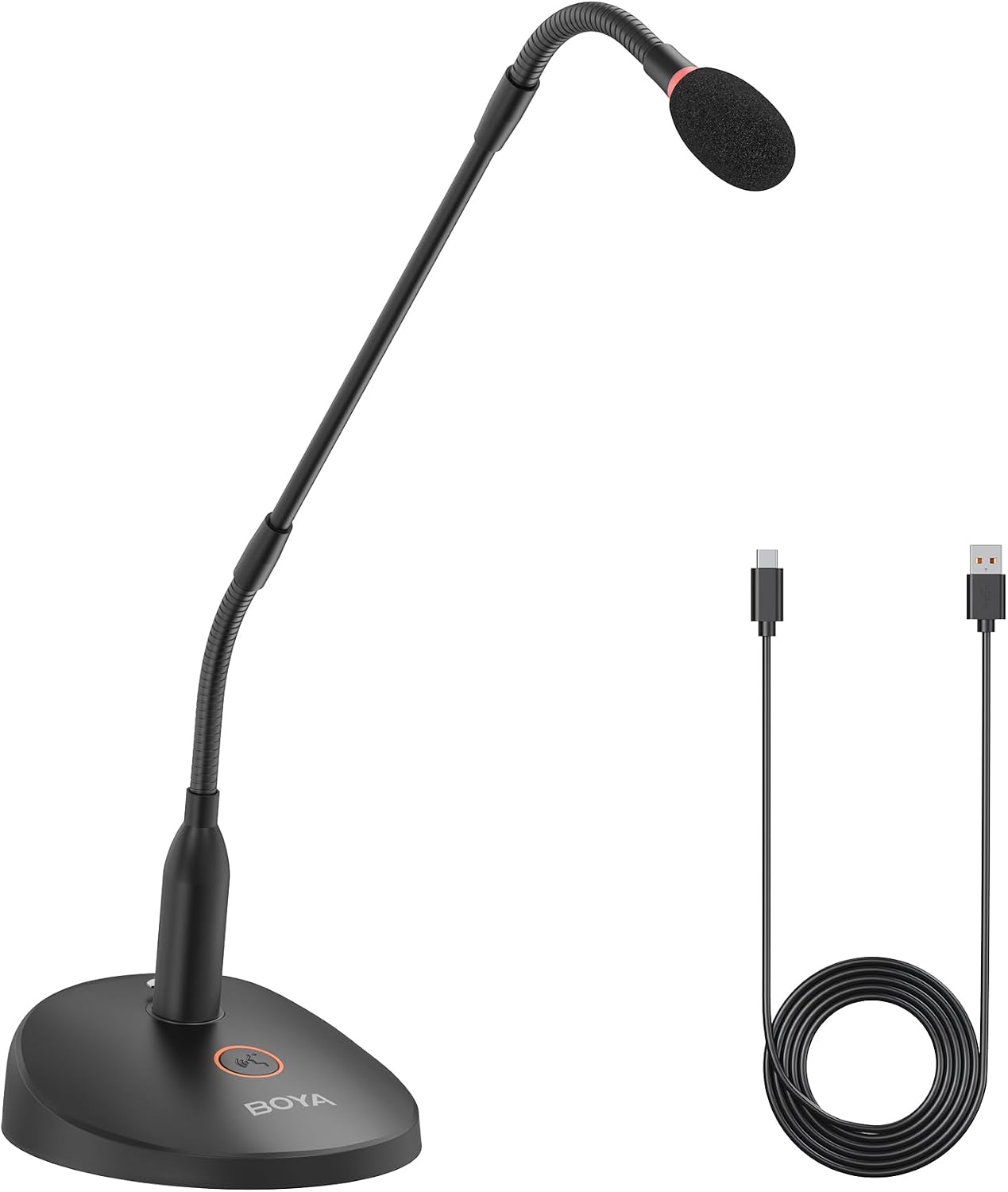
This is an 18-inch desktop gooseneck condenser microphone with a weighted base that plugs straight into a computer over USB-C. It uses a cardioid pickup pattern aimed at your voice, adds a one-touch mute button, and includes a 3.5 mm headphone jack for real-time monitoring. There are no batteries and no drivers to install.
I spent time with the BY-GM18CU for daily calls, lecture-style recording, and voice dictation to see how it holds up. After that hands-on use, I rate it 3.9 out of 5. The sound quality punches above the roughly $69.95 price, though some real quality-control and polish issues keep it from a higher score.

What I Liked About the BOYA BY-GM18CU
Clear, Speech-Focused Cardioid Sound
The core job of this mic is making a single voice easy to understand, and it does that well. The cardioid condenser capsule listens to what is in front of it and tunes down noise from the sides and behind, so your words stay clear even in a busy room. In my use it picked me up cleanly from about a foot away without my needing to lean in.
This is not a mic trying to flatter music or capture a room. It is tuned for intelligible speech, which is exactly what video conferences, calls, lectures, and dictation need.
An 18-Inch Bi-Fold Gooseneck That Reaches You
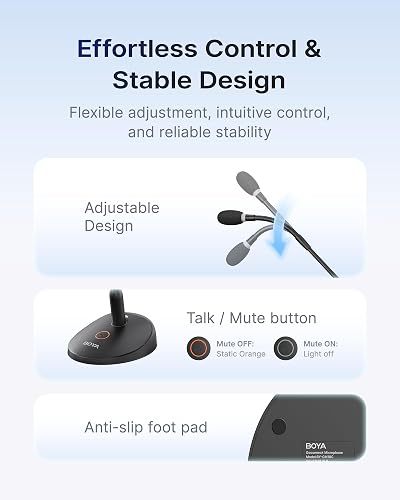
The 18-inch bi-fold gooseneck is the feature that sets this apart from stubby desktop mics. Two bendable sections plus a straight middle run let you park the heavy base behind your keyboard and still curl the capsule up toward your mouth without blocking your computer monitor. I could reposition it for sitting, standing, or a side angle in seconds, then leave it set.
The weighted base stays put on a desk and does not tip when you move the arm. For a USB computer mic, the build and overall design feel solid rather than flimsy, and it stands out among the cheap desktop condenser microphones in this price range.
True Plug-and-Play USB-C Setup
Setup is about as simple as desktop audio gets. You connect the included USB-A to USB-C cable to your personal computer, pick the BY-GM18CU as your input, and start talking, with no batteries, drivers, or software to install. It worked immediately on both Windows and Mac in my testing.
This plug-and-play simplicity is the whole reason to pick the USB CU model over its XLR sibling. Anyone comfortable choosing an input device can have it running in under a minute.
One-Touch Mute With a Visible LED Status
A single tap on the base mutes or unmutes the mic, and an LED on both the base and the capsule tip shows its state at a glance. The light glows orange when the mic is live and goes dark when muted, so you can tell from across the room whether you are hot. That is genuinely useful for coughing, side conversations, or stepping away mid-call.
Hardware mute beats hunting for a software button during a meeting. Seeing the status on the mic itself removes the usual “am I muted?” guesswork.
Real-Time Headphone Monitoring
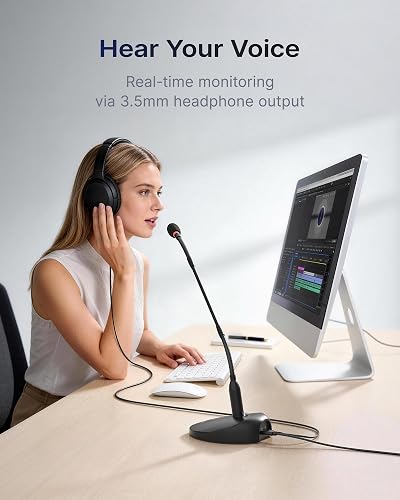
A 3.5 mm headphone jack on the base lets you plug your headphones in and hear yourself live with no delay. That means you catch problems, like being too quiet or drifting off the mic, while you record instead of after. For dictation and lecture capture, that instant feedback keeps takes usable.
Direct monitoring is a feature you normally find on pricier audio gear. Having it on a sub-$70 desktop mic is a welcome touch.
What Needs Improvement
Inconsistent Unit-to-Unit Quality Control
The biggest knock against the BY-GM18CU is uneven quality control. Among the critical reviews, buyers describe units that would not power on across multiple computers, a faulty LED ring around the capsule, and at least one dead cable in the box. These are a minority against a 4.0-star average from 232 ratings, but the failure rate is high enough that I would test yours thoroughly inside the return window.
When a unit works, it works well. The problem is that you cannot fully predict which one you will get.
Poppy Mute Button and Phantom-Power Noise
Several reviewers note an audible pop when you tap the mute button. One traced the activation and deactivation pops to inexpensive shielding around the phantom-power circuit, calling the mic “pretty Poppy” when switching states. It is a minor irritation on a call but more noticeable if you are recording a clean take.
The mic also leans toward a higher noise floor than audio purists want. One buyer found the signal-to-noise too weak for serious recording or PA, while fine for a video conference. If you need cleaner audio for serious recording rather than calls, the BOYA BOYAMIC 2 Wireless Microphone steps up to onboard 32-bit float capture and AI noise cancellation. For the video conferences this mic handles well, the YOLOLIV YoloCam S3 is a 4K webcam that keeps your picture as sharp as your voice.
A Foam Windscreen That Pops Off Easily
The bundled foam windscreen attaches loosely and slips off at the lightest touch. One reviewer who used these for live events ended up securing them with a drop of glue and buying spares by the dozen. If you move the mic often, plan on babysitting that little foam cap.
It is a small part, but losing it mid-event is annoying. A tighter fit would cost BOYA almost nothing.
Weak Manufacturer Support and Documentation
Support is where BOYA stumbles. Multiple buyers report that the online manual download does nothing, there is no Q&A section, and chat or phone support can come back in Chinese. The included paper instructions are thin enough that one reviewer called them useless, and warranty or user guide details are hard to track down online.
The mic is simple enough that most people will not need help. Still, you are largely on your own if something goes wrong. That same low-friction, plug-and-play approach extends to your video with the Acer 1080p USB Webcam, another budget desk pick that works the moment you plug it in. If you would rather keep the mic and headphones in one unit for all-day calls, the Soothielec KH53 wireless headset pairs an ENC boom mic with on-ear comfort on a similar budget.
How the BY-GM18CU Compares to Other Gooseneck and USB Mics
BY-GM18CU vs BOYA BY-GM18CB
BOYA sells a near-identical twin, the BY-GM18CB, and it is easy to grab the wrong one. The CB runs on XLR or AAA batteries and tops out at a 50 Hz to 16 kHz response with a 78 dB signal-to-noise ratio, while this CU model adds USB-C plug-and-play with a wider 45 Hz to 18 kHz range and 80 dB SNR. The included foam windscreen and bi-fold gooseneck are the same on both.
If you want to plug straight into a personal computer, the CU is the version to buy. Choose the CB only if you specifically need its XLR connector feeding a mixer, or battery power away from a desk.
BY-GM18CU vs Shure Gooseneck Podium Mics
Shure’s CentraVerse-style podium goosenecks are the professional audio reference for broadcast and PA, but they cost multiples of the BOYA. One reviewer who owned Shure 18-inch goosenecks priced replacements near $299 each, then found the BY-GM18CU sounded as good or better for his room and liked the on/off light his Shure lacked. He did note the BOYA measured a couple of inches longer than its stated 18 inches.
Shure still wins for large-venue PA, feedback rejection, and long-term reliability. For a desk or small podium on a budget, the value gap is hard to ignore.
BY-GM18CU vs FIFINE and Samson Desktop Mics
Against compact USB goosenecks like the FIFINE K050, the BOYA trades a smaller footprint for far more reach, onboard muting, and headphone monitoring. The Samson CM20P is a longer 20-inch podium condenser with an internal hi-pass filter, but it needs 48V phantom power and some installation rather than a simple USB cable.
For a desk or small podium driven by a computer, the BY-GM18CU hits a friendlier middle ground. You get real reach and controls without stepping up to a phantom-powered PA install.
Where It Fits for Dictation and AI Workflows
One group the BY-GM18CU quietly serves well is people running voice dictation and AI workflows. Users in Wispr Flow offices favor wired gooseneck mics for exactly this, since you can whisper commands without leaning forward, and I found the steady close pickup improved transcription accuracy.
If you talk to your desktop computer all day, that consistent positioning matters more than raw studio fidelity. Unlike a clip-on smartphone mic, it holds one fixed position on your desk. It also suits streamers and YouTubers who narrate to a computer, though heavier content creation still calls for a dedicated studio mic.
Final Verdict
The BOYA BY-GM18CU does the one thing it promises: it makes a single speaking voice sound clear, close, and present on calls, lectures, and recordings. The 18-inch gooseneck, USB-C simplicity, hardware mute, and headphone monitoring add up to a genuinely useful desk mic for around $69.95.
I am giving it a 3.9 out of 5. The sound quality and flexibility punch above the price, but uneven quality control, a poppy mute button, and thin manufacturer support keep it just short of a stronger score.
If you live on your computer talking to people or to a dictation app, the BY-GM18CU is an easy step up from a built-in mic. Just skip it if you need a true studio or music-recording microphone, and confirm your unit works before the return window closes.
Specifications
| Brand | BOYA |
| Model | BY-GM18CU |
| Type | Cardioid Condenser Gooseneck Microphone |
| Polar Pattern | Cardioid (unidirectional) |
| Frequency Response | 45 Hz - 18 kHz |
| Sensitivity | -36 dB +/-2 dB (0 dB=1V/Pa @1kHz) |
| Sample Rate | 48 kHz |
| Bit Depth | 24-bit |
| Signal-to-Noise Ratio | >= 80 dB |
| Maximum SPL | 110 dB SPL |
| Power | USB-C bus power (plug and play) or 48V phantom power |
| Audio Output | Type-C audio port, 3.5 mm headphone monitor jack |
| Gooseneck | 18 inch bi-fold, two bendable sections (13 mm x 492 mm) |
| Base Dimensions | 141 x 116 x 41 mm |
| Weight | 569.5 g (20.09 oz) |
| Compatible Devices | Windows PC, Mac |
| In the Box | 18" Gooseneck Mic, Microphone Base, 2 m USB-A to USB-C Cable, Foam Windscreen, User Manual |
| Color | Black |
Frequently Asked Questions
Is the BOYA BY-GM18CU a good microphone?
For its intended job, yes. The BY-GM18CU delivers clear, speech-focused cardioid sound for calls, lectures, and dictation, and it averages 4.0 stars from 232 Amazon ratings. It is not a studio or music mic, and quality control can be uneven, so test your unit early.
Is the BOYA BY-GM18CU made in China?
Yes. BOYA is a Chinese audio brand, and the BY-GM18CU is manufactured in China. That keeps the price low, but it also shows up in the thin, partly Chinese-language customer support that several buyers flag.
What is the difference between the BOYA BY-GM18CU and the BY-GM18CB?
The CU is the USB-C plug-and-play version with a 45 Hz to 18 kHz response and 80 dB SNR, aimed at computers. The BY-GM18CB is a near-identical twin that runs on XLR or AAA batteries with a narrower 50 Hz to 16 kHz response. Buy the CU if you want to plug straight into a PC or Mac.
Does the BOYA BY-GM18CU need batteries or drivers?
No. The BY-GM18CU is powered over the included USB-A to USB-C cable and is recognized as a standard input device on Windows and Mac, so there are no batteries and nothing to install. It can also accept 48V phantom power if you connect it that way instead.
Can the BOYA BY-GM18CU record music or podcasts?
It is not built for that. The BY-GM18CU is a communication mic tuned for intelligible speech, and one reviewer found its noise floor too high for serious recording or PA. For music or broadcast-quality podcasting, a dedicated studio microphone is the better choice.
Is the BOYA BY-GM18CU good for voice dictation and AI tools?
This is one of its strongest use cases. The long gooseneck keeps the capsule close and consistent, which improves dictation and voice-to-text accuracy, and users who run tools like Wispr Flow favor wired gooseneck mics for exactly this reason. You can sit back in your chair and still be picked up clearly.
Ready to Buy?
BOYA BY-GM18CU Gooseneck Microphone delivers on its promises. If it fits your needs, it's a solid choice you won't regret.
Check Price on Amazon Founder & Product Reviewer at TheReviewRewind
Daniel has tested 400+ products across 20+ categories through hands-on, real-world testing. Every review includes video documentation and standardized scoring criteria. His reviews appear as Amazon shoppable videos and here on TheReviewRewind.
We earn a commission if you make a purchase, at no extra cost to you. This does not influence our ratings or recommendations. Full disclosure
Looking for more options? See all our Electronics reviews.
Related Reviews