Burhoo K808 Mini Wireless Keyboard with Touchpad Review: Pocket-Sized TV Control


Burhoo K808 Mini Wireless Keyboard with Touchpad Review: Pocket-Sized TV Control
Burhoo K808 Mini Wireless Keyboard with Touchpad
Buy if you control a TV-connected PC, media box, or projector from the couch and want a backlit, pocket-sized keyboard and mouse in one hand. Skip if you plan to type emails or long documents, or if you need precise cursor work.
Buy on AmazonWhat We Liked
- Dual 2.4G and Bluetooth Pairing on One Keyboard
- The USB Receiver Hides in the Keyboard's Side Slot
- A Real Touchpad and Mouse Buttons Under Your Thumb
- Seven-Color Backlight Makes Dark-Room Typing Easy
- A 600mAh Rechargeable Battery That Charges Over USB-C
- The Built-In Laser Pointer Earns Its Place
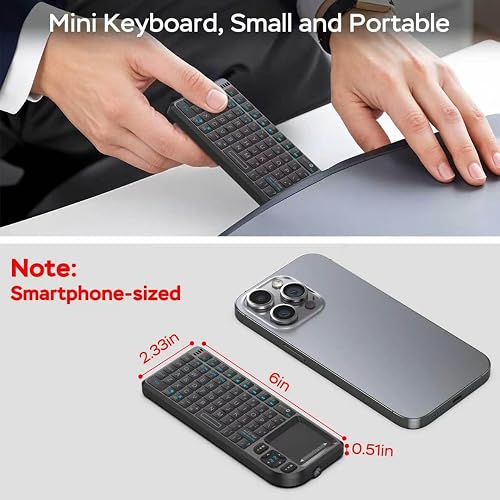
- Genuinely Pocket-Sized at About Six Inches Long
What Could Be Better
- The Touchpad Is the Weakest Part of the Package
- The Ortholinear Key Grid Slows Down Touch Typists
- Small Keys Are Awkward If You Have Large Fingers
- Apple Support Is Partial, and Burhoo Says So
How we test: Every product is used in real conditions and evaluated using our standardized scoring criteria. Read our full review methodology.
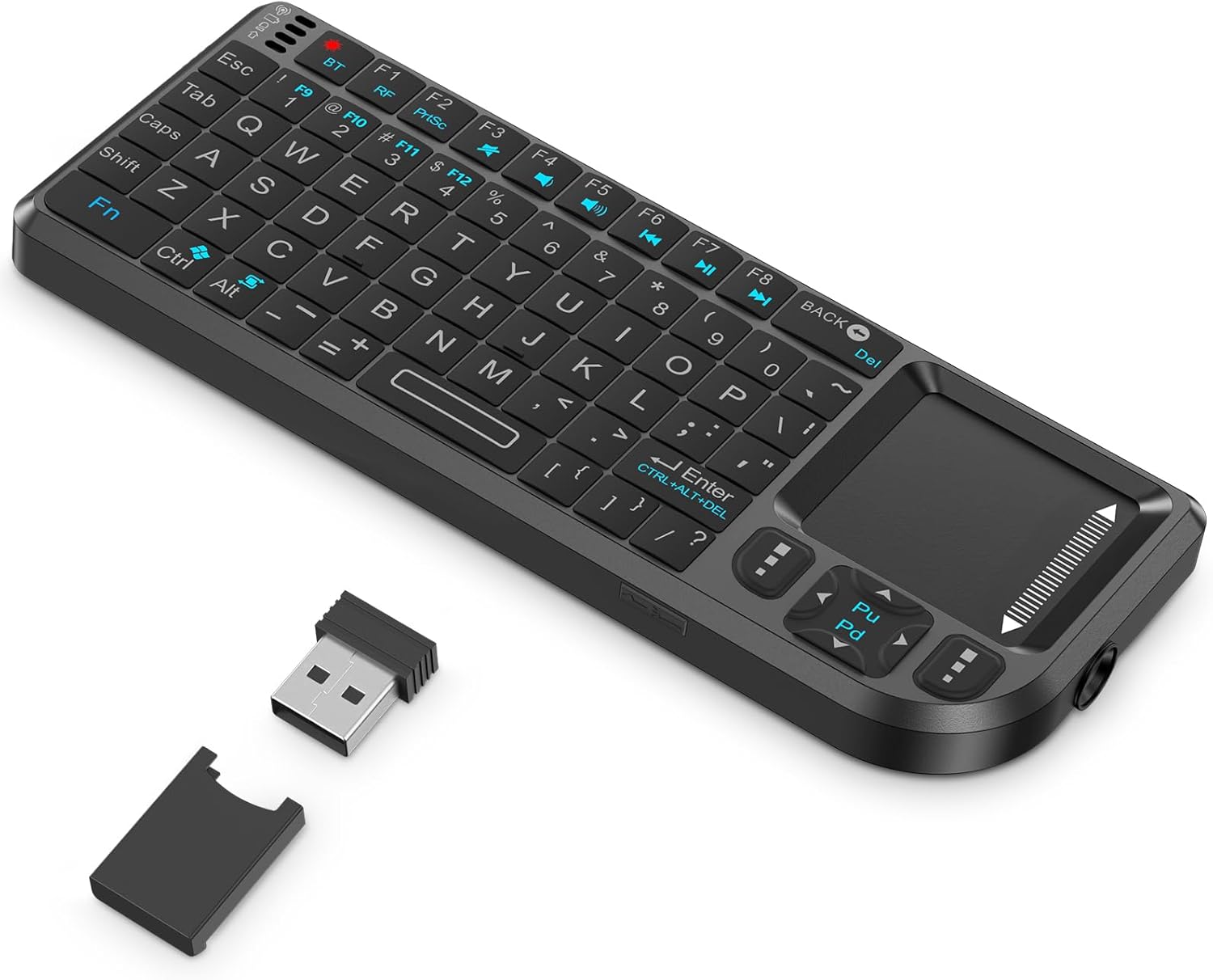
You know the moment: your laptop is hooked up to the TV across the room, and every time you want to change what is playing you have to get up and walk over to it. The Burhoo K808 mini wireless keyboard with touchpad exists to solve exactly that. It is a keyboard, a mouse, and a few extras shrunk into a body about the size of a small phone.
I paired it with a phone over Bluetooth, then with a computer, and dragged the cursor across a 35-inch ultrawide to see how far one swipe would carry. This keyboard review covers what the K808 does well, where the trackpad runs out of road, and who should skip it.
At $17.79 it sits near the bottom of the market, carrying a 4.4-star Amazon rating across 430 reviews. That price buys 2.4 GHz wireless and Bluetooth in one handheld device, a seven-color backlight, a rechargeable battery, and a laser pointer. Whether it adds up depends almost entirely on what you plan to type on it.
What I Liked About the Burhoo K808 Mini Keyboard
Dual 2.4G and Bluetooth Pairing on One Keyboard
The K808 connects two ways, and that flexibility does more work than any other feature here. The included USB receiver auto-pairs in 2.4G mode, so you plug the dongle into a PC or smart TV and it works with no setup and no software to install. Bluetooth mode skips the dongle entirely and frees up a port on laptops, tablets, and phones.
In practice that means you are not locked to one device. I left the dongle in a computer and still paired the same keyboard to a phone over Bluetooth, where it showed up in the device list as “K808.” Burhoo rates the wireless link at up to 10 m, or roughly 33 feet, which covers a living room comfortably. If you want that same freedom to jump between machines on a full-size desk keyboard, the YUNZII B87 Wireless Mechanical Keyboard carries 2.4GHz, Bluetooth, and a wired mode in one tri-mode board.
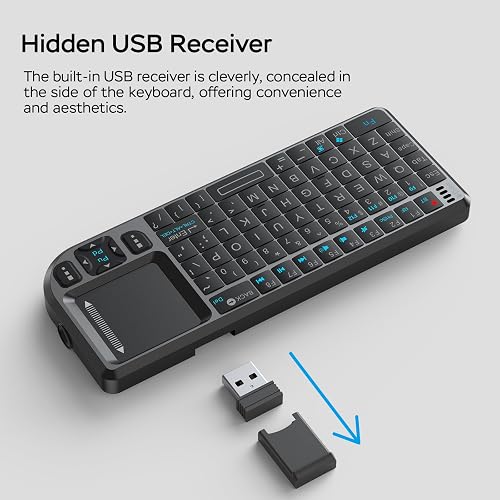
The USB Receiver Hides in the Keyboard’s Side Slot
The USB-A dongle stores in a slot cut into the side of the body rather than rattling around in a bag. Losing the receiver is the single most common way one of these keyboards dies, since it is paired to that specific unit and no off-the-shelf adapter replaces it. Keeping it in the chassis is a small design decision that matters.
A Real Touchpad and Mouse Buttons Under Your Thumb
The touchpad is what makes this more than a keyboard. It sits at the left of the deck with dedicated left and right mouse buttons directly below it, so you can point, click, and right-click without reaching for a second accessory. Pressing FN+Alt rotates the touchpad axis 90 degrees to match how you are holding the unit.
That combination replaces the worst part of a TV-connected computer: hunting around an on-screen keyboard with a remote, one letter at a time. You type and point the way you would on a laptop.
Seven-Color Backlight Makes Dark-Room Typing Easy
A button cycles the backlight through seven colors, and the RGB glow is the difference between usable and useless in a dark media room. This is the feature the Logitech K400 Plus still does not have after a decade on sale.
A 600mAh Rechargeable Battery That Charges Over USB-C
The built-in 600mAh cell charges over Type-C with the same cable already on your desk, so there are no AAAs to swap. An auto sleep and wake function powers the unit down when you set it aside and brings it back when you pick it up. Standby life stretches long enough that charging never became part of my routine.
The Built-In Laser Pointer Earns Its Place
A dedicated button on the side fires a laser pointer, which is an odd inclusion until you present with it. Advancing slides, typing live notes, and pointing at the screen from one handheld unit means no separate clicker in the bag.
Genuinely Pocket-Sized at About Six Inches Long
At roughly 6 x 2.33 x 0.51 inches and 0.1 kg, this portable keyboard fits in a palm and slips into a coat pocket. The 69-key QWERTY deck is plastic rather than metal, but nothing about it feels fragile in the hand. The keycaps have a tactile rubbery press that is closer to an old cell phone keypad than a mechanical switch, and for short bursts that works well.
What Needs Improvement on This Wireless Keyboard with Touchpad
The Touchpad Is the Weakest Part of the Package
The touchpad works, but the cursor moves slowly, and that is the compromise you accept for this form factor. On my 35-inch ultrawide it took five swipes to cross two-thirds of the screen and eight swipes to cross the whole thing. A desktop trackpad would do it in about four.
On a normal display you will swipe fewer times than that, so this is not the dealbreaker it sounds like. It is still fine for navigating menus and clicking links, and poor for pixel-accurate work. Every competing mini keyboard I researched draws the same complaint, so treat it as a category limit rather than a Burhoo defect.
The Ortholinear Key Grid Slows Down Touch Typists
The keys sit in straight rows instead of the staggered layout your hands already know. Touch typists lose their rhythm on it, and the adjustment period is real. This deck is built for short bursts, not for sitting down and writing for an hour.
Small Keys Are Awkward If You Have Large Fingers
At six inches wide there is no way around it: one fingertip covers most of a single key. I had no trouble hitting the right one, but my fingers are not large, and buyers with big hands consistently report more typos than they expected.
Apple Support Is Partial, and Burhoo Says So
Burhoo’s own retail listing warns that some functions may not be compatible with iOS devices and advises buying with that in mind. The keyboard is built around Windows, Android, smart TV, and Raspberry Pi OS, and it works on a Mac as a plain computer keyboard, but do not count on every shortcut key mapping cleanly on Apple hardware.
One more caveat worth knowing before you buy: 2.4 GHz shares the crowded ISM radio band with Wi-Fi. Owners of similar dongle-based keyboards report the link degrading when the receiver is tucked behind a TV or blocked by furniture. Moving the dongle to a front-facing port or a short extension cable fixes most of it.
How the K808 Compares to Logitech and Rii Alternatives
Burhoo K808 vs. Logitech K400 Plus
The Logitech K400 Plus is the default recommendation in this category, and at around $29.99 it earns it with a 3.5-inch touchpad and roughly 18 months on a pair of AA batteries. It is also a two-handed, laptop-width slab you rest on your knees, not something you hold in one palm.
The two gaps that matter are backlight and Bluetooth. The K400 Plus has neither, so it is invisible in a dark room and cannot pair with a phone or tablet at all. The K808 gives you both for roughly $12 less.
Burhoo K808 vs. Rii i4 and Rii Mini Keyboards
Rii mini keyboards are the closest handheld rivals, and the Rii i4 runs about $33 at 7.1 x 4.2 x 0.9 inches and 6.3 ounces. It adds a scroll wheel that owners single out as the reason they keep it, which the K808 does not match.
You are paying nearly double for that scroll wheel and a slightly roomier deck. Reviewers still describe the Rii touchpad as short of a dedicated pointing device, so the trade is size and price rather than precision.
Burhoo K808 vs. Arteck HB030B Backlit Keyboard
The Arteck HB030B is the upgrade pick if the couch is the only place this wireless keyboard will ever live. It shares the seven-color backlight and USB-C rechargeable battery, and reviewers rate its typing feel and touchpad well above the K400 Plus.
It also costs roughly triple and is full size, which rules it out for a bag or a tool kit. If you need one device for the living room, a conference room, and a field service call, the K808 is the only one of the three that goes in a pocket. If typing is the job rather than pointing, the ProtoArc XK04 Foldable Keyboard folds down to a similar pocket size while keeping the staggered layout your hands already know. At the opposite end of the size range, the Clevetura CLVX 1 Mac Keyboard builds touch sensing into every key, so a Mac desk gets cursor control without a separate pointing device at all.
Final Verdict on This Compact, Portable Mini Keyboard
The Burhoo K808 earns 4.2 out of 5 from me. That starts at the 4.4-star Amazon average and comes down slightly for the slow cursor, the cramped ortholinear grid, and the partial iOS support Burhoo documents itself.
None of those are surprises at this price. What you get instead is the widest feature set in the segment: dual 2.4GHz and Bluetooth radios, a stored USB dongle, a seven-color backlight, USB-C charging, and a laser pointer, in something that fits in a pocket.
If you want one compact device to control a TV-connected computer, a media box, or a projector during a presentation, this is worth checking out. If you want to type on it for an hour, buy a real keyboard instead.
Specifications
| brand | Burhoo |
| built_in_media | usb_cable |
| color | Black |
| compatible_devices | Gaming Console, Laptop, Personal Computer, Smartphone, Television |
| compatible_operating_system_family | Android, Windows, iOS |
| connectivity_technology | Bluetooth+2.4G |
| hand_orientation | Ambidextrous |
| item_highlight | 600mAh rechargeable battery, laser pointer, compatible with pc/tv/htpc,and other devices, for travel,office and home use |
| item_weight | 0.1 kg |
| keyboard_backlighting_color_support | RGB |
| keyboard_description | 2.4G+Bluetooth mini wireless keyboard with touchpad, multi-function mini keyboard |
| keyboard_layout | QWERTY |
| manufacturer | Burhoo |
| mfr_part_number | 4352257125 |
| model_number | BH800 |
| number_of_batteries | 1 Lithium Polymer batteries required. (included) |
| number_of_keys | 69 |
| number_of_packs | 1 |
| operating_system | Android, Raspberry Pi OS |
| other_special_features_of_the_product | Lightweight, Portable, Rechargeable, Touchpad, backlight |
| power_source | Battery Powered |
| upc | 753210505819 |
Frequently Asked Questions
Is the Burhoo K808 the best small wireless keyboard with a touchpad?
It is the best-equipped one at its price. Nothing else near $18 gives you dual 2.4G and Bluetooth radios, a seven-color backlight, USB-C charging, and a laser pointer in a six-inch body. The Logitech K400 Plus has a far better touchpad and the Arteck HB030B types better, but both are two-handed keyboards that cost more.
Does the Burhoo K808 work without the adapter?
Yes. The USB adapter is only needed for 2.4G mode. Switch to Bluetooth and the K808 pairs directly with a phone, tablet, laptop, or Bluetooth-capable smart TV, leaving the port free. Keep the dongle in its side slot anyway, since 2.4G is the more reliable option for older TVs and streaming boxes without Bluetooth.
Is the Burhoo K808 a good wireless mini keyboard for a smart TV?
This is the use case it is built for. Plug the receiver into a smart TV, HTPC, or Android TV box and it auto-pairs with no setup, giving you a keyboard and mouse in one hand from about 10 m away. The backlight matters here too, since most media rooms are dark.
How does the Burhoo K808 trackpad compare to a normal mouse?
It is noticeably slower. Crossing a 35-inch ultrawide took eight swipes where a desktop trackpad would take about four. For navigating menus, clicking links, and scrolling it is fine; for dragging small UI elements or precision work it is not a substitute for a mouse.
How long does the Burhoo K808 battery last and how does it charge?
It is battery powered by a built-in 600mAh rechargeable cell that charges over a USB-C cable, so there are no AAAs to replace. An auto sleep and wake function drops it into standby when you set it down, which stretches standby life to weeks rather than days for typical couch use.
Does the Burhoo K808 work with a Mac or an iPad?
It pairs and types on both, but Burhoo's own retail listing warns that some functions may not be compatible with iOS devices. Expect basic typing and cursor control to work on Apple hardware and expect some shortcut and media keys not to map. If your household is iOS-first, this is the wrong keyboard.
Can you use the Burhoo K808 with a Raspberry Pi or a game console?
Yes to both. Burhoo lists Raspberry Pi OS among the supported operating systems, and the 2.4G dongle needs only a free USB-A port, which makes this handheld portable wireless keyboard useful for headless Pi setup work. On a console it will not replace a controller for gameplay, but it turns typing a search or a chat message into a two-second job.
Ready to Buy?
Burhoo K808 Mini Wireless Keyboard with Touchpad delivers on its promises. If it fits your needs, it's a solid choice you won't regret.
Check Price on Amazon Founder & Product Reviewer at TheReviewRewind
Daniel has tested 400+ products across 20+ categories through hands-on, real-world testing. Every review includes video documentation and standardized scoring criteria. His reviews appear as Amazon shoppable videos and here on TheReviewRewind.
We earn a commission if you make a purchase, at no extra cost to you. This does not influence our ratings or recommendations. Full disclosure
Looking for more options? See all our Computers reviews.
Related Reviews