Uineer A06 Vertical Ergonomic Mouse Review: Real Wrist Relief for $27?


Uineer A06 Vertical Ergonomic Mouse Review: Real Wrist Relief for $27?
Uineer A06 Vertical Ergonomic Mouse
Buy if you spend long hours on a mouse and feel it in your wrist by evening, or you bounce between a laptop, desktop, and tablet and want silent clicks with one-button switching. Skip if you do pixel-level design all day or you need a competitive gaming sensor and premium build.
Buy on AmazonWhat We Liked
- Real Wrist and Forearm Relief at 59 Degrees
- Near-Silent Left and Right Click Buttons
- Tri-Mode Wireless With Three-Device Switching
- A 500mAh Battery You Can Actually Monitor
- On-the-Fly DPI Switching Across Four Levels
- Lightweight Enough to Toss in a Laptop Bag
What Could Be Better
- Fine Cursor Control Suffers at This Angle
- A Slow, Button-Press Wake From Deep Sleep
- No First-Party Button-Remapping Software
- A Light Shell That Feels a Step Below Premium
How we test: Every product is used in real conditions and evaluated using our standardized scoring criteria. Read our full review methodology.
If your wrist starts aching by the middle of the afternoon and you have been blaming your chair, your desk, or your posture, the real culprit might be the way your hand sits on your mouse all day.
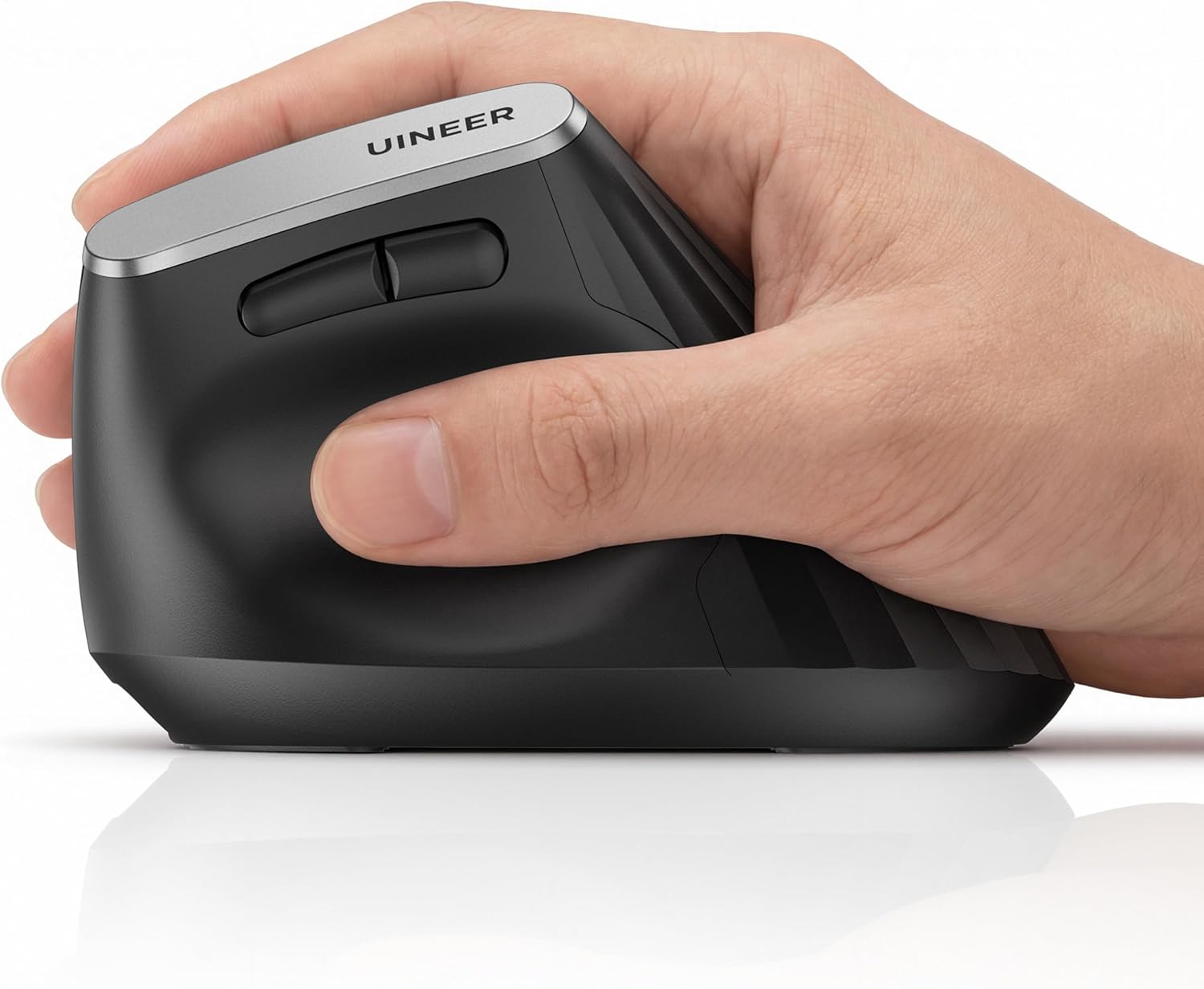
The Uineer A06 Ergonomic Wireless Vertical Mouse is a budget vertical mouse that stands on its side, so your hand grips it in a natural handshake position instead of lying flat. It runs about $27, tilts your hand to a 59-degree angle, connects three ways, and switches between three paired devices with one button.
I have used ergonomic mice for over a decade, and I put this one through my normal work-and-multi-device routine to see where the corners were cut. That covered the silent clicks, the tri-mode wireless, the DPI switching, and a rechargeable battery that surprised me.
The short version? For the price, it takes real strain off a hand position that has been quietly wearing you down. A few budget trade-offs are worth knowing before you buy.

What I Liked
The Uineer A06 earns its keep in a few specific areas during daily desk work. Here is what stood out as I tested this wireless vertical mouse.
Real Wrist and Forearm Relief at 59 Degrees
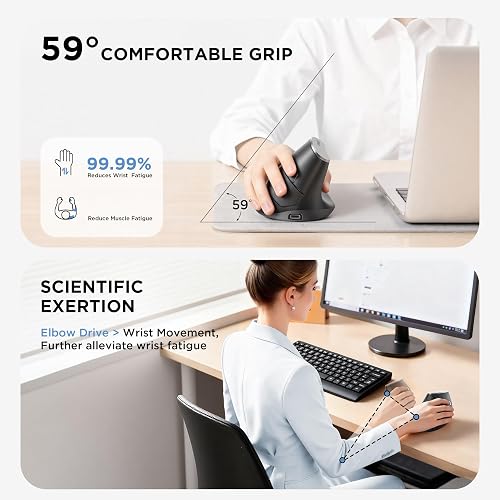
The shape is the whole point here. The shell sits at a 59-degree angle, so your forearm stops rotating flat, palm down, and settles into a more neutral handshake position instead.
On a regular flat mouse your forearm bones stay crossed over each other for eight to ten hours a day. On this ergonomic mouse they stack, and I noticed the difference after a single day of use. Try it yourself: make clicking gestures palm-down, then switch to the handshake grip and feel how much tension drains out of your wrist and forearm.
That relief is not just my experience. After testing nine vertical mice, ZDNET’s David Gewirtz named the A06 his winner and daily driver, writing that he had “been using the A06 for days without any discomfort.”
Near-Silent Left and Right Click Buttons
The two main buttons use a soft-click design and are close to silent. That matters in a quiet office, a library, a shared room, or late at night while someone else is asleep.
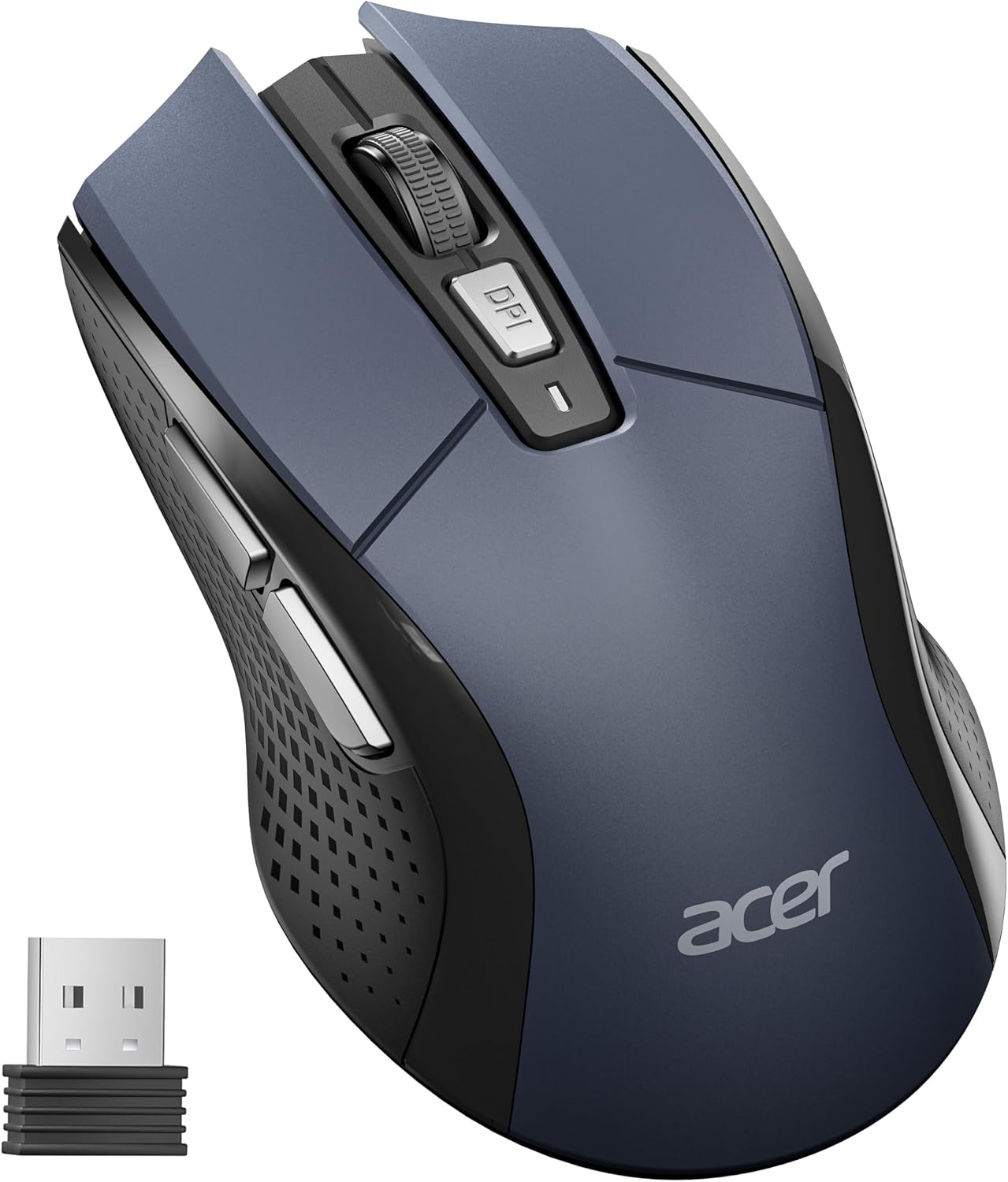
The scroll wheel, DPI button, and thumb buttons are a little louder, so this is not completely silent across every input. For the clicks you make most, though, you are not filling the room with constant clatter. If a traditional full-size shape suits you better than a vertical one, the Acer Wireless Mouse delivers similarly crisp clicks for everyday office work at an even lower price. For keeping that same quiet machine awake through long downloads or meetings, the Yonktoo Mouse Jiggler runs on a near-silent motor so it never adds noise to the room either.
Tri-Mode Wireless With Three-Device Switching
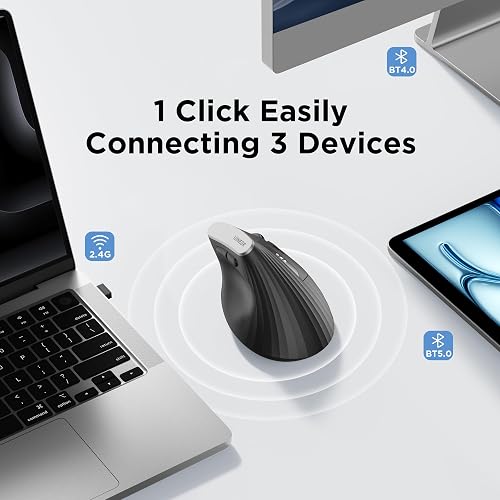
The Uineer connects three ways: Bluetooth 5.0, Bluetooth 4.0, and 2.4GHz wireless through a small USB-A receiver that tucks into the base of the mouse. The 2.4GHz dongle is the plug-and-play option, and in my testing it ran a higher report rate than Bluetooth, so cursor movement felt noticeably smoother and more precise.
The feature I used most is the three-device switching. You can pair a work laptop, a home desktop, and an iPad at once, then jump between them with the mode button instead of diving into Bluetooth settings. It works across Windows, Mac, Chrome OS, and Linux, and on Mac it paired immediately with no driver hunting. Uineer offers the same handshake relief and three-device switching on its cheaper A9 model, the Uineer Vertical Ergonomic Mouse, which runs closer to $20. For a comparison with more onboard controls, the Transformers Vertical Ergonomic Mouse adds the same three-device switching alongside a control knob and an LED status screen.
A 500mAh Battery You Can Actually Monitor
Inside is a 500mAh rechargeable battery that tops up over the included USB-C cable, so there are no AA batteries to buy and swap forever. In my use I got over 20 hours before the low-battery indicator started flashing, which means days between charges rather than hours.
The detail I liked more than expected is the three-bar LED gauge on the side that shows the battery level. You get a clear heads-up before it dies, and because the USB-C port is on the front, you can keep working while it charges. A dead battery never means a dead mouse.
On-the-Fly DPI Switching Across Four Levels
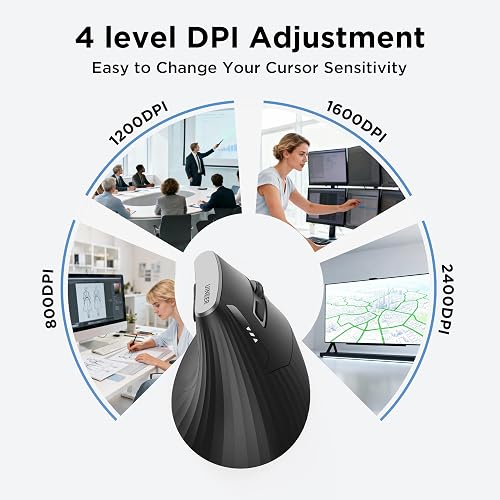
A button up top cycles the DPI, which sets cursor speed, through four steps: 800, 1200, 1600, and 2400. You can slow it down for precision work like lining things up in a spreadsheet, or speed it up to fly across a wide monitor.
Changing it on the fly, rather than digging into settings, is a small thing that turns out to be handy day to day. The sensor is more than adequate for office work, document editing, and browsing.
Lightweight Enough to Toss in a Laptop Bag
At roughly 105 grams the A06 is lighter than premium vertical mice, so it is not tiring to move around all day and it is an easy one to throw in a bag. The plastic reads a step below top tier, but nothing about it feels flimsy or creaky.
It also suits a range of hand sizes. The body comfortably fits larger hands, and even smaller hands still get the ergonomic benefit, because the angle is what delivers the relief.
What Needs Improvement
No $27 mouse is flawless, and the Uineer A06 has a handful of budget compromises. None were dealbreakers for me, but they are worth knowing before you buy.
Fine Cursor Control Suffers at This Angle
At a 59-degree angle, nudging the cursor one or two pixels at a time is harder than on a flat mouse. For spreadsheets, email, and browsing you will never notice it.
If you do detailed photo retouching or pixel-level design work, though, you may still want a traditional mouse sitting next to this one for that specific task. That is less a flaw in the mouse than a trade you make with any vertical shape, but it is worth knowing going in.
A Slow, Button-Press Wake From Deep Sleep
The A06 drops into a low-power mode after about a minute idle and a deeper sleep after roughly 10 minutes. Waking it from that deep sleep takes a few seconds, and you have to press a button rather than just moving it.
It is a minor daily friction rather than a real problem, but if you step away often, expect that short pause before the cursor responds again.
No First-Party Button-Remapping Software
There is no first-party software for remapping the buttons. If you want to reassign the thumb buttons or add gestures, you will need a third-party remapping utility, which is an extra step.
Mac users should also note that forward and back side buttons can be inconsistent on macOS with budget vertical mice, so a utility like BetterMouse may be needed to get them working reliably.
A Light Shell That Feels a Step Below Premium
The A06 is light, and in the hand the plastic feels a step below top-tier vertical mice. That is largely the price talking, and it never felt like it would break during my testing.
A pricier mouse like the Logitech Lift adds grippier texture and a more premium feel that the Uineer skips. If build quality is what you value most, this is where the budget shows.
How It Compares
The obvious benchmark is the Logitech Lift, and I put the two side by side. The Logitech is grippier, a little heavier, and feels more premium in the hand than the Uineer does, and it adds a left-handed version the A06 lacks.
The catch is that the gap in function does not match the gap in price. The Lift costs roughly $80, about three times the Uineer, yet in my testing the A06 handled the same tasks just as effectively. The Lift also runs on a single AA cell, where the Uineer gives you a 500mAh rechargeable battery and a wired-while-charging fallback. Unless you specifically want the premium build, the budget vertical mouse does the job.
Step up to the Logitech MX Vertical and you get a flagship at about $120 with a larger-hand design, full customization software, and a wired USB-C mode, but you pay flagship money for it. That suits people who want the best build in everything they buy, which is exactly the buyer the Uineer is not chasing.
Among budget rivals, ZDNET’s runner-up was the ProtoArc EM11 NL, which the reviewer found capable but more tiring after a few hours than the A06. The Anker 2.4G vertical mouse sits at a similar price but drops to a 2.4GHz receiver only, with no Bluetooth, no 2400 DPI step, and AAA batteries instead of a rechargeable cell. For a tri-mode, rechargeable vertical that covers the essentials most people actually use, the Uineer is the stronger value.
Final Verdict
The Uineer A06 Ergonomic Wireless Vertical Mouse is an affordable, low-effort way to fix a hand position that has been quietly wearing you down, and it covers the features that matter most for work and multi-device setups.
I am giving it a 4.2 out of 5.
It loses a little for the harder fine control at this angle, the slow wake from deep sleep, the lack of first-party remapping software, and a light build that feels a step below premium. The genuine wrist relief, near-silent clicks, tri-mode wireless, three-device switching, and a readable rechargeable battery more than make up for it at this price.
Bottom line: If you deal with wrist strain from a regular mouse and want a comfortable vertical without spending flagship money, the Uineer A06 is an easy one to recommend, and at around $27 it is a low-risk way to find out whether a vertical mouse works for you.
Specifications
| additional_features | Battery Indicator, Ergonomic Design, Rechargeable, Wireless |
| antenna_location | Office |
| brand | Uineer |
| button_quantity | 6 |
| color | Black |
| compatible_devices | Personal Computer, Smartphone, Tablet |
| connectivity_technology | Bluetooth 5.0, Bluetooth 4.0, 2.4 GHz Wireless, USB |
| enclosure_material | Plastic |
| hand_orientation | Right |
| hardware_platform | Linux, Mac, PC |
| included_components | 1 x 50CM Type - c charging cable, 1 x USB receiver (stored at the bottom of the mouse), 1 x User manual, 1 x Wireless Vertical mouse |
| item_dimensions_l_x_w | 4.57"L x 3.03"W |
| item_weight | 105 g |
| manufacturer | UINEER |
| mfr_part_number | A06 |
| minimum_required_operating_system_version | Windows 10 |
| model_name | A06 |
| model_number | A06 |
| mouse_maximum_sensitivity | 2400 dots_per_inch |
| movement_detection | Optical |
| number_of_batteries | Built-in 500 mAh rechargeable (included) |
| operating_system | Windows 11/10/8/7/XP/Vista and Mac OS X/Linux/Android/iOS(13+) |
| power_source | Rechargeable (built-in battery) |
| range | 32 feet |
| style_name | Ergonomic |
| unit_count | 1 Count |
| warranty_description | 12-Month Replacement (45-Day Refund) |
| tilt_angle | 59 degrees |
Frequently Asked Questions
Are Uineer mice any good?
For the price, yes. The Uineer A06 delivers the core ergonomic benefit of a vertical mouse, adds tri-mode wireless and a rechargeable battery, and was named the winner of a nine-mouse comparison by ZDNET. The trade-offs are a lighter build and no first-party software, which is fair at around $27.
Do vertical mice actually help with wrist pain?
They can. A vertical mouse keeps your forearm in a more neutral handshake position instead of twisting it palm-down, which takes pressure off the wrist over long sessions. Results vary from person to person, it is not a medical device, and some users find it moves strain to the hand, so it is worth trying with a return option.
Is the Uineer A06 a good budget vertical mouse?
It is one of the better budget picks. At about $27 it offers a 59-degree angle, Bluetooth 5.0 and 4.0 plus 2.4GHz wireless, three-device switching, four DPI levels, and a 500mAh rechargeable battery with a visible charge gauge, a feature set usually found on pricier mice.
How long does the Uineer A06 battery last?
In my testing I got over 20 hours of use before the low-battery light began flashing, and the brand rates it for weeks of typical office use. A three-bar LED gauge shows the charge level, and you can keep working over USB-C while it recharges.
Does the Uineer A06 work with a Mac?
Yes. It pairs instantly on macOS with no driver setup and also works on Windows, Chrome OS, and Linux. The forward and back side buttons can be inconsistent on macOS, as with most budget vertical mice, so you may need a third-party utility to map them.
Uineer A06 or Logitech Lift, which should I buy?
Buy the Logitech Lift if you want a grippier, more premium build, a left-handed option, and customization software, and you do not mind paying roughly three times as much. Buy the Uineer A06 if you want the same everyday wrist relief, a rechargeable battery, and tri-mode switching for far less.
Ready to Buy?
Uineer A06 Vertical Ergonomic Mouse delivers on its promises. If it fits your needs, it's a solid choice you won't regret.
Check Price on Amazon Founder & Product Reviewer at TheReviewRewind
Daniel has tested 400+ products across 20+ categories through hands-on, real-world testing. Every review includes video documentation and standardized scoring criteria. His reviews appear as Amazon shoppable videos and here on TheReviewRewind.
We earn a commission if you make a purchase, at no extra cost to you. This does not influence our ratings or recommendations. Full disclosure
Looking for more options? See all our Computers reviews.
Related Reviews