WAVLINK Quad Monitor Docking Station Review: 4 Windows Displays From One USB-C Cable


WAVLINK Quad Monitor Docking Station Review: 4 Windows Displays From One USB-C Cable
WAVLINK Quad Monitor Docking Station
Buy if you run Windows and want true four-monitor expansion under fifty dollars with mixed DisplayPort, HDMI, and VGA outputs. Skip if you use a Mac, need fast USB-A or Gigabit Ethernet from the dock, or do not want to buy a separate 100W charger.
Buy on AmazonWhat We Liked
- Four Monitors From One USB-C Cable
- 100W Power Delivery, 95W to the Laptop
- Mixed DP, HDMI, and VGA Ports for Old and New Monitors
- Plug and Play With No DisplayLink Driver
What Could Be Better
- USB-A 2.0 Speeds Limit Peripherals to 480 Mbps
- No Ethernet Port on the Dock
- Windows Only, Mac OS Not Supported
How we test: Every product is used in real conditions and evaluated using our standardized scoring criteria. Read our full review methodology.
Want four monitors running off a single USB-C cable on your Windows laptop without spending three hundred dollars on a Thunderbolt dock? The WAVLINK Quad Monitor Docking Station promises exactly that for under fifty.
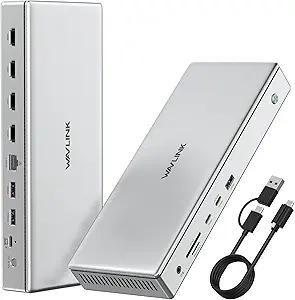
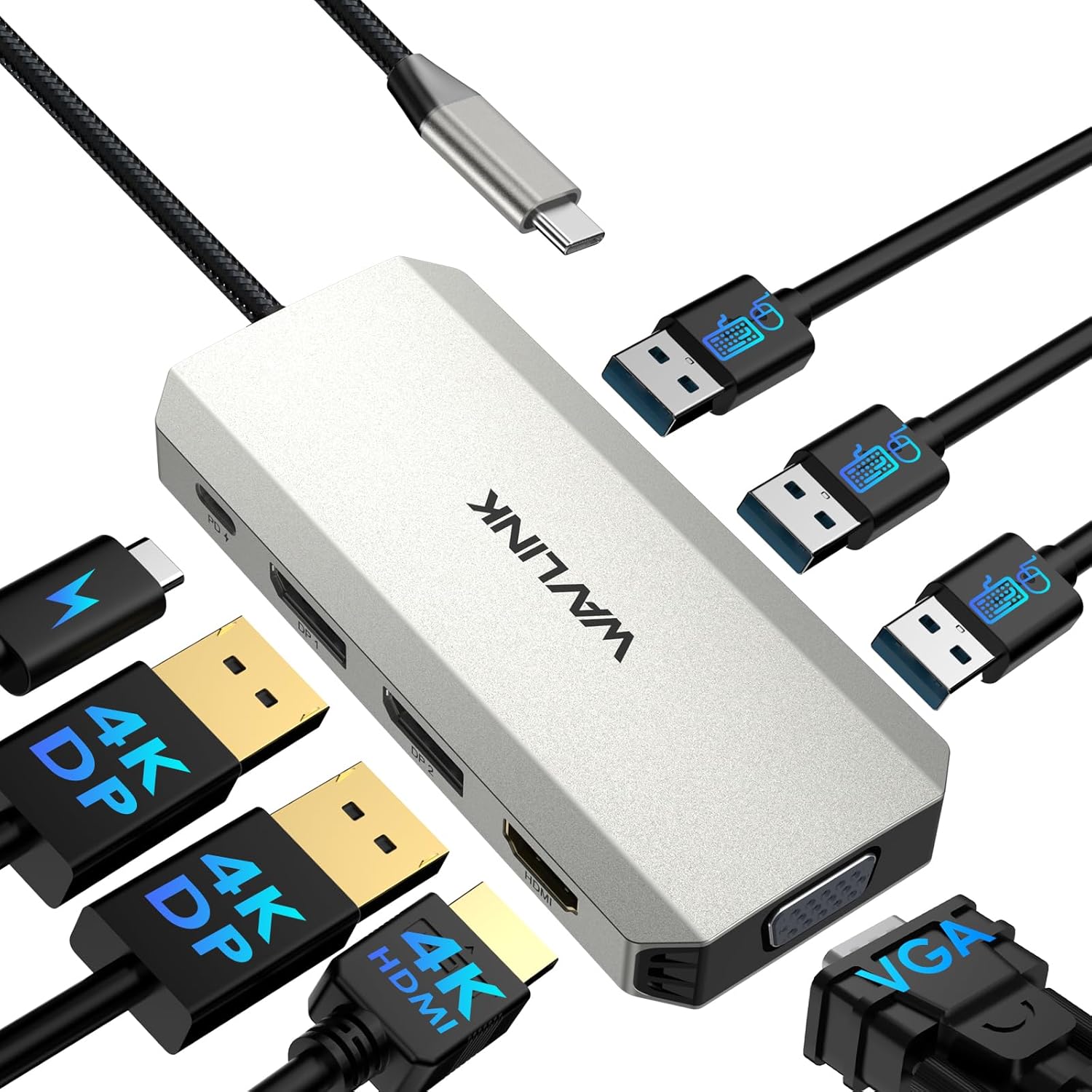
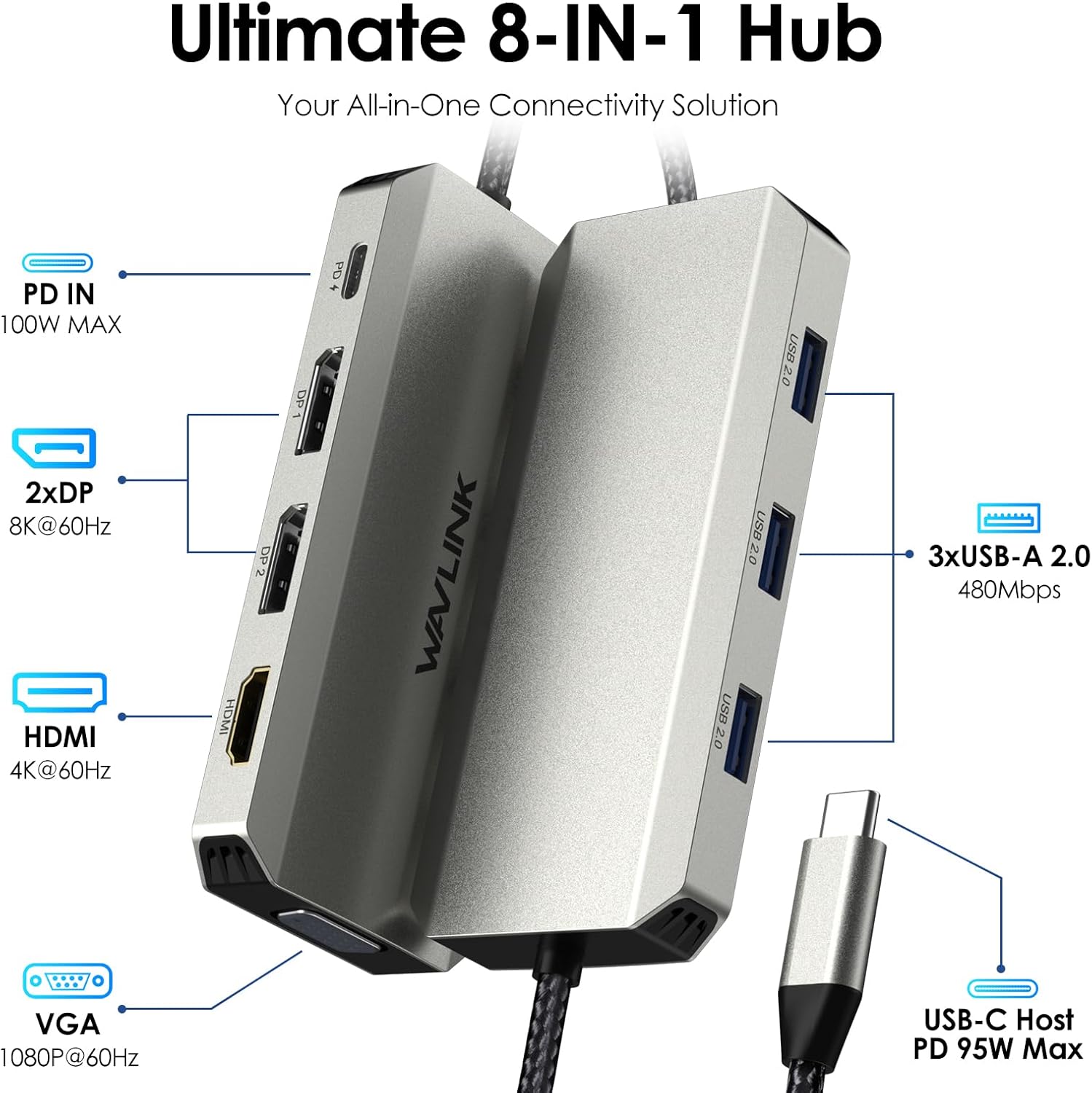
The WAVLINK Quad Monitor Docking Station is the WL-UMD307 Pro, an 8-in-1 USB-C dock with dual DisplayPort, HDMI, VGA, three USB-A 2.0 ports, and 100W power delivery for laptop charging. It is designed for Windows users only, and the mix of port types means it can drive both new 4K panels and an older VGA monitor at the same time.
I ran this dock for a week with three external monitors plus a wireless mouse dongle and a SanDisk Extreme SSD on a Windows laptop. Setup took minutes, no DisplayLink driver was required, and it kept the laptop charging at near-full speed while feeding every display.
The short answer: at $49.99 it is a smart pick for Windows multi-monitor desks, with a few real trade-offs that you need to know before clicking buy.
What I Liked
After a week of daily use across a multi-monitor Windows setup, four things stood out about this WAVLINK dock.
Four Monitors From One USB-C Cable
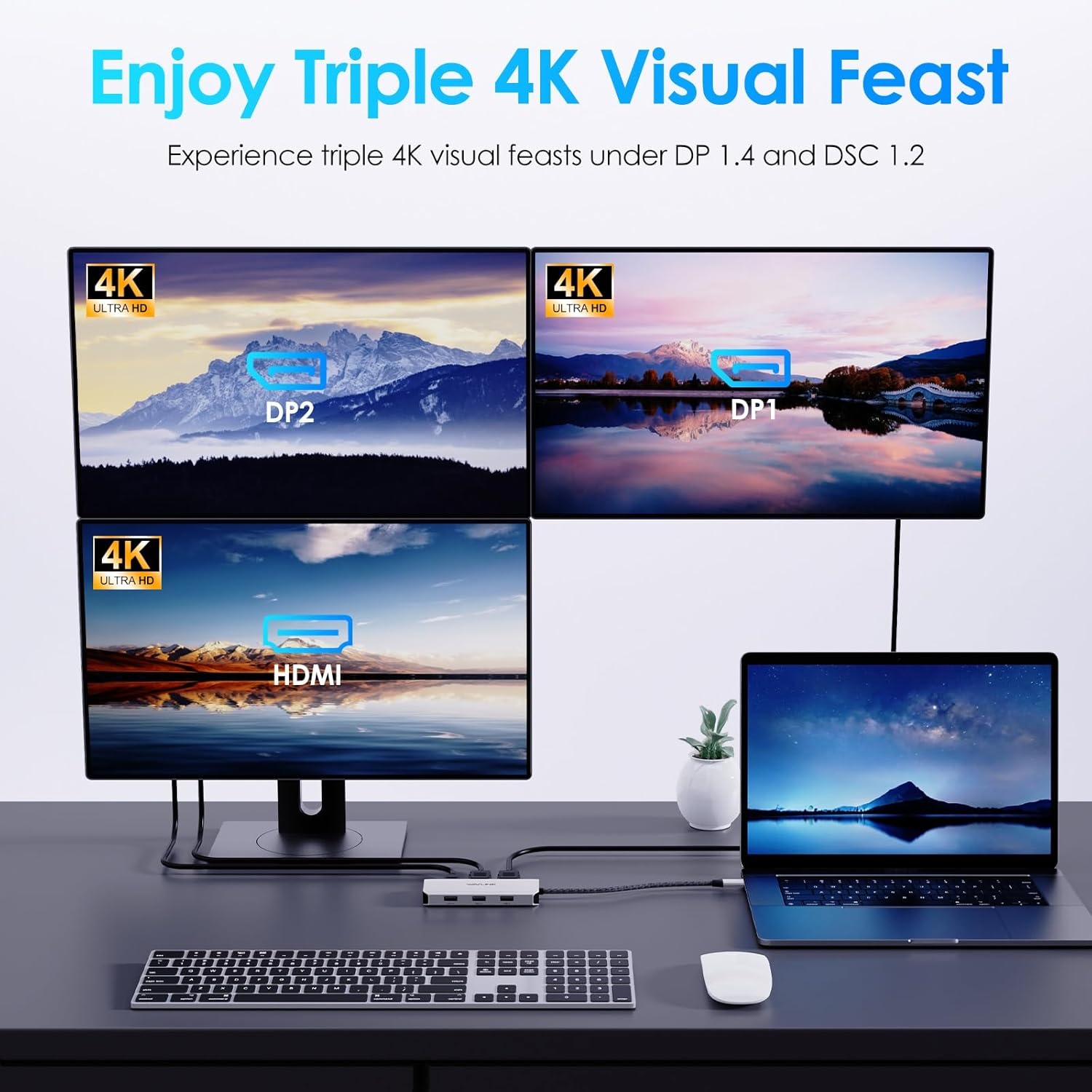
The headline feature actually works. The dock exposes two DisplayPort outputs that each top out at 8K@60Hz, one HDMI 2.1 port at 4K@60Hz, and a VGA output at 1080p@60Hz, and it can drive all four simultaneously at 4K@60Hz, 4K@60Hz, 4K@30Hz, and 1080p@60Hz when your laptop GPU and USB-C port support DP1.4 with DSC1.2.
Compared to most sub-$100 USB-C docks that cap at two or three external monitors, this is the cheapest way I have seen to get a true four-display Windows setup over a single cable. WAVLINK’s premium Mac-compatible DL7400 dock starts around $300, so the price gap for Windows-only buyers is significant.
For developers running an editor, a terminal, browser docs, and a chat app, or for traders watching multiple feeds, that fourth screen turns a normal laptop into a desk you would expect to see in a finance office. If three monitors cover your needs, the WAVLINK Laptop Docking Station 3 Monitors uses the same plug and play USB-C Alt Mode with 125W charging at around $80. Anyone who prefers an upright form factor can also look at the WAVLINK 11-in-1 docking station, which trades the fourth display for a vertical stand and Gigabit Ethernet.

100W Power Delivery, 95W to the Laptop
The dock takes 100W in through its USB-C PD input and passes 95W through to the host laptop while it is also pushing video to four displays and running peripherals. In a week of testing on a 14-inch Windows laptop, the battery stayed pinned near 100% even under load.
That 95W is enough to keep most 14- and 15-inch ultrabooks charging at full speed. Dell, HP, and Lenovo workstations with thirstier 130W bricks will charge more slowly than off their stock charger, but they still gain ground rather than draining.
The catch is that the 100W charger is sold separately, which is mentioned in fine print on the listing.
Mixed DP, HDMI, and VGA Ports for Old and New Monitors
I have one VGA monitor left in my office that I keep around as a status dashboard. The WAVLINK is the first compact dock I have used that takes that VGA cable directly without an adapter. Two DisplayPort outputs cover modern 4K panels, the HDMI handles a TV or older 4K monitor, and the VGA keeps a legacy display in the rotation at 1080p@60Hz.
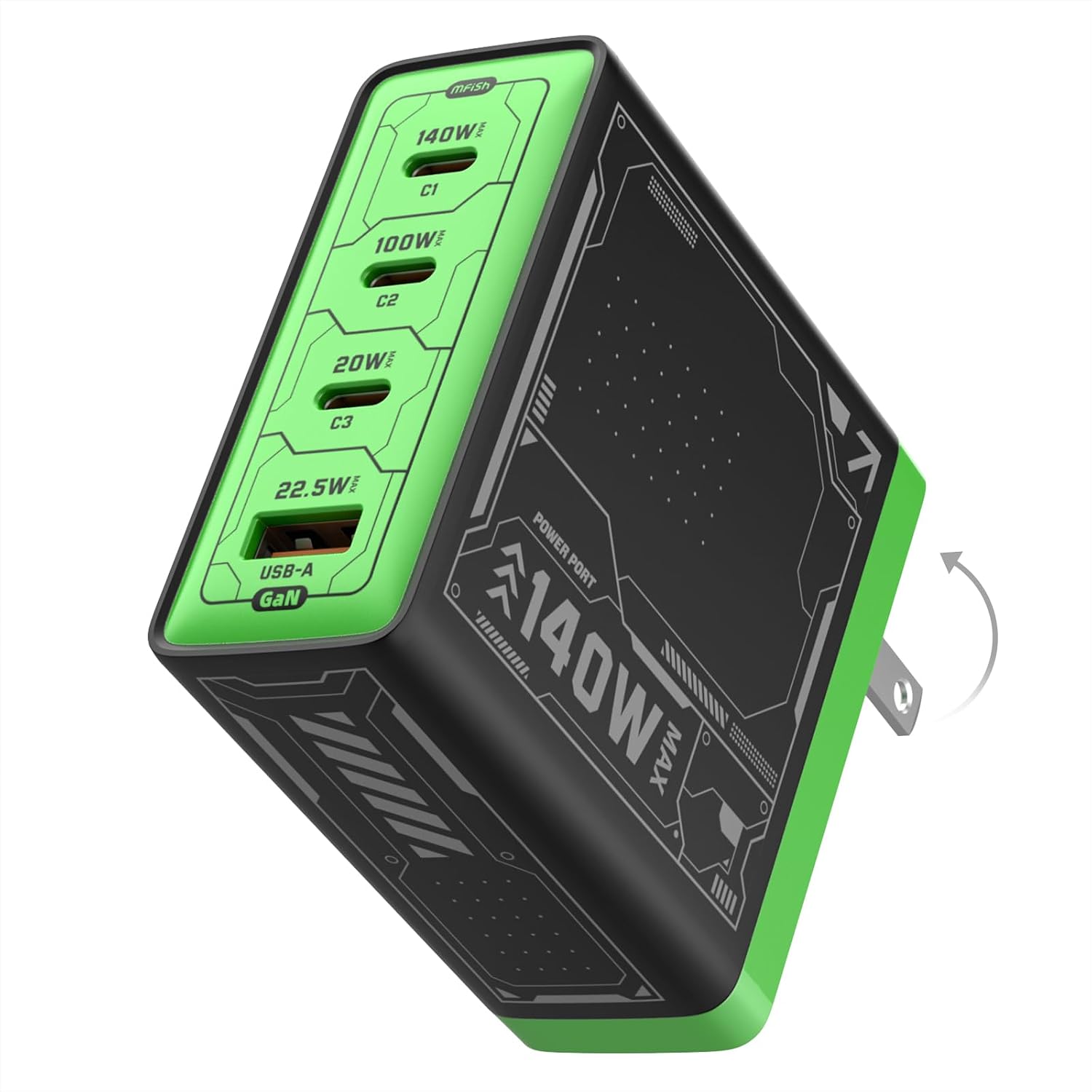
For hot-desk and home-office setups where the monitor inventory is whatever you happen to own, this port mix matters more than another USB-C output. You are not forced to buy active DP-to-HDMI or DP-to-VGA adapters just to plug in everything you already have. Because the dock ships without its own power brick, pairing it with a compact unit like the Mfish E-Rhino 140W USB-C charger covers both the laptop and a phone from one outlet.
Plug and Play With No DisplayLink Driver
This dock does not use DisplayLink, which is a real differentiator. There is no driver download, no kernel extension, no screen-recording permission prompt on macOS-style nag screens. Plug the USB-C cable into a Windows laptop that supports DP Alt Mode and the displays light up in seconds.
Compared to the WAVLINK Pro DL7400 and similar premium docks that depend on DisplayLink Manager and CPU-side video encoding, the WL-UMD307 Pro feels much more like a normal monitor cable than a software peripheral. For IT teams provisioning shared desks, that means one less driver to push and one less thing to break after a Windows update.
What Needs Improvement
The WAVLINK gets a lot right for the price, but three trade-offs are worth knowing before you order.
USB-A 2.0 Speeds Limit Peripherals to 480 Mbps
The three USB-A ports on the dock are USB 2.0, capped at 480 Mbps. That is fine for a wireless mouse dongle, a keyboard, a printer, or an old USB stick, but it is a non-starter for fast external storage. A SanDisk Extreme SSD plugged into the dock dropped to roughly thirty megabytes per second when I tested it, which is one fifteenth of what the same drive does directly off the laptop’s USB 3.2 port.
If you intend to dump RAW photo cards or move project files through the dock, this is the bottleneck. You can route an external SSD through the laptop’s spare USB-C or USB-A port and use the dock for monitors and peripherals only, which is the workaround most reviewers settle on. WAVLINK’s pricier Pro models use USB 3.0 or USB 3.2 ports for storage, but they cost three to six times as much.
No Ethernet Port on the Dock
There is no RJ45 jack anywhere on this docking station. If you rely on wired internet at the desk, you have to either keep using the laptop’s built-in Ethernet, plug in a separate USB-C-to-Ethernet adapter through one of the dock’s USB-A 2.0 ports, or accept the speed hit of running gigabit through that 480 Mbps interface.
For office and hot-desk environments that lean on wired networking for stability or security, this is a real omission. The WAVLINK 11-in-1 and DL7400 docks both add 2.5 Gigabit Ethernet, which is one of the easier reasons to step up.
Windows Only, Mac OS Not Supported
The Amazon listing is explicit: “Not compatible with any MAC OS computer.” MacBooks, iMacs, and Mac Minis cannot extend across multiple displays through this dock because Apple’s chip-level limits would make every external screen mirror the same image. Some Windows laptops with integrated GPUs are also capped at three external monitors, including the laptop’s own screen, which means the fourth display only fires up when you close the lid or set the laptop screen as disabled.
Mac users who want four displays from one cable need WAVLINK’s DisplayLink-based DL7400 dock or a Plugable Thunderbolt 4 quad option. Windows buyers should confirm their laptop supports DP1.4 with DSC1.2 over USB-C before ordering, because that requirement is easy to miss in the listing.
How It Compares
Quad-monitor docks come in roughly three tiers. The WAVLINK WL-UMD307 Pro sits at the entry level, where the trade-offs are deliberate.
vs Plugable Thunderbolt 4 Quad Display Dock
The Plugable TBT4-UDZ runs around $279 and uses native Thunderbolt 4 plus DisplayLink to drive four displays. It adds Gigabit Ethernet, USB 3.2 ports for fast storage, and 96W charging on Mac and Windows laptops with Thunderbolt.
The WAVLINK is the better pick if you only need four monitors and faster USB-A ports are not on your list, since it is roughly six times cheaper. The Plugable wins for Mac users, anyone moving large files through the dock, or buyers who need wired networking from the dock itself.
vs WAVLINK Pro DL7400 (WL-UG75PD1-DH)
WAVLINK’s own premium dock at around $300 uses the DisplayLink DL7400 chipset to drive four 4K displays on both Windows and Mac, including base M1, M2, and M3 MacBooks that Apple normally limits to a single external screen. It bundles 14 ports including 2.5 Gigabit Ethernet, faster USB-A 3.0, and dual SD card slots.
If you bought a MacBook Air and want four external monitors anyway, the DL7400 is the right WAVLINK to buy. The WL-UMD307 Pro reviewed here makes more sense for Windows-only buyers who do not need Mac support, Ethernet, or fast USB ports through the dock. Our full review of the WAVLINK Pro Docking Station DL7400 walks through the DisplayLink driver setup and quad 4K Mac testing in depth. MacBook owners who want triple displays plus wired Gigabit Ethernet at a midrange price can also consider the WAVLINK 12-in-1 DisplayLink Docking Station.
vs Dell UD22 Universal Dock
Dell’s UD22 is the corporate IT pick. It uses DisplayLink to drive up to four 4K displays across Windows, macOS, ChromeOS, and Linux, adds Gigabit Ethernet, and is widely supported by enterprise procurement. Pricing typically lands between $200 and $250.
The UD22 makes sense for fleet deployments, Mac users, or anyone who needs a vendor-supported dock with global warranty service. The WAVLINK undercuts it sharply on price for a small home office or a single Windows desk where DisplayLink overhead and Mac support are not worth the premium.
Final Verdict
The WAVLINK Quad Monitor Docking Station turns a compatible Windows laptop into a true four-monitor workstation for less than the price of a single mid-range monitor.
I am giving it a 4.3 out of 5. The dock loses points for USB-A 2.0 speeds, no Ethernet, and the Windows-only restriction, but it gains them back with native quad-display support, mixed DP, HDMI, and VGA outputs, plug-and-play setup with no DisplayLink driver, and 95W laptop charging from one USB-C cable, all at $49.99.
Bottom line: if you run Windows, want four monitors on a budget, and can route fast storage and Ethernet through your laptop instead of the dock, the WL-UMD307 Pro is the most aggressive value I have tested in the quad-display category. If you use a Mac or need Ethernet and fast USB ports through the dock, step up to WAVLINK’s DL7400 or a Thunderbolt 4 alternative.
Specifications
| model | WL-UMD307 Pro |
| ports | 1x USB-C (PD IN, 100W), 1x HDMI (4K@60Hz), 2x DisplayPort (8K@60Hz), 1x VGA (1080P@60Hz), 3x USB 2.0-A (480Mbps) |
| max_displays | Four external monitors (4K@60Hz x2 + 4K@30Hz + 1080P@60Hz) |
| power_delivery | 100W in, 95W to laptop |
| compatibility | Windows 11/10/8.1/8/7. Not compatible with Mac OS. |
| size | 11.0 x 5.0 x 1.5 cm (4.3 x 2.0 x 0.6 in) |
| weight | 85 g (3.0 oz) |
| cable_length | 25 cm (9.8 in) integrated USB-C cable |
| housing_material | Aluminum shell |
| color | Silver |
| ean | 6955362050085 |
Frequently Asked Questions
What docking station supports 4 monitors at this price?
The WAVLINK Quad Monitor Docking Station (WL-UMD307 Pro) supports four external displays from one USB-C cable at $49.99. It uses dual DisplayPort, HDMI, and VGA outputs with no DisplayLink driver required. Most quad-display docks at this price tier max out at two or three monitors.
Does the WAVLINK Quad Monitor Docking Station work with Mac?
No. The Amazon listing is explicit that the WL-UMD307 Pro is not compatible with any Mac OS computer. Apple's chip-level limits would force every external screen to mirror the same image. Mac users who want four displays need the WAVLINK Pro DL7400, which uses DisplayLink to bypass Apple's limit.
What country is WAVLINK from?
WAVLINK is a Shenzhen-based Chinese electronics brand founded in 2003. It primarily sells networking and PC peripherals, including USB-C docking stations, Wi-Fi range extenders, and KVM switches, distributed worldwide through Amazon and its own wavlink.com store.
Is the WAVLINK Quad Monitor Docking Station the most reliable docking station for Windows?
It is one of the most reliable budget options for Windows because it skips DisplayLink and runs on standard DP Alt Mode. That means no driver to break after a Windows update. Premium options like the CalDigit TS4 or Kensington SD5700T are more reliable across Mac and Windows but cost five to six times as much.
Does the WAVLINK Quad Monitor Docking Station charge my laptop?
Yes. The dock takes 100W in through its USB-C PD input and passes 95W through to the host laptop while running monitors and peripherals. The 100W charger is sold separately and is required to hit full performance, so plan for that extra purchase.
What is the difference between the WAVLINK Quad Monitor Dock and the WAVLINK Pro DL7400?
The WL-UMD307 Pro reviewed here is Windows-only, $49.99, and uses native DP Alt Mode with no driver. The Pro DL7400 (WL-UG75PD1-DH) costs around $300, uses DisplayLink, supports Mac and Windows, and adds 2.5 Gigabit Ethernet plus faster USB ports. Mac users and anyone needing Ethernet should buy the DL7400.
Ready to Buy?
WAVLINK Quad Monitor Docking Station delivers on its promises. If it fits your needs, it's a solid choice you won't regret.
Check Price on Amazon Founder & Product Reviewer at TheReviewRewind
Daniel has tested 400+ products across 20+ categories through hands-on, real-world testing. Every review includes video documentation and standardized scoring criteria. His reviews appear as Amazon shoppable videos and here on TheReviewRewind.
We earn a commission if you make a purchase, at no extra cost to you. This does not influence our ratings or recommendations. Full disclosure
Looking for more options? See all our Computers reviews.
Related Reviews